What is the Alexa Skills Kit?
The Alexa Skills Kit (ASK) is a software development framework that enables you to create content, called skills . Skills are like apps for Alexa. With an interactive voice interface, Alexa gives users a hands-free way to interact with your skill. Users can use their voice to perform everyday tasks like checking the news, listening to music, or playing a game.
Users can also use their voice to control cloud-connected devices. For example, users can ask Alexa to turn on lights or change the thermostat. Skills are available on Alexa-enabled devices, such as Amazon Echo and Amazon Fire TV, and on Alexa-enabled devices built by other manufacturers.
How does a user access skill content?
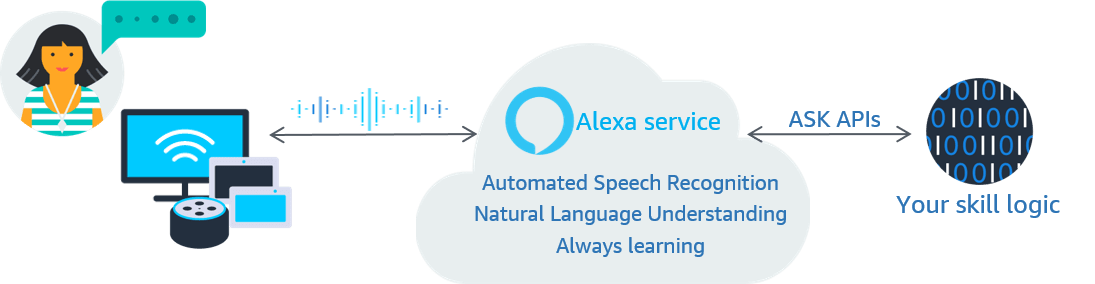
A user accesses content in a skill by asking Alexa to invoke the skill. Alexa is always ready to invoke new skills. When a user says the wake word, "Alexa," and speaks to an Alexa-enabled device, the device streams the speech to the Alexa service in the cloud. Alexa recognizes the speech, determines what the user wants, and then sends a request to invoke the skill that can fulfill the request. The Alexa service handles the speech recognition and natural language processing.
Your skill runs as a service on a cloud platform. Alexa communicates with your skill by using a request-response mechanism over the HTTPS interface. When a user invokes an Alexa skill, your skill receives a POST request containing a JSON body. The request body contains the parameters necessary for your skill to understand the request, perform its logic, and then generate a response.
The following diagram shows the voice-activated processing flow to invoke a skill with the Alexa service.
In addition to voice interaction, skills might include complementary visuals and touch interactions.
How does a user interact with a skill?
Every Alexa skill has a voice interaction model that defines the words and phrases users can say to make the skill do what they want. This model determines how users communicate with and control your skill.
A voice user interface is similar to a graphical user interface in a traditional app. Instead of clicking buttons and selecting options from dialog boxes, users make their requests and respond to questions by voice. Often, the voice interaction is of a much shorter duration than interaction with an app. When a user asks questions and makes requests, Alexa employs the interaction model to interpret and translate the words into a specific request to the identified skill.
The following table compares a voice user interface skill with a graphical user interface app for making airline reservations.
| Action | Voice user interface | Typical graphical user interface |
|---|---|---|
| Make a request | User says, "Alexa, I want to fly to Denver from Seattle." | User clicks on the app, and then selects the origination and destination airports. User scrolls through the list of airports to find Seattle, and then scrolls to find Denver. |
| Collect more information from the user | Alexa replies, "When would you like to travel?" and then waits for a reply. | App displays a calendar, and then waits for the user to select a date. |
| Provide needed information | User replies, "February first." The skill makes the reservation and waits for confirmation. | User opens the calendar, selects February 1, and then chooses OK. User clicks a button to complete the request, and then waits for confirmation. |
| Request complete | Alexa replies, "Your reservation from Seattle to Denver on Monday, February first is all set." | App displays the result of the request. The user closes the app. |
Alexa supports two types of voice interaction models:
- Pre-built voice interaction model – In this model, ASK defines the set of words users say to invoke a skill. For example, a user can say, "Alexa, turn on the light." or "Alexa, turn off the television." You simply define your skill to accept these predefined requests.
- Custom voice interaction model – The custom model gives you the most flexibility, but is the most complex. You design the entire voice interaction. With the custom model, you typically must define every way a user might communicate the same request to your skill. For example, "Alexa, plan a trip from Seattle to Denver," "Alexa, I want to go on a trip to Denver from Seattle," and "Alexa, plan a trip to Denver."
With either type of voice interaction model, you develop your skill to receive voice requests, process the request, and respond appropriately. All skills use natural, voice-first interactions that adapt to the ways a user might express meaning through speech. For more details, see About Voice Interaction Models.
What types of skills can you develop?
The functionality you want to implement determines how your skill integrates with the Alexa service and what code you develop. Your skill idea might fit one of the Alexa pre-built voice interaction models, or your idea might require that you design your own custom voice interaction model. You can develop game skills, music skills, smart home skills, and many other skill types. For a complete list, see Index of Skill Types.
Skill development workflow
After you know what type of skill you want to develop, familiarize yourself with Alexa skill development terminology. For details, see the Glossary. Also, review the requirements to certify and publish an Alexa skill. Your skill must meet the requirements for policy, security, functionality, and voice interface and user experience.
Follow the Alexa skill development workflow to create your skill.

To develop any type of Alexa skill, you need an Amazon developer account. You can use an existing Amazon account to sign in, or you can create a new Amazon developer account.
Design your skill
Design your Alexa skills to be natural, user-centric, and accompanied by complementary visual design. You can design and test your custom voice interaction model before you develop your custom skill. For details about skill design, see Design Your Skill.
Build your skill
Build a skill that can accept requests from the Alexa service and send back the appropriate responses based on the skill type and voice interaction model. For details about skill development for each model, see Build Your Skill.
To build a skill by using one of the pre-built voice interaction models, you need the following resources:
-
An Internet-accessible endpoint for hosting your cloud-based service. Provision your skill on Amazon Web Services (AWS) Lambda using your personal AWS resources. You need an AWS account in addition to your Amazon developer account. Most skill types that use the pre-built voice interaction model must use AWS Lambda.
-
A development environment appropriate for the programming language you plan to use to code your skill. You can author a Lambda function in Node.js, Java, Python, C#, Go, Ruby, or PowerShell.
To build a skill with a custom voice interaction model, you need:
-
An Internet-accessible endpoint for hosting your cloud-based service.
ASK provides the Alexa-hosted option for custom skills to build, store, and host your skill and skill resources on AWS. Use this option to get started building skills quickly.
Another option is to provision your own backend resources on AWS. You can host your skill as an AWS Lambda function by using your personal AWS resources.
Or, you can build and host your custom skill as an HTTPS web service.
-
A development environment appropriate for the programming language you plan to use to code your skill. You can author a Lambda function in Node.js, Java, Python, C#, Go, Ruby, or PowerShell. You can author a web service in any language appropriate for web services. If you choose the Alexa-hosted skill option, you write your code in Node.js and Python.
Test your skill
During skill development, you can test your skill without a device by using the Alexa simulator in the Alexa developer console or in Visual Studio Code. Before you submit your skill for certification, follow the recommendations in the testing guides for your skill type. Before you publish your skill, you have the option to make your skill available to a limited group of testers for beta testing. For details about testing, see Test Your Skill.
Certify and publish your skill
Before you can publish your skill in the Amazon Alexa Skills Store, Amazon must certify the skill to make sure it meets quality, security, and policy guidelines. For details about certifying and publishing your skill, see Certify and Publish Your Skill.
Monitor your skill and metrics
After you publish your skill, you can monitor your live skill for usage, run analytics, and view payments and earnings in the developer console. If you find problems with your live skill, you can rollback to a previous live version. For details, see Monitor Your Skill and Metrics.
What's in ASK?
ASK includes APIs, tools, code samples, and technical documentation to create and manage skills throughout their lifecycle. These libraries, tools, and training materials can help you successfully develop and publish an Alexa skill. For more details, see Tools to Create and Manage Skills.
Development software and tools
ASK provides multiple options to support the development lifecycle, including the Alexa developer console, the Alexa extension for Visual Studio Code, and the ASK Command Line Interface (CLI). The ASK Software Development Kits (SDKs) include development tools and libraries that give you access to Alexa features. These SDKs are available in Node.js, Java, and Python. Alternatively, you can develop your skill in any language and accept requests from and send responses to the Alexa service.
Testing tools
ASK includes tools to test your skill. The Alexa skill simulator, the Alexa app, and the ASK Command Line Interface (CLI) are available to test your skill logic and voice interactions. You can also troubleshoot speech recognition and natural language processing by using the tools included with the Alexa developer console.
Help with skill certification
Before you can publish your skill for public use, your skill must pass certification testing. ASK provides guidelines and tools to certify and publish skills.
Skill monitoring tools
ASK includes tools to manage and monitor live skills, including the ability to run analytics. If you implement in-skill purchasing, you can view and manage your payments and earnings.
Design techniques for custom skills
ASK includes an Alexa Design Guide for best practices to follow when you design a custom voice interaction model, design the purchase flow for in-skill purchasing, and add visuals to your skill. ASK also provides a library of built-in intents for common utterances.
Tutorials and sample code
ASK includes a complete set of technical documentation, tutorials, and sample code to jump start the skill development process. For links to these resources, see Build Your Skill/Additional Resources.
Related topics
- If you want to connect your smart home device to Alexa, consider the Alexa-Enabled Smart Home.
- If you want Alexa to control your device, but don't want to develop a skill, consider the Alexa Connect Kit (ACK).
- To deploy and manage Alexa-enabled devices at scale, in properties such as hotels, hospitals, and senior living, consider Alexa Smart Properties.
Last updated: Oct 30, 2025