
Ring Appstore MCP Server
The Ring Appstore Knowledge MCP Server connects your AI coding assistant (Kiro, Cursor, Cline, etc.) to Ring Appstore documentation. Instead of searching through docs on Developer Portal, your AI can instantly access Ring API documentation and answer your integration questions in real-time.
What is Ring Appstore MCP?
Ring Appstore MCP is a remote Model Context Protocol server backed by an Amazon Bedrock Knowledge Base. When your AI assistant receives a Ring Appstore-related question, it calls the MCP server's tools to search indexed documentation, retrieve full documents, and return accurate answers with source references — all without you leaving your IDE.
The knowledge base includes Ring Appstore API references, integration guides, and technical specifications, so you can use it not just to look things up but to actively build apps against Ring Appstore APIs with your AI assistant generating working code from real documentation.
Simple Example:
- You ask: "How do I stream live video from a Ring camera?"
- Your AI calls
search_docs→ gets ranked documentation snippets with confidence scores - If it needs more detail, it calls
get_docon a specific source → gets the full document - You receive accurate API endpoints, authentication steps, and code examples — with sources
How It Works
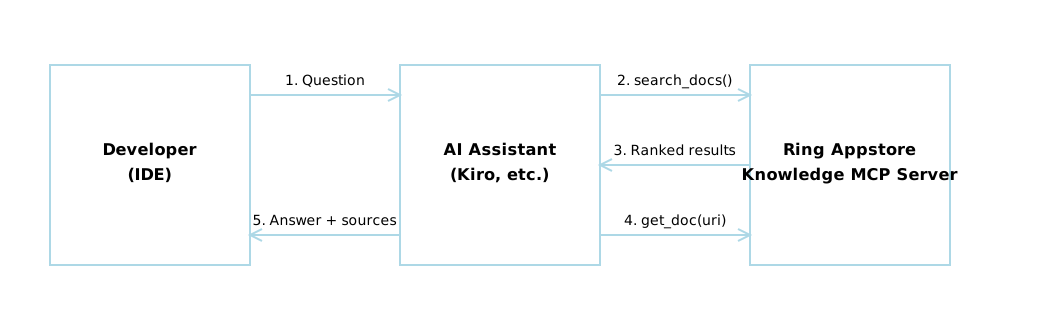
- You ask a Ring Appstore-related question in your IDE
- Your AI assistant calls
search_docswith your query - The server searches the Bedrock Knowledge Base, reranks results, and returns the top matches with confidence scores
- If the AI needs the full content of a specific document, it calls
get_docwith the source URI - Your AI synthesizes everything into a complete answer with references
Available Tools
The Ring Appstore MCP server exposes two tools that your AI assistant calls automatically:
search_docs — Search Ring Appstore Documentation
Searches the Ring Appstore knowledge base and returns ranked results filtered by confidence.
| Parameter | Type | Default | Description |
|---|---|---|---|
query |
string | (required) | The search query (e.g., "How do I authenticate with AVA APIs?") |
max_results |
string | "5" |
Maximum number of results to return |
min_confidence |
string | "0.2" |
Minimum confidence score threshold (0.0 to 1.0) |
Returns a structured result with:
status—"success","clarification_needed", or"error"confidence— Overall confidence score across resultsresults[]— Each containingcontent,score, andmetadata.source(file path or URL)followUpQuestions[]— Suggested follow-ups when results are unclear
get_doc — Retrieve Full Document Content
Fetches the complete content of a specific documentation file or web page. Typically used after search_docs to get the full text of a result.
| Parameter | Type | Description |
|---|---|---|
uri |
string | A file path from search_docs results (e.g., "api/authentication.md") or a Ring documentation URL |
Returns the full document content as a string.
Quick Setup
Prerequisites
- One of these IDEs installed: Kiro, Cursor, Cline, or Claude Desktop
- Server URL:
https://knowledge.appstore-mcp.ring.amazon.dev/mcp
Known Issues
Configuration Instructions
Choose your IDE and follow the steps:
Option 1: Kiro IDE (Recommended)
- Open Kiro IDE
- Click the Kiro button on the left panel
- Scroll to MCP Servers section → Click edit icon
- Add this configuration:
{
  "ring-appstore-knowledge-mcp-server": {
    "type": "streamable-http",
    "url": "https://knowledge.appstore-mcp.ring.amazon.dev/mcp",
    "disabled": false
  }
}
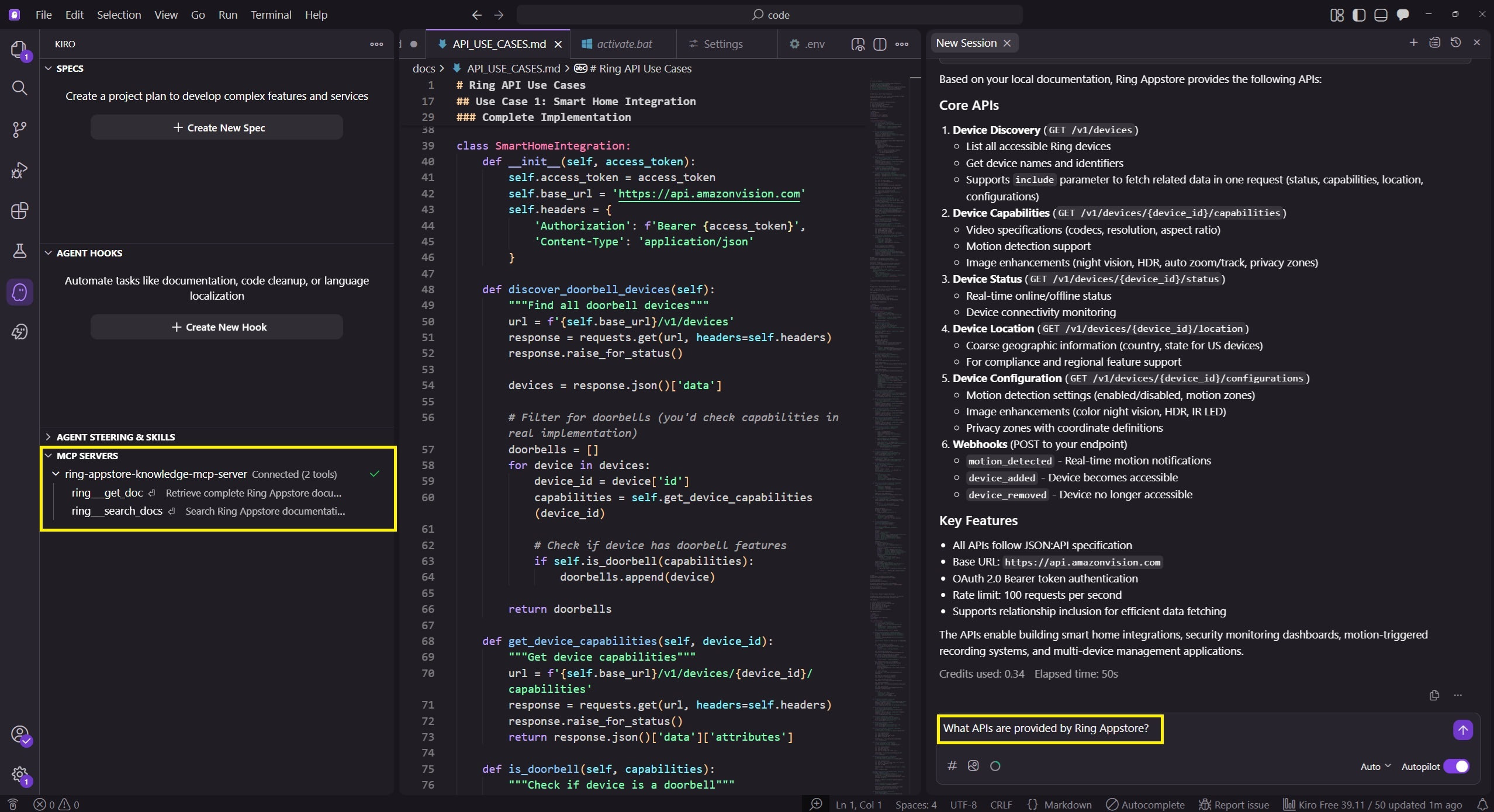
- Look for a green checkmark (✓) next to "ring-appstore-knowledge-mcp-server"
- Test it: Ask Kiro "What APIs are provided by Ring Appstore?"
Option 2: Cursor
- Open Cursor
- Open Settings (Cmd/Ctrl + ,) → Features → Model Context Protocol → Edit Config
- Add this configuration:
{
  "mcpServers": {
    "ring-appstore-knowledge-mcp-server": {
      "type": "streamable-http",
      "url": "https://knowledge.appstore-mcp.ring.amazon.dev/mcp",
      "disabled": false
    }
  }
}
- Restart Cursor
- Test it: Open Cursor Chat (Cmd/Ctrl + L) and ask "How do I authenticate with AVA APIs?"
Option 3: Cline (VS Code)
- Install Cline extension in VS Code
- Click Cline icon → MCP Servers → Remote Servers → Add Remote Server
- Fill in:
- Server Name: ring-appstore-knowledge-mcp-server
- Server URL: https://knowledge.appstore-mcp.ring.amazon.dev/mcp
- Transport Type: Streamable HTTP
- Click Add Server
- Test it: Ask Cline "How do I get motion detection events?"
Option 4: Claude Desktop
- Find your config file:
- Mac:
~/Library/Application Support/Claude/claude_desktop_config.json - Windows:
%APPDATA%\Claude\claude_desktop_config.json
- Mac:
- Add this configuration:
{
  "mcpServers": {
    "ring-appstore-knowledge-mcp-server": {
      "type": "streamable-http",
      "url": "https://knowledge.appstore-mcp.ring.amazon.dev/mcp"
    }
  }
}
- Restart Claude Desktop
- Test it: Ask "What Ring devices can I access via API?"
Try These Examples
Once configured, try asking your AI assistant these questions:
Authentication
"How do I authenticate with Ring AVA APIs?"
Video Streaming
- "Show me how to stream live video from a Ring camera"
- "How do I set up WebRTC/WHEP streaming?"
Events & Webhooks
- "How do I receive motion detection notifications?"
- "What webhook events can I subscribe to?"
Device Management
- "How do I get a list of Ring devices a customer has?"
- "How do I check if a Ring camera is online?"
Code Generation
- "Generate Python code to authenticate with Ring AVA APIs"
- "Write Node.js code to handle Ring motion detection webhooks"
Examples:
• Kiro: 'Use the ring-appstore-knowledge-mcp-server to answer: What APIs are provided by Ring Appstore?'
• Cursor: '@ring-appstore-knowledge-mcp-server What are the authentication requirements?'
• Cline: 'Query the ring-appstore-knowledge-mcp-server: How do I set up webhook events?'
Build a Complete Sample App
Ring Appstore MCP can help you build entire applications. Try this advanced example:
Example: Person Detection App
Use this prompt to build a complete React web app that streams Ring video and detects people in real-time:
Step 1: Initial Setup
Build a minimal React web app (use Vite React template with bun) for calling Ring
Appstore APIs. Set it up for local development with a separate config.js file where
you can manually paste credentials. Install the necessary dependencies but skip any
documentation files. Add a local proxy server to make the app work on localhost.
Use the Ring Appstore MCP server to get Ring Appstore API details.
Step 2: Configure Access Token
[Manual] Paste your access_token into the config file (token value should be
obtained separately).
Step 3: Add Live Streaming
When you click on a device, start a live streaming session and display the video
(canvas or video element). Add play/stop controls. Refer to Ring Appstore API
docs for implementation details.
Step 4: Add Person Detection
Build a real-time person detection app with live counting and historical graph
visualization. Stream video from Amazon Vision APIs into TensorFlow
"@tensorflow-models/coco-ssd" for person detection. Display current person count
and plot historical data using Recharts. No persistence needed. Include logging
throughout.
What Ring Appstore MCP Will Do:
- Search Ring documentation for authentication, device discovery, and video streaming APIs
- Provide code examples for WebRTC/WHEP streaming setup
- Guide you through OAuth token management
- Help troubleshoot API integration issues
Expected Outcome
A working React app that:
- Lists Ring devices linked to a customer account
- Streams live video from selected cameras
- Detects and counts people in real-time using TensorFlow
- Displays historical person count graphs
Troubleshooting
Connection Failed?
- Check the server URL is exactly:
https://knowledge.appstore-mcp.ring.amazon.dev/mcp - Restart your IDE after configuration changes
Ring Appstore MCP Not Being Invoked?
- Make sure your question is Ring-specific (e.g., "Ring AVA API authentication" not just "authentication")
- Check that
"disabled": falsein your configuration
Related topics
- Ring API Development Guide — Development lifecycle, testing process, and code snippets
- Ring API Documentation — Complete API reference and integration guide
- Getting Started with Ring Developer Experience — Registration, lifecycle overview, and key terminology
