
Ring Partner API Documentation
Overview
Ring provides device capabilities to partners while ensuring a high bar for security, transparency, and control for users. This API enables partners to:
- Authenticate users through OAuth 2.0 with one-way account linking
- Discover and access Ring devices with proper permissions
- Receive real-time notifications for device events
- Stream live video content using WebRTC/WHEP protocol
- Download historical video clips in MP4 format
- Address individual cameras on multi-camera devices such as Ring Elite
Key Features
🔐 Secure Authentication
OAuth 2.0 with account linking ensures user consent and secure token management
📱 Device Discovery
Comprehensive device discovery and configuration through JSON:API specification
🔔 Real-time Notifications
Webhook-based event system for motion detection and device lifecycle events
📹 Video Streaming
WebRTC-based live video with WHEP protocol for low-latency streaming
API Standards
The Ring Partner API follows these standards:
- JSON:API Specification for most endpoints
- OAuth 2.0 for authentication
- WebRTC/WHEP for live video streaming
- Standard HTTP for media downloads
Getting Started Steps
-
Review the Architecture - Understand the end-to-end deployment flow before building.
-
Authentication Setup - Implement OAuth 2.0 token exchange and one-way account linking with HMAC nonce verification.
-
Retrieve User Profile - Call the Users API to get the Ring Account ID for nonce matching and event correlation.
-
Confirm Account Link - Complete the two-step POST + PATCH flow to finalize the integration.
-
Device Discovery - Discover Ring devices, capabilities, and status through JSON:API.
-
Webhook Notifications - Set up webhook endpoints to receive real-time device events with HMAC signature verification.
-
Live Video Streaming - Stream live video from Ring devices using WebRTC/WHEP.
-
Media Clips - Download historical video clips in MP4 format.
-
Image Snapshots - Download image snapshots in JPEG or PNG format.
Quick Links
- 🏗️ High Level Architecture
- 🔐 Authentication Guide
- 📱 Device Discovery
- 🎥 Multi-Camera Devices
- 👤 Users API
- 🔗 App Integrations
- 🔔 Webhook Notifications
- 📹 Live Video Streaming
- 🎬 Media Clips
- 📋 Error Handling
API Reference
Base URL
All API requests should be made to:
https://api.amazonvision.com
Authentication
All API requests require authentication using OAuth 2.0 Bearer tokens:
Authorization: Bearer <access_token>
Rate Limiting
- Default rate: 100 requests per second (TPS) per partner
- Scope: Rate limits apply per partner
client_idacross all endpoints
Rate Limit Headers
| Header | Description |
|---|---|
X-RateLimit-Limit |
Maximum requests allowed per time window |
X-RateLimit-Remaining |
Remaining requests in the current window |
Retry-After |
Seconds to wait before retrying (included with 429 responses) |
When you exceed the rate limit, the API returns HTTP 429 Too Many Requests. Use exponential backoff starting at 1 second and respect the Retry-After header.
Content Types
- JSON APIs:
application/json - Media streaming:
application/sdp - Media downloads: Binary content with appropriate MIME types
Authentication Endpoints
Exchange Authorization Code
Request:
POST https://oauth.ring.com/oauth/token
Content-Type: application/x-www-form-urlencoded

grant_type=authorization_code
client_id=<partner_client_id>
code=<authorization_code>
client_secret=<partner_client_secret>
Response:
{
  "access_token": "xxxxx",
  "refresh_token": "yyyyy",
  "scope": "<scope>",
  "expires_in": 14400,
  "token_type": "Bearer"
}
Refresh Access Token
Request
POST https://oauth.ring.com/oauth/token
Content-Type: application/x-www-form-urlencoded

grant_type=refresh_token
refresh_token=<refresh_token>
client_id=<partner_client_id>
client_secret=<partner_client_secret>
Response:
{
  "access_token": "xxxxx",
  "refresh_token": "yyyyy",
  "scope": "<scope>",
  "expires_in": 14400,
  "token_type": "Bearer"
}
Endpoint Reference
All device and media endpoints require Authorization: Bearer <access_token>. Responses follow JSON:API format.
On a multi-camera device such as Ring Elite, several endpoints accept an optional component_id query parameter to target one camera module. See Multi-Camera Devices.
Device Endpoints
| Method | Endpoint | Description | Full Docs |
|---|---|---|---|
| GET | /v1/devices |
List all accessible devices. Use ?include=status,capabilities,location,configurations for related data. |
Device Discovery |
| GET | /v1/devices/{device_id} |
Get a specific device | Device Discovery |
| GET | /v1/devices/{device_id}/status |
Device online/offline status. On a chime, also reports snooze state — see Chime Status. | Status |
| GET | /v1/devices/{device_id}/capabilities |
Video codecs, motion detection, image enhancements, camera modules. Add ?component_id=N to scope to one camera module. On a chime, returns the audio slot count — see Chime Capabilities. |
Capabilities |
| GET | /v1/devices/{device_id}/location |
Coarse location (country, state) for compliance | Locations |
| GET | /v1/devices/{device_id}/configurations |
Motion zones, privacy zones, image settings. Add ?component_id=N to scope to one camera module. On a chime, returns audio slots and volume, read-only — see Chime Configurations. |
Configurations |
| GET | /v1/history/devices/{device_id}/events |
Get event history for a device | Event History |
Media Endpoints
| Method | Endpoint | Description | Full Docs |
|---|---|---|---|
| POST | /v1/devices/{device_id}/media/streaming/whep/sessions |
Start WebRTC WHEP live video session (Content-Type: application/sdp). Add ?component_id=N to select a camera module. |
Live Video |
| DELETE | /v1/devices/{device_id}/media/streaming/whep/sessions/{session_id} |
Close live video session | Live Video |
| — | rtsps://video.rtsp.amazonvision.com:322/v1/devices/{device_id}/stream |
RTSPS live video stream. Add ?component_id=N to select a camera module. |
RTSP Live Video Streaming |
| POST | /v1/devices/{device_id}/media/video/download |
Download historical video as MP4. Pass a components array in the request body to select a camera module. |
Media Clips |
| POST | /v1/devices/{device_id}/media/image/download |
Download image snapshot as JPEG or PNG. Pass a components array in the request body to select a camera module. |
Image Snapshot |
| POST | /v1/devices/{device_id}/media/audio/playback |
Play audio on a chime, named by audio_ref in the request body. Requires the Chime Controls capability. |
Chimes |
Account & Integration Endpoints
| Method | Endpoint | Description | Full Docs |
|---|---|---|---|
| GET | /v1/users/me |
Get authenticated user's Account ID | Users API |
| POST | /v1/accounts/me/app-integrations |
Confirm account link | App Integrations |
| PATCH | /v1/accounts/me/app-integrations |
Update integration status | App Integrations |
| GET | /v1/accounts/me/subscriptions |
List subscriptions and trials for the authenticated user's app | Subscriptions Query API |
Webhook Events
Partners receive webhook notifications at their configured endpoint. All webhooks include an HMAC-SHA256 signature in the X-Signature header. See Notifications for full details.
Event Types
| Event | Type Value | Description | Full Docs |
|---|---|---|---|
| Motion Detected | motion_detected |
Motion detected by a device camera. Includes attributes.sub_type (such as human), plus attributes.component_ids on multi-camera devices |
Motion Detection |
| Button Press | button_press |
Ring doorbell button pressed | Button Press |
| Device Added | device_added |
A device became accessible to the partner | Device Addition |
| Device Removed | device_removed |
A device is no longer accessible | Device Removal |
| Device Online | device_online |
A device came online | Device Online |
| Device Offline | device_offline |
A device went offline | Device Offline |
| App Integration Added | app_integration_added |
A Ring user linked your partner integration | App Integration Added |
| App Integration Removed | app_integration_removed |
A Ring user unlinked your partner integration | App Integration Removed |
| Subscription Activated | subscription_activated |
A paid subscription or trial was activated | Subscription Activated |
| Subscription Deactivated | subscription_deactivated |
A paid subscription or trial was deactivated | Subscription Deactivated |
Error Responses
All errors follow JSON:API format. See Error Handling for comprehensive details.
Common Error Codes
- 400: Bad Request — Invalid parameters
- 401: Unauthorized — Invalid or expired token
- 403: Forbidden — Insufficient permissions
- 404: Not Found — Resource not found
- 429: Too Many Requests — Rate limit exceeded
- 500: Internal Server Error
- 503: Service Unavailable — Device offline
Testing Your Integration
Recommended Tools
There is no official Ring Partner SDK. Use standard HTTP libraries and tools:
| Tool | Use Case |
|---|---|
| curl | Quick command-line testing |
| Postman | GUI-based API exploration |
| Bruno | Open-source, Git-friendly alternative to Postman |
| Standard HTTP libraries | fetch (JS), requests (Python), axios (JS/TS) |
Testing with curl
curl -X GET 'https://api.amazonvision.com/v1/devices?include=status,capabilities' \
  -H 'Authorization: Bearer <access_token>' \
  -H 'Content-Type: application/json' \
  -v
SDKs and Libraries
JavaScript/TypeScript
const response = await fetch('https://api.amazonvision.com/v1/devices', {
  headers: {
    'Authorization': `Bearer ${accessToken}`,
    'Content-Type': 'application/json'
  }
});
const devices = await response.json();
Python
import requests

headers = {
    'Authorization': f'Bearer {access_token}',
    'Content-Type': 'application/json'
}
response = requests.get('https://api.amazonvision.com/v1/devices', headers=headers)
devices = response.json()
Application Deployment
This document defines the end-to-end deployment architecture for a partner application integrating with the Ring AppStore. It covers the complete journey from initial app creation and credential setup through endpoint configuration, authentication orchestration, device access, and webhook event delivery.
1. Prerequisites and Setup
Before deploying your application, you must create your app in the Ring Developer Portal, obtain credentials, configure your endpoints, and prepare your backend services.
1.1 Create Your Application
Register your application in the Ring Developer Portal. See Configure Your Ring Application for the complete step-by-step registration process.
- Click Create new app and provide your app name
- Accept Ring's security and privacy standards
- Complete the app information form (description, category, website, support email, privacy policy, terms of service, app icon)
1.2 Obtain Credentials
When you create your application, Ring issues three credentials. These are shown only once — store them securely before continuing.
| Credential | Purpose |
|---|---|
| Client ID | Identifies your app in OAuth token requests |
| Client Secret | Authenticates your app during token exchange and refresh |
| HMAC Signing Key | Verifies webhook signatures and generates nonces during account linking |
These credentials are shared across staging and production environments. Never commit them to version control — use environment variables or a secrets manager.
There's no way to regenerate credentials on an existing app. If you lose them, or you need to replace them after an exposure, delete the app and create a new one, which issues a fresh set of all three. Use this approach only before you submit the app for certification; after submission, contact Ring support. See Replacing Your App Credentials.
1.3 Configure Endpoints
Register the following HTTPS endpoints in the Ring Developer Portal:
| Endpoint | Purpose | Required |
|---|---|---|
| Token Exchange URL | Receives Ring OAuth authorization codes for token exchange | Yes |
| Account Link URL | User login page for nonce-based account association | Yes |
| Webhook URL | Receives real-time event notifications from Ring devices | Yes |
| App Homepage URL | Custom app configuration page for post-linking setup | Yes |
Configure staging endpoints first, validate your integration, then configure production endpoints. See Configure Your Ring Application for detailed requirements.
1.4 Set Up Your Backend
Before a Ring user installs your app, your backend must be ready to handle:
- Token exchange — Receive authorization codes at your Token Exchange URL and exchange them within 60 seconds (Section 5)
- Token storage — Securely store access tokens (~4 hour lifetime) and refresh tokens (~30 day lifetime) with associated Account IDs
- Nonce matching — Implement HMAC-SHA256 nonce verification for account linking (Nonce Validation and Account Linking)
- Webhook handler — Accept HTTPS POST requests, verify HMAC signatures, and return HTTP 200 within 5 seconds (Section 9)
- API client — Call Amazon Vision APIs with Bearer token authentication for device discovery, live video, and media downloads (Section 8)
2. App Deployment Journey
2.1 Lifecycle Overview
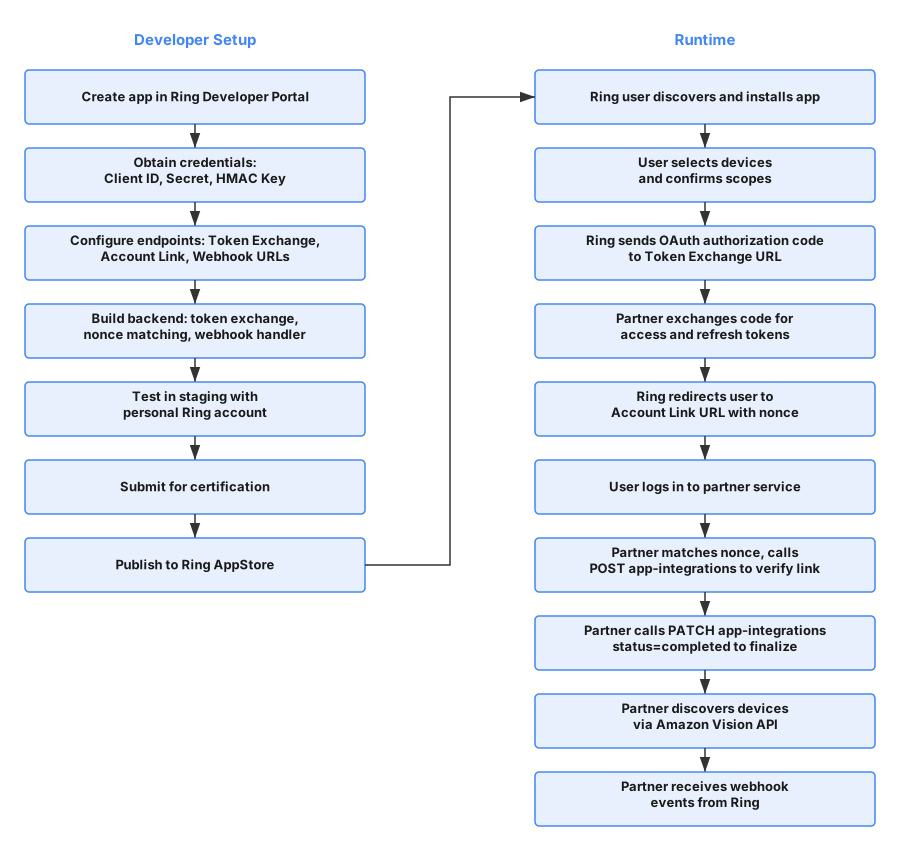
2.2 Phase Summary
| Phase | Description | Reference |
|---|---|---|
| Create App | Register in Ring Developer Portal, provide app information | Configure Your Ring Application |
| Obtain Credentials | Receive Client ID, Client Secret, HMAC Signing Key | Section 1.2 |
| Configure Endpoints | Register Token Exchange, Account Link, Webhook, and App Homepage URLs | Section 4 |
| Build Integration | Implement token exchange, nonce matching, device access, webhook handling | Section 5 through Section 9 |
| Test & Certify | Validate in staging, then submit for Ring review | Certify Your Ring Application |
| Publish | Deploy to Ring AppStore | Publish Your Ring Application |
| User Installs App | Ring user discovers app, selects devices, confirms scopes | Section 7 |
| Token Exchange | Ring sends auth code, partner exchanges for OAuth tokens | Section 5 |
| Account Linking | Nonce-based verification binds Ring user to partner account | Section 6 |
| Device Access | Discover devices, stream live video, download media clips | Section 8 |
| Webhook Events | Receive real-time motion, doorbell, device status notifications | Section 9 |
3. Service Architecture Overview
The Ring AppStore follows a one-way account linking model where Ring manages the OAuth credential lifecycle and partners verify messages through HMAC digital signatures. Partners do not need to operate as OAuth servers.
3.1 Security
Ring takes security seriously. Our account linking mechanism ensures security through cryptographic verification, time-bound validation, and mandatory user authentication. All communications use HTTPS, and access tokens are scoped to specific devices and operations authorized by the user.
3.2 High-Level Service Architecture
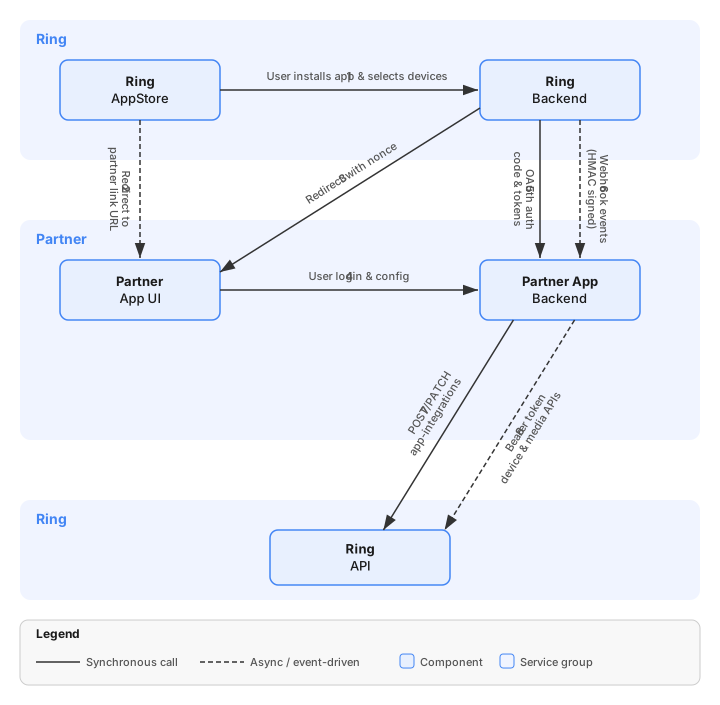
3.3 Component Responsibilities
| Component | Role |
|---|---|
| Ring AppStore | User-facing interface — AppStore browsing, app installation, device selection, scope consent, integration management |
| Ring Backend | Orchestrates all server-side logic — OAuth credential lifecycle, app state management, nonce generation, device authorization, notification delivery, HMAC key management |
| Amazon Vision API | External API layer for partners — device discovery, device status/capabilities, live video streaming, media downloads, account integration verification |
| Partner App Backend | Partner server — receives OAuth tokens, exchanges auth codes, stores tokens, handles webhook events, calls Amazon Vision APIs, verifies nonce during account linking |
| Partner App UI | Partner web interface — user login portal for account linking, app configuration pages |
4. Endpoint Configuration
Partners must configure endpoint categories to complete an integration. These are registered via the Ring Developer Portal during app creation.
4.1 Partner-Hosted Endpoints
| Endpoint | Purpose | Required | Example |
|---|---|---|---|
| Token Exchange URL | Receives Ring OAuth authorization codes for token exchange | Yes | https://api.partner.example.com/oauth/token |
| Webhook URL | Receives real-time event notifications from Ring | Yes | https://api.partner.example.com/webhooks/ring |
| Account Link URL | Partner sign-in page for nonce-based token claiming (sign-in is mandatory) | Yes | https://partner.example.com/ring/link |
| App Homepage URL | Custom app configuration page | Yes | https://partner.example.com/ring/config |
4.2 Ring-Hosted Endpoints — Amazon Vision API
| Endpoint | Method | Purpose |
|---|---|---|
https://oauth.ring.com/oauth/token |
POST | Token exchange — authorization code to access/refresh tokens |
https://api.amazonvision.com/v1/devices |
GET | Device discovery |
https://api.amazonvision.com/v1/devices/{id}/status |
GET | Device online/offline status |
https://api.amazonvision.com/v1/devices/{id}/capabilities |
GET | Device capabilities and codecs |
https://api.amazonvision.com/v1/devices/{id}/media/streaming/whep/sessions |
POST | Start live video stream via WebRTC WHEP |
https://api.amazonvision.com/v1/devices/{id}/media/video/download |
POST | Download recorded video clips |
https://api.amazonvision.com/v1/users/me |
GET | Get user profile — returns Account ID |
https://api.amazonvision.com/v1/accounts/me/app-integrations |
POST | Partner confirms account link |
https://api.amazonvision.com/v1/accounts/me/app-integrations |
PATCH | Partner updates integration status |
See API Reference for full details.
5. Token Exchange Flow
After a Ring user installs a partner app, Ring Backend generates an OAuth authorization code and sends it to the Partner App Backend.
5.1 What Triggers This Flow
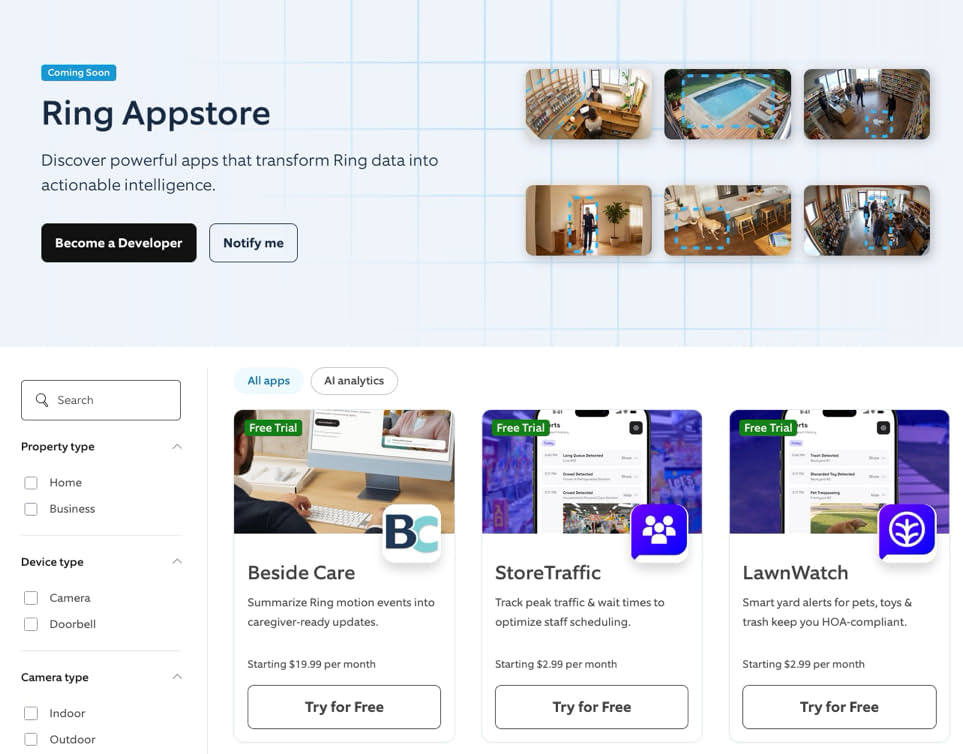
- The user discovers your app in the Ring AppStore
- The user reviews the data access scopes your app requests
- The user selects which Ring devices to share with your app
- The user clicks Confirm to approve the integration
Ring Backend then generates an OAuth authorization code and sends it directly to your Token Exchange URL (backend-to-backend).
5.2 Token Exchange Sequence
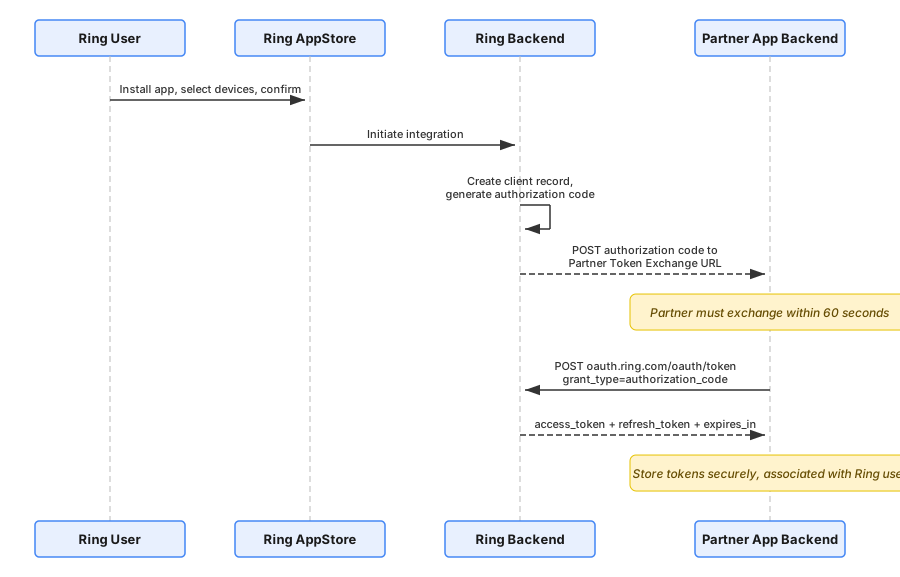
5.3 Token Lifecycle
| Token | Lifetime | Purpose |
|---|---|---|
| Authorization Code | 60 seconds | One-time use; exchanged for tokens |
| Access Token | ~4 hours | Bearer token for Amazon Vision API calls |
| Refresh Token | ~30 Days | Used to obtain new access tokens |
5.4 Token Refresh
POST https://oauth.ring.com/oauth/token
Content-Type: application/x-www-form-urlencoded

grant_type=refresh_token&refresh_token=<refresh_token>&client_id=<client_id>&client_secret=<client_secret>
See Refresh Tokens for implementation guidance.
6. Account Linking
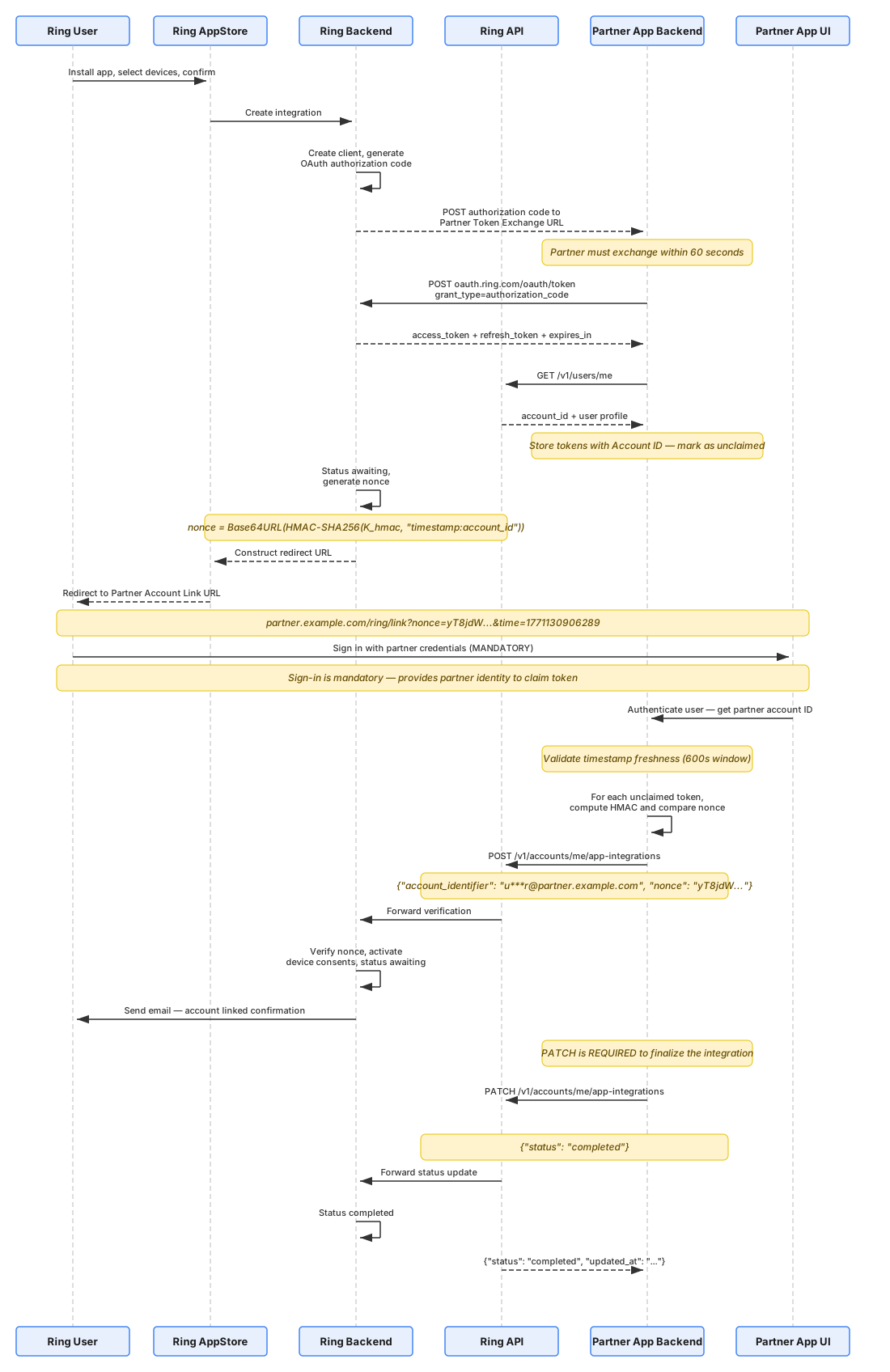
At this point in the deployment journey the Ring user links their Ring account to your partner account. Ring releases OAuth credentials to your backend upfront, redirects the user to your Account Link URL with an HMAC-signed nonce, and your backend matches that nonce to the correct unclaimed token before calling the App-Integrations API to activate the integration.
The full specification for this step — the design rationale, the sequence diagram, the nonce technical reference, and the seven implementation steps — is in One-Way Account Linking, alongside the partner-initiated alternative.
7. App Integration Flow
This section shows the end-to-end app integration experience from two perspectives: a step-by-step walkthrough of the complete account linking flow, and a condensed UX flow diagram that maps the same journey across system components.
7.1 Complete Account Linking Flow
The following flow shows each step a Ring user and your backend go through during account linking, from app discovery to a confirmed integration.
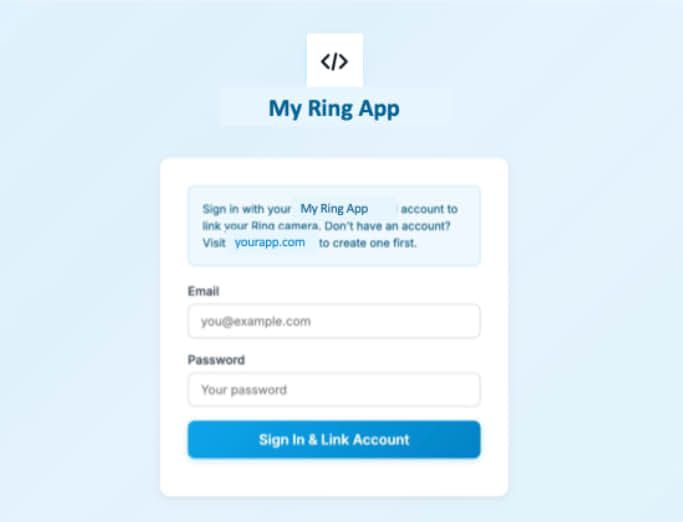
[UI] Step 1 Ring user selects app to enable User browses available apps and selects the app they want to enable |
→ | [UI] Step 2 Ring user sees app details User views the details and information about the selected app |
→ | [UI] Step 3 Ring user consents to data access User reviews and provides consent for the app to access their Ring data |
→ | [S2S] Step 4 Token Exchange Sequence starts Partner Backend returns 200 response to initiate the token exchange |
→ | [UI] Step 5 Ring user selects device to subscribe User chooses which Ring device(s) they want to connect with the app |
→ | [S2S] Step 6 device_added webhook sent Webhook notification sent to Partner Backend confirming device selection |
→ | [S2S] Step 7 Redirects to Partner Account Link URL Backend redirect to partner linking endpoint |
→ | [UI] Step 8 User clicks Sign in — redirected to app login User is prompted to sign in and redirected to the partner app's login page |
→ | [UI] Step 9 User creates account or logs in User creates a new account or logs into existing account |
→ | [S2S] Step 10 Partner Backend verifies user & completes linking POST + PATCH app-integrations — completes the account linking |
→ | [S2S] Step 11 app_integration_added webhook sent Webhook confirmation sent after successful linking |
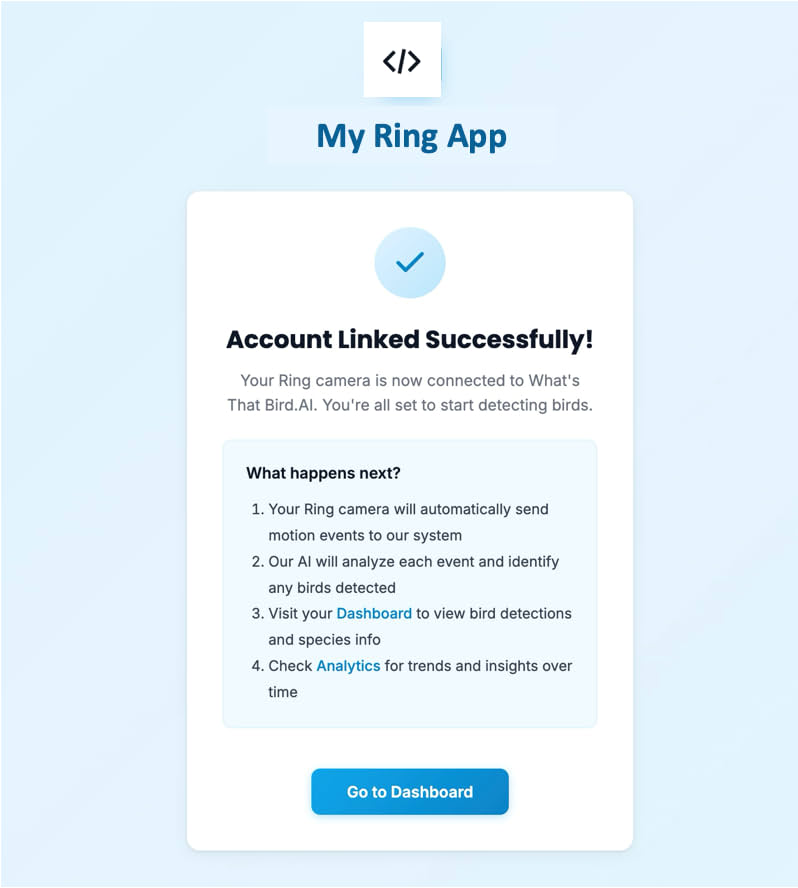
→ | [UI] Step 12 User sees "Account Linked Successfully" User receives confirmation that account has been successfully linked |
→ | [UI] Step 13 User sees Active on Integrations Dashboard User can view the active integration status in their Ring dashboard |
 |
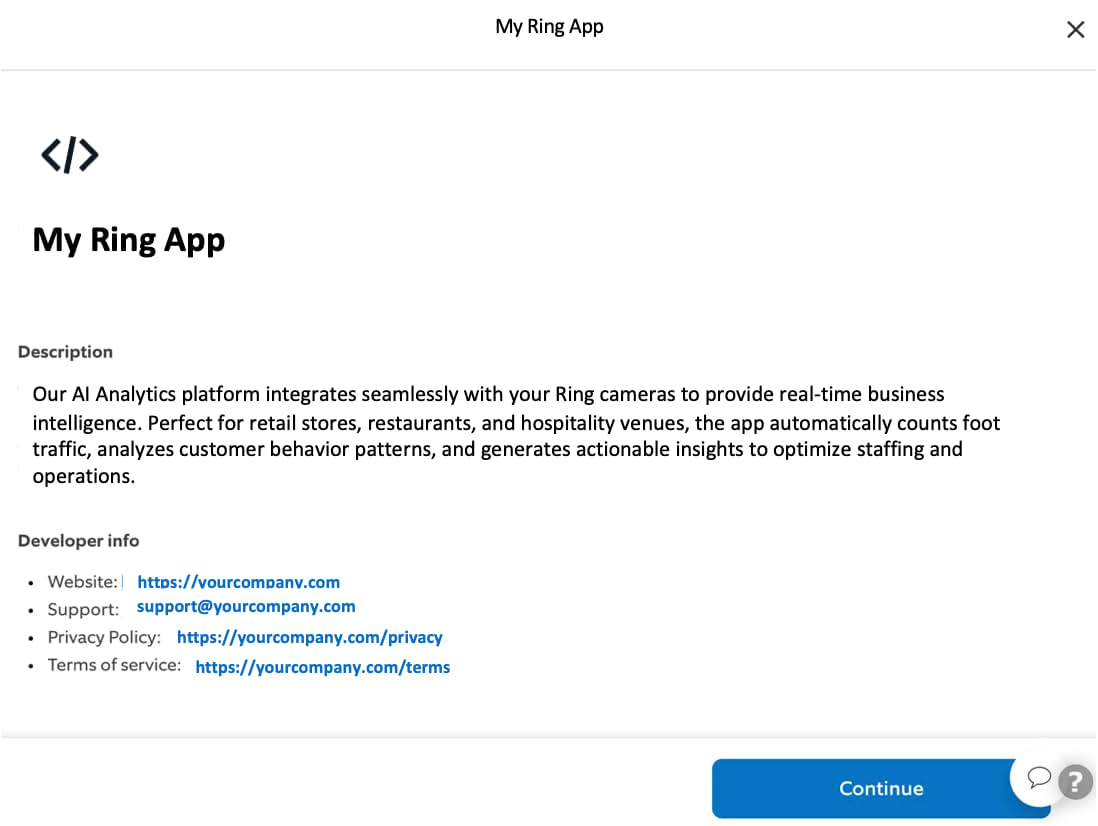 |
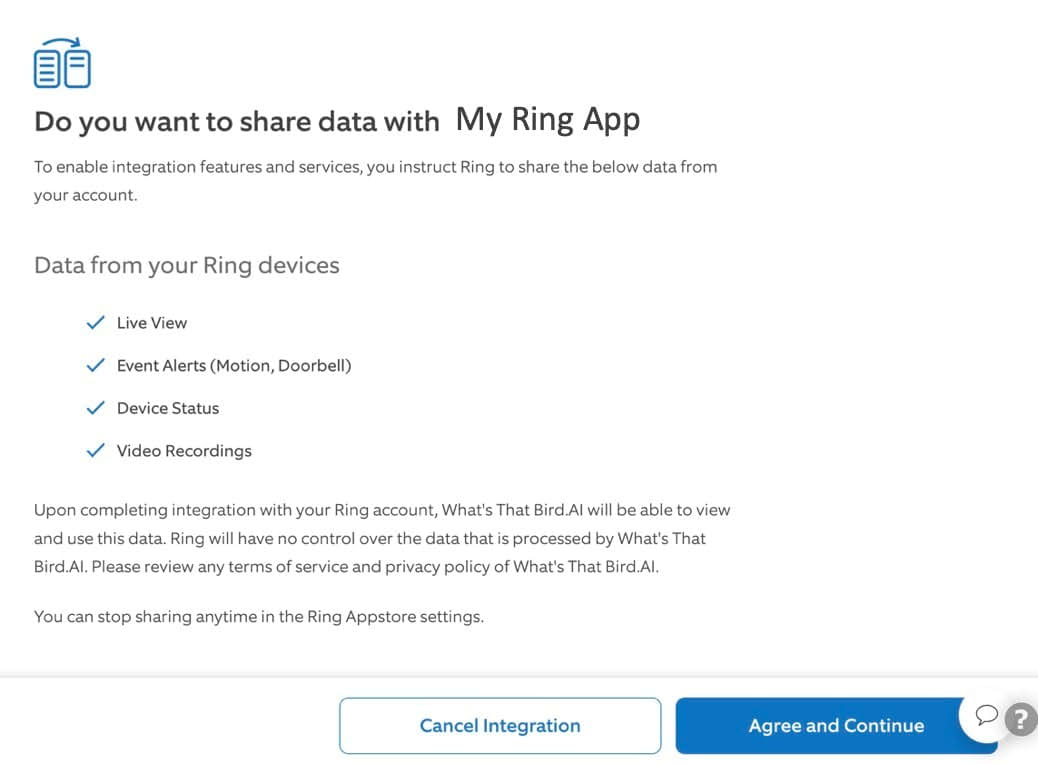 |
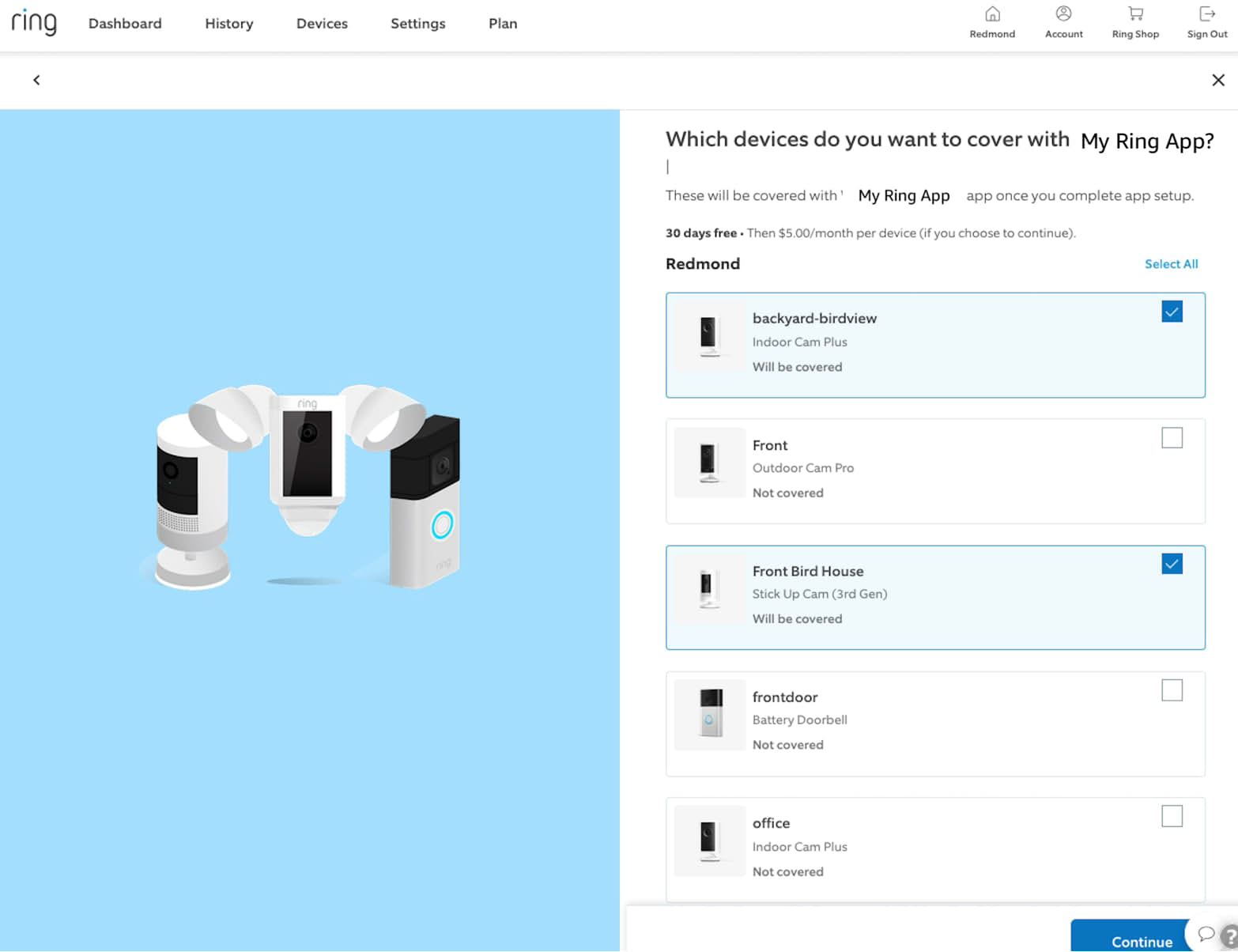 |
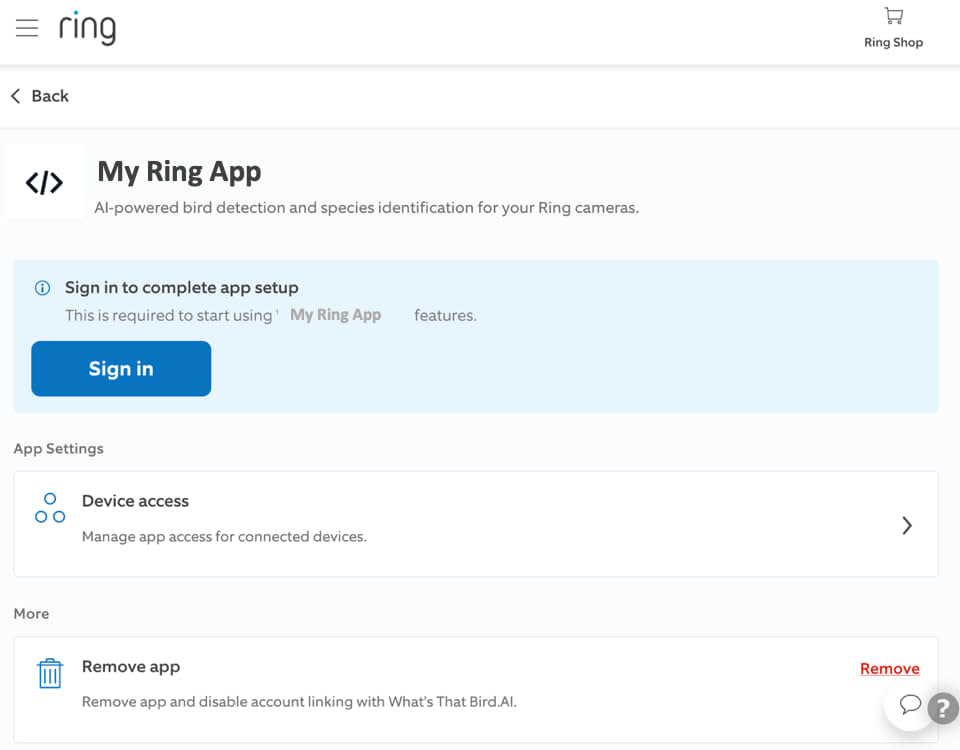 |
 |
 |
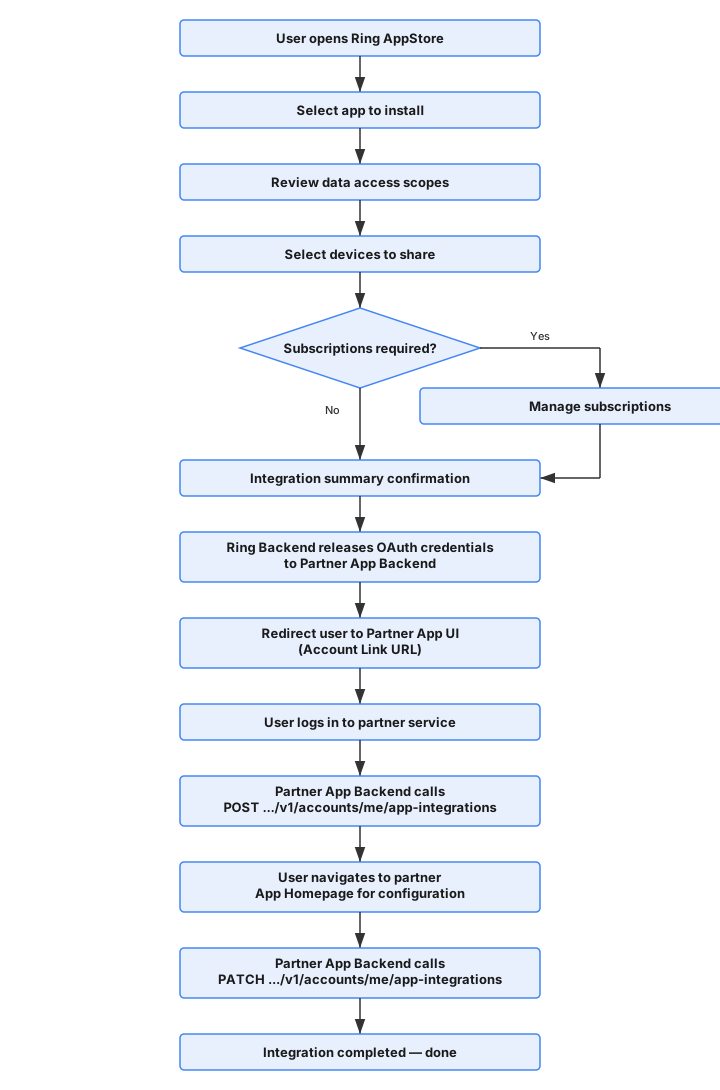
7.2 App Integration UX Flow
The following diagram shows the same integration journey as a sequence across the Ring AppStore, Ring API, Partner App UI, and Partner App Backend.
8. Accessing Devices
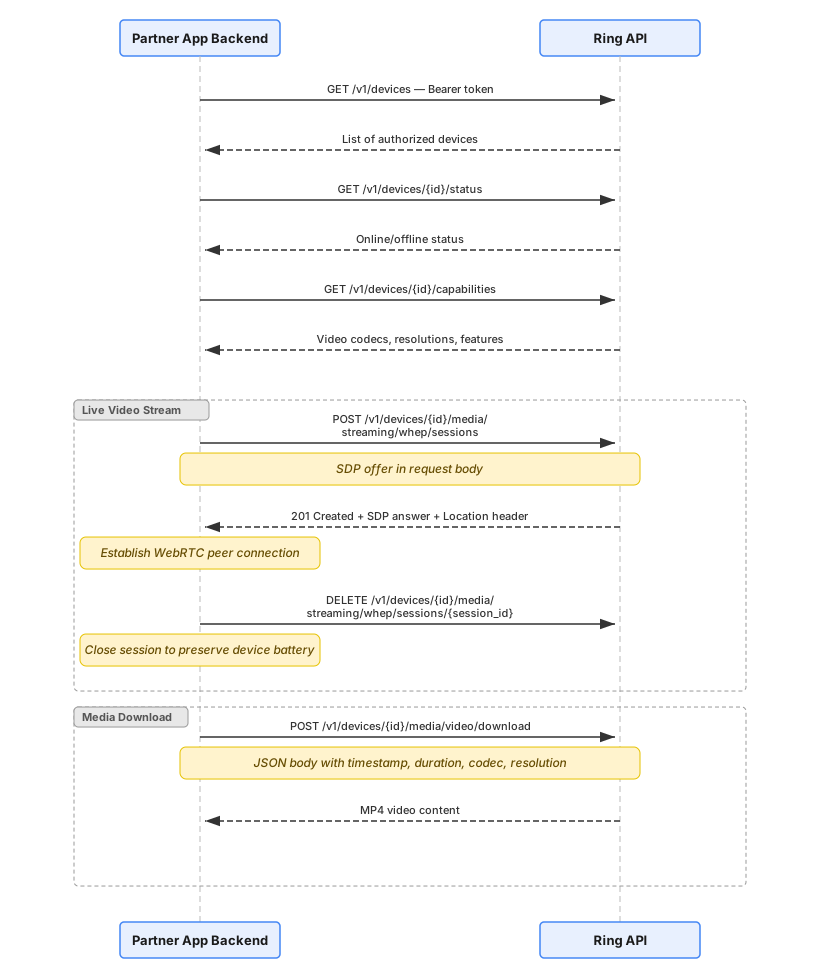
Once the integration reaches awaiting or completed status, the Partner App Backend can access authorized Ring devices through the Ring API.
See: Device Discovery · Live Video · Media Clips . Image Snapshots
8.1 Device Access Sequence
8.2 Authentication Header
All Ring API calls require a valid access token:
Authorization: Bearer <access_token>
If the token has expired, refresh it before making API calls. See Refresh Tokens.
9. Webhook Event Delivery
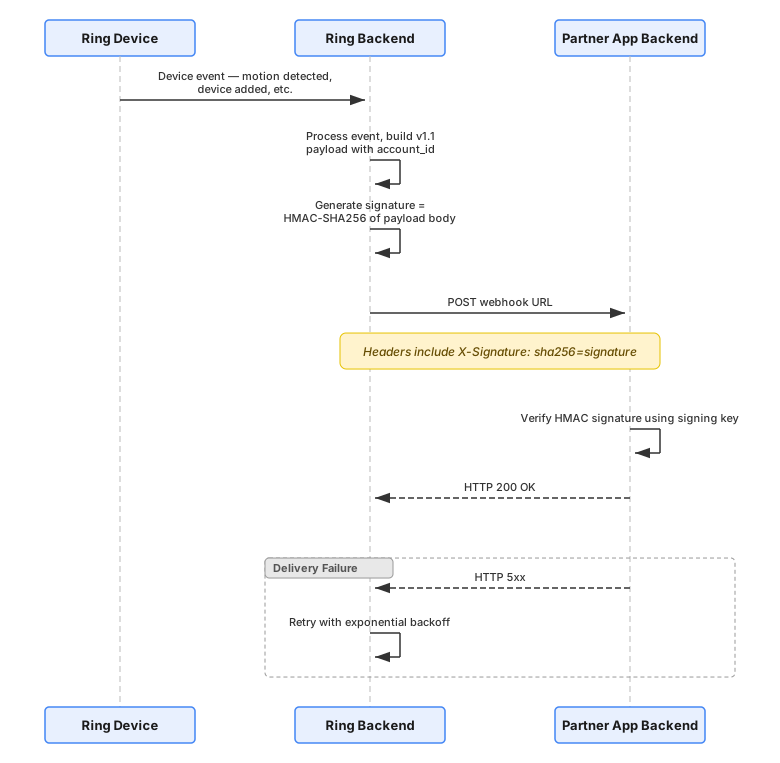
Ring Backend delivers real-time event notifications to the Partner App Backend via signed webhooks using HMAC-SHA256 signatures.
See: Notifications
9.1 Webhook Delivery Sequence
9.2 Event Types
| Event | Type Value | Description | Details |
|---|---|---|---|
| Motion Detected | motion_detected |
Motion detected (includes attributes.sub_type such as human) |
Motion Detection |
| Button Press | button_press |
Doorbell button pressed | Button Press |
| Device Added | device_added |
Device becomes available to partner | Device Addition |
| Device Removed | device_removed |
Partner loses access to a device | Device Removal |
| Device Online | device_online |
Device comes online | Device Online |
| Device Offline | device_offline |
Device goes offline | Device Offline |
10. Environment Configuration
| Component | Production |
|---|---|
| Ring API | https://api.amazonvision.com |
| OAuth Server | https://oauth.ring.com |
| Dev Portal | https://developer.amazon.com/ring/console/apps |
Authentication
Ring utilizes OAuth 2.0 standard tokens for authentication to ensure secure communication with partner cloud services. The authentication system is based on an "account linking" mechanism that provides user-scoped authentication materials while maintaining customer awareness and control.
Account Linking Methods
The following table shows the key similarities and differences between the two account linking methods.
| Aspect | One-Way (Ring-Driven) | Partner-Initiated OAuth 2.0 |
|---|---|---|
| Flow initiator | Ring AppStore | Partner's app or platform |
| Ring login page shown | No (user already signed in) | Yes — user authenticates at Ring |
| Permission agreement | Yes | Yes (reuses existing UI) |
| Device selection | Yes | Yes (reuses existing UI) |
| PKCE required | No | Yes |
| Token delivery | Ring POSTs auth code to partner's Token Exchange URL | Partner calls Ring after redirect with auth code |
| HMAC nonce | Yes — validates Ring-to-partner redirect | Not used — Bearer token is proof of possession |
| Webhook authentication | HMAC-SHA256 signed with shared signing key | HMAC-SHA256 signed with shared signing key |
| Token storage | Partner stores Ring tokens | Partner stores Ring tokens |
| Free or paid | Both | Free only (current phase) |
| Status | Current recommended for Ring-initiated flows | New — available by invitation |
Overview
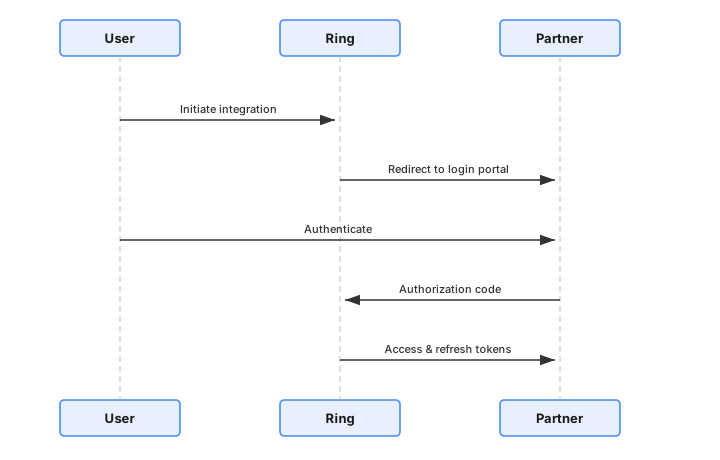
The authentication flow involves:
- Account Linking: Users authenticate with partner systems
- Token Exchange: Authorization codes are exchanged for access/refresh tokens
- Token Management: Refresh tokens maintain long-term access
Key Components
- User-scoped tokens: Each token pair is associated with a specific Ring user
- Customer confirmation: Users must confirm the partner account before token release
- Webhook notifications: Tokens enable Ring to deliver signed webhook notifications to partners
Authentication Flow
Token Types
Access Tokens
- Used for API requests
- Short-lived (typically 4 hours)
- Include in
Authorization: Bearer <token>header - See Access Tokens for details
Refresh Tokens
- Used to obtain new access tokens
- Valid for approximately 30 days
- Must be refreshed proactively before expiry — an expired refresh token requires the user to re-link their account
- Critical for maintaining continuous access
- See Refresh Tokens for details
Authorization: Bearer header, API calls will fail with 401 Unauthorized. You must first exchange the refresh token for an access token via POST https://oauth.ring.com/oauth/token. See Refresh Tokens for the exchange flow.Quick Start: If You Already Have a Refresh Token
If you already have a refresh token (e.g., from a completed account linking flow) and need to start making API calls:
- Obtain your
client_idandclient_secret— These are issued during partner onboarding. - Exchange the refresh token for an access token — Call
POST https://oauth.ring.com/oauth/tokenwithgrant_type=refresh_token. See Refresh Token Exchange. - Use the access token in API requests — Include in the
Authorization: Bearer <access_token>header.
POST https://oauth.ring.com/oauth/token
Content-Type: application/x-www-form-urlencoded

grant_type=refresh_token&refresh_token=<your_refresh_token>&client_id=<your_client_id>&client_secret=<your_client_secret>
The response will include a new access_token (valid ~4 hours) and a new refresh_token. Store both securely.
Security Requirements
- All authentication materials are user-scoped
- Partners must use correct tokens for specific user data
- Token storage and handling must follow security best practices
- Regular token refresh is required to maintain access
Sub-pages
- One-Way Account Linking — OAuth account linking flow (one-way recommended)
- Partner-Initiated OAuth 2.0 — Partner-initiated account linking with PKCE (invitation only)
- Refresh Tokens — Token refresh and management
- Access Tokens — Using access tokens in API requests
One-Way Account Linking
The one-way account linking model eliminates the need for partners to act as OAuth servers. Ring releases credentials upfront and redirects the user to the partner for account association.
For the partner-initiated alternative, see Partner-Initiated OAuth 2.0 Account Linking. For a side-by-side comparison of both methods, see Account Linking Methods in the Authentication section.
See also: App Integrations API
Why One-Way Account Linking Is Designed the Way It Is
The one-way account linking flow solves a specific problem: how do you securely associate a Ring user's OAuth tokens with the correct partner user, when the tokens arrive on the backend before the partner even knows who the user is?
The Core Challenge
Ring wants to release OAuth credentials upfront — before the user logs into the partner service. This means the partner receives tokens for a Ring user but has no idea which partner user they belong to. The tokens are "unclaimed."
Why Not Just Send the Ring Account ID in the Redirect?
Because the redirect goes through the user's browser. Anything in the URL can be intercepted, modified, or forged. An attacker could swap the Account ID and trick the partner into linking the wrong Ring account to their partner account. There's no way to verify the value is legitimate.
Why the HMAC Nonce?
The nonce is a cryptographic proof that the redirect came from Ring and corresponds to a specific Ring user. It's computed as HMAC-SHA256(K_hmac, "<time>:<account_id>") using a shared secret that only Ring and the partner know: the HMAC Key. An attacker can't forge it without the HMAC key. The partner can verify it by recomputing the HMAC against each unclaimed token's Account ID and prefixing it with the time provided in the redirect — only the correct one will match.
Why Does the Partner Need to Call /v1/users/me Separately?
To get the Account ID through a trusted backend channel (the access token), not from the browser. This keeps the Account ID out of the URL entirely. The partner stores it server-side, and later uses it to verify the nonce — also server-side.
Why the Mandatory Partner Sign-In?
Without it, the partner has no verified identity to attach to the claimed token. The sign-in provides the partner-side user identity (e.g., email) that gets associated with the Ring credentials. Without this step, anyone who intercepts the nonce redirect could claim the token.
Why the Two-Step POST + PATCH?
The POST sends the nonce back to Ring for server-side verification and transitions the integration to awaiting. The PATCH lets the partner signal "I'm fully configured" and moves to completed. This separation allows partners that need additional setup steps after linking to do so before finalizing.
Summary
The design boils down to: Ring releases credentials early (better UX, simpler partner infrastructure), and the HMAC nonce is the mechanism that securely binds those credentials to the right user despite the tokens arriving before the user identifies themselves on the partner side.
Full Account Linking Sequence
Nonce Validation and Account Linking — Step-by-Step
The nonce mechanism prevents replay attacks and cryptographically binds each linking attempt to a specific Ring user.
Prerequisites
- Partner App Backend possesses an unclaimed OAuth token. After receiving the token, the partner retrieves the user's Account ID by calling
GET https://api.amazonvision.com/v1/users/me(see Users API). - Both Ring Backend and Partner App Backend share an HMAC signing key (
K_hmac) exchanged during partner onboarding. - Algorithm: HMAC-SHA256.
Nonce Technical Reference
The nonce mechanism uses HMAC-SHA256 with a time-bound validation window to ensure secure account linking.
| Property | Value |
|---|---|
| Algorithm | HMAC-SHA256 |
| Validation window | 600 seconds (10 minutes) |
| Output encoding | URL-safe Base64, no padding (RFC 4648 §5, without = characters) |
A-Z, a-z, 0-9, -, _) with no = padding. Standard Base64 (which uses +, /, and = padding) will produce a different string. In Java: Base64.getUrlEncoder().withoutPadding(), in Python: base64.urlsafe_b64encode(...).rstrip(b'=')..hexdigest() + sha256= prefix). Nonces use URL-safe Base64 encoding instead. Do not mix the two.Step 1: Ring Backend Generates Nonce and Redirects User
When the user clicks "Confirm" in the Ring App, Ring Backend generates a cryptographically signed nonce, transitions the integration status to awaiting, and redirects the user to the partner Account Link URL:
https://partner.example.com/ring/link?nonce=yT8jdW_nu2W4gR6FI-l8hkPpt_c9EAf4DJ9CTIcuM7c&time=1771130906289
Step 2: User Arrives at Partner App UI
The user lands on the Partner App UI login page with the nonce parameters in the URL.
Partner App Backend extracts time and nonce, then performs a freshness check:
VALIDATION_WINDOW_SECONDS = 600  # 10 minutes

current_time_ms = int(time.time() * 1000)
time_param_ms = int(request.args['time'])
time_delta_seconds = (current_time_ms - time_param_ms) / 1000

if time_delta_seconds > VALIDATION_WINDOW_SECONDS:
    raise Exception('Link request expired')
if time_delta_seconds < 0:
    raise Exception('Invalid timestamp: cannot be in the future')
Step 3: User Authenticates with Partner
The user signs in to the Partner App UI. The Partner App Backend authenticates the user and obtains their partner-side account information.
Why sign-in is mandatory:
- Identifies the partner user — without sign-in, the partner has no verified way to know which user is performing the linking
- Provides the
account_identifier— the signed-in user's email (masked) is used when calling the App-Integrations API - Prevents blind token claiming — without explicit authentication, tokens would be claimed without user verification
Step 4: Partner Matches Nonce to Unclaimed Token
import hmac
import hashlib
import base64

def compute_nonce(time_param, account_id, hmac_key):
    """Compute nonce using the same algorithm as Ring Backend."""
    payload = f"{time_param}:{account_id}"
    mac = hmac.new(
        hmac_key.encode('utf-8'),
        payload.encode('utf-8'),
        hashlib.sha256
    ).digest()
    return base64.urlsafe_b64encode(mac).rstrip(b'=').decode('utf-8')

def match_nonce_to_token(received_nonce, time_param, hmac_key):
    unclaimed_tokens = get_unclaimed_tokens()

    for token_record in unclaimed_tokens:
        account_id = token_record.account_id
        computed_nonce = compute_nonce(time_param, account_id, hmac_key)

        # Constant-time comparison to prevent timing attacks
        if hmac.compare_digest(computed_nonce, received_nonce):
            return token_record  # Match found

    return None  # No match
Step 5: Partner Claims Token and Calls App-Integrations API
POST https://api.amazonvision.com/v1/accounts/me/app-integrations
Authorization: Bearer <matched_ava_token>
Content-Type: application/json

{
  "account_identifier": "u***r@partner.example.com",
  "nonce": "yT8jdW_nu2W4gR6FI-l8hkPpt_c9EAf4DJ9CTIcuM7c"
}
See App Integrations API for full endpoint details.
Step 6: Ring Backend Verifies and Activates
Ring Backend verifies the nonce, transitions status to awaiting, activates device-level consents, and sends a confirmation email to the Ring user.
Step 7: Partner Calls PATCH to Complete Integration
PATCH https://api.amazonvision.com/v1/accounts/me/app-integrations
Authorization: Bearer <matched_ava_token>
Content-Type: application/json

{
  "status": "completed"
}
status: completed, the integration remains in awaiting state and is not fully operational. Required flow: POST (nonce verification → awaiting) → PATCH (status update → completed).Security Considerations
The nonce-based account linking mechanism provides protection against common attack vectors including replay attacks, token interception, and unauthorized token claiming. The time-bound validation window and cryptographic verification ensure that only legitimate linking attempts succeed.
Partner-Initiated OAuth 2.0 Account Linking
This section describes Ring AppStore's Partner-Initiated OAuth 2.0 Account Linking — an account linking method that enables partners to start the linking flow from their own platforms. With this method, your app presents a "Connect Ring Account" button; the user is redirected to Ring for login, consent, and device selection; and Ring redirects the user back to your app with a standard OAuth 2.0 authorization code.
This is a standard OAuth 2.0 authorization code flow with PKCE (S256). If you have implemented OAuth 2.0 before, the mechanics are familiar.
For the Ring-driven alternative, see One-Way Account Linking. For a side-by-side comparison of both methods, see Account Linking Methods in the Authentication section.
Availability: Partner-Initiated OAuth 2.0 is currently available by invitation only. Contact your Ring AppStore partner representative to request access.
Terminology
This section uses the following terms consistently:
| Term | Meaning |
|---|---|
| Ring base plan | A Ring subscription that activates cloud features (video history, snapshots) on Ring devices. Users must have an active Ring base plan on a device before sharing it with a partner app. This is a prerequisite for device eligibility — it is not related to whether the partner app charges users. |
| Free app | An app listed on Ring AppStore that is free for users — no payment required to use it. All Partner-Initiated OAuth 2.0 apps are free apps in the current phase. |
| Paid app | An app listed on Ring AppStore that charges users a fee to use it. Paid app support for Partner-Initiated OAuth 2.0 is planned for a future phase. |
| Subscription activation | The step in the account linking flow where a user subscribes to a paid app. This step is skipped for free apps. Not applicable to Partner-Initiated OAuth 2.0 in the current phase. |
| Billing setup | The process where the developer sets the app price working with a Ring onbarding manager. |
| Account linking | The process of connecting a Ring user's account with a partner service so the partner can access authorized Ring devices via API. |
| PKCE (S256) | Proof Key for Code Exchange — a security extension to OAuth 2.0 that prevents authorization code interception. Mandatory for Partner-Initiated OAuth 2.0. |
Terminology note: "Ring base plan" is unrelated to whether an app is free or paid. A Ring base plan is what users pay Ring for cloud features on their devices — it determines which devices are eligible for sharing. Whether users pay the partner to use the app is a separate concept (free app vs. paid app). A user needs a Ring base plan on their devices regardless of whether the partner app is free or paid.
Flow Overview
The following diagram illustrates the Partner-Initiated OAuth 2.0 flow. The initiating participant is on the left, so reading left to right follows the flow.
Key characteristics:
- Partner initiates the flow — user never needs to visit Ring AppStore first
- Standard OAuth 2.0 authorization code + PKCE
- No nonce, no unclaimed token pool — the Bearer token proves possession
- Partner confirms the link via
PATCH /v1/accounts/me/app-integrations
For the one-way (Ring-driven) flow diagram, see One-Way Account Linking.
Prerequisites
Before implementing Partner-Initiated OAuth 2.0 account linking, confirm that:
- Your app is created in the Ring Developer Portal. App creation, certification, and publishing follow the same process as any other Ring AppStore app — see Getting Started.
- Your app is allowlisted for Partner-Initiated OAuth 2.0 (see Requesting access below).
- You have your partner credentials:
client_id,client_secret, andhmac_signing_key— issued during onboarding via the Ring Developer Portal.
Requesting access
Partner-Initiated OAuth 2.0 is gated behind an internal allowlist. To request access and have your app shown as Free, send an e-mail to ring-appstore-auth-support@amazon.com, and include in it:
| Information needed | How to obtain it |
|---|---|
| Vendor ID | Sign in at https://developer.amazon.com/settings/console/mycid |
| App ID | Sign in at https://developer.amazon.com/ring/console/apps then navigate to your app and provide the key in the URL on screen, which is between apps and overview |
After allowlisting is complete, the Partner-Initiated OAuth 2.0 configuration fields become available on the Account Linking page of your app in the Developer Portal.
Developer Portal Configuration
After your app is allowlisted, configure the account linking settings in the Ring Developer Portal.
Account linking fields
Navigate to your app → Account linking. The page has separate Staging settings and Production settings tabs — configure both. Under Authorization, provide the following:
| Field | Description | Required |
|---|---|---|
| OAuth Redirect URI | Pre-registered HTTPS URIs that Ring redirects the user to after authorization, with the authorization code. Must exactly match the redirect_uri parameter in the authorization request. |
Yes |
| Account Link URL | Where account linking starts. This is the page on your platform that begins the flow by redirecting the user to Ring's authorization endpoint. If a user starts from your Ring AppStore listing instead, Ring forwards them here. | Yes |
| Default Redirect URL | A single link that handles routing for all users — for example, your web app or a smart routing link. Use this when you need one entry point that routes users to the right destination across platforms. | Yes |
| Webhook URL | Your endpoint for receiving Ring event notifications. Ring sends POST requests for events like motion detection, device additions, and device removals. | Yes |
All four values must use HTTPS.
Webhook URL is required even if you plan to poll. You must register an endpoint that returns
200. If you aren't ready to process webhooks at launch, acknowledge deliveries with200and use the Event History API instead — see API polling alternative.
Staging and production settings
Configure each environment on its own tab:
- Staging settings — used while you develop and test your integration
- Production settings — used by live Ring users after your app is certified and published
Save each tab separately. Values do not carry over between environments, so register the redirect URIs for each environment where your app runs.
Redirect URI rules
- All redirect URIs must use HTTPS
- Ring validates using exact match — scheme, domain, path, and port must match precisely
- No wildcard or prefix matching
What stays the same
Everything outside of account linking configuration is unchanged:
- App creation and metadata (name, description, icon, supported devices)
- Certification and review process
- Publishing to Ring AppStore
- Scopes — declared and approved during app submission, not configured separately
Implementation Guide
This section walks through the complete implementation of Partner-Initiated OAuth 2.0 account linking.
Step 1: Generate PKCE parameters
Before redirecting the user, generate a PKCE code verifier and code challenge.
import secrets
import hashlib
import base64

def generate_pkce():
    """Generate PKCE code_verifier and code_challenge (S256)."""
    # Generate a random code verifier (43-128 characters)
    code_verifier = secrets.token_urlsafe(32)

    # Compute SHA-256 hash and Base64URL-encode it (no padding)
    digest = hashlib.sha256(code_verifier.encode("ascii")).digest()
    code_challenge = base64.urlsafe_b64encode(digest).rstrip(b"=").decode("ascii")

    return code_verifier, code_challenge
Store code_verifier securely in your session — you need it for the token exchange in Step 4.
Step 2: Redirect user to Ring
This is the work your Account Link URL performs. Users reach that page either by choosing "Connect Ring Account" in your app or by being forwarded from your Ring AppStore listing. Either way, the page redirects the user's browser to Ring's authorization endpoint with the following parameters:
https://account.ring.com/account/integrations/partner-link/authorize
  ?client_id=<your_client_id>
  &redirect_uri=<your_registered_redirect_uri>
  &response_type=code
  &scope=<approved_scope>
  &state=<random_csrf_token>
  &code_challenge=<code_challenge>
  &code_challenge_method=S256
Authorization request parameters
| Parameter | Required | Description |
|---|---|---|
client_id |
Yes | Your Ring OAuth client ID (issued during onboarding) |
redirect_uri |
Yes | One of your pre-registered redirect URIs — must exactly match |
response_type |
Yes | Always code |
scope |
Yes | Only the scope ava.v1:read is supported currently |
state |
Yes | An opaque, random string for CSRF protection. Store it in your session and validate it on the callback. |
code_challenge |
Yes | Base64URL-encoded SHA-256 hash of your code_verifier |
code_challenge_method |
Yes | Always S256 |
Example redirect
from flask import redirect, session
import secrets

@app.route("/connect-ring")
def connect_ring():
    # Generate PKCE pair
    code_verifier, code_challenge = generate_pkce()

    # Generate CSRF state token
    state = secrets.token_urlsafe(16)

    # Store both in session for later validation
    session["pkce_code_verifier"] = code_verifier
    session["oauth_state"] = state

    # Build the authorization URL
    auth_url = (
        "https://account.ring.com/account/integrations/partner-link/authorize"
        f"?client_id={CLIENT_ID}"
        f"&redirect_uri={REDIRECT_URI}"
        f"&response_type=code"
        f"&scope=ava"
        f"&state={state}"
        f"&code_challenge={code_challenge}"
        f"&code_challenge_method=S256"
    )

    return redirect(auth_url)
What happens at Ring
After you redirect the user:
- Login — If the user is not signed in to Ring, they see the Ring login page (with 2FA if enabled on their account)
- Permission agreement — The user reviews and approves the data access scopes your app requests
- Device selection — The user selects which Ring devices to share with your app. Only devices covered by an active Ring base plan are selectable.
- Redirect back — Ring redirects the user to your
redirect_uriwith?code=<authorization_code>&state=<your_state>
Ring base plan requirement: Users can only share devices that have an active Ring base plan. If no devices are covered, the user is informed they need a Ring base plan and the flow cannot proceed. The user must return to your app and re-initiate after purchasing a plan.
Step 3: Handle the callback
When Ring redirects the user back to your redirect_uri, validate the response and extract the authorization code.
Successful callback
https://your-app.example.com/callback?code=<authorization_code>&state=<your_state>
Error callback
If the user cancels or an error occurs, Ring redirects with an OAuth error:
https://your-app.example.com/callback?error=<error_code>&error_description=<description>&state=<your_state>
| Error code | Description |
|---|---|
access_denied |
User cancelled the flow, denied consent, or has no devices with an active Ring base plan. Check error_description to tell these apart. |
server_error |
An unexpected error occurred on Ring's side |
invalid_scope |
Requested scope is not approved for your app |
For the full list of error_description values and how to handle each one, see Error Handling Reference.
Callback handler example
@app.route("/callback")
def oauth_callback():
    # Validate state to prevent CSRF
    received_state = request.args.get("state")
    if received_state != session.get("oauth_state"):
        return "Invalid state parameter", 403

    # Check for errors
    error = request.args.get("error")
    if error:
        error_description = request.args.get("error_description", "")
        return f"Authorization failed: {error} — {error_description}", 400

    # Extract the authorization code
    authorization_code = request.args.get("code")
    if not authorization_code:
        return "Missing authorization code", 400

    # Proceed to token exchange (Step 4)
    tokens = exchange_code_for_tokens(authorization_code)
    return handle_successful_linking(tokens)
Step 4: Exchange authorization code for tokens
Exchange the authorization code at Ring's token endpoint. You must include the code_verifier for PKCE validation.
Request
POST https://oauth.ring.com/oauth/token
Content-Type: application/x-www-form-urlencoded

grant_type=authorization_code
code=<authorization_code>
code_verifier=<code_verifier>
client_id=<your_client_id>
client_secret=<your_client_secret>
| Parameter | Required | Description |
|---|---|---|
grant_type |
Yes | Always authorization_code |
code |
Yes | The authorization code received in the callback |
code_verifier |
Yes | The PKCE code verifier you stored in Step 1 |
client_id |
Yes | Your Ring OAuth client ID |
client_secret |
Yes | Your Ring OAuth client secret |
Response (200 OK)
{
  "access_token": "xxxxx",
  "refresh_token": "yyyyy",
  "scope": "ava",
  "expires_in": 14400,
  "token_type": "Bearer"
}
| Field | Description |
|---|---|
access_token |
Bearer token for Ring API calls (valid ~4 hours) |
refresh_token |
Used to obtain new access tokens (valid ~30 days) |
expires_in |
Access token lifetime in seconds |
token_type |
Always Bearer |
Token exchange example
import time

import requests

def exchange_code_for_tokens(authorization_code):
    """Exchange the authorization code for access and refresh tokens."""
    code_verifier = session.pop("pkce_code_verifier")

    response = requests.post(
        "https://oauth.ring.com/oauth/token",
        data={
            "grant_type": "authorization_code",
            "code": authorization_code,
            "code_verifier": code_verifier,
            "client_id": CLIENT_ID,
            "client_secret": CLIENT_SECRET,
        },
        headers={"Content-Type": "application/x-www-form-urlencoded"},
    )

    if response.status_code != 200:
        raise Exception(f"Token exchange failed: {response.text}")

    tokens = response.json()

    # Store tokens securely — associated with the authenticated partner user
    store_user_tokens(
        partner_user_id=get_current_user_id(),
        access_token=tokens["access_token"],
        refresh_token=tokens["refresh_token"],
        expires_at=time.time() + tokens["expires_in"],
    )

    return tokens
Important: The authorization code is single-use and expires within 10 minutes. Exchange it immediately after receiving it. Note that this differs from one-way account linking, where the authorization code expires after 60 seconds.
Step 5: Confirm the account link
After obtaining tokens, call the App Integrations API to finalize the account link. This step transitions the integration to a fully active state.
Request
PATCH https://api.amazonvision.com/v1/accounts/me/app-integrations
Authorization: Bearer <access_token>
Content-Type: application/json

{
  "status": "completed",
  "account_identifier": "u***r@partner.example.com"
}
| Field | Type | Required | Description |
|---|---|---|---|
status |
string | Yes | Set to "completed" to finalize the link. The same endpoint also accepts "awaiting" later to pause an active integration — see Pausing the integration. |
account_identifier |
string | Yes | An obfuscated identifier for the partner user account (e.g., masked email). Displayed to the Ring user for confirmation. |
Response (200 OK)
{
  "account_identifier": "u***r@partner.example.com",
  "status": "completed",
  "updated_at": "2026-07-28T14:30:00Z"
}
Confirmation example
import requests

def confirm_account_link(access_token, partner_email):
    """Confirm the account link with Ring — finalizes the integration."""
    response = requests.patch(
        "https://api.amazonvision.com/v1/accounts/me/app-integrations",
        headers={
            "Authorization": f"Bearer {access_token}",
            "Content-Type": "application/json",
        },
        json={
            "status": "completed",
            "account_identifier": mask_email(partner_email),
        },
    )

    if response.status_code != 200:
        raise Exception(f"Account link confirmation failed: {response.text}")

    return response.json()


def mask_email(email):
    """Mask email for privacy: u***r@example.com"""
    local, domain = email.split("@")
    if len(local) <= 2:
        masked = local[0] + "***"
    else:
        masked = local[0] + "***" + local[-1]
    return f"{masked}@{domain}"
Important: The integration is not fully active until you call this endpoint with
status: "completed". Without this call, device consents remain inactive and you cannot receive webhook notifications.
Note: Unlike one-way account linking, no
POSTcall with a nonce is required — Partner-Initiated OAuth 2.0 uses only thePATCHcall. See App Integration for the full endpoint reference.
Step 6: Start using the Ring API
After confirmation, you can call Ring APIs using the access token:
import requests

def get_devices(access_token):
    """List all Ring devices shared with your app."""
    response = requests.get(
        "https://api.amazonvision.com/v1/devices?include=status,capabilities",
        headers={
            "Authorization": f"Bearer {access_token}",
            "Content-Type": "application/json",
        },
    )
    return response.json()
For the full API reference, see API Reference.
Token Management
Token lifetimes and the refresh flow are identical to one-way account linking, with one exception — the authorization code lifetime:
| Token | Lifetime | Purpose |
|---|---|---|
| Authorization code | 10 minutes (single-use) | Exchanged for access and refresh tokens |
| Access token | ~4 hours (14400 seconds) | Bearer token for Ring API calls |
| Refresh token | ~30 days | Used to obtain new access/refresh token pairs |
Refresh tokens proactively — each refresh returns a new refresh_token that invalidates the old one, and an expired refresh token requires the user to re-link from scratch. For the complete refresh flow and best practices, see Refresh Tokens and Access Tokens.
Webhook Notifications
After account linking is complete, Ring delivers real-time event notifications to your Webhook URL. Webhook delivery, HMAC-SHA256 signature verification, payload structure, and retry logic are identical to one-way account linking — no difference in how you verify or handle them. See Notifications for full webhook documentation, including signature verification.
API polling alternative
If your architecture cannot support inbound webhooks at initial launch, you can use Ring's Event History API to poll for events:
GET https://api.amazonvision.com/v1/history/devices/{device_id}/events
Authorization: Bearer <access_token>
Webhook support via HMAC signing is available whenever you are ready to enable it.
App Discovery from Ring AppStore
Although Partner-Initiated OAuth 2.0 flows normally start from your app, your app is still listed on Ring AppStore. When a user discovers your app there and chooses Connect App:
- Ring forwards the user to your Account Link URL (configured in the Developer Portal)
- Your page then starts the flow the same way it would for a user who began on your platform — redirect to Ring's authorization endpoint with the OAuth and PKCE parameters
- This differs from one-way account linking, where Connect App begins the Ring-side consent flow directly
This ensures a single, consistent account linking path regardless of where the user discovers your app.
Managing and Removing Integrations
Post-linking management
Device selection changes and permission review are handled by the Ring user within Ring AppStore. Partners have no API to change a user's device access or permissions. Partners can change two things about the integration itself: pause and resume it — see Pausing the integration — and remove it — see Removing the integration.
| Action | Who performs it | How it's done |
|---|---|---|
| Modify device selection | Ring user | Ring AppStore → My Apps → select your app → change devices |
| Review permissions | Ring user | Ring AppStore → My Apps → select your app |
| Remove app / unlink | Ring user or partner | Ring user: Ring AppStore → My Apps → select your app → Remove App. Partner: DELETE /v1/accounts/me/app-integrations |
| Pause or resume the integration | Partner | PATCH /v1/accounts/me/app-integrations with status set to awaiting or completed |
Partner-side UX requirement
When a user wants to change their device selection or review permissions from within your app, you must navigate them to the Ring AppStore page for your app. There is no API for changing a user's device selection, so don't attempt it from your own UI. To let the user disconnect Ring from within your app, call DELETE /v1/accounts/me/app-integrations — see Removing the integration.
Example implementation:
# When user clicks "Manage Ring Connection" in your app
RING_APPSTORE_MY_APPS_URL = "https://account.ring.com/account/integrations"

def get_manage_ring_url():
    """Return the URL where users manage their Ring integration."""
    return RING_APPSTORE_MY_APPS_URL
Pausing the integration
You can pause an active integration instead of removing it. Call the same PATCH /v1/accounts/me/app-integrations endpoint you used to activate the link, with status set to awaiting instead of completed. This moves the integration back to the awaiting state, which is useful when your service is undergoing maintenance, when you need to suspend event processing temporarily, or when your own configuration for that user is incomplete.
Pausing is reversible. Call the endpoint again with status set to completed to resume. Pausing does not invalidate tokens and does not remove the account link — the user's device authorizations and your stored credentials remain intact.
Request
PATCH https://api.amazonvision.com/v1/accounts/me/app-integrations
Authorization: Bearer <access_token>
Content-Type: application/json

{
  "status": "awaiting"
}
| Value | Effect |
|---|---|
awaiting |
Pauses the integration |
completed |
Resumes the integration |
Example implementation
import requests

AVA_BASE_URL = "https://api.amazonvision.com"


def set_integration_status(access_token, status):
    """Pause or resume a Ring integration.

    Pass status="awaiting" to pause, status="completed" to resume.
    """
    if status not in ("awaiting", "completed"):
        raise ValueError("status must be 'awaiting' or 'completed'")

    response = requests.patch(
        f"{AVA_BASE_URL}/v1/accounts/me/app-integrations",
        headers={
            "Authorization": f"Bearer {access_token}",
            "Content-Type": "application/json",
        },
        json={"status": status},
    )

    if response.status_code != 200:
        raise Exception(f"Status update failed: {response.text}")

    return response.json()


def pause_integration(access_token):
    """Pause the integration — for example, during maintenance."""
    return set_integration_status(access_token, "awaiting")


def resume_integration(access_token):
    """Resume a paused integration."""
    return set_integration_status(access_token, "completed")
Use a valid access token. Pausing requires the access token for the specific Ring user whose integration you are pausing. Refresh the token first if it has expired.
Removing the integration
To unlink a Ring user from your app, call DELETE on the same /v1/accounts/me/app-integrations endpoint. Ring removes the integration for the Ring user identified by the Bearer token and revokes that user's access and refresh tokens. Use it when the user disconnects Ring from within your app or closes their account with you.
Removal is permanent. The user must go through the account linking flow again to reconnect. If you only need to stop event processing for a while, pause the integration instead.
Unlike POST and PATCH on this endpoint, DELETE takes no request body and no Content-Type header — the target integration comes from the Bearer token.
Availability:
DELETE /v1/accounts/me/app-integrationsworks only for apps that use Partner-Initiated OAuth 2.0. Apps that use one-way (Ring-driven) account linking receive403 Forbidden; their users remove the integration from Ring AppStore.
Request
DELETE https://api.amazonvision.com/v1/accounts/me/app-integrations
Authorization: Bearer <access_token>
Response (200 OK)
{
  "data": {
    "type": "app-integrations",
    "id": "ava1.ring.client.<client_id>",
    "attributes": {
      "status": "deleted"
    }
  },
  "meta": {
    "time": "2026-09-15T14:30:00Z"
  }
}
After a successful call, Ring does exactly what it does when a user removes your app from Ring AppStore: it invalidates the user's access and refresh tokens, stops sending webhook events for that user, and sends an app_integration_removed webhook — see Handling removal notifications. Discard the stored tokens as soon as the call returns 200 OK; do not wait for the webhook.
Example implementation
import requests

AVA_BASE_URL = "https://api.amazonvision.com"


def remove_integration(access_token):
    """Unlink the Ring user and revoke their tokens.

    Call this when the user disconnects Ring from your app. The access
    token must belong to the Ring user being unlinked.
    """
    response = requests.delete(
        f"{AVA_BASE_URL}/v1/accounts/me/app-integrations",
        headers={"Authorization": f"Bearer {access_token}"},
    )

    if response.status_code == 404:
        # Already removed — for example, by the user from Ring AppStore
        return None

    if response.status_code != 200:
        raise Exception(f"Integration removal failed: {response.text}")

    return response.json()["data"]["attributes"]
Use a valid access token. Removal requires the access token for the specific Ring user whose integration you are removing. Refresh the token first if it has expired.
Handling removal notifications
When a user removes your app from Ring AppStore, or your app removes the integration with DELETE, Ring:
- Immediately invalidates the associated access and refresh tokens
- Stops sending webhook events
- Sends an
app_integration_removedwebhook (if your endpoint is reachable)
Your app should handle 401 Unauthorized responses gracefully as an indicator that the user has removed the integration. Prompt the user to re-link if they want to reconnect.
Security Requirements for Partner-Initiated OAuth 2.0
PKCE (S256) — mandatory
PKCE prevents authorization code interception attacks. It is mandatory for all Partner-Initiated OAuth 2.0 flows. Ring rejects authorization requests that do not include code_challenge and code_challenge_method=S256.
Redirect URI validation
- Ring performs exact-match validation (scheme + domain + path + port)
- No prefix matching, wildcard matching, or partial matching
- If the
redirect_uriin the authorization request does not match a registered URI, Ring shows an error page — it does not redirect to the unvalidated URI
State parameter
- You must include a non-empty, unpredictable
stateparameter in every authorization request - Ring echoes it back exactly in the redirect
- Validate that the returned
statematches what you stored in the user's session - This prevents CSRF attacks
Token storage
- Ring does not store your (partner) user credentials
- You are responsible for securely storing Ring access and refresh tokens
- If tokens are lost, the user must re-link from scratch
- Associate tokens with the specific partner user who completed the linking
Differences from One-Way Account Linking
If you are already integrated with one-way (Ring-driven) account linking, the following table shows what changes with Partner-Initiated OAuth 2.0.
| Concern | One-Way (Ring-Driven) | Partner-Initiated OAuth 2.0 |
|---|---|---|
| Who starts the flow | Ring — user begins in Ring AppStore | Partner — user begins in your app |
| Token Exchange URL | Required — Ring POSTs the auth code to your backend | Not used — you receive the code via browser redirect |
| Account Link URL | Required — Ring redirects user here with the nonce after the token exchange | Required — the page that starts the flow, and where Ring forwards users who begin from your AppStore listing |
| HMAC nonce matching | Required — you iterate unclaimed tokens and match | Not used — no nonce, no unclaimed token pool |
| Unclaimed token pool | Required — you store tokens as "unclaimed" until nonce match | Not needed — you receive and store tokens directly |
| App Integrations API | POST (nonce verify) + PATCH (status: completed) | PATCH (status: completed) + DELETE (remove the integration) |
| Pausing an integration | PATCH with status: awaiting | PATCH with status: awaiting — identical |
| Removing an integration | Ring user only, from Ring AppStore | Ring user from Ring AppStore, or partner via DELETE |
| Webhooks | HMAC-SHA256 — identical | HMAC-SHA256 — identical |
| Token refresh | Identical | Identical |
| Ring API usage | Identical | Identical |
Implementation Checklist
Use this checklist to verify your integration is complete.
Developer Portal
- App created in Ring Developer Portal
- App allowlisted for Partner-Initiated OAuth 2.0 (Vendor ID + App ID provided to Ring)
- OAuth Redirect URI(s) registered (HTTPS, exact-match)
- Account Link URL configured
- Default Redirect URL configured
- Webhook URL configured
- Staging settings and Production settings both saved
- App submitted for certification
Code — Account Linking
- PKCE generation (
code_verifier+code_challengewith S256) - Authorization redirect to
account.ring.com/account/integrations/partner-link/authorize stateparameter generated, stored in session, and validated on callback- Callback handler validates
stateand checks for error responses - Token exchange at
oauth.ring.com/oauth/tokenwithcode_verifier - Account link confirmation via
PATCH /v1/accounts/me/app-integrationswithstatus: "completed" - Tokens stored securely, associated with the partner user
Code — Token Management
- Proactive token refresh before expiry (background job recommended)
- New refresh token stored on every refresh
401 Unauthorizedhandling — refresh and retry, or prompt re-link if refresh fails- Graceful handling when user removes the integration (all tokens invalidated)
Code — Webhooks
- Webhook endpoint accepts POST with
application/json - HMAC-SHA256 signature verification using raw body bytes
- Idempotency handling via
meta.request_id - Response within five seconds (async processing recommended)
User Experience
- "Connect Ring Account" button in your app initiates the flow
- "Manage Ring Connection" navigates the user to Ring AppStore
- Optional — "Disconnect Ring Account" calls
DELETE /v1/accounts/me/app-integrationsand discards the stored tokens - Error states handled (user cancels, Ring base plan required, server errors)
- Re-link prompt shown when tokens are invalidated
Error Handling Reference
Authorization errors (redirect to partner)
These errors are returned as query parameters on your redirect_uri:
error |
error_description |
Meaning | Recommended action |
|---|---|---|---|
access_denied |
user_cancelled |
User closed the flow or clicked cancel | Show a friendly message; offer to retry |
access_denied |
user_denied_consent |
User explicitly denied consent | Inform the user that permissions are required |
access_denied |
ring_base_plan_required |
No devices with an active Ring base plan | Inform the user they need a Ring base plan; link to https://ring.com/plans |
server_error |
varies | Unexpected error on Ring's side | Show a generic error; offer to retry later |
invalid_scope |
— | Requested scope is not approved for this app | Verify your scope matches what was approved at certification |
Authorization errors (shown on Ring error page — no redirect)
| Condition | Behavior |
|---|---|
Invalid or unregistered redirect_uri |
Ring shows an error page. No redirect — unvalidated URIs are never redirected to. |
Unknown client_id |
Ring shows an error page. No redirect. |
Token exchange errors
| HTTP Status | Cause | Fix |
|---|---|---|
| 400 | Invalid code_verifier, expired code, or code already used |
Ensure code_verifier matches the code_challenge from the authorization request. Authorization codes are single-use. |
| 401 | Invalid client_id or client_secret |
Verify your credentials. |
App Integrations API errors
| HTTP Status | Cause | Fix |
|---|---|---|
| 400 | Missing required fields or invalid status transition (PATCH); malformed request (DELETE) |
Ensure status is "completed" and account_identifier is present. For DELETE, send no body and no Content-Type header |
| 403 | DELETE called by an app that does not use Partner-Initiated OAuth 2.0, or the token is not authorized for this user |
Removal is available to Partner-Initiated OAuth 2.0 apps only. Verify the access token belongs to the Ring user you are unlinking |
| 404 | No integration found for this token | Verify you are using the access token from this linking session. For DELETE, the integration is already gone — treat it as removed |
| 500 | Internal error or downstream failure. For DELETE, this includes downstream throttling — the operation never returns 429 |
Retry with exponential backoff |
Frequently Asked Questions
Can my app support both one-way and partner-initiated account linking?
Partners can support only one account linking method per app. An app configured for Partner-Initiated OAuth 2.0 uses that method exclusively. If a user discovers the app on Ring AppStore and chooses Connect App, Ring forwards them to your Account Link URL, which starts the partner-initiated flow.
Do I need a Token Exchange URL?
No. The Token Exchange URL is specific to one-way (Ring-driven) account linking, where Ring POSTs the authorization code to your backend. In Partner-Initiated OAuth 2.0 you receive the authorization code on your registered OAuth Redirect URI via browser redirect, then exchange it yourself at https://oauth.ring.com/oauth/token.
Do I need to implement HMAC nonce matching?
No. The nonce mechanism is specific to one-way account linking. In Partner-Initiated OAuth 2.0, the Bearer token obtained through the code exchange is the proof of possession.
What happens if the user has no Ring base plan?
Users can only share devices covered by an active Ring base plan. If no devices qualify, Ring shows a message explaining the requirement. The flow terminates and the user must return to your app after purchasing a plan to re-initiate.
What if the user is already linked to my app?
One active link per user per app. Ring blocks duplicate linking attempts. The user must remove their existing integration from Ring AppStore before re-linking.
Can I programmatically unlink a user?
Yes. Call DELETE /v1/accounts/me/app-integrations with the user's access token. Ring removes the integration, revokes the user's tokens, and sends an app_integration_removed webhook — see Removing the integration. This works for Partner-Initiated OAuth 2.0 apps only. If you only need to stop event processing temporarily, pause the integration instead.
How do I pause an integration without unlinking the user?
Call PATCH /v1/accounts/me/app-integrations with status set to awaiting. Resume by calling it again with status set to completed. Pausing keeps tokens and device authorizations intact — see Pausing the integration.
What are the token lifetimes?
Access token: ~4 hours. Refresh token: ~30 days. You must refresh tokens proactively — an expired refresh token requires the user to re-link.
Do webhooks work the same way?
Yes. Webhook delivery, HMAC-SHA256 signature verification, payload structure, and retry logic are identical regardless of which account linking method was used. See Notifications.
Related Documentation
- API Reference — Full endpoint reference
- Authentication — OAuth overview and token types
- Access Tokens — Token usage and management
- Refresh Tokens — Token refresh flow
- Notifications — Webhook events and HMAC verification
- App Integration — App Integrations API reference
- Device Discovery — Listing and querying devices
- One-Way Account Linking — The Ring-driven account linking method
- Getting Started — App creation and onboarding
Refresh Tokens
Refresh tokens enable partners to maintain long-term access to Ring user data by obtaining new access tokens when the current ones expire.
Overview
- Access tokens have limited validity (typically 4 hours / 14400 seconds)
- Refresh tokens are valid for approximately 30 days
- Partners must refresh tokens proactively before they expire — an expired refresh token cannot be recovered and requires the Ring user to re-link their account through the Ring App
- Partners should store refresh tokens securely for continuous access
Authorization: Bearer headers. You MUST exchange them for an access token first using the POST https://oauth.ring.com/oauth/token endpoint described below. Placing a refresh token in the Authorization: Bearer header will result in 401 Unauthorized errors.Quick Start: Exchanging a Refresh Token
HTTP Request
POST https://oauth.ring.com/oauth/token
Content-Type: application/x-www-form-urlencoded

grant_type=refresh_token&refresh_token=<your_refresh_token>&client_id=<your_client_id>&client_secret=<your_client_secret>
Python Example
import requests

OAUTH_TOKEN_URL = "https://oauth.ring.com/oauth/token"

def exchange_refresh_token(refresh_token, client_id, client_secret):
    """Exchange a refresh token for a new access token."""
    response = requests.post(OAUTH_TOKEN_URL, data={
        "grant_type": "refresh_token",
        "refresh_token": refresh_token,
        "client_id": client_id,
        "client_secret": client_secret,
    })
    response.raise_for_status()
    tokens = response.json()

    # tokens contains: access_token, refresh_token, expires_in, token_type, scope
    return tokens

# Usage

tokens = exchange_refresh_token(
    refresh_token="your_refresh_token_here",
    client_id="your_client_id_here",
    client_secret="your_client_secret_here",
)

# Now use the access token for API calls
headers = {"Authorization": f"Bearer {tokens['access_token']}"}
JavaScript Example
async function exchangeRefreshToken(refreshToken, clientId, clientSecret) {
  const response = await fetch("https://oauth.ring.com/oauth/token", {
    method: "POST",
    headers: { "Content-Type": "application/x-www-form-urlencoded" },
    body: new URLSearchParams({
      grant_type: "refresh_token",
      refresh_token: refreshToken,
      client_id: clientId,
      client_secret: clientSecret,
    }),
  });

  if (!response.ok) throw new Error(`Token exchange failed: ${response.status}`);
  return await response.json();
}
When to Refresh
Ring recommends refreshing tokens in these scenarios:
- Proactive refresh: Based on the
expires_invalue from the token response - Reactive refresh: When receiving HTTP 401 responses from Ring endpoints
Refresh Token Exchange
POST https://oauth.ring.com/oauth/token
Content-Type: application/x-www-form-urlencoded

grant_type=refresh_token
refresh_token=<refresh_token>
client_id=<client_id>
client_secret=<client_secret>
Response:
{
  "access_token": "xxxxx",
  "refresh_token": "yyyyy",
  "scope": "<scope>",
  "expires_in": 14400,
  "token_type": "Bearer"
}
Implementation Best Practices
Token Storage
- Store refresh tokens securely (encrypted at rest)
- Associate tokens with the correct user accounts
- Implement proper access controls
Proactive Refresh Strategy
To prevent refresh token expiry, implement a background job that refreshes tokens before they expire:
import time

# Recommended: refresh tokens every 24 hours to maintain a healthy margin
REFRESH_INTERVAL_SECONDS = 86400  # 24 hours

def background_token_refresh():
    """Background job to proactively refresh all stored tokens."""
    for token_record in get_all_active_tokens():
        try:
            new_tokens = refresh_access_token(token_record.refresh_token)
            update_stored_tokens(token_record.account_id, new_tokens)
        except Exception as e:
            # Alert on refresh failures — may indicate approaching expiry
            alert_token_refresh_failure(token_record.account_id, e)
Security Considerations
- Refresh tokens are sensitive credentials
- Rotate refresh tokens regularly (they are updated with each exchange)
- Monitor for tokens approaching the 30-day expiry window
- Implement alerting for failed refresh attempts
- Implement rate limiting to prevent abuse
Related Documentation
- Access Tokens — How to use access tokens in API requests
- One-Way Account Linking — How the initial token exchange works
Access Tokens
Access tokens are the primary authentication material used to access Ring user data. They are user-scoped, meaning each token is associated with a specific Ring user account.
Token Characteristics
- Short-lived: Typically valid for 4 hours (14400 seconds)
- User-scoped: Each token provides access to one user's data
- Bearer tokens: Used in HTTP Authorization headers
Authorization: Bearer headers. Refresh tokens are not valid Bearer tokens — using a refresh token in the Authorization header will result in 401 Unauthorized errors. If you only have a refresh token, you must first exchange it for an access token via POST https://oauth.ring.com/oauth/token. See Refresh Tokens for the exchange flow.Usage
Include access tokens in the Authorization header for all API requests:
Authorization: Bearer <access_token>
Example API Request
GET https://api.amazonvision.com/v1/devices
Authorization: Bearer eyJhbGciOiJIUzI1NiIsInR5cCI6IkpXVCJ9...
Token Management
Expiration Handling
Access tokens include an expires_in field indicating their lifetime in seconds:
{
  "access_token": "xxxxx",
  "refresh_token": "yyyyy",
  "scope": "<scope>",
  "expires_in": 14400,
  "token_type": "Bearer"
}
Implementation Example
import time
import requests

class TokenManager:
    def __init__(self, access_token, refresh_token, expires_in):
        self.access_token = access_token
        self.refresh_token = refresh_token
        self.expires_at = time.time() + expires_in

    def get_valid_token(self):
        if time.time() >= self.expires_at - 300:  # Refresh 5 minutes early
            self.refresh_token_if_needed()
        return self.access_token

    def refresh_token_if_needed(self):
        # Implement refresh logic here
        pass

    def make_authenticated_request(self, url):
        headers = {
            'Authorization': f'Bearer {self.get_valid_token()}'
        }
        return requests.get(url, headers=headers)
Best Practices
- Track expiration: Monitor token expiration times
- Proactive refresh: Refresh tokens before they expire
- Handle 401 responses: Implement automatic token refresh on authentication failures
- Secure storage: Store tokens securely and associate with correct users
Account ID Retrieval
After receiving an access token, partners should call GET https://api.amazonvision.com/v1/users/me to retrieve the Ring user's Account ID. This Account ID is used for nonce matching during account linking and correlating webhook events. See Users API for details.
Scope and Permissions
Access tokens are scoped to specific permissions granted during the account linking process. The scope determines which Ring resources and operations the token can access.
Common scopes include:
- Device discovery and status
- Video streaming access
- Notification subscriptions
- Configuration reading
Security Considerations
- Never log or expose access tokens
- Use HTTPS for all API requests
- Implement proper token rotation
- Monitor for suspicious usage patterns
- Revoke tokens when users disconnect integrations
Related Documentation
- Refresh Tokens — How to refresh expired access tokens
- One-Way Account Linking — How the initial token exchange works
Users API
The Users API allows partners to retrieve basic profile information about the Ring user associated with their AVA access token. This endpoint returns the user's Account ID, name, email, and phone number.
Overview
| Method | Endpoint | Purpose |
|---|---|---|
| GET | https://api.amazonvision.com/v1/users/me |
Get the authenticated user's profile information |
Authentication
Requires a valid AVA access token:
Authorization: Bearer <ava_token>
See Access Tokens for details on obtaining and managing tokens.
GET — User Profile
Returns basic profile information for the Ring user associated with the provided AVA token. The me path parameter indicates the currently authenticated user.
Request
GET https://api.amazonvision.com/v1/users/me
Authorization: Bearer <ava_token>
No request body is required.
Response (200 OK)
{
  "data": {
    "type": "users",
    "id": "ava1.ring.account.XXXYYY",
    "attributes": {
      "first_name": "John",
      "last_name": "Doe",
      "email": "johndoe@example.com"
    }
  }
}
Response Fields
| Field | Type | Description |
|---|---|---|
data.type |
string | Always users |
data.id |
string | The user's Account ID — use this to identify the Ring user in your system |
data.attributes.first_name |
string | User's first name |
data.attributes.last_name |
string | User's last name |
data.attributes.email |
string | User's email address |
data.attributes.phone_number |
string | User's phone number |
Error Responses
| Status | Description |
|---|---|
| 400 | Malformed request |
| 403 | Client is not authenticated or token is invalid |
| 404 | No user found for the given token |
| 500 | Internal server error |
Key Uses of Account ID
The Account ID (data.id) returned by this endpoint is used throughout the Ring integration:
-
Nonce matching during account linking — The Account ID is the binding identifier in the HMAC nonce. Ring computes the nonce as
HMAC-SHA256(K_hmac, "<timestamp_ms>:<account_id>"). Partners call this endpoint for each unclaimed token at receipt time to store the Account ID, then use it to recompute and match the nonce during account linking. See One-Way Account Linking for details. -
Webhook event association — The same Account ID appears in the
meta.account_idfield of all webhook notifications, allowing partners to associate events with the correct Ring user. See Notifications. -
User management — Use the Account ID as the stable identifier for Ring users in your system. Avoid indexing on email or name as these may change.
Implementation Example
Basic Profile Retrieval
import requests

def get_user_profile(ava_token):
    """Get the Ring user profile for the given AVA token."""
    response = requests.get(
        "https://api.amazonvision.com/v1/users/me",
        headers={
            "Authorization": f"Bearer {ava_token}"
        }
    )

    if response.status_code == 200:
        user_data = response.json()['data']
        return {
            "account_id": user_data['id'],
            "first_name": user_data['attributes']['first_name'],
            "last_name": user_data['attributes']['last_name'],
            "email": user_data['attributes']['email'],
            "phone_number": user_data['attributes']['phone_number']
        }
    elif response.status_code == 403:
        raise PermissionError("Invalid or expired token")
    elif response.status_code == 404:
        raise LookupError("User not found")
    else:
        response.raise_for_status()
Store Account ID at Token Receipt
Call this endpoint immediately after receiving an AVA token to store the Account ID for later use in nonce matching and event correlation:
def on_token_received(ava_token, refresh_token):
    """Called when a new AVA token is received during OAuth exchange."""
    profile = get_user_profile(ava_token)
    account_id = profile['account_id']

    token_store.save(
        access_token=ava_token,
        refresh_token=refresh_token,
        account_id=account_id,
        status="unclaimed"
    )

    return account_id
Best Practices
- Call immediately after token exchange — Retrieve the Account ID as soon as you receive the AVA token so it's available for nonce matching
- Use Account ID as primary identifier — Do not index on email or name, as users can change these at any time
- Cache profile data carefully — User profile data may change; re-fetch periodically if displaying user info
- Handle token expiration — If you get a 403, refresh the token and retry
- Privacy compliance — Handle user personal information according to your privacy policy and Ring's partner agreements
App Integration
The App Integrations API allows partners to manage the lifecycle of their Ring AppStore integration. Partners use these endpoints to confirm account linking, update integration configuration status, and manage the association between their users and Ring users.
Overview
The App Integrations API provides two operations on a single endpoint. Both calls are required to complete the integration — POST to confirm the account link, then PATCH to finalize the integration status:
| Order | Method | Endpoint | Purpose |
|---|---|---|---|
| 1 | POST | https://api.amazonvision.com/v1/accounts/me/app-integrations |
Confirm account link — validate the nonce and associate a partner account with a Ring user (status → awaiting) |
| 2 | PATCH | https://api.amazonvision.com/v1/accounts/me/app-integrations |
Required — Update integration status to completed after partner-side configuration is done |
status: completed. Without this call, the integration remains in awaiting state and is not fully operational in the Ring AppStore.Both endpoints:
- Require a valid AVA access token in the
Authorization: Bearerheader - Derive the Ring user identity from the token (no explicit user ID needed)
- Accept standard JSON request bodies (
Content-Type: application/json) - Return JSON:API formatted responses — the resource is wrapped in a
dataobject alongside ametaobject
Authentication
All requests require a valid AVA access token obtained through the OAuth token exchange flow:
Authorization: Bearer <ava_token>
See Access Tokens for details.
POST — Confirm Account Link
Called by the Partner App Backend after a Ring user has authenticated with the partner service. This endpoint verifies the nonce from the account linking redirect and establishes the link between the Ring user and the partner account.
When to Call
Call this endpoint after:
- The Ring user has been redirected to your Account Link URL with
timeandnoncequery parameters - The user has signed in to your partner service (mandatory)
- You have matched the nonce to the correct unclaimed AVA token
Request
POST https://api.amazonvision.com/v1/accounts/me/app-integrations
Authorization: Bearer <ava_token>
Content-Type: application/json

{
  "account_identifier": "u***r@partner.example.com",
  "nonce": "<nonce_value>"
}
Request Fields
| Field | Type | Required | Description |
|---|---|---|---|
account_identifier |
string | Optional | Obfuscated partner account identifier displayed to the Ring user for confirmation (e.g., masked email u***r@partner.example.com). Must be derived from the user's actual signed-in session. |
nonce |
string | Required | The nonce received from the Ring redirect URL — used to cryptographically verify the linking attempt |
Response (200 OK)
{
  "data": {
    "type": "app-integrations",
    "id": "ava1.ring.client.<client_id>",
    "attributes": {
      "status": "awaiting"
    }
  },
  "meta": {
    "time": "2026-07-21T07:07:15Z"
  }
}
Response Fields
| Field | Type | Description |
|---|---|---|
data.type |
string | Always app-integrations |
data.id |
string | Opaque client identifier, prefixed ava1.ring.client. — treat it as a string key |
data.attributes.status |
string | Integration status after verification — awaiting indicates the link is verified and awaiting configuration completion |
meta.time |
string (ISO 8601) | Timestamp of the response |
Error Responses
| Status | Title | Description |
|---|---|---|
| 400 | Invalid Nonce | Nonce validation failed |
| 400 | Missing Required Fields | The nonce field is missing |
| 404 | Not Found | No integration exists for this token |
Side Effects
When this endpoint is called successfully:
- The integration status transitions to
awaiting - Device-level consents are activated — the partner can now access authorized devices
- Ring sends a confirmation email to the Ring user
Implementation Example
import requests

def verify_account_link(ava_token, account_identifier, nonce):
    """Verify the account link with Ring after user authenticates."""
    response = requests.post(
        "https://api.amazonvision.com/v1/accounts/me/app-integrations",
        headers={
            "Authorization": f"Bearer {ava_token}",
            "Content-Type": "application/json"
        },
        json={
            "account_identifier": account_identifier,
            "nonce": nonce
        }
    )

    if response.status_code == 200:
        # Status is nested inside the JSON:API envelope
        return response.json()["data"]["attributes"]["status"]  # "awaiting"
    elif response.status_code == 400:
        raise ValueError(f"Verification failed: {response.json()}")
    elif response.status_code == 404:
        raise LookupError("Integration not found for this token")
    else:
        response.raise_for_status()
PATCH — Update Integration Status
Called by the Partner App Backend to update the integration status. This call is mandatory after the POST nonce validation to finalize the integration.
When to Call
- During initial integration (required): After POST succeeds — call PATCH with
status: completed - During ongoing operations (as needed): To pause configuration or update
account_identifier
Request
PATCH https://api.amazonvision.com/v1/accounts/me/app-integrations
Authorization: Bearer <ava_token>
Content-Type: application/json

{
  "account_identifier": "u***r@partner.example.com",
  "status": "completed"
}
Request Fields
| Field | Type | Required | Description |
|---|---|---|---|
account_identifier |
string | Optional | Updated partner account identifier |
status |
string | Optional | completed (configuration done) or awaiting (in progress) |
At least one field must be provided.
Response (200 OK)
{
  "data": {
    "type": "app-integrations",
    "id": "ava1.ring.client.<client_id>",
    "attributes": {
      "account_identifier": "u***r@partner.example.com",
      "status": "completed",
      "updated_at": "2026-07-21T07:07:16Z"
    }
  },
  "meta": {
    "time": "2026-07-21T07:07:16Z"
  }
}
Response Fields
| Field | Type | Description |
|---|---|---|
data.type |
string | Always app-integrations |
data.id |
string | Opaque client identifier, prefixed ava1.ring.client. — treat it as a string key |
data.attributes.account_identifier |
string | The current partner account identifier, returned in the same masked form it was submitted |
data.attributes.status |
string | The current integration status — awaiting or completed |
data.attributes.updated_at |
string (ISO 8601) | Timestamp of this update |
meta.time |
string (ISO 8601) | Timestamp of the response |
Error Responses
| Status | Title | Description |
|---|---|---|
| 400 | Missing Required Fields | Request body is empty |
| 400 | Invalid Status Transition | The requested status change is not allowed |
| 404 | Not Found | No integration exists for this token |
Integration Status Lifecycle
| Status | Meaning | Set By | Required |
|---|---|---|---|
awaiting |
Link verified, device access enabled, awaiting partner configuration | Ring (after POST) or Partner (via PATCH) | POST triggers this automatically |
completed |
Fully configured and operational | Partner (via PATCH) | PATCH is mandatory to reach this state |
Required integration flow:
- POST with nonce → status becomes
awaiting - PATCH with
status: completed→ status becomescompleted(mandatory)
Complete Integration Example
import requests

def complete_integration(ava_token, account_identifier, nonce):
    """Complete the full integration: POST nonce verification, then PATCH to completed."""

    # Step 1: POST — Verify the nonce and confirm account link
    post_response = requests.post(
        "https://api.amazonvision.com/v1/accounts/me/app-integrations",
        headers={
            "Authorization": f"Bearer {ava_token}",
            "Content-Type": "application/json"
        },
        json={
            "account_identifier": account_identifier,
            "nonce": nonce
        }
    )

    if post_response.status_code != 200:
        raise ValueError(f"POST nonce verification failed: {post_response.json()}")

    # Step 2: PATCH — Update status to completed (REQUIRED)
    patch_response = requests.patch(
        "https://api.amazonvision.com/v1/accounts/me/app-integrations",
        headers={
            "Authorization": f"Bearer {ava_token}",
            "Content-Type": "application/json"
        },
        json={
            "status": "completed"
        }
    )

    if patch_response.status_code != 200:
        raise ValueError(f"PATCH status update failed: {patch_response.json()}")

    # Attributes are nested inside the JSON:API envelope
    return patch_response.json()["data"]["attributes"]
Best Practices
- Call POST immediately after nonce matching — The verification window is time-limited
- Call PATCH after POST succeeds — Mandatory to finalize the integration
- Mask account identifiers — Use obfuscated identifiers to protect user privacy
- Update account_identifier on changes — If the user updates their email, call PATCH
- Handle errors gracefully — Implement retry logic for transient failures
- Use the correct AVA token — Must be associated with the specific Ring user being linked
- Require user sign-in before processing the nonce — The
account_identifiermust come from an authenticated partner session
Device Discovery
After obtaining customer authentication materials, partners can access Ring's public API to discover and interact with shared devices. Device discovery is the entry point for accessing Ring resources.
Overview
Device discovery follows the JSON:API Specification and provides:
- Basic device information and identification
- Device capabilities and supported features
- Current device status and connectivity
- Location information (coarse-grained)
- User configurations and settings
Basic Device Discovery
Retrieve a list of devices accessible to the authenticated user:
GET https://api.amazonvision.com/v1/devices
Authorization: Bearer <access_token>
Response Structure
{
  "meta": {
    "time": "2026-02-14T22:57:16Z"
  },
  "data": [
    {
      "type": "devices",
      "id": "ava1.ring.device.XXXYYY",
      "attributes": {
        "name": "Front Door Camera"
      },
      "relationships": {
        "status": {
          "data": {
            "type": "device-status",
            "id": "ava1.ring.device.status.XXXYYY"
          },
          "links": {
            "related": "/v1/devices/ava1.ring.device.XXXYYY/status"
          }
        },
        "capabilities": {
          "data": {
            "type": "device-capabilities",
            "id": "ava1.ring.device.capabilities.XXXYYY"
          },
          "links": {
            "related": "/v1/devices/ava1.ring.device.XXXYYY/capabilities"
          }
        },
        "configurations": {
          "data": {
            "type": "device-configurations",
            "id": "ava1.ring.device.configurations.XXXYYY"
          },
          "links": {
            "related": "/v1/devices/ava1.ring.device.XXXYYY/configurations"
          }
        },
        "location": {
          "data": {
            "type": "locations",
            "id": "ava1.ring.device.location.XXXYYY"
          },
          "links": {
            "related": "/v1/devices/ava1.ring.device.XXXYYY/location"
          }
        }
      }
    }
  ]
}
Response Fields
| Field | Type | Description |
|---|---|---|
meta.time |
string | ISO 8601 timestamp of the response |
data |
array | Array of device resources |
data[].type |
string | Always "devices" |
data[].id |
string | Unique device identifier (e.g., ava1.ring.device.XXXYYY) — use this in all device-specific API calls |
data[].attributes.name |
string | User-assigned device name (e.g., "Front Door Camera") |
data[].attributes.image_url |
string | URL of a square product image for the device |
data[].relationships |
object | JSON:API resource linkage — each relationship contains data (type + id) and links (API path) |
ava1.ring.device.GPBGLFYKSWL2...). Do not parse or make assumptions about their structure — use them as-is in API paths.Including Related Data
Use the include query parameter to fetch related data in a single request:
GET https://api.amazonvision.com/v1/devices?include=status,capabilities
Authorization: Bearer <access_token>
Response with Included Data (Compound Document)
When using ?include=status,capabilities, the related resources are returned in a top-level included array. Match resources using the type + id pair from relationships.{rel}.data to the corresponding entry in included:
{
  "meta": {
    "time": "2026-02-14T22:57:16Z"
  },
  "data": [
    {
      "type": "devices",
      "id": "ava1.ring.device.XXXYYY",
      "attributes": {
        "name": "Office"
      },
      "relationships": {
        "status": {
          "data": { "type": "device-status", "id": "ava1.ring.device.status.XXXYYY" },
          "links": { "related": "/v1/devices/ava1.ring.device.XXXYYY/status" }
        },
        "capabilities": {
          "data": { "type": "device-capabilities", "id": "ava1.ring.device.capabilities.XXXYYY" },
          "links": { "related": "/v1/devices/ava1.ring.device.XXXYYY/capabilities" }
        }
      }
    }
  ],
  "included": [
    {
      "type": "device-status",
      "id": "ava1.ring.device.status.XXXYYY",
      "attributes": {
        "online": true
      }
    },
    {
      "type": "device-capabilities",
      "id": "ava1.ring.device.capabilities.XXXYYY",
      "attributes": {
        "video": {
          "configurations": ["resolution_mode"],
          "codecs": ["AVC"],
          "ratio": "16:9",
          "max_resolution": 1080,
          "supported_resolutions": [1080]
        },
        "motion_detection": {
          "configurations": ["enabled", "motion_zones"]
        },
        "image_enhancements": {
          "configurations": ["color_night_vision", "hdr", "ir_led_night_vision", "privacy_zones"]
        }
      }
    }
  ]
}
?include= works: Resources requested via include appear in the top-level included array. Resources NOT requested still appear in relationships with data and links but are not embedded in included — use the links.related path to fetch them individually. You can include any combination: status, capabilities, location, configurations.Included Resource Fields
| Included Type | Key Attributes | Description |
|---|---|---|
device-status |
online (boolean) |
Whether the device is currently online |
device-capabilities |
video, motion_detection, image_enhancements, components |
Device feature support — codecs, resolutions, configurable settings. components appears on multi-camera devices only. See Capabilities |
device-configurations |
motion_detection, image_enhancements |
Current user settings — zones, enhancements. See Configurations |
locations |
Coarse location data | Country/state-level location. See Locations |
Devices with multiple cameras
A Ring Elite camera contains several camera modules but returns a single device entry, structurally identical to any other camera. Sideload capabilities with ?include=capabilities and check for a components object in the device-capabilities resource: its presence tells you the device has multiple camera modules and lists them. Devices without components are single-camera devices.
For the full model, see Multi-Camera Devices.
Device Relationships
Each device provides relationships to:
- Status: Online/offline state and connectivity — see Status
- Capabilities: Supported features and hardware specs — see Capabilities
- Location: Coarse geographic information — see Locations
- Configurations: User settings and preferences — see Configurations
JSON:API Compliance
The device discovery API follows JSON:API specifications:
- Consistent resource structure with
type,id,attributes,relationships - Resource linkage via
dataobjects (type + id) in relationships - Compound documents via
includeparameter with top-levelincludedarray - Relationship
linksfor individual resource fetching - Extensible attribute model for future enhancements
Rate Limiting
- Respect rate limits (don't exceed 100 TPS)
- Implement exponential backoff for retries
- Cache device information when appropriate
Sub-pages
- Capabilities — Device hardware features and supported functionality
- Status — Real-time device availability and connectivity
- Locations — Coarse geographic information for compliance
- Configurations — User settings, motion zones, and privacy zones
- Multi-Camera Devices — Addressing individual cameras on Ring Elite devices
Capabilities
Device capabilities provide information about the hardware features and supported functionality of Ring devices. This information helps partners understand what operations are available for each device.
Accessing Capabilities
Capabilities can be retrieved in two ways:
- During device discovery using the
includeparameter:GET https://api.amazonvision.com/v1/devices?include=capabilities Authorization: Bearer <access_token> - Individual device capabilities:
GET https://api.amazonvision.com/v1/devices/{device_id}/capabilities Authorization: Bearer <access_token> - A single camera module on a multi-camera device, using the
component_idquery parameter:GET https://api.amazonvision.com/v1/devices/{device_id}/capabilities?component_id=5 Authorization: Bearer <access_token>
Response Structure
{
"meta": {
"time": "2025-07-07T10:30:00Z"
},
"data": {
"id": "xxxyyy.capabilities",
"type": "device-capabilities",
"attributes": {
"video": {
"configurations": ["resolution_mode"],
"codecs": ["HEVC"],
"ratio": "16:9",
"max_resolution": 2160,
"supported_resolutions": [2160]
},
"motion_detection": {
"configurations": ["enabled", "motion_zones"]
},
"image_enhancements": {
"configurations": [
"color_night_vision",
"hdr",
"ir_led_night_vision",
"auto_zoom_track",
"privacy_zones"
]
}
},
"relationships": {
"configurations": {
"links": {
"related": "/v1/devices/xxxyyy/configurations"
}
}
}
}
}
Capability Types
Video Capabilities
- codecs: Supported video codecs (HEVC, AVC)
- ratio: Video aspect ratio
- max_resolution: Maximum supported resolution
- supported_resolutions: Array of available resolutions
- configurations: Related configuration options
- component_id: On a multi-camera device, the camera module this block describes
ratio and max_resolution — don't assume them. Both vary by device, and the values in the example above are not universal. A Ring Elite 360 reports a ratio of 19:21 and a max_resolution of 2736. Marketing resolution claims don't map directly to these values either, so always use what the response gives you.Components
Devices with more than one camera module — the Ring Elite lineup — list them under components. The field is absent on single-camera devices.
| Field | Type | Description |
|---|---|---|
components.items[].component_id |
string | Identifier for one camera module. Pass as the component_id query parameter. |
components.items[].component_type |
string | Module type — "lens" for a camera module. |
components.items[].component_name |
string | Display label, such as "View 1". |
The array order matches the physical arrangement of the modules. See Multi-Camera Devices.
Motion Detection Capability
- configurations: Available motion detection settings
- Typically includes motion zones and enable/disable options
Image Enhancements
- color_night_vision: Color night vision support
- hdr: High Dynamic Range support
- ir_led_night_vision: Infrared LED night vision
- auto_zoom_track: Automatic zoom and tracking
- privacy_zones: Privacy zone configuration
Per-component capabilities
Request one camera module's metadata with the component_id query parameter.
GET https://api.amazonvision.com/v1/devices/{device_id}/capabilities?component_id=5
Authorization: Bearer <access_token>
{
"data": {
"type": "component-capabilities",
"id": "ava1.ring.component.capabilities.XXXYYY",
"attributes": {
"component_type": "lens",
"component_id": "5",
"component_name": "View 6"
},
"relationships": {
"configurations": {
"links": {
"related": "/v1/devices/{device_id}/configurations?component_id=5"
}
}
}
},
"meta": {
"time": "2026-08-14T13:42:45Z"
}
}
The scoped response returns identity metadata only — component_type, component_id, and component_name. Video, motion detection, and image enhancement capabilities aren't scoped per component. Read those from the device-level response, which describes the first component in components.items.
Note the resource type is component-capabilities (not device-capabilities) and the id uses the ava1.ring.component.capabilities. prefix.
Important Notes
- Optional capabilities: Not all devices support all capabilities
- Device variation: Capabilities vary significantly between Ring device models
- Configuration relationship: Each capability lists its related configuration options
- Future extensibility: Additional capabilities may be added over time
Using Capability Information
Partners should:
- Check for capability existence before attempting related operations
- Use the
configurationsarray to understand available settings - Handle missing capabilities gracefully
- Cache capability information as it rarely changes
Example Usage
def check_video_capabilities(device_capabilities):
video_caps = device_capabilities.get('attributes', {}).get('video')
if video_caps:
max_res = video_caps.get('max_resolution', 1080)
codecs = video_caps.get('codecs', ['AVC'])
return {
'supports_4k': max_res >= 2160,
'supports_hevc': 'HEVC' in codecs
}
return {'supports_4k': False, 'supports_hevc': False}
Status
Device status provides real-time information about device availability and connectivity. This is essential for determining whether devices can respond to requests or stream video.
Accessing Device Status
Status information can be retrieved in two ways:
- During device discovery using the
includeparameter:GET https://api.amazonvision.com/v1/devices?include=status Authorization: Bearer <access_token> - Individual device status:
GET https://api.amazonvision.com/v1/devices/{device_id}/status Authorization: Bearer <access_token>
Response Structure
{
"meta": {
"time": "2025-07-07T10:30:00Z"
},
"data": {
"type": "device-status",
"id": "xxxyyy.status",
"attributes": {
"online": true
}
}
}
Status Attributes
Online Status
- online: Boolean indicating if the device is currently connected
- Primary indicator for device availability
- Essential for determining if live streaming or commands will work
Usage Patterns
Checking Device Availability
def is_device_available(device_status):
return device_status.get('attributes', {}).get('online', False)
def can_stream_video(device_id, device_status):
if is_device_available(device_status):
return True
else:
print(f"Device {device_id} is offline - streaming not available")
return False
Best Practices
- Check before operations: Always verify device is online before attempting video streaming or configuration changes
- Handle offline gracefully: Provide appropriate user feedback when devices are offline
- Cache appropriately: Status can change frequently, so don't cache for extended periods
- Monitor status changes: Consider implementing status monitoring for critical operations
Error Scenarios
When devices are offline:
- Live video streaming will fail
- Configuration changes may not be applied immediately
- Motion detection may not trigger notifications
- Historical video may still be available depending on cloud storage
Locations
Device location information provides coarse, non-specific geographic data about where Ring devices are installed. This information may be required for determining local legal compliance or regional feature availability.
Accessing Location Data
Location information can be retrieved in two ways:
- During device discovery using the
includeparameter:GET https://api.amazonvision.com/v1/devices?include=location Authorization: Bearer <access_token> - Individual device location:
GET https://api.amazonvision.com/v1/devices/{device_id}/location Authorization: Bearer <access_token>
Response Structure
{
"meta": {
"time": "2025-07-07T10:30:00Z"
},
"data": {
"type": "locations",
"id": "zzzzzz",
"attributes": {
"country": "US",
"state": "GA"
}
}
}
Location Attributes
Country
- country: ISO country code (e.g., "US", "CA", "GB")
- Always provided when location data is available
- Primary identifier for regional compliance
State/Province
- state: State or province code (e.g., "GA", "CA", "ON")
- Provided for devices in the United States when available
- Should be treated as optional and non-guaranteed
- May not be available for all countries
Privacy and Granularity
Ring provides intentionally coarse location information to protect user privacy:
- No precise coordinates: Exact addresses or GPS coordinates are never provided
- Country-level minimum: At minimum, country information is provided
- State-level maximum: For supported regions, state/province may be included
- No city-level data: Specific cities or postal codes are not provided
Use Cases
Legal Compliance
def check_regional_compliance(device_location):
country = device_location.get('attributes', {}).get('country')
state = device_location.get('attributes', {}).get('state')
if country == 'US':
if state in ['CA', 'IL']: # States with specific privacy laws
return apply_enhanced_privacy_controls()
elif country in ['GB', 'DE', 'FR']:
return apply_gdpr_controls()
return apply_default_controls()
Important Considerations
- Optional data: Location information may not be available for all devices
- Privacy first: Location data is intentionally limited to protect user privacy
- Compliance focus: Primary use case is legal and regulatory compliance
- No tracking: This data should not be used for user tracking or analytics
- Static nature: Device locations typically don't change frequently
Configurations
Device configurations provide details about user-specified settings that may affect partner processing of video content and device behavior. These settings are particularly important for motion detection and privacy considerations.
Accessing Configuration Data
Configuration information can be retrieved in two ways:
- During device discovery using the
includeparameter:GET https://api.amazonvision.com/v1/devices?include=configurations Authorization: Bearer <access_token> - Individual device configurations:
GET https://api.amazonvision.com/v1/devices/{device_id}/configurations Authorization: Bearer <access_token> - A single camera module on a multi-camera device, using the
component_idquery parameter:GET https://api.amazonvision.com/v1/devices/{device_id}/configurations?component_id=5 Authorization: Bearer <access_token>
Response Structure
{
"meta": {
"time": "2026-02-14T23:37:48Z"
},
"data": {
"type": "device-configurations",
"id": "ava1.ring.device.configurations.XXXYYY",
"attributes": {
"e2e_encryption": {
"enabled": false
},
"motion_detection": {
"enabled": "on",
"motion_zones": [
{
"id": "a9d225a6-3122-4f4d-a933-0c24e53cc535",
"vertices": [
{"x": 0, "y": 0.2},
{"x": 0.5, "y": 0.2},
{"x": 1, "y": 0.2},
{"x": 1, "y": 0.6},
{"x": 1, "y": 1},
{"x": 0.5, "y": 1},
{"x": 0, "y": 1},
{"x": 0, "y": 0.6}
]
}
],
"component_id": "0"
},
"video": {
"component_id": "0"
},
"image_enhancements": {
"color_night_vision": "off",
"hdr": "off",
"ir_led_night_vision": "off",
"auto_zoom_track": "off",
"privacy_zones": []
}
}
}
}
id and vertices). When no privacy zones are configured, the array is empty ([]).Configuration Categories
End-to-End Encryption
- enabled: Whether video encryption is turned on for this device (
trueorfalse). Whentrue, video requests for the device still succeed but return encrypted content your app cannot read
e2e_encryption.enabled is a JSON boolean, not one of the on/off strings the rest of this response uses — motion_detection.enabled in the same payload is the string on. Compare e2e_encryption.enabled to true, not to a string. Read it before you attempt any video processing for a device, and treat unreadable media as an expected outcome for a subset of devices rather than retrying or surfacing an error. See Video encryption (TAKE and E2EE).Motion Detection Configuration
- enabled: Motion detection on/off status (
"on"or"off") - motion_zones: Array of defined motion detection areas
- Each zone has a UUID
idandverticesarray - Vertices define the polygon boundaries of the detection zone
- Each zone has a UUID
- component_id: On a multi-camera device, the camera module these zones belong to
motion_detection.component_id — not to the device as a whole. Don't apply one module's zones to every view. See Multi-Camera Devices.Image Enhancements
- color_night_vision: Color night vision setting (
"on"or"off") - hdr: High Dynamic Range setting (
"on"or"off") - ir_led_night_vision: Infrared LED night vision setting (
"on"or"off") - auto_zoom_track: Automatic zoom and tracking setting (
"on"or"off") - privacy_zones: Array of privacy zones that should be obscured (same structure as motion zones)
Per-component configurations
Scope the configurations request to one camera module with the component_id query parameter.
GET https://api.amazonvision.com/v1/devices/{device_id}/configurations?component_id=5
Authorization: Bearer <access_token>
{
"data": {
"type": "component-configurations",
"id": "ava1.ring.component.configurations.XXXYYY",
"attributes": {
"component_name": "View 6",
"component_id": "5",
"component_type": "lens"
}
},
"meta": {
"time": "2026-08-14T13:42:16Z"
}
}
The scoped response returns identity metadata only. Motion zones, video settings, and image enhancements aren't yet scoped per component — read them from the device-level configurations response, which describes the first component in components.items and names it in motion_detection.component_id.
Zone Coordinate System
Zones use a normalized coordinate system where all values are in the range 0.0 to 1.0:
- Origin: Top-left corner (0, 0)
- X-axis:
0.0= left edge,1.0= right edge - Y-axis:
0.0= top edge,1.0= bottom edge - Vertices: Define polygon boundaries as ordered points
To convert to pixel coordinates, multiply by the frame dimensions:
pixel_x = vertex['x'] * frame_width
pixel_y = vertex['y'] * frame_height
x and y values are JSON numbers. When a value falls on a whole number (e.g., 0, 1), JSON parsers may deserialize it as an Integer rather than a Double. In Java, do not cast vertex values directly to (Double) — use ((Number) value).doubleValue() instead. In Python, this is not an issue.Impact on Partner Operations
Video Encryption
def is_video_readable(device_config):
encryption = device_config.get('attributes', {}).get('e2e_encryption', {})
return not encryption.get('enabled', False)
Motion Detection Settings
def should_process_motion_events(device_config):
motion_config = device_config.get('attributes', {}).get('motion_detection', {})
return motion_config.get('enabled') == 'on'
def get_motion_zones(device_config):
motion_config = device_config.get('attributes', {}).get('motion_detection', {})
return motion_config.get('motion_zones', [])
Privacy Zone Handling
def get_privacy_zones(device_config):
image_config = device_config.get('attributes', {}).get('image_enhancements', {})
return image_config.get('privacy_zones', [])
def should_obscure_regions(device_config):
privacy_zones = get_privacy_zones(device_config)
return len(privacy_zones) > 0
Example Zone Processing
def point_in_polygon(point, vertices):
"""Check if a normalized point (0-1 range) is inside a polygon."""
x, y = point
n = len(vertices)
inside = False
p1x, p1y = vertices[0]['x'], vertices[0]['y']
for i in range(1, n + 1):
p2x, p2y = vertices[i % n]['x'], vertices[i % n]['y']
if y > min(p1y, p2y):
if y <= max(p1y, p2y):
if x <= max(p1x, p2x):
if p1y != p2y:
xinters = (y - p1y) * (p2x - p1x) / (p2y - p1y) + p1x
if p1x == p2x or x <= xinters:
inside = not inside
p1x, p1y = p2x, p2y
return inside
Best Practices
- Respect privacy zones: Always obscure or avoid processing areas marked as privacy zones
- Check motion settings: Verify motion detection is enabled before expecting motion events
- Handle missing configs: Not all devices will have all configuration options
- Zone processing: Implement proper polygon intersection algorithms for zone handling
- Configuration changes: Be prepared for configurations to change over time
- Numeric type safety: Always handle vertex coordinates as
Number(notDoubleorInteger) to avoid type cast errors
Multi-Camera Devices
Some Ring cameras contain more than one camera module in a single physical unit. Ring Elite cameras combine several camera modules covering different parts of a panoramic field of view, and report themselves to the API as one device.
Each camera module is a component, addressed by a component_id. Discovery tells you how many components a device has; a component_id query parameter lets you target one of them for capabilities, configurations, and live streaming.
The Ring Elite lineup
| Model | Camera modules |
|---|---|
| Ring Elite 140 | Two |
| Ring Elite 180 | Three |
| Ring Elite 270 | Five |
| Ring Elite 360 | Six |
attributes.name is a name the customer chose. Use this table to know what to expect across the lineup, but always read the actual camera count from components.items at runtime.Detecting a multi-camera device
A multi-camera device exposes a components object in its device-capabilities resource. Single-camera devices omit components entirely — its absence is how you identify a standard single-camera device.
GET https://api.amazonvision.com/v1/devices?include=capabilities
Authorization: Bearer <access_token>
The components.items array lists every camera module in physical order. The following response is from a Ring Elite 360.
{
  "type": "device-capabilities",
  "id": "ava1.ring.device.capabilities.XXXYYY",
  "attributes": {
    "components": {
      "items": [
        { "component_id": "0", "component_type": "lens", "component_name": "View 1" },
        { "component_id": "1", "component_type": "lens", "component_name": "View 2" },
        { "component_id": "2", "component_type": "lens", "component_name": "View 3" },
        { "component_id": "3", "component_type": "lens", "component_name": "View 4" },
        { "component_id": "4", "component_type": "lens", "component_name": "View 5" },
        { "component_id": "5", "component_type": "lens", "component_name": "View 6" }
      ]
    }
  }
}
Component fields
| Field | Type | Description |
|---|---|---|
component_id |
string | Identifier for one camera module. Pass this as the component_id query parameter. |
component_type |
string | Module type. "lens" for a camera module. Treat unrecognized values as unsupported and skip them. |
component_name |
string | Display label for the module, such as "View 1". Show this to users instead of the raw component_id. |
component_id is a string and opaque. Values on current devices look like "0" through "5", but don't parse them as integers, sort them numerically, or generate them yourself. Read them from components.items and pass them back unchanged.Component order
components.items is ordered to match the physical arrangement of the camera modules on the device, and that order is stable across API calls. Use the array order — not the component_id value — when you lay out views side by side or build a panoramic composite.
Ring doesn't expose a pre-stitched panoramic stream through the partner API. To present a panorama, stream each component and compose the views in your own application using the array order.
Targeting a component
Two mechanisms, depending on the endpoint.
Query parameter — metadata and live streaming:
| Endpoint | Purpose |
|---|---|
GET /v1/devices/{device_id}/capabilities?component_id=N |
Metadata for one camera module |
GET /v1/devices/{device_id}/configurations?component_id=N |
Settings scoped to one camera module |
POST /v1/devices/{device_id}/media/streaming/whep/sessions?component_id=N |
Live WHEP stream from one camera module |
rtsps://video.rtsp.amazonvision.com:322/v1/devices/{device_id}/stream?component_id=N |
Live RTSP stream from one camera module |
Request body — media downloads. These take a components array instead of a query parameter:
| Endpoint | Purpose |
|---|---|
POST /v1/devices/{device_id}/media/video/download |
Recorded clip from one camera module |
POST /v1/devices/{device_id}/media/image/download |
Snapshot from one camera module |
"components": [
  { "component_id": "1" }
]
The array takes exactly one entry — one request per camera module. See Media Clips and Image Snapshots.
Default behavior when you omit component_id
For capabilities, configurations, and live streaming, omitting component_id targets the first component in components.items. Device-level capabilities and configurations responses describe that first component, and carry component_id inside the motion_detection and video blocks so you can confirm which one you're reading.
An application with no multi-camera support keeps working against a Ring Elite: it discovers one device, streams one view, and receives device-level webhook events. Single-camera devices ignore component_id entirely.
components in the request body. On a multi-camera device, the video and image download endpoints do not currently guarantee which camera module you get when components is omitted. Send it on every download request against a Ring Elite. See Media Clips and Image Snapshots.Motion events
Motion webhooks fire at the device level. On a multi-camera device the payload carries a component_ids array naming the components that contributed to the event. The field is absent on single-camera devices.
{
  "data": {
    "type": "motion_detected",
    "attributes": {
      "source": "ava1.ring.device.XXXYYY",
      "source_type": "devices",
      "timestamp": 1786715596787,
      "sub_type": "motion",
      "component_ids": ["0"]
    }
  }
}
See Motion Detection for the full payload.
Working with a multi-camera device
The following code example discovers components and starts a stream for each one. It works unchanged across the Ring Elite lineup and on single-camera devices.
def get_components(device_capabilities):
    """Return component IDs for a device, or a single default entry."""
    components = device_capabilities.get("attributes", {}).get("components")
    if not components:
        return [None]              # Single-camera device — omit component_id
    return [c["component_id"] for c in components["items"]]


def stream_all_views(device_id, device_capabilities, access_token, sdp_offer):
    base = f"https://api.amazonvision.com/v1/devices/{device_id}/media/streaming/whep/sessions"
    sessions = []
    for component_id in get_components(device_capabilities):
        url = base if component_id is None else f"{base}?component_id={component_id}"
        sessions.append(start_whep_session(url, access_token, sdp_offer))
    return sessions
Because components takes a single entry, downloading every view means one request per module.
def download_all_views(device_id, device_capabilities, access_token, timestamp):
    """One request per camera module — components takes exactly one entry."""
    results = {}
    for component_id in get_components(device_capabilities):
        payload = {"type": "at_timestamp", "timestamp": timestamp}
        if component_id is not None:
            payload["components"] = [{"component_id": component_id}]
        results[component_id] = post_image_download(device_id, access_token, payload)
    return results
Related topics
- Device Discovery — Discovering devices and sideloading capabilities
- Capabilities — Per-component and device-level capability resources
- Configurations — Per-component and device-level settings
- WHEP Live Video Streaming — Per-component live streaming
- Media Clips — Per-component recorded video downloads
- Motion Detection — Motion webhook payload including
component_ids
Notifications
Ring provides real-time notifications to partners through webhook-based callbacks. This enables partners to receive timely updates about device events, changes, and user actions.
Overview
The notification system uses:
- HTTP POST webhooks to partner endpoints
- HMAC-SHA256 signature in the
X-Signatureheader for message authenticity - JSON:API structure for consistent payload format
- Event-driven architecture for real-time updates
- Account ID in
metafor user association
Webhook Endpoint Requirements
Before receiving webhooks, your endpoint must meet the following requirements:
| Requirement | Detail |
|---|---|
| Protocol | HTTPS only (TLS 1.2 or higher required) |
| Accessibility | Endpoint must be publicly accessible from Ring's servers |
| Registration | Webhook URL is configured during partner onboarding |
| Response time | Must respond within 5 seconds or Ring treats the delivery as failed |
| Content-Type | Ring sends application/json; your endpoint must accept this content type |
| Method | Ring sends POST requests exclusively |
Webhook Authentication & Verification
HMAC-SHA256 Signature Verification
All webhook requests from Ring include an HMAC-SHA256 signature in the X-Signature header. Partners must verify this signature using the HMAC signing key issued with their partner credentials before processing any webhook payload:
POST https://api.partner.example.com/webhooks/ring
X-Signature: sha256=<hmac_signature>
Content-Type: application/json
Signature Verification
import hmac
import hashlib

def verify_webhook_signature(signing_key, raw_body, received_signature):
    """Verify the HMAC-SHA256 signature of a Ring webhook."""
    expected = hmac.new(
        signing_key.encode(),
        raw_body,
        hashlib.sha256
    ).hexdigest()

    received = received_signature.removeprefix("sha256=")

    # Constant-time comparison to prevent timing attacks
    return hmac.compare_digest(expected, received)
raw_body must be the request body exactly as received (in Flask, request.data). If you parse the JSON and then re-serialize it to compute the HMAC, whitespace and key ordering change the bytes — the digest will not match and every signature check will fail with a payload that looks correct. Verify first, parse second..hexdigest()), while Nonces use URL-safe Base64 without padding. Do not mix encodings.Webhook v1.1 Payload Structure
All Ring webhooks follow the v1.1 payload format with account_id in the meta section:
{
  "meta": {
    "version": "1.1",
    "time": "2026-02-13T13:39:57.200155525Z",
    "request_id": "2ad45ade-1818-4154-813b-afdd8bcd8085",
    "account_id": "ava1.ring.account.XXXYYY"
  },
  "data": {
    "id": "<device_id>_<event_type>_<timestamp>",
    "type": "<event_type>",
    "attributes": {
      "source": "<device_id>",
      "source_type": "devices",
      "timestamp": 1770989995231
    },
    "relationships": {
      "devices": {
        "links": {
          "self": "/v1/devices/<device_id>"
        }
      }
    }
  }
}
Meta Fields
- version: Always
1.1for the current webhook specification - time: ISO 8601 timestamp when Ring sent the webhook
- request_id: Unique identifier for this webhook request (use for idempotency)
- account_id: The Account ID of the Ring user associated with this event
component_ids array inside attributes, naming the camera modules that contributed to the event. Events still fire at the device level. See Multi-Camera Devices.Event Types
Ring supports the following webhook event types:
| Event | Type Value | Description | Details |
|---|---|---|---|
| Motion Detected | motion_detected |
Motion detected by a device camera. Includes attributes.sub_type (such as human), plus attributes.component_ids on multi-camera devices |
Motion Detection |
| Button Press | button_press |
Ring doorbell button pressed | Button Press |
| Device Added | device_added |
A device became accessible to the partner | Device Addition |
| Device Removed | device_removed |
A device is no longer accessible | Device Removal |
| Device Online | device_online |
A device came online | Device Online |
| Device Offline | device_offline |
A device went offline | Device Offline |
| App Integration Added | app_integration_added |
A Ring user linked a partner integration | App Integration Added |
| App Integration Removed | app_integration_removed |
A Ring user unlinked a partner integration | App Integration Removed |
Webhook v1.1 payload structure — subscription lifecycle notifications
Subscription lifecycle webhooks follow the v1.1 payload format with account_id in the meta section:
{
  "meta": {
    "version": "1.1",
    "time": "2026-07-06T11:11:00Z",
    "request_id": "3c4484f3-4605-4bad-920d-4583cd2bef69",
    "account_id": "ava1.ring.account.XXXYYY"
  },
  "data": {
    "id": "<event_id>",
    "type": "subscription_activated",
    "attributes": {
      "source": "subscriptions",
      "source_id": "<subscription_id>",
      "sub_type": "paid",
      "plan_id": "<plan_id>",
      "expires_at": "2026-08-06T00:00:00Z"
    },
    "relationships": {
      "devices": {
        "data": [
          { "type": "device", "id": "<device_id>" }
        ]
      },
      "subscriptions": {
        "links": {
          "self": "/v1/accounts/me/subscriptions"
        }
      }
    }
  }
}
Meta fields
- version: Always
1.1for the current webhook specification - time: ISO 8601 timestamp when Ring sent the webhook
- request_id: Unique identifier for this webhook request (use for idempotency)
- account_id: The Account ID of the Ring user associated with this event
Event types and sub types
Ring supports the following subscription lifecycle event types:
| Event | Type Value | Description | Details |
|---|---|---|---|
| Subscription Activated | subscription_activated |
A paid subscription or trial was activated | Subscription Activated |
| Subscription Deactivated | subscription_deactivated |
A paid subscription or trial was deactivated | Subscription Deactivated |
Webhook Response Handling
Your endpoint must respond with an appropriate HTTP status code:
| Status Code | Ring Behavior | Details |
|---|---|---|
| 200-299 | Delivery successful | Ring marks the event as delivered. No retry. |
| 400-499 | Permanent failure — no retry | Indicates a client-side issue. Ring will not retry these. |
| 500-599 | Temporary failure — retry with backoff | Ring will retry delivery using exponential backoff. |
| Timeout | Treated as 5xx — retry with backoff | If your endpoint does not respond within 5 seconds, Ring treats it as a server error. |
Retry Logic
Ring implements automatic retry logic for failed webhook deliveries (5xx responses and timeouts):
Retry Schedule
| Attempt | Delay After Previous Attempt |
|---|---|
| 1 (initial) | Immediate |
| 2 | 1 second |
| 3 | 5 seconds |
| 4 | 30 seconds |
| 5 | 2 minutes |
| 6 | 10 minutes |
| 7 | 1 hour |
- Maximum retry attempts: 6 retries (7 total attempts including the initial delivery)
- Dead letter queue: After all retries are exhausted, the event is moved to a dead letter queue. Events are retained for 72 hours. Partners can request a replay of dead-lettered events by contacting their Ring integration representative.
meta.request_id field to deduplicate events.Implementation Best Practices
Webhook Handler Example
from flask import Flask, request, jsonify
import hmac
import hashlib

app = Flask(__name__)

SIGNING_KEY = "your_hmac_signing_key"

@app.route('/webhook/ring', methods=['POST'])
def handle_ring_webhook():
    # Verify HMAC signature
    signature = request.headers.get('X-Signature', '')
    if not verify_webhook_signature(SIGNING_KEY, request.data, signature):
        return jsonify({'error': 'Invalid signature'}), 401

    # Parse payload
    try:
        payload = request.get_json()
        event_type = payload['data']['type']
        account_id = payload['meta']['account_id']

        # Route to appropriate handler
        if event_type == 'motion_detected':
            handle_motion_detection(payload)
        elif event_type == 'button_press':
            handle_button_press(payload)
        elif event_type == 'device_added':
            handle_device_addition(payload)
        elif event_type == 'device_removed':
            handle_device_removal(payload)
        elif event_type == 'device_online':
            handle_device_online(payload)
        elif event_type == 'device_offline':
            handle_device_offline(payload)
        elif event_type == 'app_integration_added':
            handle_app_integration_added(payload)
        elif event_type == 'app_integration_removed':
            handle_app_integration_removed(payload)
        elif event_type == 'subscription_activated':
            handle_subscription_activated(payload)
        elif event_type == 'subscription_deactivated':
            handle_subscription_deactivated(payload)
        else:
            return jsonify({'error': 'Unknown event type'}), 400

        return jsonify({'status': 'processed'}), 200

    except Exception as e:
        log_error(f"Webhook processing failed: {e}")
        return jsonify({'error': 'Processing failed'}), 500
Idempotency Handling
def handle_webhook_with_idempotency(payload):
    request_id = payload['meta']['request_id']

    if is_already_processed(request_id):
        return {'status': 'already_processed'}

    result = process_webhook(payload)
    mark_as_processed(request_id)
    return result
Common Mistakes
| Mistake | Consequence | Fix |
|---|---|---|
| Not verifying HMAC signatures | Accepts spoofed webhooks | Always call verify_webhook_signature() before processing |
| Signing re-serialized JSON | Every signature check fails with 401, even though the payload looks correct |
Compute the HMAC over the raw body bytes as received (request.data), before parsing |
| Doing heavy processing in handler | Exceeds 5-second timeout, causes duplicates | Return 200 immediately, process asynchronously |
| Not handling duplicate events | Business logic executes multiple times | Use meta.request_id as idempotency key |
| Returning 4xx for transient errors | Ring will not retry | Return 500 for recoverable errors |
| Ignoring dead letter queue | Missed events during outages | Monitor and request replays within 72-hour window |
Security Considerations
- Verify HMAC signature: Always validate the
X-Signatureheader - Use account_id: Associate events with the correct Ring user via
meta.account_id - Validate payload: Check request structure and required fields
- Idempotency: Handle duplicate deliveries gracefully using
request_id - Rate limiting: Implement appropriate rate limiting on webhook endpoints
- Respond quickly: Return HTTP 200 within 5 seconds
Motion Detection
Motion detection notifications are sent when Ring devices detect movement in their field of view. These real-time notifications enable partners to respond immediately to motion events.
Webhook Delivery
Ring delivers all webhook notifications with an HMAC-SHA256 signature in the X-Signature header. Partners must verify this signature before processing the payload. See Notifications for signature verification details.
Webhook Payload
{
  "meta": {
    "version": "1.1",
    "time": "2026-02-13T13:39:57.200155525Z",
    "request_id": "2ad45ade-1818-4154-813b-afdd8bcd8085",
    "account_id": "ava1.ring.account.XXXYYY"
  },
  "data": {
    "id": "<device_id>_motion_<timestamp>",
    "type": "motion_detected",
    "attributes": {
      "source": "<device_id>",
      "source_type": "devices",
      "timestamp": 1786715596787,
      "timestamp_readable": "2026-08-14 08:53:16",
      "sub_type": "motion",
      "component_ids": ["0"]
    },
    "relationships": {
      "devices": {
        "links": {
          "self": "/v1/devices/<device_id>"
        }
      }
    }
  }
}
Payload Fields
Meta Information
- version: Webhook payload version (
1.1includesaccount_id) - time: ISO 8601 timestamp when Ring sent the webhook
- request_id: Unique identifier for this webhook request (use for idempotency)
- account_id: The Account ID of the Ring user associated with this event
Event Data
- id: Unique identifier for this specific motion event (format:
<device_id>_<sub_type>_<timestamp>) - type: Always
motion_detectedfor motion events - sub_type: Classification of the motion detected (for example,
motion,human). Returned insideattributes. - source: Device ID that detected the motion
- source_type: Always
devicesfor device-originated events - timestamp: Epoch milliseconds when motion was detected
- timestamp_readable: Human-readable rendering of
timestamp, for logs and debugging. No timezone offset is included — usetimestampfor any time calculation. - component_ids: Array of strings naming the camera modules that contributed to the event. Present only on multi-camera devices such as Ring Elite. See Multi-Camera Devices.
The values sub_type can carry depend on whether the device has Smart Alerts enabled. Smart Alerts is the Ring-side detection that classifies what triggered a motion event; customers turn it on per device in the Ring app.
Smart Alerts disabled. No classification is performed, and every motion event from the device carries one value:
| Sub Type | Description |
|---|---|
| motion | General motion detected |
Smart Alerts enabled. Ring classifies the trigger, and sub_type carries one of:
| Sub Type | Description |
|---|---|
| human | Human detected |
| vehicle | Vehicle detected |
| package_delivery | Package delivery detected |
| other_motion | Unable to categorize motion |
sub_type is returned inside attributes — read it as data.attributes.sub_type, not data.subType.sub_type. Treat the field as an open-ended vocabulary: handle the values you act on, and pass anything else through rather than dropping it. See Refer to Ring app for device configuration settings.Processing Motion Events
def handle_motion_detection(payload):
    attributes = payload['data']['attributes']
    device_id = attributes['source']
    account_id = payload['meta']['account_id']
    motion_timestamp = attributes['timestamp']
    event_id = payload['data']['id']
    sub_type = attributes.get('sub_type', 'unknown')

    # Multi-camera devices name the modules that triggered the event
    component_ids = attributes.get('component_ids', [])

    log_motion_event(device_id, account_id, motion_timestamp, event_id, sub_type, component_ids)
    trigger_motion_response(device_id, account_id, motion_timestamp, sub_type, component_ids)

    return {'status': 'processed'}
Best Practices
- Verify HMAC signature: Always verify the
X-Signatureheader before processing - Use account_id: Associate events with the correct Ring user via
meta.account_id - Handle sub_type: Use
attributes.sub_type(e.g.,human) to differentiate motion classifications - Handle component_ids: On multi-camera devices, use
attributes.component_idsto attribute the event to specific camera modules - Handle duplicates: Implement idempotency using
request_idor eventid - Respond quickly: Return HTTP 200 within 5 seconds to avoid timeout
- Respect configuration: Check device motion detection settings
Button Press
Button press notifications are sent when a Ring doorbell button is pressed. These real-time notifications enable partners to respond immediately to doorbell press events.
Webhook Delivery
Ring delivers all webhook notifications with an HMAC-SHA256 signature in the X-Signature header. Partners must verify this signature before processing the payload. See Notifications for signature verification details.
Webhook Payload
{
  "meta": {
    "version": "1.1",
    "time": "2026-02-14T00:02:53.027052438Z",
    "request_id": "c83081fc-2f1b-4cb7-8b18-b18a318b8bab",
    "account_id": "ava1.ring.account.XXXYYY"
  },
  "data": {
    "id": "<device_id>_button_press_<timestamp>",
    "type": "button_press",
    "attributes": {
      "source": "<device_id>",
      "source_type": "devices",
      "timestamp": 1771027372393
    },
    "relationships": {
      "devices": {
        "links": {
          "self": "/v1/devices/<device_id>"
        }
      }
    }
  }
}
Payload Fields
Meta Information
- version: Webhook payload version (
1.1includesaccount_id) - time: ISO 8601 timestamp when Ring sent the webhook
- request_id: Unique identifier for this webhook request (use for idempotency)
- account_id: The Account ID of the Ring user associated with this event
Event Data
- id: Unique identifier (format:
<device_id>_button_press_<timestamp>) - type: Always
button_pressfor doorbell press events - source: Device ID of the doorbell that was pressed
- source_type: Always
devices - timestamp: Epoch milliseconds when the button was pressed
When Button Press Occurs
Button press notifications are triggered when:
- A visitor presses the Ring doorbell button
- The doorbell hardware button is physically activated
Processing Button Press Events
def handle_button_press(payload):
    device_id = payload['data']['attributes']['source']
    account_id = payload['meta']['account_id']
    press_timestamp = payload['data']['attributes']['timestamp']
    event_id = payload['data']['id']

    log_button_press(device_id, account_id, press_timestamp, event_id)
    trigger_doorbell_response(device_id, account_id, press_timestamp)

    return {'status': 'processed'}
Best Practices
- Verify HMAC signature: Always verify the
X-Signatureheader before processing - Use account_id: Associate events with the correct Ring user via
meta.account_id - Handle duplicates: Implement idempotency using
request_idor eventid - Respond quickly: Return HTTP 200 within 5 seconds to avoid timeout
- Trigger video: Consider initiating a live video session after button press for visual verification
Device Addition
Device addition notifications are sent when a new Ring device becomes available for partner access. This occurs when users add devices to their account or grant additional permissions to the partner integration.
Webhook Delivery
Ring delivers all webhook notifications with an HMAC-SHA256 signature in the X-Signature header. Partners must verify this signature before processing the payload. See Notifications for signature verification details.
Webhook Payload
{
  "meta": {
    "version": "1.1",
    "time": "2026-02-13T12:20:20.935994571Z",
    "request_id": "216c97be-4d57-45c1-a9f0-28c9f5442e8c",
    "account_id": "ava1.ring.account.XXXYYY"
  },
  "data": {
    "id": "<device_id>_device_added_<timestamp>",
    "type": "device_added",
    "attributes": {
      "source": "<device_id>",
      "source_type": "devices",
      "timestamp": 1770985219558
    },
    "relationships": {
      "devices": {
        "links": {
          "self": "/v1/devices/<device_id>"
        }
      }
    }
  }
}
When Device Addition Occurs
Device addition notifications are triggered when:
- User installs a new Ring device and grants partner access
- User modifies integration settings to include additional devices
- Device permissions are restored after being temporarily revoked
Processing Device Addition
def handle_device_addition(payload):
    device_id = payload['data']['attributes']['source']
    account_id = payload['meta']['account_id']

    # Fetch full device information
    device_info = fetch_device_details(device_id)

    if device_info:
        store_new_device(device_info, account_id)
        setup_device_monitoring(device_id)
        return {'status': 'device_added'}
    else:
        return {'status': 'error', 'message': 'Failed to fetch device details'}
Best Practices
- Verify HMAC signature: Always verify the
X-Signatureheader before processing - Use account_id: Associate events with the correct Ring user via
meta.account_id - Immediate processing: Process device additions promptly to enable functionality
- Fetch device info: Call
GET /v1/devices/{id}?include=capabilities,statusafter receiving the notification - Handle duplicates: Implement idempotency using
request_idor eventid - Respond quickly: Return HTTP 200 within 5 seconds to avoid timeout
Device Removal
Device removal notifications are sent when a partner loses access to a Ring device. This occurs when users revoke permissions, remove devices, or modify their integration settings.
Webhook Delivery
Ring delivers all webhook notifications with an HMAC-SHA256 signature in the X-Signature header. Partners must verify this signature before processing the payload. See Notifications for signature verification details.
Webhook Payload
{
  "meta": {
    "version": "1.1",
    "time": "2026-02-13T19:28:04.020279817Z",
    "request_id": "668b822c-266b-43c4-a1f0-6045bc5f3b1c",
    "account_id": "ava1.ring.account.XXXYYY"
  },
  "data": {
    "id": "<device_id>_device_removed_<timestamp>",
    "type": "device_removed",
    "attributes": {
      "source": "<device_id>",
      "source_type": "devices",
      "timestamp": 1771010883164
    },
    "relationships": {
      "devices": {
        "links": {
          "self": "/v1/devices/<device_id>"
        }
      }
    }
  }
}
When Device Removal Occurs
Device removal notifications are triggered when:
- User explicitly removes device from partner integration
- User deletes the device from their Ring account
- User revokes partner access permissions
- Device is permanently offline or decommissioned
- Integration is disconnected or disabled
Processing Device Removal
def handle_device_removal(payload):
    device_id = payload['data']['attributes']['source']
    account_id = payload['meta']['account_id']
    removal_timestamp = payload['data']['attributes']['timestamp']

    # Stop active streaming sessions
    terminate_active_streams(device_id)

    # Cancel scheduled operations
    cancel_scheduled_operations(device_id)

    # Clean up stored data
    cleanup_device_resources(device_id)

    # Update device status in partner system
    mark_device_removed(device_id, account_id, removal_timestamp)

    return {'status': 'device_removed'}
Post-Removal Behavior
After device removal:
- All API requests for the device will return 404 errors
- Active streaming sessions are terminated
- Scheduled operations are cancelled
- Historical data may be preserved for audit purposes
Best Practices
- Verify HMAC signature: Always verify the
X-Signatureheader before processing - Use account_id: Associate events with the correct Ring user via
meta.account_id - Immediate cleanup: Process removal notifications promptly to free resources
- Graceful termination: Close active sessions and operations cleanly
- Data preservation: Archive important data before cleanup
- User communication: Inform users about device removal
- Audit logging: Log all removal events for compliance
- Idempotency: Handle duplicate removal notifications safely
Device Online
Device online notifications are sent when a Ring device comes online and becomes available for interaction. These real-time notifications enable partners to know when devices are reachable for streaming, configuration, or other operations.
Webhook Delivery
Ring delivers all webhook notifications with an HMAC-SHA256 signature in the X-Signature header. Partners must verify this signature before processing the payload. See Notifications for signature verification details.
Webhook Payload
{
  "meta": {
    "version": "1.1",
    "time": "2026-02-13T23:32:51.234231900Z",
    "request_id": "ab058f6f-8edd-4e92-9796-956ddc4d739d",
    "account_id": "ava1.ring.account.XXXYYY"
  },
  "data": {
    "id": "<device_id>_device_online_<timestamp>",
    "type": "device_online",
    "attributes": {
      "source": "<device_id>",
      "source_type": "devices",
      "timestamp": 1771025567000
    },
    "relationships": {
      "devices": {
        "links": {
          "self": "/v1/devices/<device_id>"
        }
      }
    }
  }
}
When Device Online Occurs
Device online notifications are triggered when:
- A device reconnects to the network after being offline
- A device powers on after being powered off
- A device restores connectivity after a network interruption
Processing Device Online Events
def handle_device_online(payload):
    device_id = payload['data']['attributes']['source']
    account_id = payload['meta']['account_id']
    online_timestamp = payload['data']['attributes']['timestamp']

    update_device_status(device_id, account_id, 'online', online_timestamp)
    resume_device_operations(device_id)

    return {'status': 'processed'}
Best Practices
- Verify HMAC signature: Always verify the
X-Signatureheader before processing - Use account_id: Associate events with the correct Ring user via
meta.account_id - Update status tracking: Maintain device online/offline status in your system
- Resume operations: Re-enable any features that were paused while the device was offline
- Handle duplicates: Implement idempotency using
request_idor eventid - Respond quickly: Return HTTP 200 within 5 seconds to avoid timeout
Device Offline
Device offline notifications are sent when a Ring device goes offline and is no longer reachable. These real-time notifications enable partners to handle device unavailability gracefully and inform users.
Webhook Delivery
Ring delivers all webhook notifications with an HMAC-SHA256 signature in the X-Signature header. Partners must verify this signature before processing the payload. See Notifications for signature verification details.
Webhook Payload
{
  "meta": {
    "version": "1.1",
    "time": "2026-02-13T23:26:49.710448203Z",
    "request_id": "343385ae-1de8-4b29-85aa-07bd4b7112fd",
    "account_id": "ava1.ring.account.XXXYYY"
  },
  "data": {
    "id": "<device_id>_device_offline_<timestamp>",
    "type": "device_offline",
    "attributes": {
      "source": "<device_id>",
      "source_type": "devices",
      "timestamp": 1771025206000
    },
    "relationships": {
      "devices": {
        "links": {
          "self": "/v1/devices/<device_id>"
        }
      }
    }
  }
}
When Device Offline Occurs
Device offline notifications are triggered when:
- A device loses network connectivity
- A device powers off or runs out of battery
- A device experiences a hardware or firmware issue preventing communication
Processing Device Offline Events
def handle_device_offline(payload):
    device_id = payload['data']['attributes']['source']
    account_id = payload['meta']['account_id']
    offline_timestamp = payload['data']['attributes']['timestamp']

    update_device_status(device_id, account_id, 'offline', offline_timestamp)
    terminate_active_streams(device_id)
    pause_device_operations(device_id)

    return {'status': 'processed'}
Best Practices
- Verify HMAC signature: Always verify the
X-Signatureheader before processing - Use account_id: Associate events with the correct Ring user via
meta.account_id - Update status tracking: Mark the device as offline in your system
- Terminate active sessions: Close any active video streams for the device
- Pause operations: Suspend scheduled operations until the device comes back online
- Handle duplicates: Implement idempotency using
request_idor eventid - Respond quickly: Return HTTP 200 within 5 seconds to avoid timeout
App Integration Added
App integration added notifications are sent when a Ring user links your partner integration to their Ring account. This event confirms that the account linking process has completed.
Webhook delivery
Ring delivers all webhook notifications with an HMAC-SHA256 signature in the X-Signature header. Partners must verify this signature before processing the payload. See Notifications for signature verification details.
Webhook payload
{
  "meta": {
    "version": "1.1",
    "time": "2026-07-06T11:11:00Z",
    "request_id": "3c4484f3-4605-4bad-920d-4583cd2bef69",
    "account_id": "ava1.ring.account.XXXYYY"
  },
  "data": {
    "id": "<event_id>",
    "type": "app_integration_added",
    "attributes": {
      "source": "<account_id>",
      "source_type": "users",
      "timestamp": 1699457230000
    }
  }
}
Note: The
relationshipsblock is not included in this event. After integration addition, the partner's access to the user's devices is established through the account linking flow.
Payload fields
Meta information
- version: Webhook payload version (
1.1includesaccount_id) - time: ISO 8601 timestamp when Ring sent the webhook
- request_id: Unique identifier for this webhook request (use for idempotency)
- account_id: The Account ID of the Ring user who added the integration
Event data
- id: Unique event identifier (opaque — do not parse)
- type: Always
app_integration_addedfor this event - source: The Account ID of the Ring user who triggered the event
- source_type: Always
"users"— integration events are user-initiated actions - timestamp: Epoch milliseconds when the integration was added
When app integration addition occurs
This event is sent when:
- A Ring user completes the account linking flow with your app
Processing app integration added
def handle_app_integration_added(payload):
    account_id = payload['meta']['account_id']
    request_id = payload['meta']['request_id']
    event_timestamp = payload['data']['attributes']['timestamp']

    # Deduplicate using request_id
    if is_duplicate_event(request_id):
        return {'status': 'duplicate'}
    mark_event_processed(request_id)

    # Initialize the user's integration in your system
    initialize_integration(account_id, event_timestamp)

    return {'status': 'processed'}
Best practices
- Verify HMAC signature: Always verify the
X-Signatureheader before processing - Use account_id: Associate events with the correct Ring user via
meta.account_id - Handle duplicates: Implement idempotency using
request_id - Respond quickly: Return HTTP 200 within 5 seconds to avoid timeout
App Integration Removed
App integration removed notifications are sent when a Ring user unlinks or removes your partner integration from their Ring account. This event signals that the partner's access to the user's account, devices, and data has been revoked.
Webhook delivery
Ring delivers all webhook notifications with an HMAC-SHA256 signature in the X-Signature header. Partners must verify this signature before processing the payload. See Notifications for signature verification details.
Webhook payload
{
  "meta": {
    "version": "1.1",
    "time": "2026-07-06T11:11:00Z",
    "request_id": "3c4484f3-4605-4bad-920d-4583cd2bef69",
    "account_id": "ava1.ring.account.XXXYYY"
  },
  "data": {
    "id": "<event_id>",
    "type": "app_integration_removed",
    "attributes": {
      "source": "<account_id>",
      "source_type": "users",
      "timestamp": 1699457230000
    }
  }
}
Note: The
relationshipsblock is not included in this event. After integration removal, the partner's AVA access and refresh tokens are revoked — any API calls using those tokens fail with 401 Unauthorized.
Payload fields
Meta information
- version: Webhook payload version (
1.1includesaccount_id) - time: ISO 8601 timestamp when Ring sent the webhook
- request_id: Unique identifier for this webhook request (use for idempotency)
- account_id: The Account ID of the Ring user who removed the integration
Event data
- id: Unique event identifier (opaque — do not parse)
- type: Always
app_integration_removedfor this event - source: The Account ID of the Ring user who triggered the removal
- source_type: Always
"users"— integration events are user-initiated actions - timestamp: Epoch milliseconds when the integration was removed
When app integration removal occurs
This event is sent when:
- A Ring user removes or unlinks your partner integration from their Ring account
Processing app integration removed
def handle_app_integration_removed(payload):
    account_id = payload['meta']['account_id']
    request_id = payload['meta']['request_id']
    event_timestamp = payload['data']['attributes']['timestamp']

    # Deduplicate using request_id
    if is_duplicate_event(request_id):
        return {'status': 'duplicate'}
    mark_event_processed(request_id)

    # Clean up the user's integration
    terminate_active_sessions(account_id)
    cancel_scheduled_operations(account_id)
    remove_cached_tokens(account_id)
    mark_integration_removed(account_id, event_timestamp)

    return {'status': 'processed'}
Best practices
- Verify HMAC signature: Always verify the
X-Signatureheader before processing - Use account_id: Associate events with the correct Ring user via
meta.account_id - Handle duplicates: Implement idempotency using
request_id - Respond quickly: Return HTTP 200 within 5 seconds to avoid timeout
- Clean up immediately: End sessions, remove cached tokens, and cancel pending operations
- Do not call Ring APIs: Your tokens are revoked after removal — any API calls return 401
Subscription Activated
Subscription activated notifications are sent when a user's paid subscription or trial is activated for your app. This event signals that you should grant access to your services for the associated devices.
Webhook Delivery
Ring delivers all webhook notifications with an HMAC-SHA256 signature in the X-Signature header. Partners must verify this signature before processing the payload. See Notifications for signature verification details.
Webhook Payload
{
  "meta": {
    "version": "1.1",
    "time": "2026-07-06T11:11:00Z",
    "request_id": "3c4484f3-4605-4bad-920d-4583cd2bef69",
    "account_id": "ava1.ring.account.XXXYYY"
  },
  "data": {
    "id": "<event_id>",
    "type": "subscription_activated",
    "attributes": {
      "source": "subscriptions",
      "source_id": "<subscription_id>",
      "sub_type": "paid",
      "plan_id": "<plan_id>",
      "expires_at": "2026-08-06T00:00:00Z"
    },
    "relationships": {
      "devices": {
        "data": [
          { "type": "device", "id": "<device_id>" }
        ]
      },
      "subscriptions": {
        "links": {
          "self": "/v1/accounts/me/subscriptions"
        }
      }
    }
  }
}
Payload fields
Meta information
- version: Webhook payload version (
1.1includesaccount_id) - time: ISO 8601 timestamp when Ring sent the webhook
- request_id: Unique identifier for this webhook request (use for idempotency)
- account_id: The Account ID of the Ring user associated with this event
Event data
- id: Unique event identifier (opaque — do not parse)
- type: Always
subscription_activatedfor this event - source: Always
"subscriptions"for subscription events - source_id: Directed subscription ID — the same ID returned by the Subscriptions API
- sub_type: Type of subscription activated:
"paid"— Paid subscription (purchase, renewal, or reactivation)"trial"— Free trial enrollment or trial resumed
- plan_id: Subscription plan UUID. Present for paid subscriptions.
nullfor trials. - expires_at: ISO 8601 date when the billing cycle or trial period ends. Always present for
subscription_activated.
Relationships
- devices: Array of directed device IDs covered by this subscription. Device type is
"device"(singular). - subscriptions.links.self: Link to the Subscriptions API endpoint to query full subscription state
When subscription activation occurs
This event is sent when:
- A user purchases a new paid subscription for your app
- A paid subscription renews successfully
- A paid subscription is reactivated
- A user enrolls in a free trial for your app
- A suspended trial is resumed
Recommended: fetch full state via Subscriptions API
The webhook payload notifies you that a subscription state change occurred. For the most reliable integration, use the webhook as a trigger and then call the Subscriptions API to retrieve the full, current subscription state:
import requests

def handle_subscription_activated(payload, ava_token):
    account_id = payload['meta']['account_id']
    request_id = payload['meta']['request_id']

    # Deduplicate using request_id
    if is_duplicate_event(request_id):
        return {'status': 'duplicate'}
    mark_event_processed(request_id)

    # Fetch full subscription state from the Subscriptions API
    response = requests.get(
        "https://api.amazonvision.com/v1/accounts/me/subscriptions",
        headers={"Authorization": f"Bearer {ava_token}"}
    )

    if response.status_code == 200:
        subscriptions = response.json().get('data', [])
        for sub in subscriptions:
            sub_type = sub['attributes']['sub_type']
            status = sub['attributes']['status']
            plan_id = sub['attributes'].get('plan_id')
            expires_at = sub['attributes']['expires_at']
            devices = [d['id'] for d in sub['relationships']['devices']['data']]

            if status == 'active':
                grant_access(account_id, devices, sub_type, plan_id, expires_at)

    return {'status': 'processed'}
This approach ensures you always have the latest subscription state, even if webhooks arrive out of order or are duplicated.
Best Practices
- Verify HMAC signature: Always verify the
X-Signatureheader before processing - Use account_id: Associate events with the correct Ring user via
meta.account_id - Grant access immediately: Provision services for the user's devices as soon as this event is received
- Fetch full state: Call the Subscriptions API after receiving the webhook to get the complete, current subscription state
- Handle both sub_types: Your integration should handle both
"paid"and"trial"activations - Handle duplicates: Implement idempotency using
request_id - Respond quickly: Return HTTP 200 within 5 seconds to avoid timeout
- Use expires_at: Track the expiration date to handle subscription end gracefully
Subscription Deactivated
Subscription deactivated notifications are sent when a user's paid subscription or trial is deactivated for your app. This event signals that you should revoke access immediately for the associated devices.
Webhook Delivery
Ring delivers all webhook notifications with an HMAC-SHA256 signature in the X-Signature header. Partners must verify this signature before processing the payload. See Notifications for signature verification details.
Webhook Payload
{
  "meta": {
    "version": "1.1",
    "time": "2026-07-06T11:11:00Z",
    "request_id": "3c4484f3-4605-4bad-920d-4583cd2bef69",
    "account_id": "ava1.ring.account.XXXYYY"
  },
  "data": {
    "id": "<event_id>",
    "type": "subscription_deactivated",
    "attributes": {
      "source": "subscriptions",
      "source_id": "<subscription_id>",
      "sub_type": "paid",
      "plan_id": "<plan_id>"
    },
    "relationships": {
      "devices": {
        "data": [
          { "type": "device", "id": "<device_id>" }
        ]
      },
      "subscriptions": {
        "links": {
          "self": "/v1/accounts/me/subscriptions"
        }
      }
    }
  }
}
expires_at field is not present in deactivation events. Revoke access immediately upon receiving this event.Payload fields
Meta information
- version: Webhook payload version (
1.1includesaccount_id) - time: ISO 8601 timestamp when Ring sent the webhook
- request_id: Unique identifier for this webhook request (use for idempotency)
- account_id: The Account ID of the Ring user associated with this event
Event data
- id: Unique event identifier (opaque — do not parse)
- type: Always
subscription_deactivatedfor this event - source: Always
"subscriptions"for subscription events - source_id: Directed subscription ID
- sub_type: Type of subscription deactivated:
"paid"— Paid subscription deactivated"trial"— Free trial ended, cancelled, or suspended
- plan_id: Subscription plan UUID. Present for paid subscriptions.
nullfor trials.
Relationships
- devices: Array of directed device IDs that were covered by this subscription. Device type is
"device"(singular). - subscriptions.links.self: Link to the Subscriptions API endpoint to query full subscription state
Differences from subscription_activated
| Field | subscription_activated | subscription_deactivated |
|---|---|---|
data.type |
"subscription_activated" |
"subscription_deactivated" |
attributes.expires_at |
Present (ISO 8601) | Not present |
When subscription deactivation occurs
This event is sent when:
- A user's Ring subscription is cancelled (cascading cancellation of all partner subscriptions)
- A paid subscription payment fails
- A user cancels their paid subscription (at end of billing cycle)
- A free trial expires without conversion to paid
- A user cancels their free trial
- A trial is suspended (user loses Ring subscription on the device)
Recommended: fetch full state via Subscriptions API
Use the webhook as a trigger and call the Subscriptions API to confirm the current subscription state before revoking access:
import requests

def handle_subscription_deactivated(payload, ava_token):
    account_id = payload['meta']['account_id']
    request_id = payload['meta']['request_id']

    # Deduplicate using request_id
    if is_duplicate_event(request_id):
        return {'status': 'duplicate'}
    mark_event_processed(request_id)

    # Fetch current subscription state from the Subscriptions API
    response = requests.get(
        "https://api.amazonvision.com/v1/accounts/me/subscriptions",
        headers={"Authorization": f"Bearer {ava_token}"}
    )

    if response.status_code == 200:
        subscriptions = response.json().get('data', [])
        active_device_ids = set()
        for sub in subscriptions:
            if sub['attributes']['status'] == 'active':
                for d in sub['relationships']['devices']['data']:
                    active_device_ids.add(d['id'])

        # Revoke access for devices no longer covered by any active subscription
        deactivated_devices = [
            d['id'] for d in payload['data']['relationships']['devices']['data']
        ]
        for device_id in deactivated_devices:
            if device_id not in active_device_ids:
                revoke_access(account_id, device_id)

    return {'status': 'processed'}
This approach prevents accidentally revoking access if the user has another active subscription covering the same device.
Best Practices
- Verify HMAC signature: Always verify the
X-Signatureheader before processing - Use account_id: Associate events with the correct Ring user via
meta.account_id - Revoke access immediately: Do not wait for an expiration — deactivation means access ends now
- Fetch full state: Call the Subscriptions API to confirm which devices still have active coverage before revoking
- Handle both sub_types: Your integration should handle both
"paid"and"trial"deactivations - Handle duplicates: Implement idempotency using
request_id - Respond quickly: Return HTTP 200 within 5 seconds to avoid timeout
- Clean up resources: End active sessions, cancel scheduled operations, and remove cached data for revoked devices
Sensors
Ring sensors report physical conditions: a door opening, water reaching a floor, a temperature crossing a threshold. A sensor is a devices resource, so the device endpoints you already use for cameras and doorbells work unchanged. What differs is that a sensor has no camera and no media endpoints.
This section covers all Ring sensors. Behavior is shared across devices unless a device subsection says otherwise.
Quick reference
The following table shows the sensors this section covers.
| Device | Reports | Events |
|---|---|---|
| Contact sensors, indoor and outdoor | Door and window open and close, tamper | contact_sensor_faulted, contact_sensor_cleared, tamper_detected, tamper_cleared |
| Flood/freeze sensor | Water, freezing, tamper | flood_detected, flood_cleared, freeze_detected, freeze_cleared, tamper_detected, tamper_cleared |
| Indoor temperature/humidity sensor | Temperature and humidity thresholds | temperature_exceeded, temperature_cleared, humidity_exceeded, humidity_cleared |
| Indoor air quality monitor | PM2.5, carbon monoxide, temperature, and humidity thresholds | pm25_exceeded, pm25_cleared, co_exceeded, co_cleared, temperature_exceeded, temperature_cleared, humidity_exceeded, humidity_cleared |
Every sensor also emits device_online and device_offline. See Connectivity events for sensors.
Ring cameras, doorbells, and chimes are not sensors for the purposes of this documentation. Their events are covered by Motion Detection, Button Press, and the other camera event sections.
Sensor device discovery
Sensors are returned by the same call as your cameras and doorbells.
GET /v1/devices HTTP/1.1
Authorization: Bearer <access_token>
There is no sensor-specific discovery endpoint and no sensor-specific query endpoint.
Endpoints that apply to sensors
| Endpoint | Notes |
|---|---|
GET /v1/devices |
Sensors appear in the same collection as cameras |
GET /v1/devices/{device_id} |
|
GET /v1/devices/{device_id}/status |
Attribute set varies by device. On devices that measure a value, includes the last reported reading. |
GET /v1/devices/{device_id}/capabilities |
Declares whether the device supports battery reporting. Read it before trusting battery_status. |
GET /v1/devices/{device_id}/location |
|
GET /v1/devices/{device_id}/configurations |
Returns the configured temperature and humidity thresholds on devices that have them. Remaining attributes are camera-oriented and null. |
?include=status,capabilities,location |
Mechanics unchanged |
GET /v1/devices returns sensors alongside your cameras, so code that iterates every device and calls a streaming or download endpoint will hit sensors.Identifying a sensor
| Guidance | Detail |
|---|---|
| Do not infer device type from capabilities | Capability keys are shared across device families. Alarm motion sensors declare motion_detection, the same key a doorbell declares, so the presence of that key does not identify a camera device. |
| Store your own device type mapping at setup time | Sensors that share a signal share their attributes and event types. A temperature threshold event from an air quality monitor is indistinguishable from one sent by a temperature/humidity sensor. |
Common sensor telemetry
Every sensor returns these attributes from GET /v1/devices/{device_id}/status.
"attributes": {
  "online": true,
  "reported_at": "2026-03-10T14:20:05.118Z",
  "signal_strength": {
    "value": "good"
  },
  "battery_status": {
    "percentage": 85
  },
  "audio": {
    "snooze": {
      "active": null,
      "until": null
    }
  },
  "state": null
}
| Attribute | Description |
|---|---|
online |
Whether Ring currently considers the device reachable. |
reported_at |
Last check-in time, as an ISO 8601 timestamp. Updated on every device uplink. |
signal_strength.value |
Signal quality. |
battery_status.percentage |
Integer percentage on a battery-powered device. Values pass through exactly as the device reports them. |
sensor_reporting_state.value |
Reads active even on a device that has never reported, so it does not indicate that the sensor is currently reporting. Read online and reported_at for liveness. |
online before reading any other attribute. A device that has not yet checked in returns placeholder values rather than an error, and the placeholder is not consistent: battery_status and signal_strength are absent entirely, while reported_at, online, and state return either null or, for reported_at, the Unix epoch 1970-01-01T00:00:00Z. Code that reads these keys directly raises on a newly added device, and a comparison against the epoch silently treats the device as having checked in decades ago.Detection attributes by device
| Attribute | Contact | Flood/Freeze | Temp/Humidity | Air Quality |
|---|---|---|---|---|
contact_detection.faulted |
yes | — | — | — |
flood_detection.faulted |
— | yes | — | — |
freeze_detection.faulted |
— | yes | — | — |
tamper_detection.detected |
yes | yes | — | — |
sensor_reporting_state.value |
yes | yes | — | — |
capabilities before trusting battery_status.percentage. GET /v1/devices/{device_id}/capabilities returns battery_status.supported on a battery-powered device and battery_status: null on one that is not. A device that does not support battery reporting still returns a battery_status.percentage in status, but the value is outside the 0–100 range — the air quality monitor reports 255. Treat an out-of-range value as no battery rather than as a level.faulted: true means the condition is active. An open door reports contact_detection.faulted: true. The faulted naming is inherited from the underlying protocol and does not read intuitively. Tamper alone uses detected rather than faulted.The same contact sensor closed, then open.
"contact_detection": {
  "faulted": false
}
"contact_detection": {
  "faulted": true
}
Reading attributes by device
A device that measures a value reports it in the status response, alongside the common telemetry.
| Device | Reading attributes |
|---|---|
| Indoor temperature/humidity sensor | temperature, humidity |
| Indoor air quality monitor | temperature, humidity, pm2_5, co |
Contact sensors and the flood/freeze sensor report detection attributes rather than readings.
Temperature is in degrees Celsius, humidity is a relative percentage, and PM2.5 is in µg/m³. All are floats.
"temperature": 24.2,
"humidity": 44.3,
"pm2_5": 3.5,
"co": 0.0
reported_at alongside it to judge how current it is. Observed readings have lagged the response by as much as an hour.pm2_5; the webhook payload calls it pm25_level. Temperature and humidity use the same name on both surfaces. Code that shares a parser across the two will miss the particulate reading on one of them.Sensor configuration
GET /v1/devices/{device_id}/configurations returns the temperature and humidity thresholds that drive threshold events, on devices that have them.
"temperature_threshold": {
  "high": 32.2,
  "low": 25.0
},
"humidity_threshold": {
  "high": 85.0,
  "low": 65.0
}
| Attribute | Description |
|---|---|
temperature_threshold.high, temperature_threshold.low |
Upper and lower temperature bounds, in degrees Celsius. |
humidity_threshold.high, humidity_threshold.low |
Upper and lower relative humidity bounds, as percentages. |
Crossing either bound emits the matching threshold event. A reading below low or above high produces an _exceeded event, and a return between them produces a _cleared event.
The response also carries motion_detection, image_enhancements, and audio. These are camera-oriented and null on every sensor.
Sensor events
Sensor state changes are delivered as webhooks. Ring signs every notification with an HMAC-SHA256 signature in the X-Signature header. Verify the signature before processing the payload, and return a 2xx response within 5 seconds. See Notifications.
Webhook delivery is the only source of sensor event data, which makes one field unusually important. Deduplicate on meta.request_id, the unique identifier Ring assigns to each delivery, because no event history exists to reconcile a duplicate against. Treat the value as opaque.
Event reference
Each table below uses the same four columns. Every event uses the sensor webhook payload with data.type set to the type value shown.
Contact sensors.
| Event | Type value | Trigger | Payload attributes |
|---|---|---|---|
| Contact Sensor Faulted | contact_sensor_faulted |
The contact opens | — |
| Contact Sensor Cleared | contact_sensor_cleared |
The contact closes | — |
| Tamper Detected | tamper_detected |
The device is removed from its mount or physically altered | — |
| Tamper Cleared | tamper_cleared |
The tamper condition ends | — |
Flood/freeze sensor.
| Event | Type value | Trigger | Payload attributes |
|---|---|---|---|
| Flood Detected | flood_detected |
Water reaches the level the sensor detects | — |
| Flood Cleared | flood_cleared |
Water is no longer detected | — |
| Freeze Detected | freeze_detected |
Internal temperature falls below 40 °F (4 °C) | — |
| Freeze Cleared | freeze_cleared |
Internal temperature rises above 40 °F (4 °C) | — |
| Tamper Detected | tamper_detected |
The device is physically altered | — |
| Tamper Cleared | tamper_cleared |
The tamper condition ends | — |
Indoor temperature/humidity sensor.
| Event | Type value | Trigger | Payload attributes |
|---|---|---|---|
| Temperature Exceeded | temperature_exceeded |
Temperature moves outside its threshold | temperature, threshold_type |
| Temperature Cleared | temperature_cleared |
Temperature returns within threshold | temperature |
| Humidity Exceeded | humidity_exceeded |
Humidity moves outside its threshold | humidity, threshold_type |
| Humidity Cleared | humidity_cleared |
Humidity returns within threshold | humidity |
Indoor air quality monitor.
| Event | Type value | Trigger | Payload attributes |
|---|---|---|---|
| PM2.5 Exceeded | pm25_exceeded |
Particulate level rises above its threshold | pm25_level |
| PM2.5 Cleared | pm25_cleared |
Particulate level returns to normal | pm25_level |
| CO Exceeded | co_exceeded |
Carbon monoxide rises above its threshold | — |
| CO Cleared | co_cleared |
Carbon monoxide returns to normal | — |
| Temperature Exceeded | temperature_exceeded |
Temperature moves outside its threshold | temperature, threshold_type |
| Temperature Cleared | temperature_cleared |
Temperature returns within threshold | temperature |
| Humidity Exceeded | humidity_exceeded |
Humidity moves outside its threshold | humidity, threshold_type |
| Humidity Cleared | humidity_cleared |
Humidity returns within threshold | humidity |
Connectivity events for sensors
device_online and device_offline apply to every sensor and use the payload documented on Device Online and Device Offline.
device_online is emitted on any device uplink, so for sensors it functions as a heartbeat rather than as a connectivity transition. Sensor device_offline results from a heartbeat timeout rather than from a directly observable transition, so expect it to lag the actual loss of connectivity.
Sensor webhook payload
Every sensor event shares this envelope, varying only in data.type and, for threshold events, the added reading.
{
  "meta": {
    "version": "1.1",
    "time": "2026-03-10T14:22:20.258000314Z",
    "request_id": "xxxxxxxx-xxxx-xxxx-xxxx-xxxxxxxxxxxx-1773152538431-contact_senso",
    "account_id": "ava1.ring.account.XXXXXXXX"
  },
  "data": {
    "id": "<device_id>_<event_type>_<timestamp>",
    "type": "contact_sensor_faulted",
    "attributes": {
      "source": "<device_id>",
      "source_type": "devices",
      "timestamp": 1773152538431
    },
    "relationships": {
      "devices": {
        "links": {
          "self": "/v1/devices/<device_id>"
        }
      }
    }
  }
}
Identifiers in this and every other example are placeholders.
| Field | Description |
|---|---|
data.id |
Composed of the device ID, the event type, and the event timestamp. |
data.type |
The event type. Route on this field. |
data.attributes.source |
Device ID of the sensor that emitted the event. Read the device from this field. |
data.attributes.source_type |
Always devices. |
data.attributes.timestamp |
Unix epoch milliseconds when the state change occurred. Use this as the event time. |
data.type and read the device from data.attributes.source. For detection events the event type is the entire signal, because no attribute carries the new state. Do not parse data.id to recover the device ID: its internal structure is not a documented contract and may change without notice.Threshold event attributes
The temperature/humidity sensor and the air quality monitor extend the envelope with the measured reading.
| Attribute | Appears on | Description |
|---|---|---|
temperature |
temperature_exceeded, temperature_cleared |
Measured temperature in degrees Celsius, as a float. |
humidity |
humidity_exceeded, humidity_cleared |
Measured relative humidity as a percentage, as a float. |
pm25_level |
pm25_exceeded, pm25_cleared |
Measured PM2.5 concentration in µg/m³, as a float. |
threshold_type |
temperature_exceeded, humidity_exceeded |
Which bound was crossed, either min or max. Present only on measurements that have both an upper and a lower bound. |
A humidity breach on the temperature/humidity sensor, carrying both the reading and the direction.
"attributes": {
  "source": "<device_id>",
  "source_type": "devices",
  "timestamp": 1787767836967,
  "humidity": 61.7,
  "threshold_type": "max"
}
The matching cleared event, carrying the reading alone.
"attributes": {
  "source": "<device_id>",
  "source_type": "devices",
  "timestamp": 1787767772030,
  "humidity": 55.6
}
threshold_type tells you whether a minimum or a maximum was passed, and the reading tells you by how much only after you look up the bound. Read the configured thresholds from Sensor configuration to recover the limit, and to work out which bound a temperature_cleared or humidity_cleared event returned inside, because cleared events carry no threshold_type.Event delivery and retention
| Guidance | Detail |
|---|---|
Deduplicate on meta.request_id |
Required rather than advisory, because you cannot reconcile duplicates against a canonical event list. |
| Do not infer "no change" from silence | An absent cleared event does not mean the condition persists. |
| Reconcile against status after rapid event sequences | Poll the detection attribute to confirm current state. |
| Request dead letter queue replays within 72 hours | For delivery failures. See Notifications. |
Contact sensors
Ring contact sensors report when a door or window opens and closes. The indoor and outdoor variants behave identically across every endpoint and event type.
Status returns contact_detection.faulted, tamper_detection.detected, and sensor_reporting_state.value alongside the common sensor telemetry.
"contact_detection": {
  "faulted": true
},
"tamper_detection": {
  "detected": false
},
"sensor_reporting_state": {
  "value": "active"
}
The payload does not tell you what the sensor is attached to. A door and a window produce the same event from the same device shape, so store that mapping at setup time.
Flood/freeze sensor
The Ring flood/freeze sensor carries two independent detectors in one device. Status returns flood_detection.faulted, freeze_detection.faulted, tamper_detection.detected, and sensor_reporting_state.value alongside the common sensor telemetry.
"flood_detection": {
  "faulted": true
},
"freeze_detection": {
  "faulted": true
}
The 40 °F (4 °C) freeze threshold is fixed. It is not configurable, and the event payload carries no temperature reading.
Indoor temperature/humidity sensor
This sensor measures ambient temperature and relative humidity and emits an event when a reading crosses a threshold. It has no detection attributes, so status returns the common sensor telemetry plus temperature and humidity.
You can reach a reading two ways: poll status for the last reported value, or read it from the threshold event when a bound is crossed. Its configured bounds are readable under Sensor configuration.
Indoor air quality monitor
This monitor measures particulate matter (PM2.5), carbon monoxide, temperature, and humidity. It has no detection attributes, so status returns the common sensor telemetry plus temperature, humidity, pm2_5, and co.
Because it measures temperature and humidity as well as air quality, it emits the four temperature and humidity threshold events in addition to its own four. Nothing in the payload distinguishes this device from a temperature/humidity sensor, so map device IDs to device types on your side.
Temperature and humidity are measured against both an upper and a lower bound, so their events carry a threshold_type. PM2.5 and carbon monoxide are contaminants, measured against an upper limit only. A pm25_exceeded event therefore always means the level rose above its limit, and reports no direction.
Only the temperature and humidity bounds are readable under Sensor configuration.
PM2.5 readings arrive in the threshold event as pm25_level, which is the same measurement the status response calls pm2_5.
"attributes": {
  "source": "<device_id>",
  "source_type": "devices",
  "timestamp": 1787769360072,
  "pm25_level": 551.2
}
This device does not support battery reporting, so its battery_status.percentage reads 255 rather than a level.
co_exceeded as a life-safety trigger. Ring's own alarm and notification paths are the authority for carbon monoxide alerts, and this event is not a substitute for them.Processing sensor events
One handler covers every sensor. Route on data.type, persist before processing, and read the reading only for threshold events.
READING_ATTRIBUTE = {
    'temperature': 'temperature',
    'humidity': 'humidity',
    'pm25': 'pm25_level',
}


def handle_sensor_event(payload):
    event_type = payload['data']['type']
    account_id = payload['meta']['account_id']
    request_id = payload['meta']['request_id']
    event_id = payload['data']['id']

    attributes = payload['data']['attributes']
    device_id = attributes['source']
    timestamp = attributes['timestamp']

    if already_processed(request_id):
        return {'status': 'duplicate'}

    # Persist first. A sensor event cannot be retrieved later.
    store_event(event_id, event_type, device_id, account_id, timestamp)

    measurement = event_type.rsplit('_', 1)[0]
    if measurement in READING_ATTRIBUTE:
        # Threshold event: the reading is in the payload, the threshold is not.
        reading = attributes[READING_ATTRIBUTE[measurement]]
        direction = attributes.get('threshold_type')
        notify_threshold_crossed(device_id, event_type, timestamp, reading, direction)
    else:
        # Detection event: the event type is the entire signal.
        notify_state_change(device_id, event_type, timestamp)

    return {'status': 'processed'}
Sensor best practices
| Practice | Detail |
|---|---|
| Verify the HMAC signature | In X-Signature, before processing any payload. |
| Respond within 5 seconds | With a 2xx, to avoid a delivery timeout. |
| Persist on receipt | A sensor event you do not store cannot be recovered. |
Deduplicate on meta.request_id |
Required rather than advisory for sensors. |
Route on data.type |
Not on the presence of a state field or a reading. |
Read the device ID from data.attributes.source |
Not by parsing data.id. |
| Poll status for authoritative state | Especially after multiple near-simultaneous events. |
| Store your own device type and placement mapping | The API provides neither. |
Monitor battery_status.percentage |
From status, since no battery event exists. Check capabilities first, and ignore values outside 0–100. |
Read reported_at with any reading |
Status returns the last reported value, not a live one. |
| Filter sensors out | Before calling any media endpoint. |
Chimes
A Ring Chime is a plug-in indoor speaker that announces events from the Ring cameras and doorbells on a user's account. A chime has no camera and no sensor. It is an output device: it plays audio, and it holds settings that determine what it plays and how loudly.
Chime settings are read-only to partners. Every chime operation available to your app is a read, with one exception: playback, which produces sound and changes nothing stored on the device. No partner operation mutates a chime's configuration.
| Operation | Available to partners |
|---|---|
| Read chime state: online, snooze | Yes |
| Read chime settings: volume, audio slots | Yes |
| Play audio on a chime | Yes, with the Chime Controls capability. Changes no stored state. |
| Change volume or snooze | No. The user controls these in the Ring app. |
| Change the audio in your app's slots | Not through the device API. See Audio slots. |
| Live video, video download, snapshots | No. A chime has no camera. |
A chime is a devices resource, so the device endpoints you already use for cameras and doorbells work unchanged. What differs is the attribute set. Camera-oriented fields are present in the responses but always null, and the meaningful chime data sits under audio.
Chimes are not sensors. They report no physical condition, so nothing in Sensors applies to them. They are also not cameras, so the media streaming and video download endpoints described in Live Video and Media Clips do not apply.
Which devices this covers
Your app does not need to know which chime model it is talking to. A device accepts the audio your app plays when its capabilities report audio.customizable_slots greater than zero, and that is the only test your code should apply. See Identifying a chime.
For orientation, the Chimes scope group in the developer portal names two device types, and Ring sells both across more than one hardware generation.
| Device type | Description |
|---|---|
| Ring Chime | Plug-in chime that announces doorbell presses and motion events. Supports selectable tones, snooze, and adjustable volume. |
| Ring Chime Pro | Adds a wifi extender for nearby Ring devices and a built-in nightlight. |
Treat those names as product context rather than as a list your app checks against. A model name does not tell you whether a given device has audio slots, and what a chime reports can differ between generations.
Requesting chime access
Chime access is requested through the Chimes scope group when you create your app. See Configure Your Ring Application for where this sits in the app creation flow.
Selecting the Chimes group requests access to Ring Chime monitoring and control capabilities. On its own, the group covers chime device state and settings events.
Enabling the Chimes group reveals an Additional control capabilities toggle:
| Capability | Description |
|---|---|
| Chime Controls | Play and change chime audio, ring tones, snoozes, and audio settings. |
That description names the chime audio domain the scope covers. It is not a list of endpoints, and the four items in it reach you through three different mechanisms:
| Portal phrase | What your app does | Mechanism |
|---|---|---|
| Play chime audio | Plays audio on the chime | POST /v1/devices/{device_id}/media/audio/playback |
| Change chime audio, ring tones | Supplies the audio occupying your app's slots | Set outside the device API. See Audio slots. |
| Snoozes | Reads whether the user has snoozed the chime | GET /v1/devices/{device_id}/status, read-only |
| Audio settings | Reads the chime volume | GET /v1/devices/{device_id}/configurations, read-only |
Request Chime Controls only if your app plays audio on a chime. An app that reads chime state and settings to reflect them in a dashboard needs the Chimes group alone.
Chime device discovery
Chimes are returned by the same call as your cameras and doorbells:
GET /v1/devices HTTP/1.1
Authorization: Bearer <access_token>
There is no chime-specific discovery endpoint. A chime appears in the devices collection with the standard relationships to status, capabilities, configurations, and location.
Add ?include=capabilities,configurations,status to sideload those resources and read the slot count, the slot contents, and the online and snooze state for every device in one round trip. The included resources arrive in a top-level included array, matched to each device by the type and id pair in its relationships. See Device Discovery for the matching rule.
{
  "data": [
    {
      "type": "devices",
      "id": "<device_id>",
      "attributes": {
        "name": "Upstairs",
        "image_url": "https://app-content.ring.com/shared/images/devices/square_device_images/ChimePro2/chimepro2_3x.png"
      },
      "relationships": {
        "location": {
          "data": { "type": "locations", "id": "<location_id>" },
          "links": { "related": "/v1/devices/<device_id>/location" }
        },
        "status": {
          "data": { "type": "device-status", "id": "<status_id>" },
          "links": { "related": "/v1/devices/<device_id>/status" }
        },
        "configurations": {
          "data": { "type": "device-configurations", "id": "<configurations_id>" },
          "links": { "related": "/v1/devices/<device_id>/configurations" }
        },
        "capabilities": {
          "data": { "type": "device-capabilities", "id": "<capabilities_id>" },
          "links": { "related": "/v1/devices/<device_id>/capabilities" }
        }
      }
    }
  ],
  "meta": {
    "time": "2026-08-17T17:11:12Z"
  }
}
Identifying a chime
The device resource carries no device type or device kind field. attributes contains only name and image_url, so there is no declared value you can switch on to recognize a chime.
Read the capabilities instead. A chime is the device whose audio.customizable_slots is greater than zero:
def plays_partner_audio(capabilities):
    audio = capabilities['data']['attributes'].get('audio') or {}
    return (audio.get('customizable_slots') or 0) > 0
On a device that is not a chime the audio block is absent, so customizable_slots is missing rather than 0. Both or defaults in the snippet are there for that case — without them the comparison raises an error on the first non-chime device in the collection.
image_url. The path segment happens to name the hardware model, but it addresses a content asset and is not part of the API contract. Use audio.customizable_slots from the capabilities response.Chime capabilities
GET /v1/devices/<device_id>/capabilities HTTP/1.1
Authorization: Bearer <access_token>
The response keeps the camera-oriented structure and nulls every field that does not apply, then describes the chime under audio.
{
  "data": {
    "type": "device-capabilities",
    "id": "<capabilities_id>",
    "attributes": {
      "video": {
        "configurations": null,
        "codecs": null,
        "ratio": null,
        "max_resolution": null,
        "supported_resolutions": null
      },
      "motion_detection": { "configurations": null },
      "image_enhancements": { "configurations": null },
      "audio": {
        "customizable_slots": 2
      }
    },
    "relationships": {
      "configurations": {
        "links": { "related": "/v1/devices/<device_id>/configurations" }
      },
      "data": {}
    }
  },
  "meta": {
    "time": "2026-08-17T17:11:12Z"
  }
}
Capability fields
- audio.customizable_slots: The number of audio slots your app has on this chime, as an integer. Chime Pro reports
2. A value greater than zero is what identifies a device your app can play audio on. - video, motion_detection, image_enhancements: Always null on a chime. Present because the response shape is shared with cameras.
audio.customizable_slots is an integer here, reporting how many slots exist. The same field name in the configurations response is an array holding the slots themselves. Read the capability value to size your interface and the configuration value to fill it. The name describes the slots, not your permissions: nothing your app calls changes which audio occupies them.Chime configurations
GET /v1/devices/<device_id>/configurations HTTP/1.1
Authorization: Bearer <access_token>
Configurations hold the chime settings that determine what it plays and how loudly: the audio assigned to each slot, and the volume.
{
  "data": {
    "type": "device-configurations",
    "id": "<configurations_id>",
    "attributes": {
      "motion_detection": { "enabled": null },
      "audio": {
        "customizable_slots": [
          {
            "event": "ring-appstore-event-2",
            "disabled": false,
            "audio_ref": "4d4ec269-0bb2-4312-b7df-5e53c2e613e4",
            "audio_url": "https://ringtones-amz.ring.com/ring/appstore/9c62d803-6344-41a1-93c0-49f9331af83c.wav",
            "audio_name": "Ring Alert 3"
          },
          {
            "event": "ring-appstore-event-1",
            "disabled": false,
            "audio_ref": "6150f86e-2631-497c-bdef-1c5c777c10f7",
            "audio_url": "https://ringtones-amz.ring.com/ring/appstore/9fef0127-58fb-4f8e-ba87-29a85dc6db33.wav",
            "audio_name": "Navi"
          }
        ],
        "volume": 4
      },
      "image_enhancements": {
        "color_night_vision": null,
        "hdr": null,
        "ir_led_night_vision": null,
        "auto_zoom_track": null
      }
    }
  },
  "meta": {
    "time": "2026-08-17T17:11:13Z"
  }
}
Audio slots
Your app gets a fixed set of named slots on the chime, one per partner event. Each slot binds an event name to an audio file.
- event: The slot identifier, of the form
ring-appstore-event-<n>. Chime Pro exposesring-appstore-event-1andring-appstore-event-2. - disabled: Whether the slot is suppressed.
falsemeans the slot plays. Skip a slot whosedisabledistruewhen you choose audio to play. - audio_ref: Identifier for the audio assigned to the slot. This is the value the playback response echoes back.
- audio_url: Absolute URL to the audio file, for preview in your own interface. Treat it as opaque. The host differs between the staging and production environments, so use the value as returned rather than constructing it.
- audio_name: Display name of the assigned audio, for example
Ring Alert 3.
Slots are not returned in event-name order. Sort by event before rendering them.
The slots belong to your integration. Their event names are namespaced to the Ring Appstore, the audio is served from Ring Appstore storage, and the capabilities response describes them as customizable. This is the part of the chime the Chime Controls description means by changing chime audio and ring tones.
/v1/devices/{device_id} writes a slot, and the configurations endpoint is read-only for chimes. Your app reads which audio occupies each slot and plays it.Which identifier to store
A slot keeps its event name when the audio in it changes. Store event names against your own application events, and resolve the audio_ref from configurations each time you play.
EVENT_SLOTS = {
    "door_open": "ring-appstore-event-1",
    "package_delivered": "ring-appstore-event-2",
}

def audio_ref_for(configurations, app_event):
    slots = configurations['data']['attributes']['audio']['customizable_slots']
    target = EVENT_SLOTS[app_event]
    for slot in slots:
        if slot['event'] == target and not slot['disabled']:
            return slot['audio_ref']
    return None
audio_ref. It is the value the playback request takes, which makes it the tempting one to store, but it can change when a user re-runs device setup or removes your integration. A stored audio_ref goes stale with nothing to tell you; a stored event name does not.Slot audio does not play by itself
The event name on a slot is a label your app gives meaning to, not a trigger Ring acts on. Nothing plays a slot's audio when the named event occurs, and your app cannot register it to. Audio in your slots is heard only when your app calls playback.
Volume
audio.volume is the current chime volume as an integer. Chime Pro reported 4.
audio.volume are not yet specified. Present it as the raw value the API returns rather than converting it to a percentage or a filled meter, so your interface stays correct when the range is published.Configurations are read-only
There is no partner operation that writes chime configurations. Volume is changed by the user in the Ring app. Slot audio is set outside the device API, as described in Audio slots. Neither is reachable from an endpoint your app calls.
Two consequences worth designing for:
- Treat every value here as a snapshot you display, not a setting you own. It can change at any time without your app being involved.
- Re-read this endpoint when you need current values. See Chime events for the limits on learning about changes as they happen.
Chime status
GET /v1/devices/<device_id>/status HTTP/1.1
Authorization: Bearer <access_token>
Chime status is deliberately small. It reports reachability and snooze, and nothing else.
{
  "data": {
    "type": "device-status",
    "id": "<status_id>",
    "attributes": {
      "online": true,
      "audio": {
        "snooze": {
          "active": false,
          "until": null
        }
      }
    }
  },
  "meta": {
    "time": "2026-08-17T17:11:13Z"
  }
}
Status fields
- online: Whether the chime is reachable.
- audio.snooze.active: Whether the user has snoozed the chime. A snoozed chime suppresses its announcements.
- audio.snooze.until: When the snooze expires. Null when
activeisfalse.
Snooze is set by the user in the Ring app. No partner operation snoozes or unsnoozes a chime, so treat audio.snooze as a condition to respect rather than one to manage.
Volume is not a status attribute. Read it from Chime configurations.
battery_status and no signal_strength. Chimes are mains-powered, so there is no battery to report. Do not reuse sensor status handling that expects those attributes. Chime Pro nightlight state is not exposed through the partner API.Playing audio on a chime
Playback is the only chime command available to partners, and it is gated by the Chime Controls capability. It plays audio; it changes nothing about the device.
POST /v1/devices/<device_id>/media/audio/playback HTTP/1.1
Authorization: Bearer <access_token>
Content-Type: application/json
Request
Name the audio to play with its audio_ref, in a JSON:API document whose data.type is audio.
{
  "data": {
    "type": "audio",
    "attributes": {
      "audio_ref": "4d4ec269-0bb2-4312-b7df-5e53c2e613e4"
    }
  }
}
Request fields
| Field | Type | Required | Description |
|---|---|---|---|
data.type |
String | Yes | Always audio |
data.attributes.audio_ref |
String | Yes | The audio_ref of the audio to play, read from audio.customizable_slots in the device configurations |
The request carries no slot or event name. Playback addresses the audio directly by audio_ref, so read Chime configurations first and take the audio_ref of the slot you want to sound.
Playing the audio in a slot
GET /v1/devices/{device_id}/configurationsand find the slot you want inaudio.customizable_slots, matching onevent. Skip it ifdisabledistrue.POST /v1/devices/{device_id}/media/audio/playbackwith that slot'saudio_ref.
Step 1 is required: the audio_ref the request needs has no other source. Two further reads are worth making, and neither is a precondition the request enforces.
GET /v1/devices/{device_id}/capabilitiesconfirmsaudio.customizable_slotsis greater than zero, which is how you tell a chime from a camera while working through a mixed device collection. If you already hold a known chime'sdevice_id, you can skip it.GET /v1/devices/{device_id}/statusreportsonlineandaudio.snooze.active. Check both so your app does not try to sound a chime the user has silenced or unplugged.
Fetch all three in one request with GET /v1/devices/{device_id}?include=capabilities,configurations,status.
Response (200 OK)
{
  "data": {
    "type": "audio",
    "id": "4d4ec269-0bb2-4312-b7df-5e53c2e613e4",
    "attributes": {
      "status": "completed"
    }
  },
  "meta": {
    "time": "2026-08-17T17:11:14.002266998Z"
  }
}
The response is synchronous. data.attributes.status of completed means the chime played the audio, and data.id echoes back the audio_ref you sent, so you can correlate the response with the request that caused it.
audio_ref your app already holds in one of its slots, read from the configurations response. Whether the endpoint accepts an audio_ref that is not currently assigned to one of your slots is not specified.Chime events
A chime delivers the standard device lifecycle events. These are the same event types documented for cameras and doorbells, with the chime as the event source.
| Event | data.type |
Details |
|---|---|---|
| Device addition | device_added |
Device Addition |
| Device removal | device_removed |
Device Removal |
A device_added event for a chime uses the standard v1.1 envelope:
{
  "meta": {
    "version": "1.1",
    "time": "2026-08-16T22:44:20.294608731Z",
    "request_id": "<request_id>",
    "account_id": "<account_id>"
  },
  "data": {
    "id": "<device_id>_device_added_1786920259106",
    "type": "device_added",
    "attributes": {
      "source": "<device_id>",
      "source_type": "devices",
      "timestamp": 1786920259106
    },
    "relationships": {
      "devices": {
        "links": {
          "self": "/v1/devices/<device_id>"
        }
      }
    }
  }
}
Chime webhooks arrive on the same delivery path as every other Ring webhook, with an HMAC-SHA256 signature in the X-Signature header that you must verify before processing the payload. See Notifications for signature verification.
Best practices
- Detect chimes by capability: Switch on
audio.customizable_slotsbeing greater than zero, never onimage_urlor device name. - Size slots from capabilities, read them from configurations: Read the integer
audio.customizable_slotsto learn how many slots exist, then read the array of the same name in configurations to see what occupies them. - Sort slots before display: Slots are not returned in event-name order.
- Treat settings as read-only: Volume, slot audio, and snooze belong to the user. Present them as current state, and do not build an interface that implies your app can change them.
- Re-read rather than cache indefinitely: Chime settings can change at any time with no event to tell you. Refresh configurations and status when your app next needs accurate values, for example when a user opens the relevant screen.
- Treat playback as user-visible: A playback call produces sound in a user's home. Gate it behind an explicit user action or a clearly disclosed automation, never behind a retry loop or a polling side effect.
- Respect snooze: Check
audio.snooze.activebefore playing audio. A snoozed chime reflects a deliberate user choice, and no partner operation overrides it. - Check online first: A chime that is not
onlinecannot play audio. - Do not reuse sensor status handling: Chime status carries no
battery_statusand nosignal_strength. - Verify HMAC signature: Always verify the
X-Signatureheader on chime webhooks before processing. - Store
eventnames, notaudio_refvalues: A slot keeps itseventname when its audio changes. Resolve theaudio_reffrom configurations at the point of playback. - Nothing plays your slot audio but you: A slot's
eventname is your label, not a trigger. Your audio sounds only when your app calls playback. - Expect change during Early Access: Chime endpoints, fields, and event types can change before general availability. Isolate chime handling behind an interface you can revise.
Event History
The Event History API allows partners to retrieve past events for a specific device. Events include motion detections, live view sessions, doorbell presses, and other device activity. This endpoint returns event metadata only — use the Media Clips and Image Snapshots endpoints to access video clips or images for specific events.
See also: Notifications for real-time event delivery via webhooks.
Overview
| Method | Endpoint | Purpose |
|---|---|---|
| GET | https://api.amazonvision.com/v1/history/devices/{device_id}/events |
Get event history for a device |
Authentication
Requires a valid AVA access token:
Authorization: Bearer <ava_token>
See Access Tokens for details on obtaining and managing tokens.
GET — Device event history
Returns event metadata for a specific device. Results are time-gated — only events that occurred after the user granted consent to your app are returned. Events before the consent date are not accessible.
Request
GET https://api.amazonvision.com/v1/history/devices/{device_id}/events
Authorization: Bearer <ava_token>
Path parameters
| Parameter | Required | Description |
|---|---|---|
device_id |
Yes | Directed device ID |
Query parameters
| Parameter | Required | Description |
|---|---|---|
event_types |
No | Comma-separated event types to filter (supports composite syntax) |
page[key] |
No | Pagination cursor from a previous response's links.next |
Event type filtering
The event_types parameter supports dot-delimited composite expressions for fine-grained filtering:
- Plain value (
ding) — filters by event type only - Dotted value (
motion.vehicle) — filters by event type AND detection subtype - All values are combined with OR
Examples:
| Query | Result |
|---|---|
event_types=on_demand,motion |
All on-demand and motion events |
event_types=ding,on_demand,motion.vehicle,motion.human |
Doorbell, live view, and motion events filtered to vehicle and human detections |
event_types=motion.vehicle,motion.human,motion.animal |
Motion events filtered to specific detection subtypes only |
Response (200 OK)
{
  "data": [
    {
      "type": "history-events",
      "id": "<event_id>",
      "attributes": {
        "event_type": "on_demand",
        "is_third_party_reviewed": true,
        "start": "<timestamp> (e.g., 1699457230000)",
        "end": "<timestamp> (e.g., 1699457260000)"
      },
      "relationships": {
        "source": {
          "data": {
            "type": "devices",
            "id": "<device_id>"
          }
        }
      }
    },
    {
      "type": "history-events",
      "id": "<event_id>",
      "attributes": {
        "event_type": "motion",
        "is_third_party_reviewed": false,
        "start": "<timestamp> (e.g., 1699457200000)",
        "end": "<timestamp> (e.g., 1699457225000)"
      },
      "relationships": {
        "source": {
          "data": {
            "type": "devices",
            "id": "<device_id>"
          }
        }
      }
    }
  ],
  "links": {
    "next": "/v1/history/devices/<device_id>/events?page[key]=<iso_timestamp> (e.g., 2025-07-06T11:11:00Z)"
  }
}
When no events are available (for example, a new account linking with no activity yet):
{
  "data": [],
  "links": {
    "next": "/v1/history/devices/<device_id>/events?page[key]=<iso_timestamp> (e.g., 2025-07-06T11:11:00Z)"
  }
}
Response fields
| Field | Type | Description |
|---|---|---|
data[].type |
string | Always "history-events" |
data[].id |
string | Directed event ID (opaque — do not parse) |
data[].attributes.event_type |
string | Event type (see Event Types below) |
data[].attributes.is_third_party_reviewed |
boolean | Whether your app has previously accessed media for this event |
data[].attributes.start |
number | Event start time (epoch milliseconds) |
data[].attributes.end |
number | Event end time (epoch milliseconds) |
data[].relationships.source.data.type |
string | Always "devices" |
data[].relationships.source.data.id |
string | Directed device ID that generated the event |
links.next |
string | Relative URL for the next page of results (includes page[key] cursor) |
Event types
| Event Type | Subtypes | Description |
|---|---|---|
motion |
motion.human, motion.vehicle, motion.animal, motion.other_motion |
Motion detected by device camera |
on_demand |
— | User or partner initiated a live view session |
ding |
— | Doorbell button was pressed |
is_third_party_reviewed
This field indicates whether your partner app has previously downloaded media (video or image) for this event:
true— Your app has accessed media for this eventfalse— Your app has not accessed media for this event
This is computed specifically for your partner app. Other partners' review status is not visible to you.
Pagination
Results are ordered by start timestamp descending (newest first). If more results are available, the response includes links.next as a relative URL:
/v1/history/devices/<device_id>/events?page[key]=<iso_timestamp> (e.g., 2025-07-06T11:11:00Z)
Follow the links.next URL directly to fetch the next page — it includes all original filters plus the pagination cursor. When links.next is absent, there are no more pages.
Camera modules on multi-camera devices
History events for a multi-camera device such as Ring Elite are recorded at the device level. The event record identifies the device, not the camera module that produced the event, and this endpoint doesn't accept a component_id filter.
That matters when you pair history with media downloads: the Media Clips and Image Snapshots endpoints expect a components array in the request body on a multi-camera device, and a history event won't tell you which module to name.
If you need per-camera attribution, capture it from motion webhooks instead — a motion_detected payload includes a component_ids array alongside its timestamp, which you can store and correlate with history events by time window. See Motion Detection and Multi-Camera Devices.
Time-gated authorization
Event access is restricted to events that occurred after the user granted consent to your app. The start date in any request can only go back to the consent date — not before it. This is enforced server-side and requires no additional parameters from the partner.
Error responses
| Status | Description |
|---|---|
| 400 | Bad Request — Invalid device ID format or malformed query parameters |
| 401 | Unauthorized — Invalid or expired access token |
| 403 | Forbidden — Not authorized to access this device |
| 404 | Not Found — Device not found or not accessible |
| 429 | Too Many Requests — Rate limit exceeded |
| 500 | Internal Server Error |
Implementation example
Fetch event history
import requests

def get_device_events(ava_token, device_id, event_types=None, page_key=None):
    """Get event history for a specific device."""
    params = {}
    if event_types:
        params['event_types'] = event_types
    if page_key:
        params['page[key]'] = page_key

    response = requests.get(
        f"https://api.amazonvision.com/v1/history/devices/{device_id}/events",
        headers={"Authorization": f"Bearer {ava_token}"},
        params=params
    )

    if response.status_code == 200:
        return response.json()
    elif response.status_code == 401:
        raise PermissionError("Invalid or expired token")
    elif response.status_code == 404:
        raise LookupError("Device not found")
    else:
        response.raise_for_status()


# Get all events for a device
events = get_device_events(token, device_id)

# Get only human and vehicle motion events
events = get_device_events(token, device_id, event_types="motion.human,motion.vehicle")

# Get doorbell and on-demand events
events = get_device_events(token, device_id, event_types="ding,on_demand")
Paginate through all events
BASE_URL = "https://api.amazonvision.com"

def get_all_events(ava_token, device_id, event_types=None):
    """Retrieve all events across pages for a device."""
    all_events = []
    url = f"{BASE_URL}/v1/history/devices/{device_id}/events"
    params = {}
    if event_types:
        params['event_types'] = event_types

    while True:
        response = requests.get(
            url,
            headers={"Authorization": f"Bearer {ava_token}"},
            params=params
        )

        if response.status_code != 200:
            response.raise_for_status()

        result = response.json()
        all_events.extend(result.get('data', []))

        # Follow links.next directly — it includes all filters and page[key]
        next_url = result.get('links', {}).get('next')
        if not next_url:
            break

        url = f"{BASE_URL}{next_url}"
        params = None  # params already in the URL

    return all_events
Best practices
- Use event_types filtering — Request only the event types you need to reduce response size
- Use composite syntax — Filter by detection subtype (for example,
motion.human) rather than fetching all motion events and filtering client-side - Follow
links.nextdirectly — The relative URL includes all original filters and the pagination cursor - Respect time-gated access — Events before the user's consent date are not accessible
- Track is_third_party_reviewed — Use this field to identify events your app has not yet processed
- Handle empty results — A new account linking returns an empty
dataarray until new events occur - Use with media downloads — Retrieve event metadata here, then use event timestamps with the Image Snapshots or Media Clips endpoints to access the actual media
- Track camera modules separately on multi-camera devices — History events don't identify which camera module produced an event. Record
component_idsfrom motion webhooks if you need that attribution
Live Video
Ring provides live video streaming from Ring devices to partner applications. These protocols are available:
- WHEP (WebRTC) — Low-latency streaming using WebRTC HTTP Egress Protocol
- RTSP — RTSP over TLS (RTSPS) streaming for server-side integrations and standard RTSP clients
Overview
Live video streaming features:
- Video streaming: Live streams always include video
- Optional one-way audio: You can optionally receive audio from the device — audio is receive-only (
recvonly) and is not required - Low latency: Optimized for real-time viewing
- Receive only: You receive media from the device (
recvonly) — no bidirectional media - Session management: Proper session lifecycle handling
- Session duration limits: Battery-powered devices support streams up to 30 seconds; line-powered devices support streams up to 60 seconds
- Battery optimization: Efficient streaming to preserve device battery
Streaming protocols
WHEP (WebRTC)
WHEP (WebRTC HTTP Egress Protocol) uses standard HTTP requests for WebRTC session establishment. This is the recommended protocol for browser-based and mobile integrations.
See WHEP Streaming for full documentation including API endpoints, SDP examples, WebRTC implementation, error handling, and best practices.
RTSP
RTSPS (RTSP over TLS) provides an alternative streaming protocol for server-side integrations and applications that natively support RTSP, such as FFmpeg or GStreamer.
See RTSP Streaming for full documentation including authentication, session flow, client examples, and troubleshooting.
WHEP Live Video Streaming
WHEP (WebRTC HTTP Egress Protocol) provides low-latency live video streaming from Ring devices to partner applications using standard WebRTC.
WHEP protocol
WHEP simplifies WebRTC session establishment by:
- Using standard HTTP requests for session setup
- Eliminating complex signaling server requirements
- Providing standardized SDP offer/answer exchange
- Supporting session management through HTTP endpoints
Starting a session
Session initiation
To start a live video feed, create an SDP offer using WebRTC and send it to the WHEP endpoint:
POST https://api.amazonvision.com/v1/devices/{device_id}/media/streaming/whep/sessions
Authorization: Bearer <access_token>
Content-Type: application/sdp

[SDP Protocol Offer — generated by WebRTC peer connection]
Selecting a camera on a multi-camera device
A Ring Elite exposes one WHEP endpoint per camera module, selected with the component_id query parameter.
POST https://api.amazonvision.com/v1/devices/{device_id}/media/streaming/whep/sessions?component_id=1
Authorization: Bearer <access_token>
Content-Type: application/sdp

[SDP Protocol Offer]
Omit component_id to stream the first component in components.items. The response is unchanged — 201 Created with an SDP answer and a Location header. Single-camera devices ignore the parameter.
Read the available component_id values from the components object in the device's capabilities. See Multi-Camera Devices.
component_id has to be a query parameter. The request body is the raw SDP offer sent as application/sdp, so there's no room in the body for additional fields.To open several views at once, create one session per component and track each Location URL separately.
capabilities.video.codecs describes its recording codec, which may differ from the codec negotiated for a live session — a Ring Elite 360 advertising HEVC in capabilities answers a WHEP offer with H264/90000. Configure your decoder from the a=rtpmap lines in the answer.Media tracks
The SDP offer specifies which media tracks to receive. Video is always required. Audio is optional — include an audio track to receive one-way audio from the device, or omit it for a video-only session.
All media tracks must use recvonly direction (the server sends, you receive). Bidirectional media (sendrecv, sendonly) is not supported.
Video only:
m=video 9 UDP/TLS/RTP/SAVPF 96
a=mid:video
a=recvonly
a=rtcp-mux
a=rtpmap:96 H264/90000
Video + Audio:
m=video 9 UDP/TLS/RTP/SAVPF 96
a=mid:video
a=recvonly
a=rtcp-mux
a=rtpmap:96 H264/90000
m=audio 9 UDP/TLS/RTP/SAVPF 111
a=mid:audio
a=recvonly
a=rtcp-mux
a=rtpmap:111 opus/48000/2
The SDP direction negotiation follows RFC 3264 — the client offers a=recvonly and the server answers a=sendonly.
Successful response
On successful session creation, Ring returns:
HTTP/1.1 201 Created
Content-Type: application/sdp
Location: https://api.amazonvision.com/v1/devices/{device_id}/media/streaming/whep/sessions/{session_id}

[SDP Protocol Answer — contains WebRTC connection details]
Key response elements:
- HTTP 201: Indicates successful session creation
- Location header: Provides session management URL for closing the stream
- SDP Protocol Answer: Contains connection details for establishing the WebRTC session
Session management
Session URL structure
The Location header provides a session-specific URL:
https://api.amazonvision.com/v1/devices/{device_id}/media/streaming/whep/sessions/{session_id}
Where:
{device_id}: The Ring device identifier{session_id}: Unique session identifier
Closing a session
Properly close streaming sessions to optimize battery life:
DELETE https://api.amazonvision.com/v1/devices/{device_id}/media/streaming/whep/sessions/{session_id}
Authorization: Bearer <access_token>
Session duration limits
Live video sessions have maximum duration limits that vary by device power source:
| Device Power Type | Maximum Stream Duration |
|---|---|
| Battery-powered | 30 seconds |
| Line-powered | 60 seconds |
After the maximum duration, the session is automatically terminated. You should:
- Monitor session duration and close sessions proactively before the limit
- Inform users of the remaining session time
- Implement reconnection logic if extended viewing is needed
WebRTC implementation
WebRTC session flow
- Create SDP Offer: Use
RTCPeerConnectionto generate an SDP offer with a video receive transceiver (required) and optionally an audio receive transceiver (for one-way audio) - Wait for ICE gathering: Ensure all ICE candidates are gathered before sending
- Send to WHEP endpoint: POST the complete SDP offer to the WHEP sessions endpoint with
Content-Type: application/sdp - Process SDP Answer: Set the response as the remote description on your
RTCPeerConnection - Store session URL: Save the
Locationheader URL for session cleanup
// 1. Create peer connection
const peerConnection = new RTCPeerConnection({
  iceServers: [{ urls: 'stun:stun.l.google.com:19302' }]
});

// Video is always required
peerConnection.addTransceiver('video', { direction: 'recvonly' });

// Audio is optional — add only if you want to receive device audio
// peerConnection.addTransceiver('audio', { direction: 'recvonly' });

const offer = await peerConnection.createOffer();
await peerConnection.setLocalDescription(offer);

// 2. Send [SDP Protocol Offer] to Ring WHEP endpoint
const response = await fetch(whepEndpoint, {
  method: 'POST',
  headers: {
    'Authorization': `Bearer ${accessToken}`,
    'Content-Type': 'application/sdp'
  },
  body: peerConnection.localDescription.sdp
});

// 3. Process [SDP Protocol Answer] from Ring
if (response.status === 201) {
  await peerConnection.setRemoteDescription({
    type: 'answer',
    sdp: await response.text()
  });
  currentSessionUrl = response.headers.get('Location');
}
Complete WebRTC implementation example
The following example shows a production-ready WebRTC session lifecycle including ICE server configuration, event handler setup, ICE gathering completion, media display, and cleanup. Audio is optional — pass enableAudio: true to receive one-way audio from the device.
ontrack, onicecandidate, onconnectionstatechange) must be attached to the RTCPeerConnection before calling createOffer() or setRemoteDescription(). Attaching them after may cause missed events and silent failures (e.g., no video displayed)./**
* Start a live streaming session.
*
* @param {string} deviceId - Ring device identifier
* @param {string} accessToken - Valid OAuth access token
* @param {HTMLVideoElement} videoElement - <video> element to display stream
* @param {boolean} [enableAudio=false] - Set to true to receive device audio
* @param {string|null} [componentId=null] - Camera module to stream on a multi-camera device
* @returns {Promise<{ sessionUrl: string, peerConnection: RTCPeerConnection }>}
*/
async function startLiveStream(deviceId, accessToken, videoElement, enableAudio = false,
componentId = null) {
// On a multi-camera device, componentId selects one camera module.
// Omit it (null) to stream the first component.
const whepEndpoint =
`https://api.amazonvision.com/v1/devices/${deviceId}/media/streaming/whep/sessions`
+ (componentId !== null ? `?component_id=${encodeURIComponent(componentId)}` : '');
// ── 1. Configure ICE servers ─────────────────────────────────────────
const peerConnection = new RTCPeerConnection({
iceServers: [{ urls: 'stun:stun.l.google.com:19302' }]
});
// ── 2. Set up event handlers BEFORE createOffer ─────────────────────
// Display incoming media tracks (video and optionally audio)
peerConnection.ontrack = (event) => {
console.log('Received remote track:', event.track.kind);
if (event.streams && event.streams[0]) {
videoElement.srcObject = event.streams[0];
} else {
const stream = new MediaStream([event.track]);
videoElement.srcObject = stream;
}
videoElement.play().catch((err) =>
console.warn('Autoplay blocked — user interaction may be required:', err)
);
};
// Log ICE candidate events (useful for debugging connectivity)
peerConnection.onicecandidate = (event) => {
if (event.candidate) {
console.log('ICE candidate:', event.candidate.candidate);
}
};
// Monitor connection state for errors / disconnections
peerConnection.onconnectionstatechange = () => {
console.log('Connection state:', peerConnection.connectionState);
if (peerConnection.connectionState === 'failed') {
console.error('WebRTC connection failed — check network connectivity');
}
};
// ── 3. Add media transceivers ──────────────────────────────────────
peerConnection.addTransceiver('video', { direction: 'recvonly' }); // Required
if (enableAudio) {
peerConnection.addTransceiver('audio', { direction: 'recvonly' }); // Optional
}
// ── 4. Create SDP offer ─────────────────────────────────────────────
const offer = await peerConnection.createOffer();
await peerConnection.setLocalDescription(offer);
// ── 5. Wait for ICE gathering to complete ───────────────────────────
await new Promise((resolve) => {
if (peerConnection.iceGatheringState === 'complete') {
resolve();
} else {
peerConnection.addEventListener('icegatheringstatechange', () => {
if (peerConnection.iceGatheringState === 'complete') {
resolve();
}
});
}
});
// ── 6. Send SDP offer to Ring WHEP endpoint ─────────────────────────
const response = await fetch(whepEndpoint, {
method: 'POST',
headers: {
'Authorization': `Bearer ${accessToken}`,
'Content-Type': 'application/sdp'
},
body: peerConnection.localDescription.sdp
});
if (response.status !== 201) {
peerConnection.close();
const errorBody = await response.text();
throw new Error(`WHEP session creation failed (${response.status}): ${errorBody}`);
}
// ── 7. Set remote SDP answer ────────────────────────────────────────
const sdpAnswer = await response.text();
await peerConnection.setRemoteDescription({
type: 'answer',
sdp: sdpAnswer
});
const sessionUrl = response.headers.get('Location');
console.log('Live stream started:', sessionUrl);
return { sessionUrl, peerConnection };
}
/**
* Cleanly close a live streaming session.
*/
async function closeLiveStream(sessionUrl, peerConnection, accessToken, videoElement) {
if (videoElement) {
videoElement.srcObject = null;
}
if (peerConnection) {
peerConnection.close();
}
if (sessionUrl) {
await fetch(sessionUrl, {
method: 'DELETE',
headers: { 'Authorization': `Bearer ${accessToken}` }
});
}
}
// Video only:
const session = await startLiveStream(deviceId, token, videoEl);
// Video + audio:
const session = await startLiveStream(deviceId, token, videoEl, true);
// A specific camera module on a multi-camera device:
const session = await startLiveStream(deviceId, token, videoEl, false, '2');
// Close:
await closeLiveStream(session.sessionUrl, session.peerConnection, token, videoEl);
Error handling
Common error responses
Device Offline
HTTP/1.1 503 Service Unavailable
Content-Type: application/json

{
  "errors": [{
    "status": "503",
    "title": "Device Unavailable",
    "detail": "Device is currently offline"
  }]
}
Invalid Authentication
HTTP/1.1 401 Unauthorized
Content-Type: application/json

{
  "errors": [{
    "status": "401",
    "title": "Invalid Client"
  }]
}
Device Not Found
HTTP/1.1 404 Not Found
Content-Type: application/json

{
  "errors": [{
    "status": "404",
    "title": "Not Found"
  }]
}
Error handling implementation
async function startVideoStream(deviceId, accessToken) {
  try {
    const offer = await createSdpOffer();

    const response = await fetch(`https://api.amazonvision.com/v1/devices/${deviceId}/media/streaming/whep/sessions`, {
      method: 'POST',
      headers: {
        'Authorization': `Bearer ${accessToken}`,
        'Content-Type': 'application/sdp'
      },
      body: offer.sdp
    });

    if (response.status === 201) {
      return await handleSuccessfulSession(response);
    } else {
      return await handleStreamingError(response);
    }

  } catch (error) {
    console.error('Streaming failed:', error);
    throw new Error('Failed to start video stream');
  }
}
Common mistakes
The following issues are frequently encountered when integrating live video streaming. Each item includes the symptom, cause, and fix.
"Incompatible send direction" SDP error
Symptom: Failed to set remote answer sdp: Incompatible send direction when calling setRemoteDescription().
Cause: An audio or video transceiver was added with an incorrect direction. The server only supports recvonly direction from the client (the server sends, you receive). Using sendrecv or sendonly causes SDP negotiation to fail.
Fix: Ensure all transceivers use recvonly direction:
// CORRECT — receive only:
peerConnection.addTransceiver('video', { direction: 'recvonly' });
peerConnection.addTransceiver('audio', { direction: 'recvonly' });  // Optional

// WRONG — sendrecv and sendonly are not supported:
// peerConnection.addTransceiver('video', { direction: 'sendrecv' });  // Will cause SDP error
// peerConnection.addTransceiver('audio', { direction: 'sendonly' });  // Will cause SDP error
recvonly direction is supported for both video and audio transceivers. Audio is optional — if you don't need device audio, omit the audio transceiver entirely.No video appearing despite "connected" state
Symptom: peerConnection.connectionState shows \"connected\" but the <video> element remains blank.
Cause: The ontrack event handler was attached after setRemoteDescription() was called, so the track event was missed.
Fix:
- Always set up
ontrackbefore callingcreateOffer()orsetRemoteDescription(). - Verify tracks are arriving:
peerConnection.getReceivers().forEach(r => console.log(r.track)). - Ensure the
<video>element hasautoplayandplaysinlineattributes, or callvideoElement.play()explicitly.
One session reused for several camera modules
Symptom: Only one view ever displays on a multi-camera device, or a second view replaces the first.
Cause: A multi-camera device has one device ID, which makes it tempting to treat it as one stream. Each camera module needs its own WHEP session — component_id selects the module at session creation and can't be changed afterwards.
Fix: Create one session per component_id, keep each Location URL, and close each session separately:
const componentIds = capabilities.attributes.components.items.map(c => c.component_id);
const sessions = await Promise.all(
  componentIds.map(id => startLiveStream(deviceId, token, videoElements[id], false, id))
);
Texture size [0x0] errors when processing video frames
Symptom: Errors like Requested texture size [0x0] is invalid when passing video to a processing pipeline (e.g., TensorFlow.js, Canvas).
Cause: Frame processing started before the video element had valid dimensions.
Fix: Wait for the video to have non-zero dimensions before processing:
function waitForVideoReady(videoElement) {
  return new Promise((resolve) => {
    const check = () => {
      if (videoElement.videoWidth > 0 && videoElement.videoHeight > 0) {
        resolve();
      } else {
        requestAnimationFrame(check);
      }
    };
    check();
  });
}

// Usage:
await waitForVideoReady(videoElement);
// Now safe to process frames
Best practices
Session management
- Always close sessions: Use the DELETE endpoint when streaming ends
- Handle connection failures: Implement reconnection logic
- Monitor session health: Check connection state regularly
- Timeout handling: Set appropriate timeouts for session establishment
Battery optimization
- Minimize session duration: Close streams when not actively viewing
- Efficient codecs: Use appropriate video codecs for bandwidth
- Quality adaptation: Adjust quality based on network conditions
Security
- Secure connections: Always use HTTPS and secure WebRTC
- Token validation: Ensure access tokens are valid and not expired
- Session isolation: Properly isolate sessions between users
WebRTC connectivity
- Set up event handlers first: Attach
ontrack,onicecandidate, andonconnectionstatechangeto theRTCPeerConnectionbefore callingcreateOffer(). Late handler attachment is the most common cause of "no video" bugs. - Wait for ICE gathering to complete: Listen for
icegatheringstatechangeand only send the SDP offer wheniceGatheringState === 'complete'. Sending a partial offer leads to connectivity failures.
Performance
- ICE optimization: Configure appropriate STUN servers (e.g.,
stun:stun.l.google.com:19302) - Bandwidth management: Monitor and adapt to network conditions
- Error recovery: Implement robust error handling and recovery
- Connection state monitoring: Watch
connectionStateandiceConnectionStateto detect and recover from network interruptions promptly
RTSP Live Video Streaming
The Ring RTSP Bridge provides an RTSPS (RTSP over TLS) interface for streaming Ring camera feeds using the standard Real Time Streaming Protocol. Use this if your integration is server-side, uses existing RTSP tooling (such as FFmpeg or GStreamer), or needs to plug Ring cameras into infrastructure — like a recording pipeline or a video management system — that already speaks RTSP.
Why use RTSP
WHEP is the recommended protocol for browser-based and mobile apps because it's built on WebRTC. RTSP is the better fit when:
- Your integration runs server-side and doesn't have access to a WebRTC stack.
- You're connecting existing RTSP clients (for example, FFmpeg or GStreamer) that don't support WebRTC.
- You want to reuse standard RTSP tooling for recording, transcoding, or analysis pipelines instead of building a custom WebRTC client.
Acronyms used in this section
The following table lists the acronyms used throughout this section and what they mean in the context of the RTSP bridge.
| Acronym | Full form | Description |
|---|---|---|
RTSP |
Real Time Streaming Protocol | The signaling protocol used to start, control, and stop a video session (OPTIONS, DESCRIBE, SETUP, PLAY, TEARDOWN). |
RTSPS |
RTSP over TLS | RTSP signaling sent over an encrypted TLS connection instead of plain text. This is what the Ring bridge requires — the rtsps:// URL scheme. |
TLS |
Transport Layer Security | The encryption layer that secures the connection between your client and the bridge. There's no SRTP — TLS is the only confidentiality mechanism. |
TCP |
Transmission Control Protocol | The reliable, ordered transport the bridge uses for both signaling and media. All media is sent interleaved on the same TCP/TLS connection — UDP isn't offered. |
RTP |
Real-time Transport Protocol | The packet format used to carry the actual audio and video data once a session is playing. |
SDP |
Session Description Protocol | The format of the message returned by DESCRIBE that describes the available audio/video tracks, codecs, and payload types. |
PT |
Payload Type | A number in the SDP that identifies which codec a track uses (for example, 100 for H.264). |
JWT |
JSON Web Token | The format of the Ring OAuth access token you present to authenticate a session. |
PCMU |
Pulse Code Modulation, µ-law | A standard audio codec (also called G.711 µ-law) supported for compatibility with clients that can't decode Opus. |
RTSP protocol overview
The bridge implements standard RTSP 1.0 (RFC 2326) with the following characteristics:
- RTSP over TLS (
rtsps://): All signaling is encrypted. Plainrtsp://isn't supported. - Interleaved TCP media: Audio and video ride on the same TCP/TLS connection as the signaling — there's no separate UDP media path.
- Codec negotiation via SDP: The camera's codec (H.264 or H.265 for video; Opus or PCMU for audio) is returned in the
DESCRIBEresponse. Read it from the SDP instead of assuming a fixed codec — a device that advertisesHEVCin its capabilities can still deliver H.264 over RTSP. - Token-based authentication: A single Ring OAuth token authenticates the session at
DESCRIBE. No further authentication is needed for the rest of the session. - Session duration limits: Streams disconnect automatically after the same maximum duration as WHEP — 30 seconds for battery-powered devices, 60 seconds for line-powered devices.
Starting a session
Endpoint
| Property | Value |
|---|---|
| Protocol | RTSP 1.0 over TLS (rtsps://) |
| Port | 322 |
| URL path | /v1/devices/<device_id>/stream |
component_id |
Optional query parameter. Selects one camera module on a multi-camera device. Defaults to the first component. |
rtsps://video.rtsp.amazonvision.com:322/v1/devices/<device_id>/stream
<device_id> here is the long AVA device identifier issued by your Ring integration contact (for example, ava1.ring.device.XXXX...), not a plain numeric camera ID.Selecting a camera on a multi-camera device
Append the component_id query parameter to the stream URL to select one camera module on a Ring Elite.
rtsps://video.rtsp.amazonvision.com:322/v1/devices/<device_id>/stream?component_id=5
Omit it to stream the first component. Read the available values from the components object in the device's capabilities — see Multi-Camera Devices.
gst-launch-1.0 rtspsrc \
  location="rtsps://video.rtsp.amazonvision.com:322/v1/devices/<device_id>/stream?component_id=5" \
  protocols=tcp latency=200 \
  user-id="x" user-pw="<access_token>" \
  ! rtph264depay ! h264parse ! decodebin ! autovideosink
&: ...stream?component_id=5&token=<access_token>. Prefer X-Auth-Token or a connection property where your client supports it.Authentication
Every session authenticates once, at DESCRIBE, using a Ring OAuth access token. See Access Tokens for how to obtain one. The following table shows the supported ways to present the token.
| Method | How | Use when |
|---|---|---|
| Custom header (preferred) | X-Auth-Token: <access_token> |
Your own client code, where you control the RTSP requests directly |
| Basic auth | Send the token as the password in Authorization: Basic base64(<anything>:<access_token>) |
Your client can set RTSP credentials as a connection property (for example, GStreamer's user-pw) |
| URL query parameter (non-preferred) | Append ?token=<access_token> to the stream URL |
Clients that can't send custom headers and don't reliably carry long credentials in the URL's user-info section (for example, FFmpeg). Avoid this method when possible — the token in the URL can be captured by client-side loggers, proxies, and shell or browser history. |
rtsps://user:<token>@...). If your client does this, use the ?token= query parameter instead. See Common mistakes.Session flow
A session always follows the same sequence of RTSP methods.
| Step | Method | Purpose |
|---|---|---|
| 1 | OPTIONS |
Lists the methods the bridge supports. Doesn't require authentication. |
| 2 | DESCRIBE |
Authenticates the session and returns the SDP describing the available audio/video tracks. |
| 3 | SETUP |
Negotiates interleaved TCP transport for each track returned in the SDP. Call once per track. |
| 4 | PLAY |
Starts media delivery. Audio and video arrive as interleaved RTP packets on the same TLS connection. |
| 5 | TEARDOWN |
Ends the session and releases resources. |
The following example shows a complete session exchange.
C → S: OPTIONS rtsps://<endpoint>:322/v1/devices/<device_id>/stream RTSP/1.0
S → C: 200 OK (Public: OPTIONS, DESCRIBE, SETUP, PLAY, TEARDOWN)

C → S: DESCRIBE .../stream RTSP/1.0 + X-Auth-Token (preferred; or Basic auth)
S → C: 200 OK + SDP
       m=video RTP/AVP 100  a=rtpmap:100 H264/90000  a=control:trackID=0
       m=audio RTP/AVP 111  a=rtpmap:111 opus/48000/2  a=control:trackID=1

C → S: SETUP .../stream/trackID=0  Transport: RTP/AVP/TCP;unicast;interleaved=0-1
S → C: 200 OK  Transport: RTP/AVP/TCP;unicast;interleaved=0-1;  Session: <session_id>
C → S: SETUP .../stream/trackID=1  Transport: RTP/AVP/TCP;unicast;interleaved=2-3
S → C: 200 OK  Transport: RTP/AVP/TCP;unicast;interleaved=2-3

C → S: PLAY .../stream  Session: <session_id>
S → C: 200 OK
S → C: interleaved RTP video and audio frames on the same TLS connection

C → S: TEARDOWN .../stream  Session: <session_id>
S → C: 200 OK
trackID control URL from the SDP. Requesting a non-interleaved transport, such as UDP client_port=, is rejected with 461 Unsupported Transport.Client implementation examples
The bridge works with any standard RTSP client that supports RTSPS and TCP-interleaved transport. The following examples show two common tools.
GStreamer (recommended)
GStreamer's rtspsrc supports rtsps://, TLS, and TCP interleaving natively, and it carries the full access token without truncation. Pass the token through the user-pw property rather than the URL:
gst-launch-1.0 rtspsrc \
  location="rtsps://video.rtsp.amazonvision.com:322/v1/devices/<device_id>/stream" \
  protocols=tcp latency=200 \
  user-id="x" user-pw="<access_token>" \
  ! rtph264depay ! h264parse ! decodebin ! autovideosink
glib-networking) for GStreamer to open rtsps:// connections. If the TLS handshake fails, install glib-networking.FFmpeg
FFmpeg supports rtsps:// and TCP-interleaved transport, but its RTSP client can't send a custom header and truncates long credentials placed in the URL's user-info section. Use the ?token= query parameter instead:
ffplay -rtsp_transport tcp \
  "rtsps://video.rtsp.amazonvision.com:322/v1/devices/<device_id>/stream?token=<access_token>"
To record instead of view, replace ffplay with ffmpeg -i "<url>" -c copy out.mp4 using the same -rtsp_transport tcp flag.
Client support
RTSPS support is mandatory, so any client you use must support RTSP over TLS. The following table summarizes what's confirmed for common clients.
| Capability | GStreamer | FFmpeg |
|---|---|---|
RTSP over TLS (rtsps://) |
Yes (needs a GLib TLS backend) | Yes |
| Interleaved RTP over TCP | Yes | Yes |
Token via X-Auth-Token header |
Yes | Not available |
| Token via connection property | Yes (user-pw) |
Not available |
Token via ?token= query parameter |
Works, but prefer X-Auth-Token or user-pw |
Recommended (only supported method) |
Error handling
Error codes
| Code | Description |
|---|---|
400 |
Bad Request — URL doesn't match /v1/devices/<device_id>/stream |
401 |
Unauthorized — missing, invalid, or expired token |
403 |
Forbidden — token was rejected |
404 |
Not Found — device ID not found or invalid |
461 |
Unsupported Transport — request specified a non-interleaved transport (for example, UDP) |
500 |
Internal Server Error |
503 |
Service Unavailable |
Troubleshooting
| Symptom | Likely cause and fix |
|---|---|
401 Unauthorized at DESCRIBE |
The bridge received no usable token. Check that the token isn't truncated (common with FFmpeg and URL user-info — use ?token= instead), that it hasn't expired, and that it's spelled correctly. A wrong token doesn't trigger a re-challenge, so verify the token length matches what you expect. |
PLAY returns 200 OK but no media arrives |
Confirm you used TCP transport and called SETUP for every track in the SDP. If signaling looks correct, the device may be idle, or your depayloader doesn't match the codec in a=rtpmap — check the SDP and use the matching depayloader. |
461 Unsupported Transport at SETUP |
You requested UDP or multicast transport. Use Transport: RTP/AVP/TCP;unicast;interleaved=<n>-<m> instead. |
| TLS handshake fails | Confirm you're using port 322. On GStreamer, install a GLib TLS backend (glib-networking). |
| Stream drops after a while | The token may have expired — refresh it. If audio is missing, your client may not support Opus; negotiate PCMU instead. |
Common mistakes
Token truncated in the connection URL
Symptom: 401 Unauthorized at DESCRIBE even though the token is valid.
Cause: Some clients, including FFmpeg, store the user-info portion of the URL (rtsps://user:<token>@...) in a fixed-size buffer. The access token is long enough that it gets cut off, so the bridge receives a corrupted token.
Fix: Use the ?token= query parameter instead of embedding the token in the URL's user-info section:
# Wrong — token may be truncated:
# rtsps://x:<access_token>@video.rtsp.amazonvision.com:322/v1/devices/<device_id>/stream

# Correct:
ffplay -rtsp_transport tcp \
  "rtsps://video.rtsp.amazonvision.com:322/v1/devices/<device_id>/stream?token=<access_token>"
Requesting UDP transport
Symptom: 461 Unsupported Transport when calling SETUP.
Cause: The bridge only supports interleaved RTP over the TCP/TLS connection. Requesting UDP (client_port=) or multicast transport is rejected.
Fix: Always request RTP/AVP/TCP;unicast;interleaved=<n>-<m> in the Transport header (-rtsp_transport tcp in FFmpeg, protocols=tcp in GStreamer).
Sending one SETUP for the whole session
Symptom: PLAY fails with 461 Unsupported Transport, even with TCP transport specified.
Cause: Each media track described in the SDP has its own trackID control URL. A single SETUP for the whole stream doesn't map to the SDP media lines.
Fix: Call SETUP once per track, against its own trackID control URL, before calling PLAY.
Best practices
Session management
- Always send
TEARDOWNwhen done streaming instead of relying on the idle timeout. - Follow the state machine:
DESCRIBE→SETUP(per track) →PLAY→TEARDOWN. - Read the codec from the SDP instead of assuming a fixed video or audio codec.
Authentication
- Prefer the
X-Auth-Tokenheader for the access token — it keeps the token out of the URL and out of logs and shell history. - Avoid the
?token=query parameter when possible — a token in the URL can be captured by client-side loggers, proxies, and shell or browser history. Use it only when your client can't send a custom header or a connection property (for example, FFmpeg). - Refresh tokens proactively — an expired token returns a bare
401with no re-challenge.
Client selection
- Use GStreamer or FFmpeg — both are confirmed to support
rtsps://and TCP-interleaved transport.
Media Clips
Ring provides an endpoint to download historical video content as MP4 files. This complements live video streaming by enabling access to recorded footage for analysis, storage, or playback.
416 MEDIA_NOT_FOUND error.Overview
- MP4 format: Standard video format for broad compatibility
- Configurable quality: Adjustable resolution, frame rate, and codec
- Audio support: Optional audio inclusion, off by default and omitted silently when unavailable
- Flexible duration: Up to 15 minutes per request
- Partial content support: Handles cases where full requested duration isn't available
API Endpoint
Unlike other Ring APIs, the media download endpoint does not follow JSON:API specification and uses standard HTTP constructs with MIME types.
POST https://api.amazonvision.com/v1/devices/{device_id}/media/video/download
Authorization: Bearer <access_token>
Content-Type: application/json
Selecting a camera module
On a multi-camera device such as Ring Elite, name the camera module in a components array in the request body — not as a query parameter. Each entry holds a component_id string read from the device's capabilities.
"components": [
  { "component_id": "2" }
]
Single-camera devices don't need components.
components takes exactly one entry. The field is an array, but requesting more than one camera module in a single download is not allowed. To download from several modules, make one request per module. Note also that the array is flat — capabilities nests modules under components.items[], while the download body takes components[] directly.components on a multi-camera device. Unlike live streaming, the download endpoint does not currently guarantee which camera module you receive when components is omitted — the result is not reliably the first component. See Multi-Camera Devices.Request Parameters
Required Parameters
| Parameter | Type | Description | Constraints |
|---|---|---|---|
timestamp |
integer | Start time in epoch milliseconds | ≤ now() |
duration |
integer | Video length in milliseconds | ≤ 900,000 (15 minutes) |
Optional Parameters
Video Options
| Parameter | Type | Description | Default |
|---|---|---|---|
video_options.codec |
string | Video codec ("avc" or "hevc") | Device default |
video_options.frame_rate |
integer | Frames per second | Device default (≤ 25) |
video_options.resolution.width |
integer | Video width in pixels | Device default (≤ 1920) |
video_options.resolution.height |
integer | Video height in pixels | Device default (≤ 1080) |
Audio Options
| Parameter | Type | Description | Default |
|---|---|---|---|
audio_options.audio_enabled |
boolean | Include audio in video file | false |
audio_options.audio_enabled is a request for audio, not a statement that audio exists. Set it to true whenever you want audio and let Ring resolve availability. When audio isn't available — the device has no microphone, the microphone was turned off, or the stored recording has no audio track — you get the same MP4 you would have received with audio omitted: video only, no audio track. The request still succeeds, so you don't need to check a device for audio capability first.
audio_enabled: true on a clip with no available audio returns 200 (or 206 for partial content) with a video-only MP4, not a 4xx or 5xx. Inspect the returned file if your app needs to know whether an audio track is present.Camera Modules
| Parameter | Type | Description | Default |
|---|---|---|---|
components |
array | Camera module to record from. Required for a predictable result on a multi-camera device. Exactly one object — multiple modules per request are not allowed. | Not sent |
components[].component_id |
string | Camera module identifier from components.items[] in capabilities. String, not an integer. |
— |
Request Example
{
  "timestamp": 1786996631000,
  "duration": 5000,
  "video_options": {
    "codec": "hevc",
    "frame_rate": 25,
    "resolution": {
      "width": 1920,
      "height": 1080
    }
  },
  "audio_options": {
    "audio_enabled": true
  },
  "components": [
    {
      "component_id": "2"
    }
  ]
}
Response Handling
Response Headers
- Content-Type: MIME type for the media content
- X-Media-Timestamp: Actual start timestamp of the provided video
- X-Media-Length: Actual duration in milliseconds (for partial responses)
HTTP Status Codes
200 OK - Full Content
HTTP/1.1 200 OK
Content-Type: video/mp4
X-Media-Timestamp: 1699457230000
Content-Length: 2048576

[Binary MP4 data]
206 Partial Content
HTTP/1.1 206 Partial Content
Content-Type: video/mp4
X-Media-Timestamp: 1699457235000
X-Media-Length: 3000

[Binary MP4 data]
Partial content occurs when:
- Requesting video beyond current time
- Requesting video from before recording started
- Device was offline during part of the requested timeframe
301 Redirect
Redirects may occur when video processing is handled by different servers. Clients must follow redirects.
Implementation Example
import requests
from datetime import datetime

def download_video_clip(device_id, access_token, start_time, duration_ms, component_id=None):
    url = f"https://api.amazonvision.com/v1/devices/{device_id}/media/video/download"

    payload = {
        "timestamp": int(start_time.timestamp() * 1000),
        "duration": duration_ms
    }

    # Multi-camera devices: name the camera module explicitly.
    # components takes exactly one entry — one request per module.
    if component_id is not None:
        payload["components"] = [{"component_id": component_id}]

    headers = {
        "Authorization": f"Bearer {access_token}",
        "Content-Type": "application/json"
    }

    response = requests.post(url, json=payload, headers=headers, allow_redirects=True)

    if response.status_code == 200:
        return {"status": "complete", "data": response.content}
    elif response.status_code == 206:
        return {
            "status": "partial",
            "data": response.content,
            "actual_duration": response.headers.get("X-Media-Length")
        }
    else:
        response.raise_for_status()
Recommended Workflow: Record Then Download
Since the download endpoint only retrieves existing footage, you must ensure the camera is recording before requesting a clip:
- Start a live video session (which triggers recording on supported devices)
- Wait for the desired recording duration
- Stop the session
- Download the clip using the time window from the session
import random
import requests
import time
from datetime import datetime

# Client recommendations, not media-availability guarantees.
PROCESSING_DELAY_SECONDS = 5
RETRY_DEADLINE_SECONDS = 120
RETRY_SCHEDULE_SECONDS = [5, 10, 20, 30]
RETRYABLE_STATUS = (416, 425)

def download_with_retry(device_id, access_token, start_time, duration_ms, component_id=None):
    """Retry the unchanged request until media is available or the deadline passes."""
    deadline = time.monotonic() + RETRY_DEADLINE_SECONDS
    attempt = 0

    while True:
        try:
            return download_video_clip(
                device_id=device_id,
                access_token=access_token,
                start_time=start_time,
                duration_ms=duration_ms,
                component_id=component_id
            )
        except requests.HTTPError as error:
            if error.response.status_code not in RETRYABLE_STATUS:
                raise

        # Capped backoff with jitter: 5, 10, 20, 30, then 30 seconds thereafter.
        delay = RETRY_SCHEDULE_SECONDS[min(attempt, len(RETRY_SCHEDULE_SECONDS) - 1)]
        delay += random.uniform(0, delay * 0.1)
        attempt += 1

        if time.monotonic() + delay > deadline:
            return {"status": "unavailable"}

        time.sleep(delay)

def record_and_download(device_id, access_token, duration_seconds=10):
    # Step 1: Start a live video session (triggers recording)
    session = start_live_session(device_id, access_token)
    record_start = datetime.utcnow()

    # Step 2: Wait for the desired recording duration
    time.sleep(duration_seconds)

    # Step 3: Stop the live video session
    stop_live_session(device_id, session["session_id"], access_token)

    # Step 4: Wait for media processing to finish
    time.sleep(PROCESSING_DELAY_SECONDS)

    # Step 5: Download the recorded clip, retrying until the deadline
    return download_with_retry(
        device_id=device_id,
        access_token=access_token,
        start_time=record_start,
        duration_ms=duration_seconds * 1000
    )
motion_detected or button_press webhook may fail. The device may still be recording when the notification arrives, and media processing takes additional time after the recording ends. Wait for the recording to finish first. The download endpoint returns footage only after the recording for the requested time range has completed and processed. If you stopped a live session yourself, the recording has already ended, but media processing still needs to complete.If the API returns 416 MEDIA_NOT_FOUND or 425 RECORDING_NOT_READY, retry the unchanged request with exponential backoff and jitter. Stop retrying after a reasonable timeout (e.g., 2 minutes after the requested time range ends).
The 5-second initial delay and 2-minute retry window are client recommendations, not media-availability guarantees.
See Download video after a webhook event.
Download video after a webhook event
A motion_detected or button_press webhook can arrive before its recording is available. The webhook timestamp is the event time, not a media-ready time. These are the only two event types that produce a recording; no other webhook has footage behind it.
The media download endpoint does not accept the webhook event ID. You do not need to query Event History before requesting the video.
- Read the device ID from
data.attributes.source. - Read the event time from
data.attributes.timestamp. - Choose the requested duration
Din milliseconds. - Wait until the complete range is in the past. For event time
T, do not request[T, T + D)beforeT + D. - After the range ends, wait 5 seconds for media processing.
- Submit the media request.
- If the API returns
416 MEDIA_NOT_FOUNDor425 RECORDING_NOT_READY, retry the same request with exponential backoff and jitter. - Keep the device ID, timestamp, duration, and component unchanged between attempts.
- Stop retrying 2 minutes after the requested range ends. If media remains unavailable, handle the clip as unavailable.
On a multi-camera device, preserve data.attributes.component_ids from the webhook and pass the applicable module in the media request. See Selecting a camera module.
416 or 425. A larger range does not make unfinished media available, and it can select footage outside the event.Event History is optional. It provides event metadata, but querying it does not make media ready sooner.
Response guidance
| Response | Developer action |
|---|---|
200 OK |
Process the video. |
206 Partial Content |
Process the available portion using the partial-content response fields. |
416 MEDIA_NOT_FOUND |
For a recent webhook event, retry the unchanged request within the 2-minute limit. For an older or unrelated range, treat it as terminal. |
425 RECORDING_NOT_READY |
Retry the unchanged request within the 2-minute limit. |
Other 4xx |
Do not retry unless the documentation for that error says otherwise. |
5xx |
Follow the general transient-error retry guidance in Error Handling. |
Use a capped retry sequence such as 5, 10, 20, and 30 seconds, then continue at 30 seconds with jitter until the deadline.
Common Mistakes
1. Assuming Download Triggers Recording
The most common mistake. This endpoint is read-only — it retrieves footage that was already recorded.
Wrong:
clip = download_video_clip(device_id, token, some_timestamp, 5000)
Correct:
session = start_live_session(device_id, token)
time.sleep(10)
stop_live_session(device_id, session["session_id"], token)
time.sleep(5)  # Media processing continues after the session stops
clip = download_with_retry(device_id, token, session_start_time, 10000)
2. Requesting Clips from Periods with No Recording
If you request a clip for a time range when the device was idle, there is no stored footage. Use webhook notifications to track motion_detected and button_press events to confirm when the camera was recording, and follow Download video after a webhook event when you request the clip.
Best Practices
- Reasonable durations: Request appropriate clip lengths
- Quality selection: Choose resolution and frame rate based on use case
- Audio consideration: Only include audio when needed to reduce file size
- Handle partial content: Process 206 responses appropriately
- Follow redirects: Always allow redirect following
- Retry logic: Implement exponential backoff for transient failures, and for
416or425on a recent event — see Download video after a webhook event
Image Snapshots
Ring provides an endpoint to download image snapshots in JPEG or PNG formats by a specified timestamp of the last snapshot in a time range.
Overview
- JPEG / PNG: The download can be in JPEG or PNG format as specified in the
image_options.format - Image Resolution: Image width and height as specified (optional) in
image_options.resolution.widthandimage_options.resolution.height - Snapshot Type: The sanpshot at the specified timestamp or the last snapshot in a timestamp range
Download Flow
Image downloads follow a two-step flow:
- POST to the media endpoint with your request parameters → returns a
303 See Otherredirect with a pre-signedLocationURL - GET the pre-signed URL from the
Locationheader → returns the binary media content
The pre-signed URL is time-limited. Clients can either follow the redirect automatically or extract the Location header and make the GET request separately.
Note: Unlike other Ring APIs, media download endpoints do not follow JSON:API specification. Success responses return binary content with custom headers. Error responses use the standard error format described below.
Step 1: Request Image
POST /v1/devices/{device_id}/media/image/download
Authorization: Bearer <access_token>
Content-Type: application/json
Selecting a camera module
On a multi-camera device such as Ring Elite, name the camera module in a components array in the request body. Each entry holds a component_id string read from the device's capabilities.
{
  "type": "at_timestamp",
  "timestamp": 1787176751000,
  "image_options": {
    "format": "jpeg",
    "resolution": { "width": 1920, "height": 1080 }
  },
  "components": [
    { "component_id": "1" }
  ]
}
Single-camera devices don't need components.
components takes exactly one entry. The field is an array, but requesting more than one camera module in a single download is not allowed. To download from several modules, make one request per module. Note also that the array is flat — capabilities nests modules under components.items[], while the download body takes components[] directly.components on a multi-camera device. When it's omitted, this endpoint returns the most recent image available without regard to which camera module produced it, so the result is non-deterministic on a Ring Elite. See Multi-Camera Devices.Request Body
The image endpoint supports two search modes specified by the type field:
at_timestamp— Extract a frame at a specific point in timelatest_in_range— Find the most recent image within a time window
| Field | Type | Required | Description | Constraints |
|---|---|---|---|---|
type |
string | Yes | Search mode | "at_timestamp" or "latest_in_range" |
timestamp |
integer | For at_timestamp |
Target time in epoch milliseconds | Within last 180 days, ≤ now |
start_timestamp |
integer | For latest_in_range |
Window start in epoch milliseconds | Within last 180 days, ≤ now |
end_timestamp |
integer | No | Window end in epoch milliseconds | Defaults to now. Window ≤ 24 hours |
image_options |
object | No | Image format options | |
image_options.format |
string | No | Output format | "jpeg" or "png" |
image_options.resolution.width |
integer | No | Width in pixels. Lower values increase the relative size of the watermark overlay. | 1–1920 |
image_options.resolution.height |
integer | No | Height in pixels. Lower values increase the relative size of the watermark overlay. | 1–1080 |
components |
array | No | Camera module to capture from. Required for a predictable result on a multi-camera device. | Exactly one object — multiple modules per request are not allowed |
components[].component_id |
string | With components |
Camera module identifier from components.items[] in capabilities |
String, not an integer |
Example: At Timestamp
POST /v1/devices/xxxyyy/media/image/download
Authorization: Bearer <access_token>
Content-Type: application/json

{
  "type": "at_timestamp",
  "timestamp": 1699457230000,
  "image_options": {
    "format": "jpeg"
  }
}
Example: Latest in Range
POST /v1/devices/xxxyyy/media/image/download
Authorization: Bearer <access_token>
Content-Type: application/json

{
  "type": "latest_in_range",
  "start_timestamp": 1699450000000,
  "end_timestamp": 1699457230000,
  "image_options": {
    "format": "jpeg"
  }
}
Example: Specific camera module
POST /v1/devices/xxxyyy/media/image/download
Authorization: Bearer <access_token>
Content-Type: application/json

{
  "type": "at_timestamp",
  "timestamp": 1787176751000,
  "image_options": {
    "format": "jpeg",
    "resolution": { "width": 1920, "height": 1080 }
  },
  "components": [
    { "component_id": "1" }
  ]
}
Redirect Response
HTTP/1.1 303 See Other
Location: https://download-{region}.{domain}/v1/download?security_token=...&req_type=image_download&req_id=...&X-Amz-Date=...&X-Amz-Expires=...
X-Request-ID: <request_id>
Step 2: Retrieve Image Content
Follow the Location URL from Step 1:
GET /v1/download?security_token=...&req_type=image_download&req_id=...
Success Response
HTTP/1.1 200 OK
Content-Type: image/jpeg
X-Request-ID: <request_id>
X-Media-Timestamp: 1699457230000
X-Media-Origin: recording

[Binary JPEG data]
Image Response Headers
| Header | Description |
|---|---|
X-Request-ID |
Correlates with the original request |
X-Media-Timestamp |
Timestamp of the captured frame (epoch ms) |
X-Media-Origin |
Source type: "recording" (frame from video) or "snapshot" (stored still image) |
Content-Type |
image/jpeg or image/png based on requested format |
Error Handling
Validation errors (bad request body) are returned from Step 1. Media retrieval errors are returned from Step 2. All errors follow the same format:
{
  "errors": [{
    "id": "<request_id>",
    "status": "400",
    "code": "INVALID_PAYLOAD",
    "detail": "duration must be positive",
    "source": { "pointer": "duration" },
    "meta": { "timestamp": "2025-01-15T10:30:00Z" }
  }]
}
Error Codes
| HTTP Status | Code | Detail | When |
|---|---|---|---|
| 400 | INVALID_PAYLOAD |
Validation message | Invalid or missing request parameters |
| 401 | UNAUTHORIZED |
Authentication credentials are missing or invalid | Bad or expired token |
| 403 | REQUEST_FORBIDDEN |
Client is not authorized for the device | No access to device |
| 404 | DEVICE_NOT_FOUND |
Unknown device provided: {id} | Invalid device ID |
| 416 | MEDIA_NOT_FOUND |
No media found in time range | No recordings exist for the requested time |
| 422 | CORRUPT_RECORDING |
Provided timestamp is within a corrupt recording | Damaged recording data |
| 425 | RECORDING_NOT_READY |
The request was made before any recording was available | Recording not yet available |
| 500 | INTERNAL_ERROR |
Error detail | Server-side failure |
| 503 | SERVER_BUSY |
The server is too busy to handle the request; please try again | Server overloaded |
Watermark Behavior
All image snapshots include a Ring watermark overlay. The watermark cannot be disabled.
The watermark renders at a fixed pixel size. When you request a lower resolution (for example, 640×360), the watermark occupies a larger proportion of the frame. To minimize the watermark's visual footprint:
- Omit
image_options.resolution.widthandimage_options.resolution.heightentirely, or - Set them to full resolution (1920×1080) to match the device's native output
At full resolution, the watermark appears at its intended, smaller relative size.
Example — Full Resolution Request
{
  "type": "at_timestamp",
  "timestamp": 1699457230000,
  "image_options": {
    "format": "jpeg",
    "resolution": {
      "width": 1920,
      "height": 1080
    }
  }
}
Implementation Example
import requests

def download_image(device_id, access_token, timestamp, component_id=None):
    url = f"https://api.amazonvision.com/v1/devices/{device_id}/media/image/download"
    headers = {
        "Authorization": f"Bearer {access_token}",
        "Content-Type": "application/json"
    }
    payload = {"type": "at_timestamp", "timestamp": timestamp}

    # Multi-camera devices: name the camera module explicitly.
    # components takes exactly one entry — one request per module.
    if component_id is not None:
        payload["components"] = [{"component_id": component_id}]

    response = requests.post(url, json=payload, headers=headers, allow_redirects=True)

    if response.status_code == 200:
        return {
            "data": response.content,
            "timestamp": response.headers.get("X-Media-Timestamp"),
            "origin": response.headers.get("X-Media-Origin"),
        }
    else:
        response.raise_for_status()
Best Practices
- Follow redirects: Enable automatic redirect following or handle the
303andLocationheader explicitly - Handle partial content: For video, process
206responses — theX-Media-Durationheader tells you the actual duration returned - Retry transient failures: Use exponential backoff for
503and500errors - Reasonable durations: Request only the clip length you need
- Quality selection: Choose resolution and frame rate based on your use case to reduce file size — note that lower resolutions increase the watermark's relative size (see Watermark Behavior)
- Audio consideration: Only include audio when needed
- Watermark sizing: If the watermark appears disproportionately large, request the image at full resolution (1920×1080) or omit the resolution parameters. The watermark is fixed-size in pixels, so higher resolutions reduce its relative footprint.
Subscriptions Query API
The Subscriptions Query API lets partners query the current state of paid subscriptions and trials for the authenticated user's app. This is the read-side complement to the subscription and trial webhook events — use it for reconciliation after outages, building subscriber dashboards, verifying a specific user's status, or auditing billing records.
Overview
The Subscriptions API provides:
- Active and inactive paid subscription records for your app
- Active and inactive trial records for your app
- Device and location relationships for each subscription or trial
- Directed IDs only — Ring internal user and device IDs are never exposed
Note: This API is user-scoped. It returns subscriptions for the authenticated user in the context of your app. You do not need to supply a
user_idorapp_id— both are derived from the OAuth token.
Accessing Subscriptions
GET https://api.amazonvision.com/v1/accounts/me/subscriptions
Authorization: Bearer <access_token>
Query Parameters
| Parameter | Required | Description |
|---|---|---|
page[cursor] |
No | Pagination cursor from a previous response's links.next |
Page size is fixed at 25 items.
Note: Cursor-based pagination is included for forward compatibility. At current subscription volumes, most responses fit in a single page.
Response Structure
{
  "data": [
    {
      "id": "<directed_subscription_id>",
      "type": "subscriptions",
      "attributes": {
        "sub_type": "paid",
        "status": "active",
        "plan_id": "04666ddc-c733-450e-a1a7-06aa7968a049",
        "expires_at": "2026-02-21T00:00:00Z",
        "created_at": "2026-01-21T00:00:00Z"
      },
      "relationships": {
        "devices": {
          "data": [
            { "type": "devices", "id": "<directed_device_id>" }
          ]
        },
        "locations": {
          "data": [
            { "type": "location", "id": "<location_id>" }
          ]
        }
      }
    },
    {
      "id": "<directed_trial_id>",
      "type": "subscriptions",
      "attributes": {
        "sub_type": "trial",
        "status": "active",
        "expires_at": "2026-02-21T00:00:00Z",
        "created_at": "2026-01-21T00:00:00Z"
      },
      "relationships": {
        "devices": {
          "data": [
            { "type": "devices", "id": "<directed_device_id>" }
          ]
        },
        "locations": {
          "data": [
            { "type": "location", "id": "<location_id>" }
          ]
        }
      }
    }
  ],
  "meta": {
    "time": "2025-07-06T11:11:00Z"
  }
}
Response Fields
| Field | Type | Description |
|---|---|---|
meta.time |
string | ISO 8601 timestamp of the response |
data |
array | Array of subscription resources |
data[].type |
string | Always "subscriptions" |
data[].id |
string | Directed subscription or trial ID (opaque — do not parse) |
data[].attributes.sub_type |
string | "paid" for paid subscriptions, "trial" for trials |
data[].attributes.status |
string | "active" or "inactive" |
data[].attributes.plan_id |
string | Plan UUID (present for paid subscriptions only) |
data[].attributes.expires_at |
string | ISO 8601 billing cycle or trial end date |
data[].attributes.created_at |
string | ISO 8601 subscription creation date |
data[].relationships.devices.data |
array | Array of { type, id } objects — directed device IDs covered by this subscription |
data[].relationships.locations.data |
array | Array of { type, id } objects — locations covered by this subscription. Location type is "location" (singular) |
Types and Status Values
sub_type |
status |
Meaning |
|---|---|---|
paid |
active |
Active paid subscription |
paid |
inactive |
Inactive paid subscription (payment failed, cancelled, or expired) |
trial |
active |
Active free trial |
trial |
inactive |
Inactive trial (expired, cancelled, or suspended) |
Subscription types
Trials: Limited to one per customer per app. When a trial ends, it either converts to a paid subscription (if auto-renewal was enabled) or deactivates. See Subscription Deactivated for the webhook sent on trial expiry or cancellation.
Location-based subscriptions: A subscription can be scoped to a location as well as to individual devices. Read both relationships.devices and relationships.locations to determine what a subscription covers — code that walks devices alone treats a location-scoped subscription as covering nothing. No endpoint resolves a location ID on its own — location data reaches you through a device, with GET /v1/devices/{device_id}/location or ?include=location. See Locations.
Cascading cancellation: If a customer's Ring subscription is cancelled, all dependent partner subscriptions and trials on the affected devices are automatically deactivated. You receive a subscription_deactivated webhook for each affected subscription and should revoke access immediately.
Error responses
| Status | Title | Detail | Retryable |
|---|---|---|---|
| 400 | Bad Request | Path parameter 'id' must be 'me' | No |
| 401 | Unauthorized | Invalid or expired access token | No |
| 403 | Forbidden | Not authorized to access resources for the specified user | No |
| 403 | Forbidden | This feature is not available for the specified user | No |
| 404 | Not Found | No matching configuration found for the specified user | No |
| 422 | Unprocessable Entity | Unable to process subscription request for this user | No |
| 429 | Too Many Requests | Rate limit exceeded | Yes — with backoff |
| 500 | Internal Server Error | An unexpected error occurred while processing subscription data | Yes — with exponential backoff |
| 500 | Internal Server Error | Service temporarily unavailable, please retry later | Yes — with exponential backoff |
All error responses follow JSON:API format:
{
  "errors": [
    {
      "status": "403",
      "title": "Forbidden",
      "detail": "Not authorized to access resources for the specified user"
    }
  ]
}
Privacy and security
- Directed IDs only — All subscription, device, and user IDs in the response are directed IDs. Ring internal IDs are never exposed.
- No PII — The response does not contain email, name, address, or payment information.
- Scoped by partner app — The response only includes subscriptions for your app. No cross-partner data leakage.
- Rate limited — Per-partner rate limits are enforced.
Implementation example
import requests

def get_user_subscriptions(ava_token):
    """Get all subscriptions and trials for the authenticated user."""
    response = requests.get(
        "https://api.amazonvision.com/v1/accounts/me/subscriptions",
        headers={"Authorization": f"Bearer {ava_token}"}
    )

    if response.status_code == 200:
        return response.json()
    elif response.status_code == 401:
        raise PermissionError("Invalid or expired token")
    elif response.status_code == 404:
        raise LookupError("No app integration found for this user")
    else:
        response.raise_for_status()
Best practices
- Use for reconciliation — Call this endpoint after outages or if you suspect missed webhook events to sync subscription state
- Handle both types — Your integration should handle both
"paid"and"trial"subscription types - Check plan_id for trials — Trials return
plan_id: null. Do not assumeplan_idis always present. - Cache with caution — Subscription state can change at any time via webhooks. Always treat the API response as the source of truth.
- Exponential backoff — For 500-level errors, retry with exponential backoff
Ring API Use Cases
This document provides practical use cases and complete code examples for building applications with the Ring Partner API.
Table of Contents
Use Case 1: Smart Home Integration
Integrate Ring devices with a smart home system to trigger automations based on motion detection.
Scenario
When motion is detected on a Ring doorbell:
- Turn on porch lights
- Send notification to homeowner
- Start recording video
- Log event to home automation system
Complete Implementation
import requests
import os
from datetime import datetime
from dotenv import load_dotenv

load_dotenv()

class SmartHomeIntegration:
    def __init__(self, access_token):
        self.access_token = access_token
        self.base_url = 'https://api.amazonvision.com'
        self.headers = {
            'Authorization': f'Bearer {access_token}',
            'Content-Type': 'application/json'
        }

    def discover_doorbell_devices(self):
        """Find all doorbell devices"""
        url = f'{self.base_url}/v1/devices'
        response = requests.get(url, headers=self.headers)
        response.raise_for_status()

        devices = response.json()['data']

        # Filter for doorbells (you'd check capabilities in real implementation)
        doorbells = []
        for device in devices:
            device_id = device['id']
            capabilities = self.get_device_capabilities(device_id)

            # Check if device has doorbell features
            if self.is_doorbell(capabilities):
                doorbells.append(device)

        return doorbells

    def get_device_capabilities(self, device_id):
        """Get device capabilities"""
        url = f'{self.base_url}/v1/devices/{device_id}/capabilities'
        response = requests.get(url, headers=self.headers)
        response.raise_for_status()
        return response.json()['data']['attributes']

    def is_doorbell(self, capabilities):
        """Check if device is a doorbell"""
        # Check for doorbell-specific capabilities
        return 'motion_detection' in capabilities

    def handle_motion_webhook(self, payload):
        """Handle motion detection webhook"""
        device_id = payload['data']['attributes']['source']
        timestamp = payload['data']['attributes']['timestamp']

        print(f"Motion detected on device {device_id}")

        # 1. Turn on porch lights
        self.turn_on_lights(device_id)

        # 2. Send notification
        self.send_notification(device_id, timestamp)

        # 3. Start recording (if not already recording)
        self.start_recording(device_id, timestamp)

        # 4. Log to home automation system
        self.log_event(device_id, 'motion_detected', timestamp)

        return {'status': 'processed'}

    def turn_on_lights(self, device_id):
        """Turn on lights associated with device"""
        # Integration with smart home system (e.g., Home Assistant, SmartThings)
        print(f"Turning on lights for device {device_id}")

        # Example: Call smart home API
        # smart_home_api.turn_on_lights(zone='porch')

    def send_notification(self, device_id, timestamp):
        """Send push notification to homeowner"""
        device_name = self.get_device_name(device_id)
        time_str = datetime.fromtimestamp(timestamp / 1000).strftime('%I:%M %p')

        message = f"Motion detected at {device_name} at {time_str}"

        # Send via push notification service
        print(f"Sending notification: {message}")
        # push_service.send(message)

    def start_recording(self, device_id, timestamp):
        """Start recording video"""
        print(f"Starting recording for device {device_id}")

        # In a real implementation, you'd:
        # 1. Check if device is online
        # 2. Start WHEP video stream
        # 3. Record stream to storage
        # 4. Set recording duration (e.g., 30 seconds)

    def log_event(self, device_id, event_type, timestamp):
        """Log event to home automation system"""
        event = {
            'device_id': device_id,
            'event_type': event_type,
            'timestamp': timestamp,
            'logged_at': datetime.now().isoformat()
        }

        print(f"Logging event: {event}")
        # home_automation_db.insert(event)

    def get_device_name(self, device_id):
        """Get friendly name for device"""
        url = f'{self.base_url}/v1/devices/{device_id}'
        response = requests.get(url, headers=self.headers)
        response.raise_for_status()
        return response.json()['data']['attributes']['name']

# Usage
access_token = os.getenv('ACCESS_TOKEN')
integration = SmartHomeIntegration(access_token)

# Discover doorbells
doorbells = integration.discover_doorbell_devices()
print(f"Found {len(doorbells)} doorbell devices")

# Handle webhook (called by webhook endpoint)
webhook_payload = {
    "meta": {"version": "1.0", "time": "2024-04-07T15:30:45Z", "request_id": "abc123"},
    "data": {
        "id": "event123",
        "type": "motion_detected",
        "attributes": {"source": "device123", "source_type": "devices", "timestamp": 1699457230000}
    }
}

integration.handle_motion_webhook(webhook_payload)
Use Case 2: Security Monitoring Dashboard
Build a real-time security monitoring dashboard that displays all Ring devices and their status.
Scenario
Create a dashboard that:
- Shows all devices with online/offline status
- Displays recent motion events
- Provides device location information
- Shows device capabilities and configurations
Complete Implementation
import requests
import os
from datetime import datetime, timedelta
from collections import defaultdict

class SecurityDashboard:
    def __init__(self, access_token):
        self.access_token = access_token
        self.base_url = 'https://api.amazonvision.com'
        self.headers = {
            'Authorization': f'Bearer {access_token}',
            'Content-Type': 'application/json'
        }
        self.motion_events = []

    def get_dashboard_data(self):
        """Get all data for dashboard"""
        # Fetch all devices with related data
        url = f'{self.base_url}/v1/devices'
        params = {'include': 'status,capabilities,location,configurations'}

        response = requests.get(url, headers=self.headers, params=params)
        response.raise_for_status()

        data = response.json()
        devices = data['data']

        # Process each device
        dashboard_devices = []
        for device in devices:
            device_info = self.process_device(device)
            dashboard_devices.append(device_info)

        return {
            'devices': dashboard_devices,
            'summary': self.get_summary(dashboard_devices),
            'recent_events': self.get_recent_events()
        }

    def process_device(self, device):
        """Process device data for dashboard"""
        device_id = device['id']
        device_name = device['attributes']['name']

        # Get status
        status = self.get_device_status(device_id)

        # Get capabilities
        capabilities = self.get_device_capabilities(device_id)

        # Get location
        location = self.get_device_location(device_id)

        # Get configuration
        config = self.get_device_configuration(device_id)

        return {
            'id': device_id,
            'name': device_name,
            'status': 'online' if status else 'offline',
            'location': f"{location.get('state', '')}, {location.get('country', '')}".strip(', '),
            'capabilities': self.format_capabilities(capabilities),
            'motion_detection_enabled': self.is_motion_enabled(config),
            'privacy_zones': len(self.get_privacy_zones(config)),
            'last_checked': datetime.now().isoformat()
        }

    def get_device_status(self, device_id):
        """Get device online status"""
        url = f'{self.base_url}/v1/devices/{device_id}/status'
        response = requests.get(url, headers=self.headers)
        response.raise_for_status()
        return response.json()['data']['attributes']['online']

    def get_device_capabilities(self, device_id):
        """Get device capabilities"""
        url = f'{self.base_url}/v1/devices/{device_id}/capabilities'
        response = requests.get(url, headers=self.headers)
        response.raise_for_status()
        return response.json()['data']['attributes']

    def get_device_location(self, device_id):
        """Get device location"""
        url = f'{self.base_url}/v1/devices/{device_id}/location'
        response = requests.get(url, headers=self.headers)
        response.raise_for_status()
        return response.json()['data']['attributes']

    def get_device_configuration(self, device_id):
        """Get device configuration"""
        url = f'{self.base_url}/v1/devices/{device_id}/configurations'
        response = requests.get(url, headers=self.headers)
        response.raise_for_status()
        return response.json()['data']['attributes']

    def format_capabilities(self, capabilities):
        """Format capabilities for display"""
        features = []

        if 'video' in capabilities:
            video = capabilities['video']
            resolution = video.get('max_resolution', 'Unknown')
            features.append(f"Video ({resolution}p)")

        if 'motion_detection' in capabilities:
            features.append("Motion Detection")

        if 'image_enhancements' in capabilities:
            enhancements = capabilities['image_enhancements'].get('configurations', [])
            if 'color_night_vision' in enhancements:
                features.append("Night Vision")

        return ', '.join(features)

    def is_motion_enabled(self, config):
        """Check if motion detection is enabled"""
        motion = config.get('motion_detection', {})
        return motion.get('enabled') == 'on'

    def get_privacy_zones(self, config):
        """Get privacy zones"""
        enhancements = config.get('image_enhancements', {})
        return enhancements.get('privacy_zones', [])

    def get_summary(self, devices):
        """Generate summary statistics"""
        total = len(devices)
        online = sum(1 for d in devices if d['status'] == 'online')
        offline = total - online
        motion_enabled = sum(1 for d in devices if d['motion_detection_enabled'])

        return {
            'total_devices': total,
            'online': online,
            'offline': offline,
            'motion_enabled': motion_enabled,
            'last_updated': datetime.now().isoformat()
        }

    def add_motion_event(self, device_id, timestamp):
        """Add motion event to dashboard"""
        event = {
            'device_id': device_id,
            'timestamp': timestamp,
            'recorded_at': datetime.now().isoformat()
        }
        self.motion_events.append(event)

        # Keep only last 100 events
        self.motion_events = self.motion_events[-100:]

    def get_recent_events(self, hours=24):
        """Get recent motion events"""
        cutoff = datetime.now() - timedelta(hours=hours)
        cutoff_timestamp = int(cutoff.timestamp() * 1000)

        recent = [
            e for e in self.motion_events
            if e['timestamp'] >= cutoff_timestamp
        ]

        # Group by device
        by_device = defaultdict(int)
        for event in recent:
            by_device[event['device_id']] += 1

        return {
            'total_events': len(recent),
            'by_device': dict(by_device),
            'events': recent[-10:]  # Last 10 events
        }

    def display_dashboard(self):
        """Display dashboard in console"""
        data = self.get_dashboard_data()

        print("\n" + "="*60)
        print("SECURITY MONITORING DASHBOARD")
        print("="*60)

        # Summary
        summary = data['summary']
        print(f"\nSummary:")
        print(f"  Total Devices: {summary['total_devices']}")
        print(f"  Online: {summary['online']}")
        print(f"  Offline: {summary['offline']}")
        print(f"  Motion Detection Enabled: {summary['motion_enabled']}")

        # Devices
        print(f"\nDevices:")
        for device in data['devices']:
            status_icon = "🟢" if device['status'] == 'online' else "🔴"
            print(f"\n  {status_icon} {device['name']} ({device['id']})")
            print(f"     Status: {device['status']}")
            print(f"     Location: {device['location']}")
            print(f"     Features: {device['capabilities']}")
            print(f"     Motion Detection: {'Enabled' if device['motion_detection_enabled'] else 'Disabled'}")
            if device['privacy_zones'] > 0:
                print(f"     Privacy Zones: {device['privacy_zones']}")

        # Recent Events
        events = data['recent_events']
        print(f"\nRecent Motion Events (Last 24 hours):")
        print(f"  Total: {events['total_events']}")
        if events['by_device']:
            print(f"  By Device:")
            for device_id, count in events['by_device'].items():
                print(f"    - {device_id}: {count} events")

        print("\n" + "="*60 + "\n")

# Usage
access_token = os.getenv('ACCESS_TOKEN')
dashboard = SecurityDashboard(access_token)

# Display dashboard
dashboard.display_dashboard()

# Simulate adding motion event (from webhook)
dashboard.add_motion_event('device123', 1699457230000)

# Refresh dashboard
dashboard.display_dashboard()
Use Case 3: Motion-Triggered Recording
Automatically record video clips when motion is detected, with intelligent filtering based on motion zones.
Scenario
- Receive motion detection webhook
- Check if motion is in configured zones
- Verify device is online
- Start recording for 30 seconds
- Save video clip to storage
- Generate thumbnail
- Send notification with thumbnail
Implementation
import requests
import os
from datetime import datetime
import time

class MotionRecorder:
    def __init__(self, access_token):
        self.access_token = access_token
        self.base_url = 'https://api.amazonvision.com'
        self.headers = {
            'Authorization': f'Bearer {access_token}',
            'Content-Type': 'application/json'
        }
        self.recording_duration = 30  # seconds

    def handle_motion_event(self, webhook_payload):
        """Handle motion detection and start recording"""
        device_id = webhook_payload['data']['attributes']['source']
        timestamp = webhook_payload['data']['attributes']['timestamp']

        print(f"Motion detected on {device_id} at {timestamp}")

        # 1. Check if device is online
        if not self.is_device_online(device_id):
            print(f"Device {device_id} is offline, cannot record")
            return {'status': 'device_offline'}

        # 2. Get device configuration
        config = self.get_device_configuration(device_id)

        # 3. Check if motion detection is enabled
        if not self.is_motion_enabled(config):
            print(f"Motion detection disabled for {device_id}")
            return {'status': 'motion_disabled'}

        # 4. Check motion zones (if configured)
        motion_zones = self.get_motion_zones(config)
        if motion_zones:
            print(f"Motion zones configured: {len(motion_zones)}")
            # In real implementation, you'd check if motion is in zones

        # 5. Start recording
        recording_id = self.start_recording(device_id, timestamp)

        # 6. Wait for recording to complete
        time.sleep(self.recording_duration)

        # 7. Stop recording and save
        video_path = self.stop_recording(recording_id)

        # 8. Generate thumbnail
        thumbnail_path = self.generate_thumbnail(video_path)

        # 9. Send notification
        self.send_notification_with_thumbnail(device_id, timestamp, thumbnail_path)

        return {
            'status': 'recorded',
            'recording_id': recording_id,
            'video_path': video_path,
            'thumbnail_path': thumbnail_path
        }

    def is_device_online(self, device_id):
        """Check if device is online"""
        url = f'{self.base_url}/v1/devices/{device_id}/status'
        response = requests.get(url, headers=self.headers)
        response.raise_for_status()
        return response.json()['data']['attributes']['online']

    def get_device_configuration(self, device_id):
        """Get device configuration"""
        url = f'{self.base_url}/v1/devices/{device_id}/configurations'
        response = requests.get(url, headers=self.headers)
        response.raise_for_status()
        return response.json()['data']['attributes']

    def is_motion_enabled(self, config):
        """Check if motion detection is enabled"""
        motion = config.get('motion_detection', {})
        return motion.get('enabled') == 'on'

    def get_motion_zones(self, config):
        """Get motion zones"""
        motion = config.get('motion_detection', {})
        return motion.get('motion_zones', [])

    def start_recording(self, device_id, timestamp):
        """Start video recording"""
        print(f"Starting recording for device {device_id}")

        # In real implementation:
        # 1. Start WHEP session
        # 2. Begin capturing video stream
        # 3. Return recording ID

        recording_id = f"rec_{device_id}_{timestamp}"
        return recording_id

    def stop_recording(self, recording_id):
        """Stop recording and save video"""
        print(f"Stopping recording {recording_id}")

        # In real implementation:
        # 1. Stop WHEP session
        # 2. Finalize video file
        # 3. Save to storage (S3, local, etc.)

        video_path = f"/recordings/{recording_id}.mp4"
        return video_path

    def generate_thumbnail(self, video_path):
        """Generate thumbnail from video"""
        print(f"Generating thumbnail for {video_path}")

        # In real implementation:
        # 1. Extract frame from video (e.g., at 2 seconds)
        # 2. Resize to thumbnail size
        # 3. Save as JPEG

        thumbnail_path = video_path.replace('.mp4', '_thumb.jpg')
        return thumbnail_path

    def send_notification_with_thumbnail(self, device_id, timestamp, thumbnail_path):
        """Send notification with thumbnail"""
        device_name = self.get_device_name(device_id)
        time_str = datetime.fromtimestamp(timestamp / 1000).strftime('%I:%M %p')

        message = f"Motion recorded at {device_name} at {time_str}"

        print(f"Sending notification: {message}")
        print(f"Thumbnail: {thumbnail_path}")

        # Send via push notification service with image
        # push_service.send_with_image(message, thumbnail_path)

    def get_device_name(self, device_id):
        """Get device name"""
        url = f'{self.base_url}/v1/devices/{device_id}'
        response = requests.get(url, headers=self.headers)
        response.raise_for_status()
        return response.json()['data']['attributes']['name']

# Usage
access_token = os.getenv('ACCESS_TOKEN')
recorder = MotionRecorder(access_token)

# Handle motion webhook
webhook_payload = {
    "meta": {"version": "1.0", "time": "2024-04-07T15:30:45Z", "request_id": "abc123"},
    "data": {
        "id": "event123",
        "type": "motion_detected",
        "attributes": {"source": "device123", "source_type": "devices", "timestamp": 1699457230000}
    }
}

result = recorder.handle_motion_event(webhook_payload)
print(f"Recording result: {result}")
These use cases demonstrate practical applications of the Ring API. Each example includes complete, working code that you can adapt for your specific needs.
Error Handling
Ring APIs follow consistent error handling patterns using JSON:API specification for most endpoints. Understanding these patterns is crucial for building robust integrations.
Error Response Format
Most Ring APIs return errors in JSON:API format:
{
  "errors": [{
    "status": "404",
    "title": "Not Found",
    "detail": "The requested resource could not be found"
  }]
}
Common HTTP Status Codes
400 Bad Request
Invalid request parameters or malformed request body.
{
  "errors": [{ "status": "400", "title": "Bad Request", "detail": "Invalid timestamp format" }]
}
Common causes: Invalid parameter values, missing required fields, malformed JSON, invalid date/time formats.
401 Unauthorized
Authentication failure — invalid or expired access token.
{
  "errors": [{ "status": "401", "title": "Invalid Client" }]
}
Common causes: Expired access token, invalid Bearer token format, revoked authentication, missing Authorization header.
403 Forbidden
Valid authentication but insufficient permissions.
{
  "errors": [{ "status": "403", "title": "Out of Scope Access" }]
}
Common causes: Accessing unauthorized device capabilities, insufficient scope, user revoked permissions.
404 Not Found
Requested resource does not exist or is not accessible.
Common causes: Invalid device ID, device removed from account, incorrect API endpoint.
429 Too Many Requests
Rate limit exceeded.
{
  "errors": [{ "status": "429", "title": "Rate Limit Exceeded", "detail": "Too many requests. Please retry after 60 seconds." }]
}
Headers:
Retry-After: Seconds to wait before retryingX-RateLimit-Limit: Request limit per time windowX-RateLimit-Remaining: Remaining requests in current window
500 Internal Server Error
Server-side error. Retry with exponential backoff.
503 Service Unavailable
Service temporarily unavailable (often device offline).
{
  "errors": [{ "status": "503", "title": "Service Unavailable", "detail": "Device is currently offline" }]
}
Error Handling Implementation
Basic Error Handler
def handle_api_response(response):
    if response.status_code == 200:
        return response.json()
    elif response.status_code == 401:
        refresh_access_token()
        raise AuthenticationError("Access token expired")
    elif response.status_code == 403:
        raise PermissionError("Insufficient permissions")
    elif response.status_code == 404:
        raise ResourceNotFoundError("Resource not found")
    elif response.status_code == 429:
        retry_after = int(response.headers.get('Retry-After', 60))
        raise RateLimitError(f"Rate limited. Retry after {retry_after} seconds")
    elif response.status_code >= 500:
        raise ServerError("Server error occurred")
    else:
        raise APIError(f"Unexpected error: {response.status_code}")
Comprehensive Error Handler with Retries
import time
import requests

def make_api_request(url, headers, max_retries=3, **kwargs):
    base_delay = 1

    for attempt in range(max_retries):
        try:
            response = requests.request(url=url, headers=headers, **kwargs)

            if response.status_code == 200:
                return response.json()
            elif response.status_code == 401:
                if attempt == 0:
                    refresh_access_token()
                    headers['Authorization'] = f"Bearer {get_access_token()}"
                    continue
                else:
                    raise Exception("Authentication failed after refresh")
            elif response.status_code == 429:
                retry_after = int(response.headers.get('Retry-After', 60))
                time.sleep(retry_after)
                continue
            elif response.status_code >= 500:
                if attempt < max_retries - 1:
                    time.sleep(base_delay * (2 ** attempt))
                    continue
                else:
                    raise Exception(f"Server error after {max_retries} attempts")
            else:
                raise Exception(f"Client error: {response.status_code}")

        except requests.exceptions.RequestException as e:
            if attempt < max_retries - 1:
                time.sleep(base_delay * (2 ** attempt))
                continue
            else:
                raise ConnectionError(f"Failed after {max_retries} attempts: {e}")
Rate Limiter
import time

class RateLimiter:
    def __init__(self):
        self.request_times = []
        self.max_requests = 100  # Don't exceed 100 TPS
        self.time_window = 1

    def wait_if_needed(self):
        now = time.time()
        self.request_times = [t for t in self.request_times if now - t < self.time_window]

        if len(self.request_times) >= self.max_requests:
            sleep_time = self.time_window - (now - self.request_times[0])
            if sleep_time > 0:
                time.sleep(sleep_time)

        self.request_times.append(now)
Error Recovery Strategies
- Automatic retry: For transient errors (5xx, network issues)
- Token refresh: For authentication errors (401)
- Exponential backoff: For rate limiting and server errors
- Circuit breaker: For persistent service failures
- Graceful degradation: Fallback to cached or limited data
- User notification: Inform users of service issues
Related topics
- Ring API Development Guide — Development lifecycle, testing process, and code snippets
- Ring Appstore MCP Server — AI-assisted development with Ring Appstore documentation
- Developer FAQ & Certification Best Practices — Common questions and troubleshooting tips
- Configure Your Ring Application — App registration, credentials, and endpoint setup
