
Getting Started with Ring Developer Experience
Through the Ring Developer portal, you can build applications that integrate with Ring devices and publish them in the Ring App Store. This guide explains how to register as a Ring developer, build applications using Ring APIs, test your integration, and publish your app to millions of Ring customers.
Requirements
To build applications on the Ring Developer Platform, you need:
- Basic understanding of REST APIs
- Some programming experience
- At least one Ring device for testing (camera or doorbell)
Developer Registration
To register, test, certify and publish applications you first need to register as a developer. You will provide contact info, details about your business or organization and the use cases your application is going to implement.
Account Identity Verification
Amazon requires all developer accounts to complete identity verification before you can submit apps. This is a one-time process that confirms the account owner's identity using a government-issued photo ID.
What to expect:
- You'll be prompted to upload photos (front and back) of a valid, unexpired government-issued ID such as a passport, driver's license, or national ID card.
- The full legal name on your Developer Console Company Profile must match the name on your ID exactly.
- Verification typically completes within minutes. You have up to three attempts.
Tips to avoid common issues:
- Before uploading, confirm that the name in My Settings > Company Profile matches your ID — including any middle names.
- Take clear, well-lit photos with all four corners of the ID visible. Avoid glare, blur, and cropped edges.
- Use an unexpired ID and make sure the ID type and issuing country you select match the document you upload.
For the full list of accepted ID types, photo guidelines, troubleshooting steps, and FAQ, see the Amazon Appstore identity verification documentation:
Application Life Cycle
Once you are registered as a developer, follow these steps to publish your app on the Ring App Store:
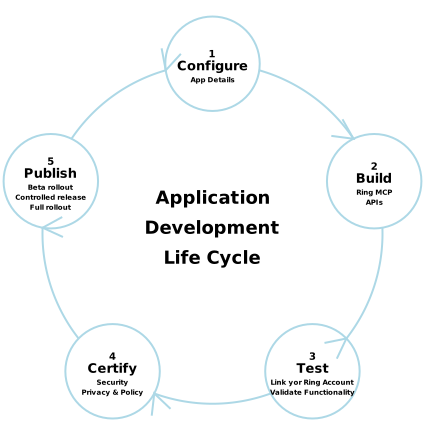
Configure
To access Ring APIs and run your app through the life cycle you first need to register it on the Ring Developer Portal. The portal supports two app tracks — Public Apps and Private Apps — available as tabs on the apps list page. This guide covers the public app track. If you're building an app for a small, known group of users without publishing it on the Appstore, see Private Use Apps.
For the public app track, you'll provide basic information about your app (name, description, use case) and receive credentials needed for API authentication.
What you'll get:
- Access to developer portal
- Client ID / secret
- HMAC Signature Key
For the full configuration walkthrough, see Configure Your Ring Application.
Build
Develop your application using Ring APIs or AI-assisted tools. Ring supports multiple development approaches to fit your workflow.
Development options:
- Ring Appstore MCP Server - Connect your AI coding assistant to Ring Appstore documentation and build with AI-powered code generation in your IDE (Kiro, Cursor, VS Code)
- Ring API Documentation - Read the API docs directly for endpoints, authentication flows, and code examples
API Core capabilities:
- Video streaming/downloads (WebRTC)
- Motion detection events
- Device discovery and status
Test
Test your integration by linking to your own Ring account. This allows you to validate your application functionality. For the full testing guide, see Test Your Ring App Store Integration.
Sandbox or testing environment:
- Developer testing - Use your personal Ring account and devices
What to test:
- Device discovery
- Video streaming
- Event webhooks
- Error handling
Certify
Submit your application for review and certification through the Ring Developer Portal. All applications undergo security testing, privacy compliance checks, and functionality validation. Only certified applications can be published.
For details on the certification process, see Certify Your Ring Application.
Publish
After certification approval, choose how to release your app to Ring customers. For the full publishing guide, see Publish Your Ring Application.
Deployment options:
Beta Rollout
Share your app with select customers using a private link to gather feedback before public launch. Ideal for new applications.
Controlled Release
Gradually roll out your app to increasing percentages of Ring customers (5% → 25% → 50% → 100%). Recommended for major updates.
Full Rollout
Make your app immediately available to all Ring customers. Best for minor updates and proven apps.
Development Team Management
The Ring Developer Portal allows you to collaborate with other developers by managing team access to your applications. All this is done in the User Settings screen. You can add team members, assign roles with different permission levels, and transfer account ownership. At the moment only Administrator and Developer roles are supported and both have full permissions.
Accessing User Settings
To access the User Settings screen,
- Sign in to the Developer Console.
- Go to My Settings > User Permissions.
To add a user
Click on the Add New button at the bottom right of the screen. Specify an email address and choose either Administrator or Developer role from the options offered (Analyst, Marketeer, and Tester are not supported at the moment)
The Ring Developer Portal supports three role types:
| Role | Permissions |
|---|---|
| Administrator | Full access to all features including team management, app configuration, certification submission, and billing. Only one owner per account. |
| Analyst | Read-only access to analytics and reports. Cannot modify any settings. |
| Marketer | Access to app store listing, analytics, and promotional materials. Cannot access code or API credentials. |
| Developer | Access to app development and testing. Cannot submit for certification or manage team settings. |
| Tester | Access to test applications. |
The team member will receive an invitation email. They must accept the invitation to gain access.
Managing Existing Team Members
In the Assign Roles table, you can:
- View all team members and their current roles
- See invitation status (Active or Pending)
- Resend invitation for pending members
- Remove access for any team member
- Change ownership (Administrator/Owner only)
Transferring Account Ownership
To transfer ownership:
- Click Change ownership next to the current owner
- In the dialog, select the new owner from the Users dropdown (only active Administrators appear)
- Review the confirmation message
- Click Save
After transfer:
- The new owner becomes the Administrator (owner)
- All billing and legal responsibilities transfer to the new owner
Example Use Cases
Ring Developer Experience supports multiple use cases across multiple industries:
Retail & Hospitality
- Foot traffic analytics and customer counting
- Queue management and wait time optimization
- Staff scheduling based on customer volume
Property Management
- Visitor logging and access control
- Maintenance request verification
Business Operations
- Delivery confirmation and package tracking
- Workplace safety monitoring
- Time and attendance verification
Residential Communities
- Package room management — Alert residents when deliveries arrive in common areas
- Parking enforcement — Monitor assigned parking spaces and visitor areas
- Pet monitoring and entertainment — Watch pets in yards, capture funny moments, track activity patterns, and share videos with neighbors
- Backyard activities — Verify gate closures and trigger automated lighting for evening activities
- Garden and landscape enjoyment — Monitor for wildlife visitors, track seasonal changes in community gardens, and capture time-lapse videos of plant growth
Key Terminology
| Term | Definition |
|---|---|
| Ring Developer Portal | The central hub where developers register and register applications, access documentation, test integrations, manage API credentials, and submit apps for certification. |
| Ring API | The Ring API is the REST API hosted at https://api.amazonvision.com that partners use to access Ring devices, manage account linking, retrieve user profiles, and stream live video. |
| Third-Party Application | Software built by external developers that integrates with Ring devices. Applications can be private (single organization) or public (available to all Ring customers through the App Store). |
| Client ID and Client Secret | Credentials issued when you register an application. The Client ID identifies your application, and the Client Secret authenticates your application when calling Ring APIs. Store the Client Secret securely and never commit it to source code. If you lose either credential, delete your app and create a new one. See Replacing Your App Credentials. |
| HMAC Signature Key | A cryptographic key issued with your Client ID and Secret, used to verify the authenticity of messages between Ring and your application. The same key is used for two purposes: (1) verifying webhook signatures from Ring using HMAC-SHA256 with hex encoding, and (2) generating and validating nonces during account linking using HMAC-SHA256 with URL-safe Base64 encoding. This key is shown only once during app creation and cannot be retrieved later. See Replacing Your App Credentials. |
| One-way Account Linking | The authorization framework Ring uses to allow customers to grant your application access to their Ring devices without sharing passwords. Customers authorize your app through the Ring mobile app, and your application receives access tokens to call APIs on their behalf. |
| Ring Appstore MCP (Model Context Protocol) | AI-powered development tool that integrates with IDEs to help generate Ring integration code. MCP provides context-aware code suggestions and automates common integration patterns. See Ring Appstore MCP Server. |
| Webhook | An HTTP callback that Ring sends to your application when events occur (motion detection, doorbell press, etc.). Your application must provide an HTTPS endpoint to receive these notifications and verify webhook signatures for security. |
| Sandbox Environment | A testing environment with synthetic Ring devices and events that allows you to test your integration without affecting real customer accounts or devices. No rate limits apply in sandbox. |
| Certification | The review process all applications undergo before being published. Ring validates security practices, privacy compliance, API usage patterns, and user experience to ensure quality and protect customer data. |
| Ring App Store | The marketplace where Ring customers discover and install third-party applications. Customers access the App Store through the Ring mobile app or ring.com/appstore. |
| Live Video Streaming | Real-time video access from Ring cameras using WebRTC/WHEP protocol. Battery-powered devices support 30-second streams; line-powered devices support 60-second streams. |
Frequently Asked Questions
How long does certification take?
On average, 90% of submissions are reviewed in less than 48 hours. You'll be notified by email of status changes. To check your review status, go to the Ring Developer Console, select your app, and click Certify (enabled while certification is in progress). If your submission is incomplete, review times may be delayed or your submission may not pass.
Can I test my application without certification?
Yes. You can test with your personal Ring account during development. You can also use the sandbox environment with synthetic test data.
What do I do if I lose my app credentials?
If you haven't submitted the app for certification yet, delete it in the Ring Developer Portal and create a new one. Your Client ID, Client Secret, and HMAC Signature Key are shown one time only and can't be regenerated on an existing app, and the new app is issued a fresh set of all three. If you've already submitted for certification, contact Ring support instead. See Replacing Your App Credentials.
What programming languages are supported?
Ring APIs are language-agnostic REST APIs. You can use any language that supports HTTP requests and OAuth 2.0.
How much does it cost to publish an application?
Publishing on the Ring App Store is free. Ring takes a 10% revenue share on paid customer subscriptions. See the Developer Agreement for complete details.
Can I monetize my application?
Yes. You can charge customers through monthly/annual subscriptions.
What if my application is rejected?
You'll receive detailed feedback explaining what needs to be fixed. Make the required changes and resubmit, there's no limit on resubmissions.
How do I handle customer support for my application?
You're responsible for supporting your application users. Provide a support email in your app listing and respond to customer inquiries promptly.
What happens if Ring's APIs change?
Ring follows semantic versioning with 12-month backward compatibility. You'll receive 30+ days advance notice before any breaking changes.
Can I unpublish my application?
Yes. You can unpublish anytime from the Developer Portal. Existing customer subscriptions will be honored through their current billing period.
Related topics
- Configure Your Ring Application — App registration, credentials, and endpoint setup
- Ring API Development Guide — Development lifecycle, testing process, and code snippets
- Ring Partner API Documentation — Complete API reference and integration guide
- Ring Appstore MCP Server — AI-assisted development with Ring Appstore documentation
- Ring Appstore Permitted Content Policy — Content guidelines for Ring Appstore applications
