
react-native-localize
在本文中,您将学习如何在Vega TV应用中使用react-native-localize程序包。您可以阅读有关Vega SDK中支持的方法的信息。
react-native-localize程序包可帮助您为每位用户创建个性化体验:
- 处理多种语言
- 设置日期和时间格式
- 设置货币
- 管理其他地区设置
@amazon-devices/react-native-localize库在适用于Vega的React Native (RNV) 应用中使用Localize React Native。该库提供本地化和国际化支持,让您可以根据不同的语言、地区和文化调整应用。
为什么要对电视应用进行本地化?
- 用户体验: 用户更喜欢能采用其语言并了解其所在地区首选项的应用。
- 全球影响力: 您可以提升应用对国际市场上更广泛受众的吸引力。
- 法律合规性: 您可以确保遵守各个地区的法规。
安装
-
将
react-native-localize程序包作为依赖项添加到package.json中:"dependencies": { ... "@amazon-devices/react-native-localize": "~2.0.0" } -
将
getCurrencies导入您的首选组件:import { getCurrencies } from '@amazon-devices/react-native-localize'; -
在项目根目录上运行
npm install来安装程序包。 -
成功安装后,运行您的Vega项目。
示例
模拟器与设备
react-native-localize程序包中方法针对模拟器的返回值可能与针对设备的返回值不同。例如,模拟器上的getCountry() 方法返回US,但对于设备,返回值基于设备的语言设置。
| 方法 | 模拟器 | 设备 |
|---|---|---|
getLocales |
相同 | 相同 |
getCurrencies |
相同 | 相同 |
getCountry |
固定值 | 视设备而定 |
getTimeZone |
固定值 | 视设备而定 |
getCalendar |
固定值 | 视设备而定 |
以下是如何使用@amazon-devices/react-native-localize的示例。
import { getCurrencies, getLocales } from "@amazon-devices/react-native-localize";

console.log(getLocales());
console.log(getCurrencies());
API参考
getLocales()
根据用户的设备返回区域设置列表。
- languageCode
- scriptCode
- languageTag
- isRTL
方法类型
type getLocales = () => Array<{
  languageCode: string;
  scriptCode?: string;
  countryCode: string;
  languageTag: string;
  isRTL: boolean;
}>;
可能的输出:
local: [
{"languageCode":"af","scriptCode":"","countryCode":"","languageTag":"af","isRTL":"false"},
{"languageCode":"af","scriptCode":"","countryCode":"NA","languageTag":"af-NA","isRTL":"false"},
{"languageCode":"af","scriptCode":"","countryCode":"ZA","languageTag":"af-ZA","isRTL":"false"},
{"languageCode":"agq","scriptCode":"","countryCode":"","languageTag":"agq","isRTL":"false"},
{"languageCode":"agq","scriptCode":"","countryCode":"CM","languageTag":"agq-CM","isRTL":"false"},
{"languageCode":"ak","scriptCode":"","countryCode":"","languageTag":"ak","isRTL":"false"},
{"languageCode":"ak","scriptCode":"","countryCode":"GH","languageTag":"ak-GH","isRTL":"false"},
{"languageCode":"am","scriptCode":"","countryCode":"","languageTag":"am","isRTL":"false"},
{"languageCode":"am","scriptCode":"","countryCode":"ET","languageTag":"am-ET","isRTL":"false"},
{"languageCode":"ar","scriptCode":"","countryCode":"","languageTag":"ar","isRTL":"true"},
{"languageCode":"ar","scriptCode":"","countryCode":"AE","languageTag":"ar-AE","isRTL":"true"},
{"languageCode":"ar","scriptCode":"","countryCode":"BH","languageTag":"ar-BH","isRTL":"true"},
{"languageCode":"ar","scriptCode":"","countryCode":"DJ","languageTag":"ar-DJ","isRTL":"true"},
{"languageCode":"ar","scriptCode":"","countryCode":"DZ","languageTag":"ar-DZ","isRTL":"true"},
{"languageCode":"ar","scriptCode":"","countryCode":"EG","languageTag":"ar-EG","isRTL":"true"},
{"languageCode":"ar","scriptCode":"","countryCode":"EH","languageTag":"ar-EH","isRTL":"true"},
{"languageCode":"ar","scriptCode":"","countryCode":"ER","languageTag":"ar-ER","isRTL":"true"},
{"languageCode":"ar","scriptCode":"","countryCode":"IL","languageTag":"ar-IL","isRTL":"true"},
{"languageCode":"ar","scriptCode":"","countryCode":"IQ","languageTag":"ar-IQ","isRTL":"true"},
{"languageCode":"ar","scriptCode":"","countryCode":"JO","languageTag":"ar-JO","isRTL":"true"},
{"languageCode":"ar","scriptCode":"","countryCode":"KM","languageTag":"ar-KM","isRTL":"true"},
{"languageCode":"ar","scriptCode":"","countryCode":"KW","languageTag":"ar-KW","isRTL":"true"},
{"languageCode":"ar","scriptCode":"","countryCode":"LB","languageTag":"ar-LB","isRTL":"true"},
{"languageCode":"ar","scriptCode":"","countryCode":"LY","languageTag":"ar-LY","isRTL":"true"},
{"languageCode":"ar","scriptCode":"","countryCode":"MA","languageTag":"ar-MA","isRTL":"true"},
{"languageCode":"ar","scriptCode":"","countryCode":"MR","languageTag":"ar-MR","isRTL":"true"},
{"languageCode":"ar","scriptCode":"","countryCode":"OM","languageTag":"ar-OM","isRTL":"true"},
{"languageCode":"ar","scriptCode":"","countryCode":"QA","languageTag":"ar-QA","isRTL":"true"},
{"languageCode":"ar","scriptCode":"","countryCode":"PS","languageTag":"ar-PS","isRTL":"true"},
{"languageCode":"ar","scriptCode":"","countryCode":"SA","languageTag":"ar-SA","isRTL":"true"},
{"languageCode":"ar","scriptCode":"","countryCode":"SD","languageTag":"ar-SD","isRTL":"true"},
{"languageCode":"ar","scriptCode":"","countryCode":"SO","languageTag":"ar-SO","isRTL":"true"}
...
示例
import React, {useEffect, useState} from 'react';
import {View, Text, StyleSheet} from 'react-native';
import {getLocales} from '@amazon-devices/react-native-localize';

const DeviceLocale= () => {
const [localeInfo, setLocaleInfo] = useState(null);

useEffect(() => {
const locales = getLocales();

if (locales && locales.length > 0) {
const locale = locales[0];
setLocaleInfo({
languageTag: locale.languageTag,
languageCode: locale.languageCode,
countryCode: locale.countryCode,
isRTL: locale.isRTL,
});
}
}, []);

return (
<View style={styles.container}>
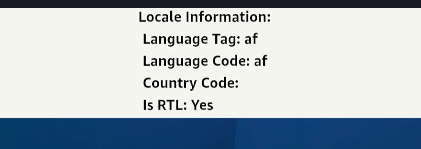
<Text style={styles.text}>Locale Information:</Text>
{localeInfo ? (
<View>
<Text style={styles.text}>
Language Tag: {localeInfo.languageTag}
</Text>
<Text style={styles.text}>
Language Code: {localeInfo.languageCode}
</Text>
<Text style={styles.text}>
Country Code: {localeInfo.countryCode}
</Text>
<Text style={styles.text}>
Is RTL: {localeInfo.isRTL ? 'Yes' : 'No'}
</Text>
</View>
) : (
<Text style={styles.text}>Loading locale...</Text>
)}
</View>
);
};
输出:
getNumberFormatSettings()
返回数字格式化设置。
方法类型
type getNumberFormatSettings = () => {
  decimalSeparator: string;
  groupingSeparator: string;
};
示例
import { getNumberFormatSettings } from "@amazon-devices/react-native-localize";

console.log(getNumberFormatSettings());
/* -> {
  decimalSeparator: ".",
  groupingSeparator: ",",
} */
getCurrencies()
返回所有货币的列表。
方法类型
type getCurrencies = () => string[];
示例
import { getCurrencies } from "@amazon-devices/react-native-localize";

console.log(getCurrencies());
// -> ["EUR", "GBP", "USD"]
可能的输出:
Currency: ["XXX","NAD","ZAR","XAF","GHS","ETB","AED","BHD","DJF","DZD","EGP","MAD","ERN","ILS","IQD","JOD","KMF","KWD","LBP","LYD","MRU","OMR","QAR","SAR","SDG","SOS","SSP","SYP","TND","YER","INR","TZS","EUR","AZN","BYN","ZMW","BGN","XOF","BDT","CNY","BAM","RUB","PHP","UGX","USD","IRR","CZK","GBP","DKK","KES","CHF","BTN","XCD","AUD","BBD","BIF","BMD","BSD","BWP","BZD","CAD","NZD","FJD","FKP","GIP","GMD","GYD","JMD","KYD","LRD","MGA","MOP","MUR","MWK","MYR","NGN","PGK","PKR","RWF","SBD","SCR","SEK","SGD","SHP","SLL","ANG","SZL","TOP","TTD","VUV","WST","ARS","BOB","BRL","CLP","COP","CRC","CUP","DOP","GTQ","HNL","MXN","NIO","PAB","PEN","PYG","UYU","VES","AFN","GNF","CDF","HTG","XPF","HRK","HUF","AMD","IDR","ISK","JPY","GEL","CVE","KZT","KHR","KPW","KRW","TRY","KGS","LAK","MZN","MKD","MNT","BND","MMK","NOK","NPR","AWG","SRD","PLN","STN","MDL","RON","UAH","LKR","ALL","RSD","TJS","THB","TMT","UZS","VND","TWD"]
getCountry()
根据用户设备的语言设置返回用户当前的国家/地区代码。例如,如果语言设置为印度英语,则该国家/地区返回为IN。
注意:如果您使用的是模拟器,Time Zone属性会输出Universal。
例如,此输出将设备的语言设置设为English India。
local: 786
Currency: INR
Country: IN
Time Zone: Europe/London
24 Hour clock: false
Calendar: gregorian
例如,此输出将设备的语言设置设为American English。
Country: US
Time Zone: Universal
24 Hour clock: false
Calendar: gregorian
getTemperatureUnit:fahrenheit
usesMetricSystem:false
方法类型
type getCountry = () => string;
示例1
import { getCountry } from "@amazon-devices/react-native-localize";

console.log(getCountry());
// -> "FR"
示例2
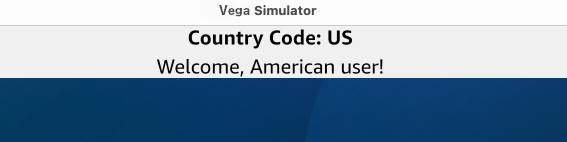
您可以根据用户设备的位置向用户显示自定义消息。
在以下代码中,您可以使用:
@amazon-devices/react-native-localize中的getCountry()方法,用于从设备获取国家/地区。useState()方法,用于保存国家/地区代码。- 开关语句,用于根据国家/地区代码更改消息。
注意: 更改设备上的设备位置,请前往Settings(设置)> Preferences(首选项)> Languages(语言)。
import React, {useEffect, useState} from 'react';
import {View, Text, StyleSheet} from 'react-native';
import {getCountry} from '@amazon-devices/react-native-localize';

const GetCountry = () => {
const [country, setCountry] = useState(null);
const [message, setMessage] = useState('');

useEffect(() => {
const countryCode = getCountry();
setCountry(countryCode);

switch (countryCode) {
case 'US':
setMessage('Welcome, American user!');
break;
case 'GB':
setMessage('Welcome, British user!');
break;
case 'IN':
setMessage('Namaste, Indian user!');
break;
default:
setMessage('Welcome, global user!');
break;
}
}, []);

return (
<View style={styles.container}>
<Text style={styles.text}>Country Code: {country}</Text>
<Text style={styles.message}>{message}</Text>
</View>
);
};
输出:

拉丁美洲地区
使用拉丁美洲区域设置的设备将返回“UN”而不是“419”,因为“419”不是标准的国家/地区代码。
getCalendar()
返回用户的首选日历格式。
方法类型
type getCalendar = () =>
  | "gregorian"
  | "buddhist"
  | "coptic"
  | "ethiopic"
  | "ethiopic-amete-alem"
  | "hebrew"
  | "indian"
  | "islamic"
  | "islamic-umm-al-qura"
  | "islamic-civil"
  | "islamic-tabular"
  | "iso8601"
  | "japanese"
  | "persian";
示例
import { getCalendar } from "@amazon-devices/react-native-localize";

console.log(getCalendar());
// -> "gregorian"
getTemperatureUnit()
返回用户的首选温度单位。
方法类型
type getTemperatureUnit = () => "celsius" | "fahrenheit";
示例
import { getTemperatureUnit } from "@amazon-devices/react-native-localize";

console.log(getTemperatureUnit());
// -> "celsius"
getTimeZone()
根据用户设备的语言设置中的国家/地区,返回用户的当前时区。模拟器返回Universal时区。电视设备返回在设备设置中设置的时区,例如Europe/London。
例如,此输出将设备的语言设置设为American English。
Country: US
Time Zone: Universal
24 Hour clock: false
Calendar: gregorian
getTemperatureUnit:fahrenheit
usesMetricSystem:false
方法类型
type getTimeZone = () => string;
示例
import { getTimeZone } from "@amazon-devices/react-native-localize";

console.log(getTimeZone());
// -> "Asia/Yerevan"
uses24HourClock()
如果用户偏好24小时的时钟格式,则返回true;如果用户偏好12小时的时钟格式,则返回false。
方法类型
type uses24HourClock = () => boolean;
示例
import { uses24HourClock } from "@amazon-devices/react-native-localize";

console.log(uses24HourClock());
// -> true
usesMetricSystem()
如果用户偏好公制度量系统,则返回true;如果用户偏好英制度量系统,则返回false。
方法类型
type usesMetricSystem = () => boolean;
示例
import { usesMetricSystem } from "@amazon-devices/react-native-localize";

console.log(usesMetricSystem());
// -> true
usesAutoDateAndTime()
显示设备是否启用自动日期和时间设置。
方法类型
type usesAutoDateAndTime = () => boolean | undefined;
示例
import { usesAutoDateAndTime } from "@amazon-devices/react-native-localize";

console.log(usesAutoDateAndTime());
// -> false/true
usesAutoTimeZone()
显示设备是否启用自动时区设置。
方法类型
type usesAutoTimeZone = () => boolean | undefined;
示例
import { usesAutoTimeZone } from "@amazon-devices/react-native-localize";

console.log(usesAutoTimeZone());
// -> false
支持的版本
| 程序包名称 | 亚马逊NPM库版本 | Vega OS内部版本号 | Vega SDK版本 | 发行说明 |
|---|---|---|---|---|
@amazon-devices/react-native-localize |
2.0.1+3.0.4 | OS 1.1 (201010438050) | 0.20 |
相关主题
- 支持的第三方库和服务
- react-native-device-info — 要检索设备和应用信息,例如操作系统版本、设备型号、应用版本和捆绑包ID,请将
react-native-device-info程序包与react-native-localize一起使用。
Last updated: 2025年12月22日
