
High Level App Deployment Architecture
This document defines the end-to-end deployment architecture for a partner application integrating with the Ring AppStore. It covers the complete journey from initial app creation and credential setup through endpoint configuration, authentication orchestration, device access, and webhook event delivery.
1. Prerequisites and Setup
Before deploying your application, you must create your app in the Ring Developer Portal, obtain credentials, configure your endpoints, and prepare your backend services.
1.1 Create Your Application
Register your application in the Ring Developer Portal. See Configure Your Ring Application for the complete step-by-step registration process.
- Click Create new app and provide your app name
- Accept Ring's security and privacy standards
- Complete the app information form (description, category, website, support email, privacy policy, terms of service, app icon)
1.2 Obtain Credentials
When you create your application, Ring issues three credentials. These are shown only once — store them securely before continuing.
| Credential | Purpose |
|---|---|
| Client ID | Identifies your app in OAuth token requests |
| Client Secret | Authenticates your app during token exchange and refresh |
| HMAC Signing Key | Verifies webhook signatures and generates nonces during account linking |
These credentials are shared across staging and production environments. Never commit them to version control — use environment variables or a secrets manager.
1.3 Configure Endpoints
Register the following HTTPS endpoints in the Ring Developer Portal:
| Endpoint | Purpose | Required |
|---|---|---|
| Token Exchange URL | Receives Ring OAuth authorization codes for token exchange | Yes |
| Account Link URL | User login page for nonce-based account association | Yes |
| Webhook URL | Receives real-time event notifications from Ring devices | Yes |
| App Homepage URL | Custom app configuration page for post-linking setup | Yes |
Configure staging endpoints first, validate your integration, then configure production endpoints. See Configure Your Ring Application for detailed requirements.
1.4 Set Up Your Backend
Before a Ring user installs your app, your backend must be ready to handle:
- Token exchange — Receive authorization codes at your Token Exchange URL and exchange them within 60 seconds (Section 5)
- Token storage — Securely store access tokens (~4 hour lifetime) and refresh tokens (~30 day lifetime) with associated Account IDs
- Nonce matching — Implement HMAC-SHA256 nonce verification for account linking (Section 6.3)
- Webhook handler — Accept HTTPS POST requests, verify HMAC signatures, and return HTTP 200 within 5 seconds (Section 9)
- API client — Call Amazon Vision APIs with Bearer token authentication for device discovery, live video, and media downloads (Section 8)
2. App Deployment Journey
2.1 Lifecycle Overview

2.2 Phase Summary
| Phase | Description | Reference |
|---|---|---|
| Create App | Register in Ring Developer Portal, provide app information | Configure Your Ring Application |
| Obtain Credentials | Receive Client ID, Client Secret, HMAC Signing Key | Section 1.2 |
| Configure Endpoints | Register Token Exchange, Account Link, Webhook, and App Homepage URLs | Section 4 |
| Build Integration | Implement token exchange, nonce matching, device access, webhook handling | Section 5 through Section 9 |
| Test & Certify | Validate in staging, then submit for Ring review | Certify Your Ring Application |
| Publish | Deploy to Ring AppStore | Publish Your Ring Application |
| User Installs App | Ring user discovers app, selects devices, confirms scopes | Section 7 |
| Token Exchange | Ring sends auth code, partner exchanges for OAuth tokens | Section 5 |
| Account Linking | Nonce-based verification binds Ring user to partner account | Section 6 |
| Device Access | Discover devices, stream live video, download media clips | Section 8 |
| Webhook Events | Receive real-time motion, doorbell, device status notifications | Section 9 |
3. Service Architecture Overview
The Ring AppStore follows a one-way account linking model where Ring manages the OAuth credential lifecycle and partners verify messages through HMAC digital signatures. Partners do not need to operate as OAuth servers.
3.1 Security
Ring takes security seriously. Our account linking mechanism ensures security through cryptographic verification, time-bound validation, and mandatory user authentication. All communications use HTTPS, and access tokens are scoped to specific devices and operations authorized by the user.
3.2 High-Level Service Architecture
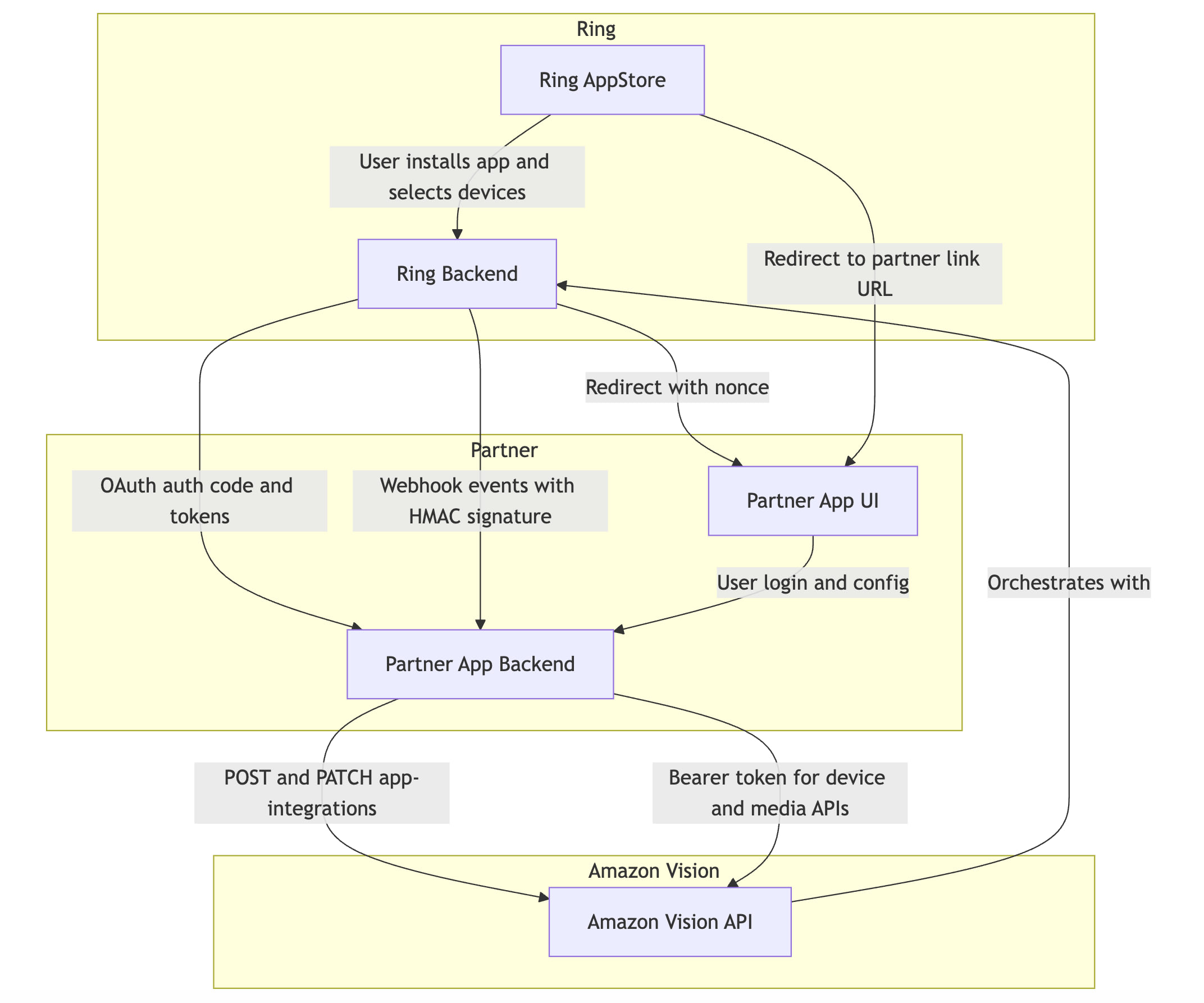
3.3 Component Responsibilities
| Component | Role |
|---|---|
| Ring AppStore | User-facing interface — AppStore browsing, app installation, device selection, scope consent, integration management |
| Ring Backend | Orchestrates all server-side logic — OAuth credential lifecycle, app state management, nonce generation, device authorization, notification delivery, HMAC key management |
| Amazon Vision API | External API layer for partners — device discovery, device status/capabilities, live video streaming, media downloads, account integration verification |
| Partner App Backend | Partner server — receives OAuth tokens, exchanges auth codes, stores tokens, handles webhook events, calls Amazon Vision APIs, verifies nonce during account linking |
| Partner App UI | Partner web interface — user login portal for account linking, app configuration pages |
4. Endpoint Configuration
Partners must configure endpoint categories to complete an integration. These are registered via the Ring Developer Portal during app creation.
4.1 Partner-Hosted Endpoints
| Endpoint | Purpose | Required | Example |
|---|---|---|---|
| Token Exchange URL | Receives Ring OAuth authorization codes for token exchange | Yes | https://api.partner.example.com/oauth/token |
| Webhook URL | Receives real-time event notifications from Ring | Yes | https://api.partner.example.com/webhooks/ring |
| Account Link URL | Partner sign-in page for nonce-based token claiming (sign-in is mandatory) | Yes | https://partner.example.com/ring/link |
| App Homepage URL | Custom app configuration page | Yes | https://partner.example.com/ring/config |
4.2 Ring-Hosted Endpoints — Amazon Vision API
| Endpoint | Method | Purpose |
|---|---|---|
https://oauth.ring.com/oauth/token |
POST | Token exchange — authorization code to access/refresh tokens |
https://api.amazonvision.com/v1/devices |
GET | Device discovery |
https://api.amazonvision.com/v1/devices/{id}/status |
GET | Device online/offline status |
https://api.amazonvision.com/v1/devices/{id}/capabilities |
GET | Device capabilities and codecs |
https://api.amazonvision.com/v1/devices/{id}/media/streaming/whep/sessions |
POST | Start live video stream via WebRTC WHEP |
https://api.amazonvision.com/v1/devices/{id}/media/video/download |
POST | Download recorded video clips |
https://api.amazonvision.com/v1/users/me |
GET | Get user profile — returns Account ID |
https://api.amazonvision.com/v1/accounts/me/app-integrations |
POST | Partner confirms account link |
https://api.amazonvision.com/v1/accounts/me/app-integrations |
PATCH | Partner updates integration status |
See API Reference for full details.
5. Token Exchange Flow
After a Ring user installs a partner app, Ring Backend generates an OAuth authorization code and sends it to the Partner App Backend.
5.1 What Triggers This Flow
- The user discovers your app in the Ring AppStore
- The user reviews the data access scopes your app requests
- The user selects which Ring devices to share with your app
- The user clicks Confirm to approve the integration
Ring Backend then generates an OAuth authorization code and sends it directly to your Token Exchange URL (backend-to-backend).
5.2 Token Exchange Sequence
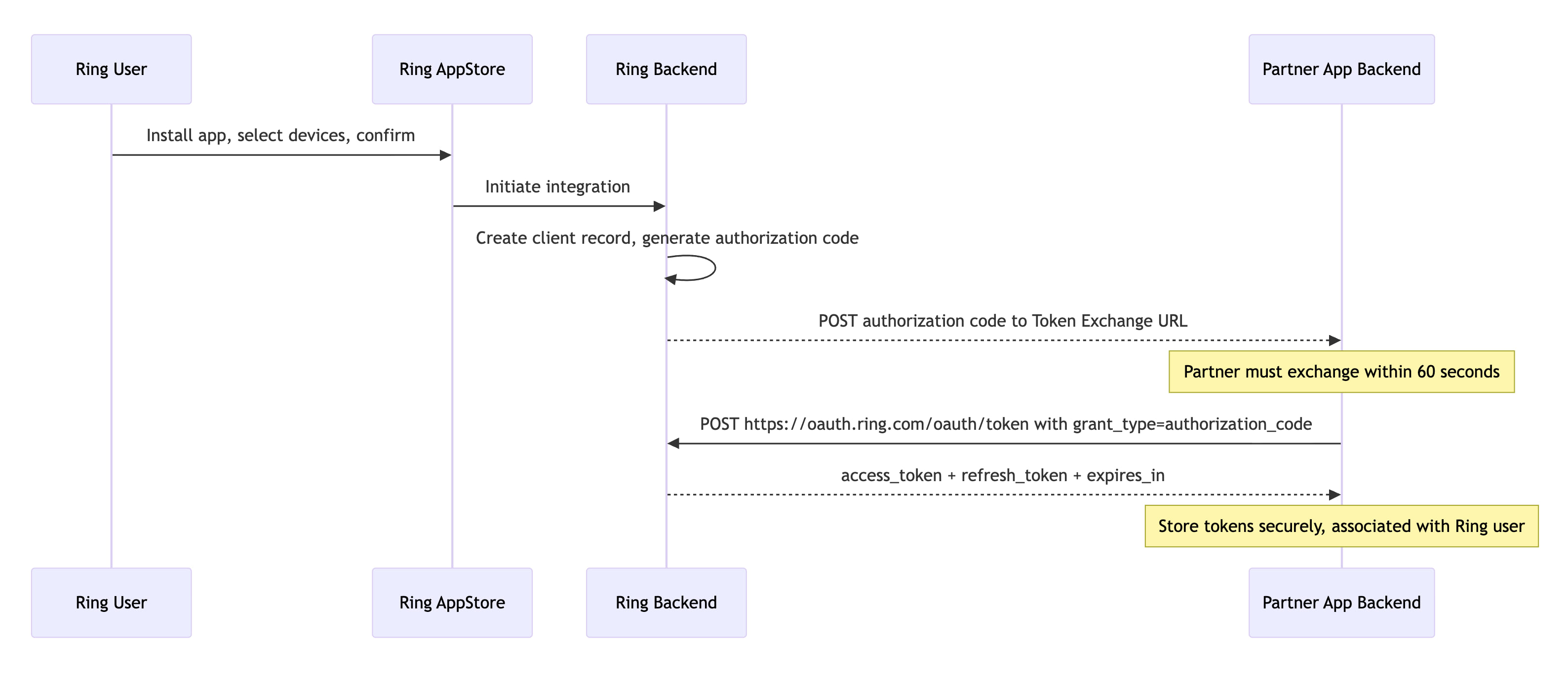
5.3 Token Lifecycle
| Token | Lifetime | Purpose |
|---|---|---|
| Authorization Code | 60 seconds | One-time use; exchanged for tokens |
| Access Token | ~4 hours | Bearer token for Amazon Vision API calls |
| Refresh Token | ~30 Days | Used to obtain new access tokens |
5.4 Token Refresh
POST https://oauth.ring.com/oauth/token
Content-Type: application/x-www-form-urlencoded

grant_type=refresh_token&refresh_token=<refresh_token>&client_id=<client_id>&client_secret=<client_secret>
See Refresh Tokens for implementation guidance.
6. Account Linking Flow (One-Way Account Linking)
The one-way account linking model eliminates the need for partners to act as OAuth servers. Ring releases credentials upfront and redirects the user to the partner for account association.
See also: Account Linking and App Integrations API
6.1 Client State Machine
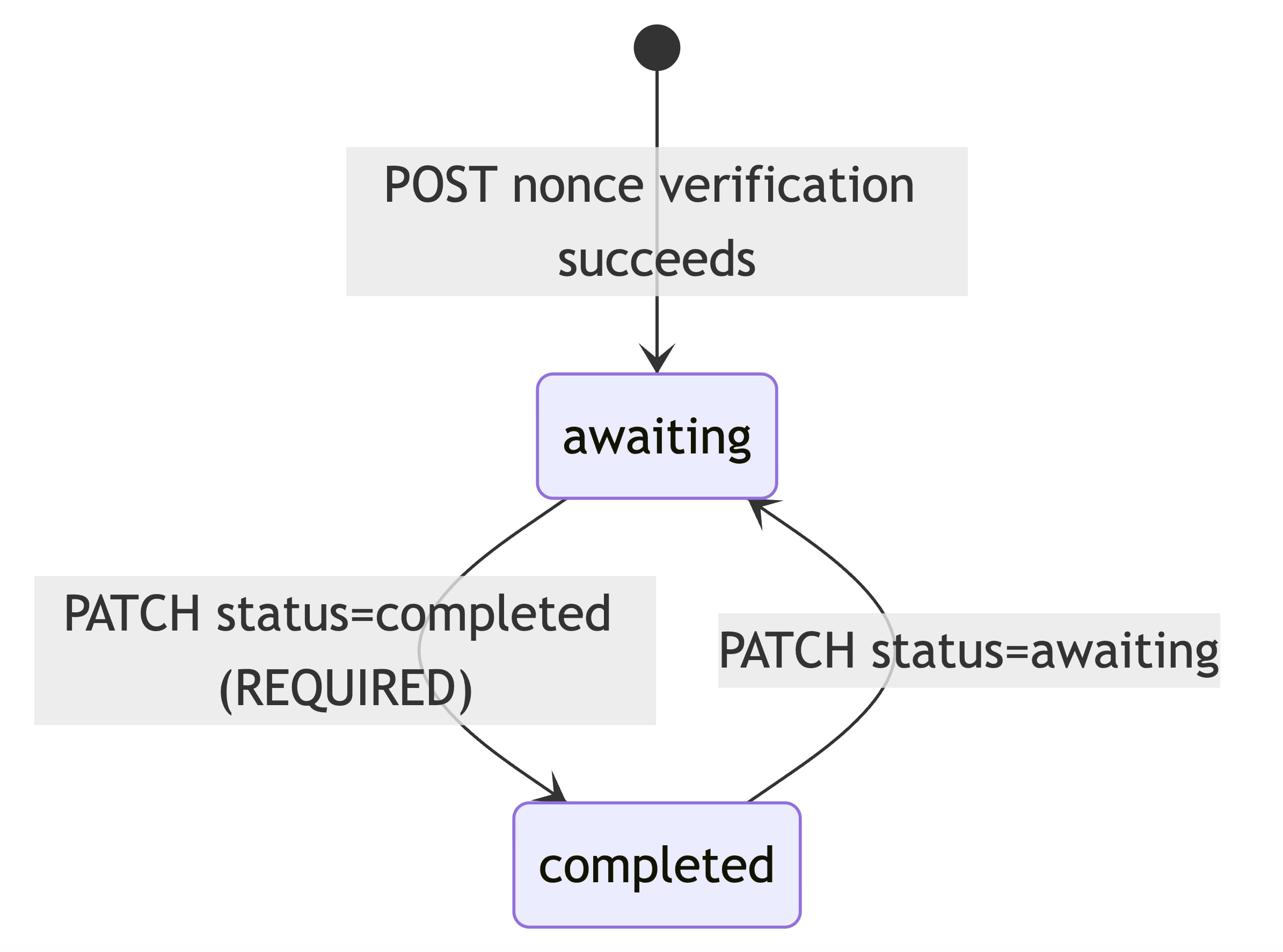
6.2 Full Account Linking Sequence
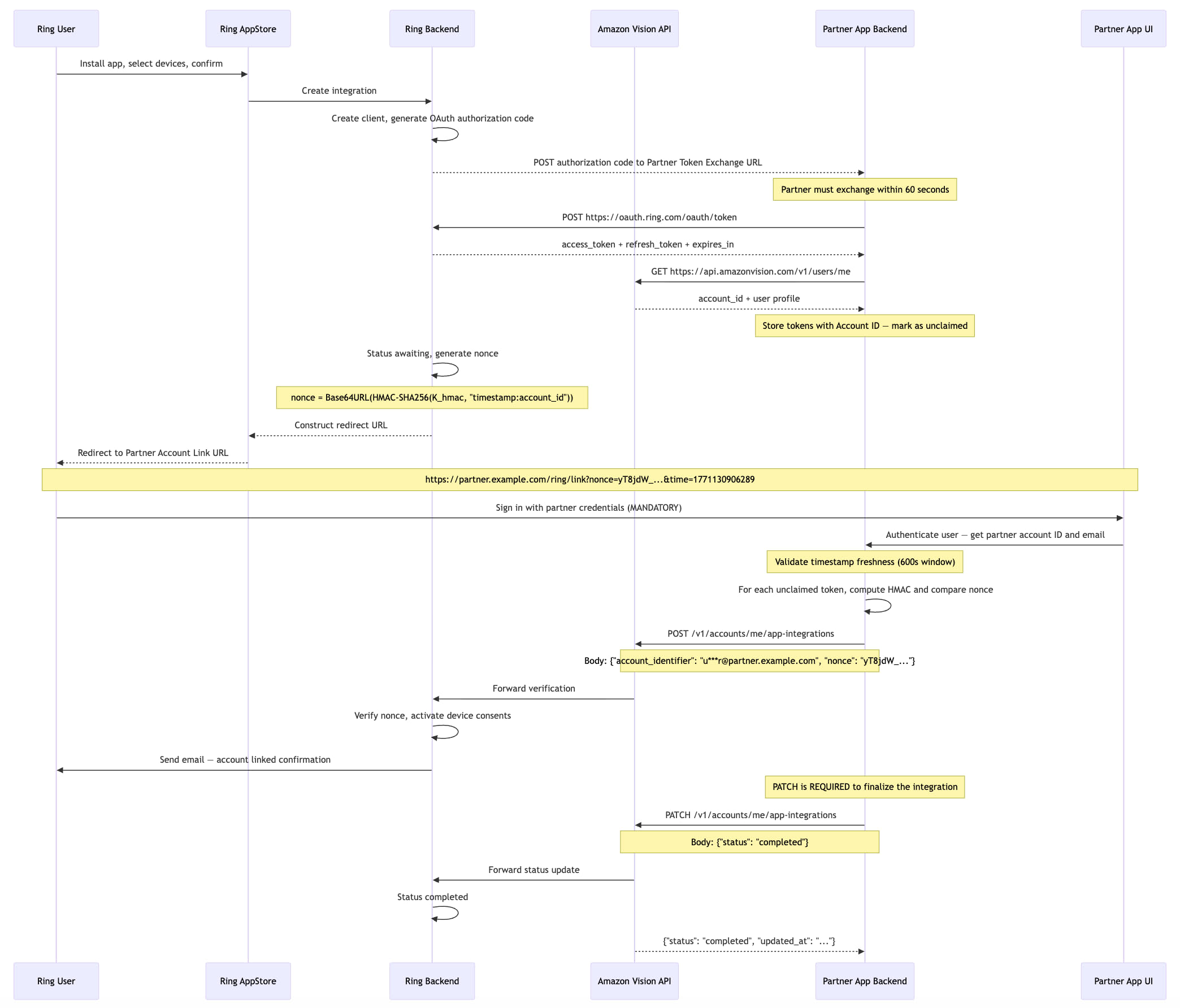
6.3 Nonce Validation and Account Linking — Step-by-Step
The nonce mechanism prevents replay attacks and cryptographically binds each linking attempt to a specific Ring user.
Prerequisites
- Partner App Backend possesses an unclaimed OAuth token. After receiving the token, the partner retrieves the user's Account ID by calling
GET https://api.amazonvision.com/v1/users/me(see Users API). - Both Ring Backend and Partner App Backend share an HMAC signing key (
K_hmac) exchanged during partner onboarding. - Algorithm: HMAC-SHA256.
Nonce Technical Reference
The nonce mechanism uses HMAC-SHA256 with a time-bound validation window to ensure secure account linking.
| Property | Value |
|---|---|
| Algorithm | HMAC-SHA256 |
| Validation window | 600 seconds (10 minutes) |
| Output encoding | URL-safe Base64, no padding (RFC 4648 §5, without = characters) |
A-Z, a-z, 0-9, -, _) with no = padding. Standard Base64 (which uses +, /, and = padding) will produce a different string. In Java: Base64.getUrlEncoder().withoutPadding(), in Python: base64.urlsafe_b64encode(...).rstrip(b'=')..hexdigest() + sha256= prefix). Nonces use URL-safe Base64 encoding instead. Do not mix the two.Step 1: Ring Backend Generates Nonce and Redirects User
When the user clicks "Confirm" in the Ring App, Ring Backend generates a cryptographically signed nonce, transitions the integration status to awaiting, and redirects the user to the partner Account Link URL:
https://partner.example.com/ring/link?nonce=yT8jdW_nu2W4gR6FI-l8hkPpt_c9EAf4DJ9CTIcuM7c&time=1771130906289
Step 2: User Arrives at Partner App UI
The user lands on the Partner App UI login page with the nonce parameters in the URL.
Partner App Backend extracts time and nonce, then performs a freshness check:
VALIDATION_WINDOW_SECONDS = 600  # 10 minutes

current_time_ms = int(time.time() * 1000)
time_param_ms = int(request.args['time'])
time_delta_seconds = (current_time_ms - time_param_ms) / 1000

if time_delta_seconds > VALIDATION_WINDOW_SECONDS:
    raise Exception('Link request expired')
if time_delta_seconds < 0:
    raise Exception('Invalid timestamp: cannot be in the future')
Step 3: User Authenticates with Partner
The user signs in to the Partner App UI. The Partner App Backend authenticates the user and obtains their partner-side account information.
Why sign-in is mandatory:
- Identifies the partner user — without sign-in, the partner has no verified way to know which user is performing the linking
- Provides the
account_identifier— the signed-in user's email (masked) is used when calling the App-Integrations API - Prevents blind token claiming — without explicit authentication, tokens would be claimed without user verification
Step 4: Partner Matches Nonce to Unclaimed Token
import hmac
import hashlib
import base64

def compute_nonce(time_param, account_id, hmac_key):
    """Compute nonce using the same algorithm as Ring Backend."""
    payload = f"{time_param}:{account_id}"
    mac = hmac.new(
        hmac_key.encode('utf-8'),
        payload.encode('utf-8'),
        hashlib.sha256
    ).digest()
    return base64.urlsafe_b64encode(mac).rstrip(b'=').decode('utf-8')

def match_nonce_to_token(received_nonce, time_param, hmac_key):
    unclaimed_tokens = get_unclaimed_tokens()

    for token_record in unclaimed_tokens:
        account_id = token_record.account_id
        computed_nonce = compute_nonce(time_param, account_id, hmac_key)

        # Constant-time comparison to prevent timing attacks
        if hmac.compare_digest(computed_nonce, received_nonce):
            return token_record  # Match found

    return None  # No match
Step 5: Partner Claims Token and Calls App-Integrations API
POST https://api.amazonvision.com/v1/accounts/me/app-integrations
Authorization: Bearer <matched_ava_token>
Content-Type: application/json

{
  "account_identifier": "u***r@partner.example.com",
  "nonce": "yT8jdW_nu2W4gR6FI-l8hkPpt_c9EAf4DJ9CTIcuM7c"
}
See App Integrations API for full endpoint details.
Step 6: Ring Backend Verifies and Activates
Ring Backend verifies the nonce, transitions status to awaiting, activates device-level consents, and sends a confirmation email to the Ring user.
Step 7: Partner Calls PATCH to Complete Integration
PATCH https://api.amazonvision.com/v1/accounts/me/app-integrations
Authorization: Bearer <matched_ava_token>
Content-Type: application/json

{
  "status": "completed"
}
status: completed, the integration remains in awaiting state and is not fully operational. Required flow: POST (nonce verification → awaiting) → PATCH (status update → completed).Security Considerations
The nonce-based account linking mechanism provides protection against common attack vectors including replay attacks, token interception, and unauthorized token claiming. The time-bound validation window and cryptographic verification ensure that only legitimate linking attempts succeed.
7. App Integration UX Flow
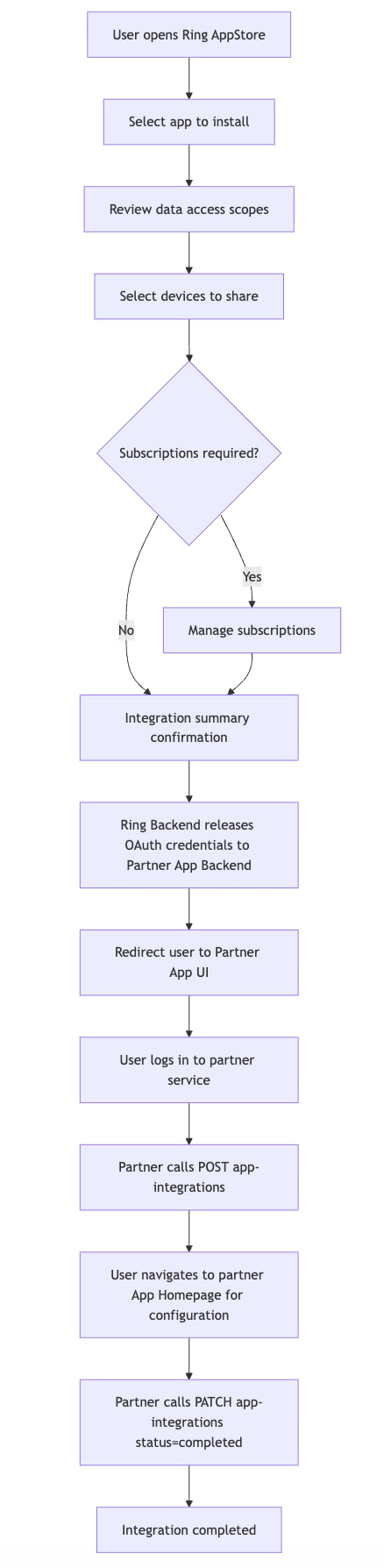
8. Accessing Devices
Once the integration reaches awaiting or completed status, the Partner App Backend can access authorized Ring devices through the Amazon Vision API.
See: Device Discovery · Live Video · Media Clips
8.1 Device Access Sequence
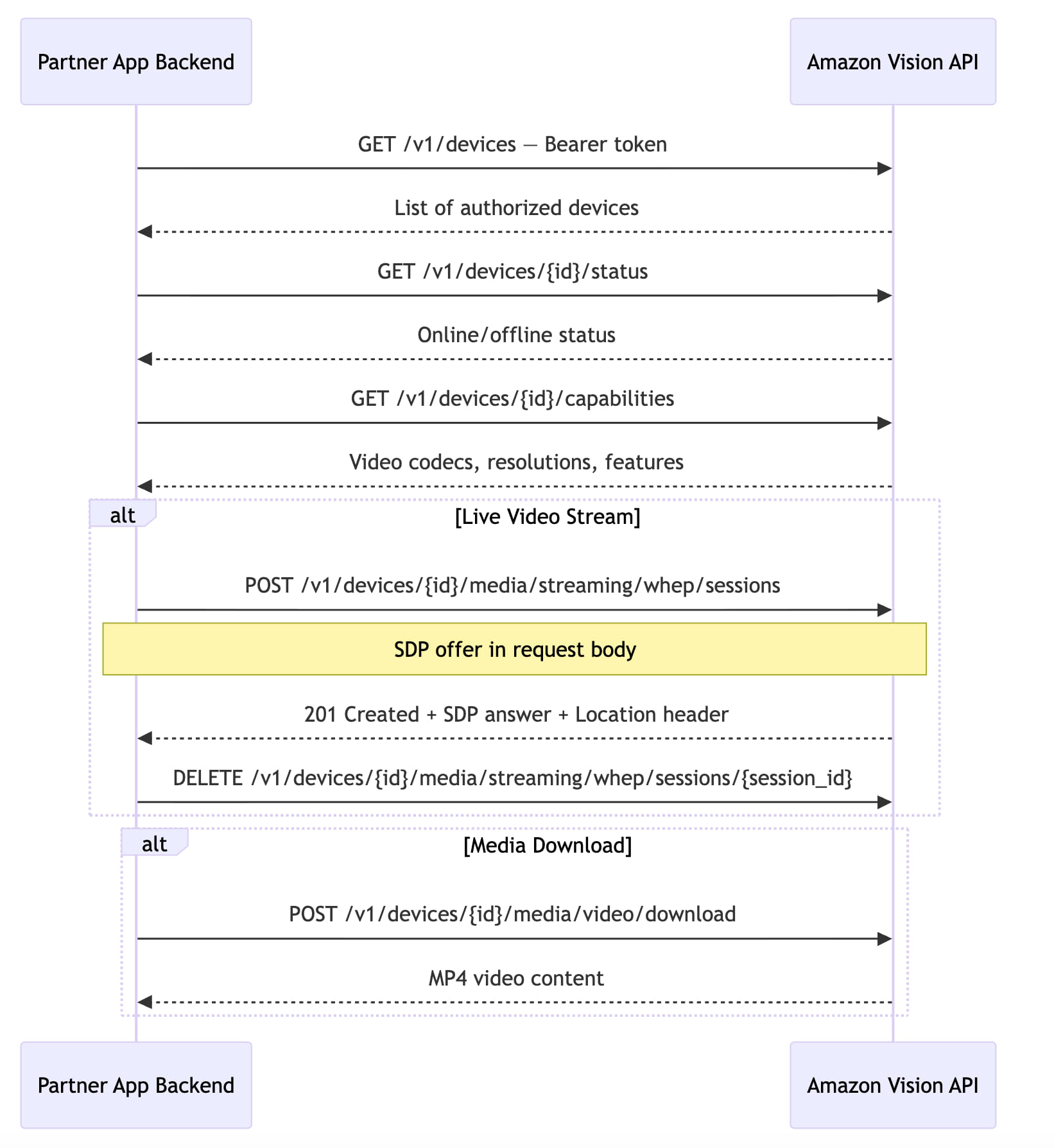
8.2 Authentication Header
All Amazon Vision API calls require a valid access token:
Authorization: Bearer <access_token>
If the token has expired, refresh it before making API calls. See Refresh Tokens.
9. Webhook Event Delivery
Ring Backend delivers real-time event notifications to the Partner App Backend via signed webhooks using HMAC-SHA256 signatures.
See: Notifications
9.1 Webhook Delivery Sequence
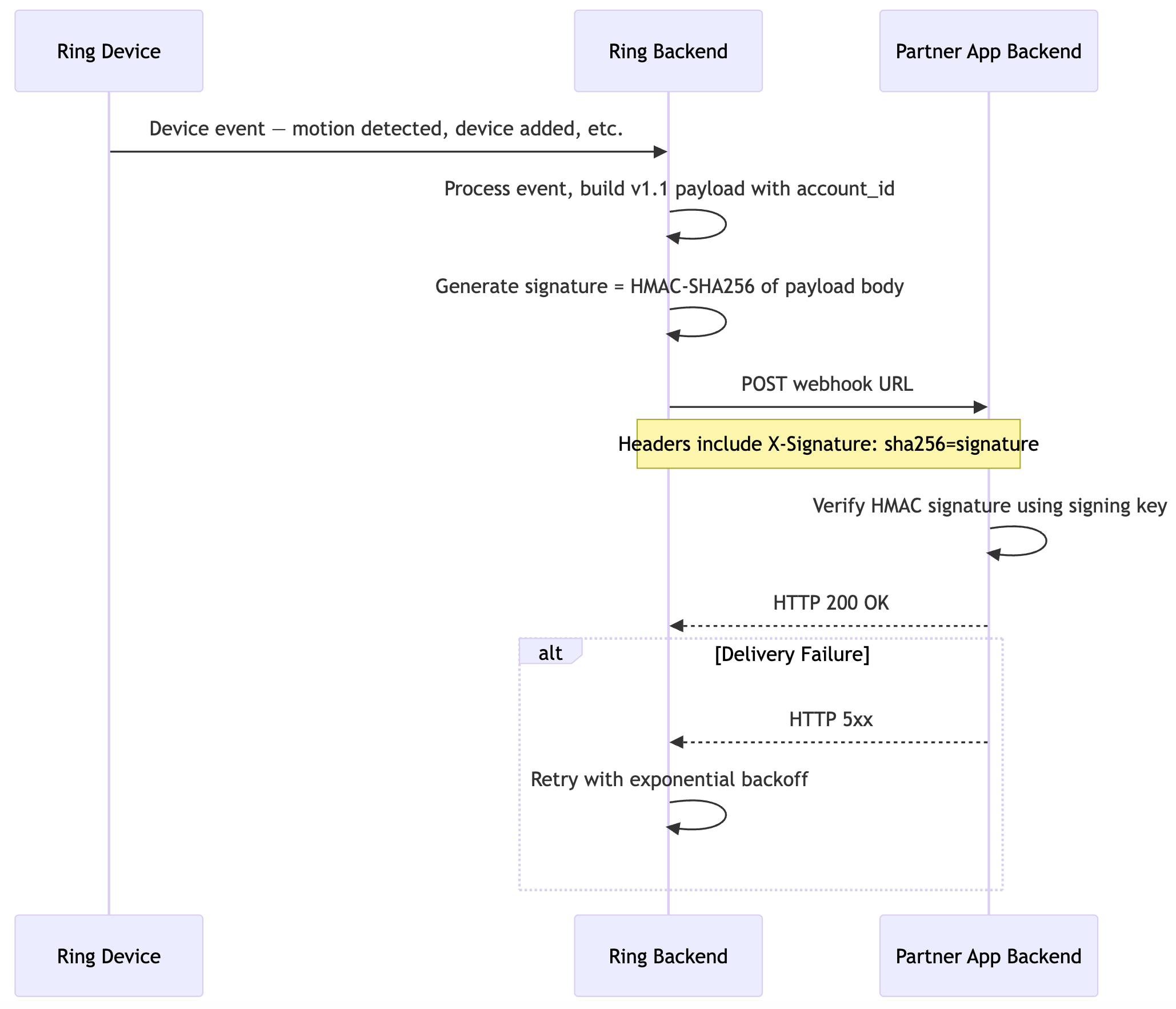
9.2 Event Types
| Event | Type Value | Description | Details |
|---|---|---|---|
| Motion Detected | motion_detected |
Motion detected (includes subType such as human) |
Motion Detection |
| Button Press | button_press |
Doorbell button pressed | Button Press |
| Device Added | device_added |
Device becomes available to partner | Device Addition |
| Device Removed | device_removed |
Partner loses access to a device | Device Removal |
| Device Online | device_online |
Device comes online | Device Online |
| Device Offline | device_offline |
Device goes offline | Device Offline |
10. Environment Configuration
| Component | Production |
|---|---|
| Amazon Vision API | https://api.amazonvision.com |
| OAuth Server | https://oauth.ring.com |
| Dev Portal | https://developer.amazon.com/ring/console/apps |
