

Availability and enrollment
When an app is available through the Amazon Cloud App Program, users on a Vega OS device see an “Amazon cloud-hosted app” tagline on your app’s Amazon Appstore detail page. Users experience the core features of your app on the Vega OS Fire TV device as they would on other Fire TV Stick devices. Amazon cloud app streaming is available only for apps that Amazon selects. If you want your app be available on Vega OS Fire TV devices through cloud app streaming, you can make a request through Developer Support. Include the ASIN and details supporting your request. However, making a request doesn’t guarantee placement into the program.Architecture
A user starts a cloud app streaming session by opening the mini app on their Vega OS Fire TV device. The mini app creates a Fire OS container in the AWS cloud and launches your APK inside it. The app in the container streams its UI to the device through a UDP connection. The mini app sends user input back to the cloud container through the same UDP connection. When the user plays content, the device fetches the stream directly from the CDN and decodes it locally. The device then combines the cloud-streamed UI with the decoded video and renders both on screen. The following diagram shows how these components interact. For more details about how cloud streaming works, see Amazon Cloud App Streaming Details.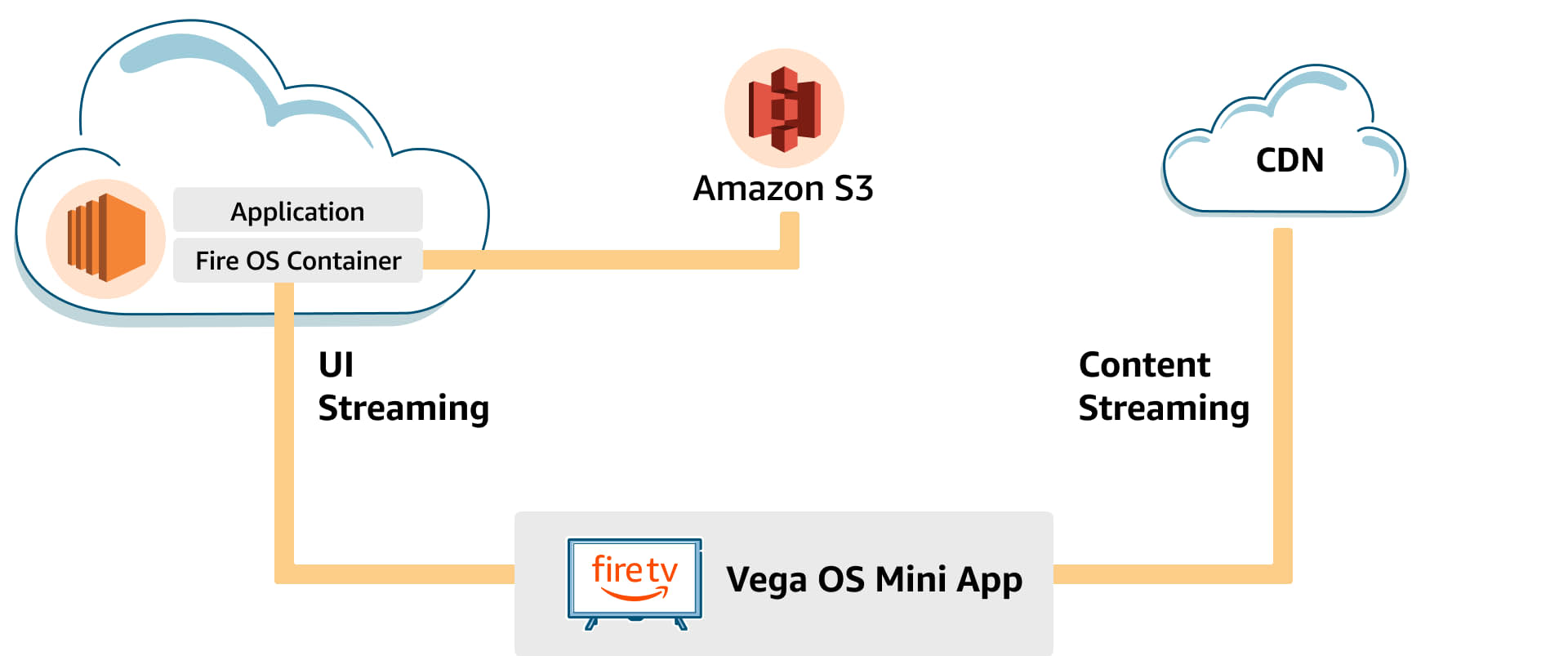
Text description of diagram
Text description of diagram
A Fire OS container runs the app in the AWS cloud, which connects to the Vega OS mini app on a Fire TV device. UI streaming flows between the cloud container and the mini app. Content streaming flows from your CDN to the mini app. The cloud container connects to Amazon S3 storage.
Prerequisites
- Active Amazon developer account.
- Fire OS app already published in the Amazon Appstore.
- App compatible with Fire TV Stick 4K Max.
- App compatible with Fire OS 7.
- App isn’t a game or utility.
- Amazon has determined that your Fire OS app is compatible and eligible for participation in the Cloud App Program.
Key considerations
- Cloud app streaming runs your existing Fire TV Stick 4K Max APK, so you don’t need to build or modify anything.
- The cloud app communicates with your back-end services the same way it does on a local Fire TV device.
- The Vega OS Fire TV device streams video content directly from your CDN, not through the cloud container.
- If your app’s back-end services or third-party SDKs need to see the device’s IP address (for example, for local ad targeting or geo-fencing), you can request IP tunneling. Contact Developer Support and select the category that best matches your issue. Include the ASIN and details supporting your request.
Life cycle of the Cloud App Program
After Amazon enrolls your app in the Cloud App Program, you manage updates through the standard app publishing process:- Upload a new APK and conduct Live App Testing on Fire OS devices.
- Submit your app for live publishing and wait for any Fire OS device staged rollout to complete.
- Wait for confirmation that Cloud App Program publishing is complete. Before your cloud-streamed app goes live for the Vega OS devices you targeted, Amazon performs additional validation checks. When Cloud App Program publishing completes, Amazon sends a confirmation email. Make sure your Fire OS app doesn’t prompt users to update your app before you get the confirmation email. If you submit another update of your Fire OS app before Cloud App Program publishing completes, it resets the publishing process.
