
react-native-localize
この記事では、Vega TVアプリでreact-native-localizeパッケージを使用する方法を説明します。Vega SDKでサポートされているメソッドについて記載しています。
react-native-localizeパッケージは、各ユーザーに合わせてパーソナライズされたエクスペリエンスを提供するために役立ちます。
- 複数の言語の処理
- 日付と時刻の形式の設定
- 通貨の設定
- その他の地域設定の管理
@amazon-devices/react-native-localizeライブラリは、Vega向けReact Native(RNV)アプリでLocalize React Native(英語のみ)を使用できるようにするものです。このライブラリにより、ローカリゼーションとインターナショナリゼーションのサポートが提供され、アプリをさまざまな言語、地域、文化に適応させることができます。
TVアプリをローカライズする理由
- ユーザーエクスペリエンス: ユーザーは、自分の言語で提供され、地域の設定を理解するアプリを好みます。
- 世界規模のリーチ: 世界中の市場の幅広いユーザーに対するアプリの訴求力を高めることができます。
- 法令遵守: さまざまな地域の規制を確実に遵守できます。
インストール
-
package.jsonに、react-native-localizeパッケージを依存関係として追加します。"dependencies": { ... "@amazon-devices/react-native-localize": "~2.0.0" } -
getCurrenciesを適切なコンポーネントにインポートします。import { getCurrencies } from '@amazon-devices/react-native-localize'; -
プロジェクトのルートで
npm installを実行して、パッケージをインストールします。 -
インストールが成功したら、Vegaプロジェクトを実行します。
例
シミュレーターとデバイス
react-native-localizeパッケージのメソッドの戻り値は、シミュレーターとデバイスで異なる場合があります。たとえば、getCountry()メソッドは、シミュレーターではUSを返しますが、デバイスでの戻り値はデバイスの言語設定に基づきます。
| メソッド | シミュレーター | デバイス |
|---|---|---|
getLocales |
同じ | 同じ |
getCurrencies |
同じ | 同じ |
getCountry |
固定値 | デバイスに基づく |
getTimeZone |
固定値 | デバイスに基づく |
getCalendar |
固定値 | デバイスに基づく |
@amazon-devices/react-native-localizeの使用方法の例を次に示します。
import { getCurrencies, getLocales } from "@amazon-devices/react-native-localize";

console.log(getLocales());
console.log(getCurrencies());
APIリファレンス
getLocales()
ユーザーのデバイスに基づいて、ロケールのリストを返します。
- languageCode
- scriptCode
- languageTag
- isRTL
メソッドタイプ
type getLocales = () => Array<{
  languageCode: string;
  scriptCode?: string;
  countryCode: string;
  languageTag: string;
  isRTL: boolean;
}>;
返される可能性のある値:
local: [
{"languageCode":"af","scriptCode":"","countryCode":"","languageTag":"af","isRTL":"false"},
{"languageCode":"af","scriptCode":"","countryCode":"NA","languageTag":"af-NA","isRTL":"false"},
{"languageCode":"af","scriptCode":"","countryCode":"ZA","languageTag":"af-ZA","isRTL":"false"},
{"languageCode":"agq","scriptCode":"","countryCode":"","languageTag":"agq","isRTL":"false"},
{"languageCode":"agq","scriptCode":"","countryCode":"CM","languageTag":"agq-CM","isRTL":"false"},
{"languageCode":"ak","scriptCode":"","countryCode":"","languageTag":"ak","isRTL":"false"},
{"languageCode":"ak","scriptCode":"","countryCode":"GH","languageTag":"ak-GH","isRTL":"false"},
{"languageCode":"am","scriptCode":"","countryCode":"","languageTag":"am","isRTL":"false"},
{"languageCode":"am","scriptCode":"","countryCode":"ET","languageTag":"am-ET","isRTL":"false"},
{"languageCode":"ar","scriptCode":"","countryCode":"","languageTag":"ar","isRTL":"true"},
{"languageCode":"ar","scriptCode":"","countryCode":"AE","languageTag":"ar-AE","isRTL":"true"},
{"languageCode":"ar","scriptCode":"","countryCode":"BH","languageTag":"ar-BH","isRTL":"true"},
{"languageCode":"ar","scriptCode":"","countryCode":"DJ","languageTag":"ar-DJ","isRTL":"true"},
{"languageCode":"ar","scriptCode":"","countryCode":"DZ","languageTag":"ar-DZ","isRTL":"true"},
{"languageCode":"ar","scriptCode":"","countryCode":"EG","languageTag":"ar-EG","isRTL":"true"},
{"languageCode":"ar","scriptCode":"","countryCode":"EH","languageTag":"ar-EH","isRTL":"true"},
{"languageCode":"ar","scriptCode":"","countryCode":"ER","languageTag":"ar-ER","isRTL":"true"},
{"languageCode":"ar","scriptCode":"","countryCode":"IL","languageTag":"ar-IL","isRTL":"true"},
{"languageCode":"ar","scriptCode":"","countryCode":"IQ","languageTag":"ar-IQ","isRTL":"true"},
{"languageCode":"ar","scriptCode":"","countryCode":"JO","languageTag":"ar-JO","isRTL":"true"},
{"languageCode":"ar","scriptCode":"","countryCode":"KM","languageTag":"ar-KM","isRTL":"true"},
{"languageCode":"ar","scriptCode":"","countryCode":"KW","languageTag":"ar-KW","isRTL":"true"},
{"languageCode":"ar","scriptCode":"","countryCode":"LB","languageTag":"ar-LB","isRTL":"true"},
{"languageCode":"ar","scriptCode":"","countryCode":"LY","languageTag":"ar-LY","isRTL":"true"},
{"languageCode":"ar","scriptCode":"","countryCode":"MA","languageTag":"ar-MA","isRTL":"true"},
{"languageCode":"ar","scriptCode":"","countryCode":"MR","languageTag":"ar-MR","isRTL":"true"},
{"languageCode":"ar","scriptCode":"","countryCode":"OM","languageTag":"ar-OM","isRTL":"true"},
{"languageCode":"ar","scriptCode":"","countryCode":"QA","languageTag":"ar-QA","isRTL":"true"},
{"languageCode":"ar","scriptCode":"","countryCode":"PS","languageTag":"ar-PS","isRTL":"true"},
{"languageCode":"ar","scriptCode":"","countryCode":"SA","languageTag":"ar-SA","isRTL":"true"},
{"languageCode":"ar","scriptCode":"","countryCode":"SD","languageTag":"ar-SD","isRTL":"true"},
{"languageCode":"ar","scriptCode":"","countryCode":"SO","languageTag":"ar-SO","isRTL":"true"}
...
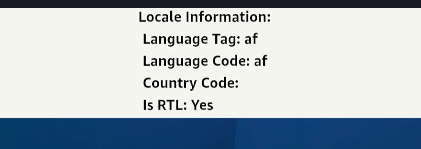
例
import React, {useEffect, useState} from 'react';
import {View, Text, StyleSheet} from 'react-native';
import {getLocales} from '@amazon-devices/react-native-localize';

const DeviceLocale= () => {
const [localeInfo, setLocaleInfo] = useState(null);

useEffect(() => {
const locales = getLocales();

if (locales && locales.length > 0) {
const locale = locales[0];
setLocaleInfo({
languageTag: locale.languageTag,
languageCode: locale.languageCode,
countryCode: locale.countryCode,
isRTL: locale.isRTL,
});
}
}, []);

return (
<View style={styles.container}>
<Text style={styles.text}>Locale Information:</Text>
{localeInfo ? (
<View>
<Text style={styles.text}>
Language Tag: {localeInfo.languageTag}
</Text>
<Text style={styles.text}>
Language Code: {localeInfo.languageCode}
</Text>
<Text style={styles.text}>
Country Code: {localeInfo.countryCode}
</Text>
<Text style={styles.text}>
Is RTL: {localeInfo.isRTL ? 'Yes' : 'No'}
</Text>
</View>
) : (
<Text style={styles.text}>Loading locale...</Text>
)}
</View>
);
};
出力:
getNumberFormatSettings()
数値の書式の設定を返します。
メソッドタイプ
type getNumberFormatSettings = () => {
  decimalSeparator: string;
  groupingSeparator: string;
};
例
import { getNumberFormatSettings } from "@amazon-devices/react-native-localize";

console.log(getNumberFormatSettings());
/* -> {
  decimalSeparator: ".",
  groupingSeparator: ",",
} */
getCurrencies()
すべての通貨のリストを返します。
メソッドタイプ
type getCurrencies = () => string[];
例
import { getCurrencies } from "@amazon-devices/react-native-localize";

console.log(getCurrencies());
// -> ["EUR", "GBP", "USD"]
返される可能性のある値:
Currency: ["XXX","NAD","ZAR","XAF","GHS","ETB","AED","BHD","DJF","DZD","EGP","MAD","ERN","ILS","IQD","JOD","KMF","KWD","LBP","LYD","MRU","OMR","QAR","SAR","SDG","SOS","SSP","SYP","TND","YER","INR","TZS","EUR","AZN","BYN","ZMW","BGN","XOF","BDT","CNY","BAM","RUB","PHP","UGX","USD","IRR","CZK","GBP","DKK","KES","CHF","BTN","XCD","AUD","BBD","BIF","BMD","BSD","BWP","BZD","CAD","NZD","FJD","FKP","GIP","GMD","GYD","JMD","KYD","LRD","MGA","MOP","MUR","MWK","MYR","NGN","PGK","PKR","RWF","SBD","SCR","SEK","SGD","SHP","SLL","ANG","SZL","TOP","TTD","VUV","WST","ARS","BOB","BRL","CLP","COP","CRC","CUP","DOP","GTQ","HNL","MXN","NIO","PAB","PEN","PYG","UYU","VES","AFN","GNF","CDF","HTG","XPF","HRK","HUF","AMD","IDR","ISK","JPY","GEL","CVE","KZT","KHR","KPW","KRW","TRY","KGS","LAK","MZN","MKD","MNT","BND","MMK","NOK","NPR","AWG","SRD","PLN","STN","MDL","RON","UAH","LKR","ALL","RSD","TJS","THB","TMT","UZS","VND","TWD"]
getCountry()
デバイスの言語設定に基づいて、ユーザーの現在の国コードを返します。たとえば、言語設定が英語(インド)の場合、返される国はINになります。
注:シミュレーターを使用している場合、タイムゾーンプロパティはUniversalと出力されます。
たとえば、以下は、デバイスの言語設定が英語(インド)に設定されている場合の出力です。
local: 786
通貨: INR
国: IN
タイムゾーン: Europe/London
24時間形式の時刻:false
カレンダー:gregorian
たとえば、以下は、デバイスの言語設定が英語(米国)に設定されている場合の出力です。
国: US
タイムゾーン: Universal
24時間形式の時刻:false
カレンダー:gregorian
getTemperatureUnit:fahrenheit
usesMetricSystem:false
メソッドタイプ
type getCountry = () => string;
例1
import { getCountry } from "@amazon-devices/react-native-localize";

console.log(getCountry());
// -> "FR"
例2
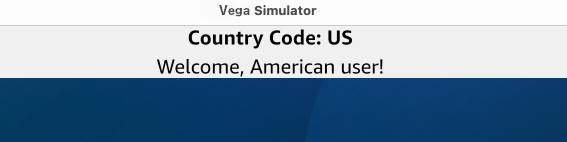
デバイスの所在地に基づいて、ユーザーにカスタムメッセージを表示できます。
以下のコードでは、次のメソッドと文を使用しています。
@amazon-devices/react-native-localizeのgetCountry()メソッド。デバイスの国を取得します。useState()メソッド。国コードを保存します。- 国コードに従ってメッセージを変更するswitch case。
注: デバイスの所在地を変更するには、[設定] > [環境設定] > [言語] に移動します。
import React, {useEffect, useState} from 'react';
import {View, Text, StyleSheet} from 'react-native';
import {getCountry} from '@amazon-devices/react-native-localize';

const GetCountry = () => {
const [country, setCountry] = useState(null);
const [message, setMessage] = useState('');

useEffect(() => {
const countryCode = getCountry();
setCountry(countryCode);

switch (countryCode) {
case 'US':
setMessage('Welcome, American user!');
break;
case 'GB':
setMessage('Welcome, British user!');
break;
case 'IN':
setMessage('Namaste, Indian user!');
break;
default:
setMessage('Welcome, global user!');
break;
}
}, []);

return (
<View style={styles.container}>
<Text style={styles.text}>Country Code: {country}</Text>
<Text style={styles.message}>{message}</Text>
</View>
);
};
出力:

ラテンアメリカ地域
ラテンアメリカの地域設定を使用するデバイスでは、「419」の代わりに「UN」が返されます。「419」は標準の国コードではないためです。
getCalendar()
ユーザーが選択しているカレンダー形式を返します。
メソッドタイプ
type getCalendar = () =>
  | "gregorian"
  | "buddhist"
  | "coptic"
  | "ethiopic"
  | "ethiopic-amete-alem"
  | "hebrew"
  | "indian"
  | "islamic"
  | "islamic-umm-al-qura"
  | "islamic-civil"
  | "islamic-tabular"
  | "iso8601"
  | "japanese"
  | "persian";
例
import { getCalendar } from "@amazon-devices/react-native-localize";

console.log(getCalendar());
// → "gregorian"
getTemperatureUnit()
ユーザーが選択している温度単位を返します。
メソッドタイプ
type getTemperatureUnit = () => "celsius" | "fahrenheit";
例
import { getTemperatureUnit } from "@amazon-devices/react-native-localize";

console.log(getTemperatureUnit());
// → "celsius"
getTimeZone()
デバイスの言語設定の国に基づいて、ユーザーの現在のタイムゾーンを返します。シミュレーターでは、Universalタイムゾーンが返されます。TVデバイスでは、Europe/Londonなど、デバイスに設定されているタイムゾーンが返されます。
たとえば、以下は、デバイスの言語設定が英語(米国)に設定されている場合の出力です。
国: US
タイムゾーン: Universal
24時間形式の時刻:false
カレンダー:gregorian
getTemperatureUnit:fahrenheit
usesMetricSystem:false
メソッドタイプ
type getTimeZone = () => string;
例
import { getTimeZone } from "@amazon-devices/react-native-localize";

console.log(getTimeZone());
// → "Asia/Yerevan"
uses24HourClock()
ユーザーが時刻の形式として24時間形式を選択している場合はtrue、12時間形式を選択している場合はfalseを返します。
メソッドタイプ
type uses24HourClock = () => boolean;
例
import { uses24HourClock } from "@amazon-devices/react-native-localize";

console.log(uses24HourClock());
// → true
usesMetricSystem()
ユーザーが測定体系としてメートル法を選択している場合はtrue、ヤード・ポンド法を選択している場合はfalseを返します。
メソッドタイプ
type usesMetricSystem = () => boolean;
例
import { usesMetricSystem } from "@amazon-devices/react-native-localize";

console.log(usesMetricSystem());
// → true
usesAutoDateAndTime()
デバイスで日付と時刻の自動設定が有効になっているかどうかを示します。
メソッドタイプ
type usesAutoDateAndTime = () => boolean | undefined;
例
import { usesAutoDateAndTime } from "@amazon-devices/react-native-localize";

console.log(usesAutoDateAndTime());
// → false/true
usesAutoTimeZone()
デバイスでタイムゾーンの自動設定が有効になっているかどうかを示します。
メソッドタイプ
type usesAutoTimeZone = () => boolean | undefined;
例
import { usesAutoTimeZone } from "@amazon-devices/react-native-localize";

console.log(usesAutoTimeZone());
// → false
サポートされているバージョン
| パッケージ名 | Amazon NPMライブラリのバージョン | Vega OSのビルド番号 | Vega SDKバージョン | リリースノート |
|---|---|---|---|---|
@amazon-devices/react-native-localize |
2.0.1+3.0.4 | OS 1.1 (201010438050) | 0.20 |
関連トピック
- サポート対象のサードパーティのライブラリとサービス
- react-native-device-info - OSバージョン、デバイスモデル、アプリバージョン、バンドルIDなどのデバイスとアプリの情報を取得するには、
react-native-device-infoパッケージをreact-native-localizeと一緒に使用します。
Last updated: 2025年12月22日
