Use Access Tokens in Your Code
An access token is a secure, time-limited credential issued by your token server obtained during user authentication. After a user successfully enables your skill and links their Amazon account with their account in your service, Alexa includes an access token in each request. Your code uses this token to retrieve user information from your resource server.
How Alexa manages access tokens
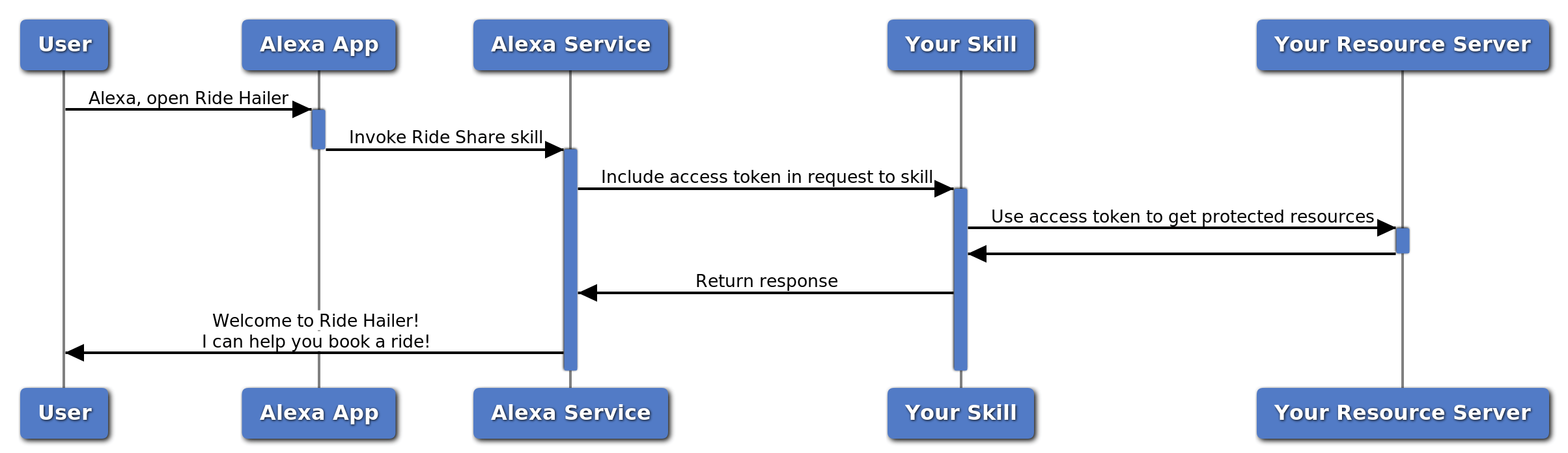
When the user makes requests to the skill, each request, such as an IntentRequest for a custom skill or a TurnOn directive for a smart home skill, now includes the access_token. You use this token in your code to get the information you need from the resource server. If the access token expires, Alexa automatically calls the access token URI with the refresh token to request a new access token and refresh token pair. Your code doesn't manage token refresh.
This following diagram shows the message flow to use the access token to retrieve information from your resource server.
Validate and use the access token
Add logic to your code to validate and use the access token to retrieve user information from your resource server.
Also, add code to send a link-account card in the response if the user didn't enable or canceled account linking. When displayed in the Alexa app, this card includes a link to your authorization URI. The user can start the account linking process directly from this card.
In this section
- Use Access Tokens in Custom Skills
- Use Access Tokens in Smart Home and Video Skills
- Use Access Tokens in Music Skills
Related topics
Last updated: Jul 14, 2026