

Alexa Video Multimodal Reference Software
The main components of a video skill include a Lambda function, a web player, and a skill manifest. Similar to other Alexa skills, the Lambda functions as the skill’s backend. The web player acts as the skill’s front end, and runs on an Echo Show device. It renders video as well as shows UI controls such as a play and a pause button. Similar to other Alexa skills, the video skill manifest is a JSON file that describes your skill. This project contains a web player, a Lambda, and, also, the Alexa Video Infrastructure CLI Tool. The CLI tool automates the processes of creating and updating video skills using the reference web player and the Lambda. Although you can build and manage your own web player and Lambda without using the CLI tool, this process is highly recommended for users who want to quickly have a fully functional video skill.Command-line Interface (CLI) Tool
The reference video skill is an open source project with various components. Most importantly, it includes the command-line interface (CLI) tool which runs on your macOS terminal or Windows PowerShell. The CLI tool uses AWS CloudFormation to provision a collection of AWS resources, so that you spend less time managing these resources, and more time focusing on developing your video skill. To get started, you have to manually prepare your Amazon developer accounts (AWS, Alexa and Login with Amazon services) for setting up a new video skill, and then use the CLI tool to input instances of the data related to your settings. By using the CLI tool, most parts of the installation, build, and deploy processes of the reference video skill are automated, so you don’t need to worry about setting up every resource and service. However, at this point, you might want to revisit this glossary to follow along.Requirements
Before you proceed, your computer environment must have the following:- Node.js 10.x. Note: Currently, this is the only supported version. Test your installed version with this command:
node --version. - npm (prebuilt in Node.js). Note: Currently, Node.js supports every npm version between 5.6.0 and 6.11.3. Test your npm version with:
npm --version. Usenpm install -g npm@versionto downgrade your npm, if needed. - Python 2.7 or later (required by some installation packages)
- Firefox. Note: Firefox is necessary during deployment of the video skill. Although you don’t need to open it, having it is a requirement for conducting automatically generated unit tests against the web player of your video skill.
- PowerShell (Windows) or terminal (macOS)
- Mobile phone or a tablet with Alexa App installed
- An Echo Show device
- AWS Developer Account
- Alexa Developer Account
Other Dependencies
Check your computer environment against the configurations listed here. Windows users: Through an elevated PowerShell or CMD.exe (run as Administrator), you must install all the required tools and configurations using Microsoft windows-build-tools with this command:xcode-select --install on a terminal.
CloudFormation Stack Structure
The CLI tool builds two stacks: the Artifact CloudFormation Stack and the Lambda CloudFormation Stack.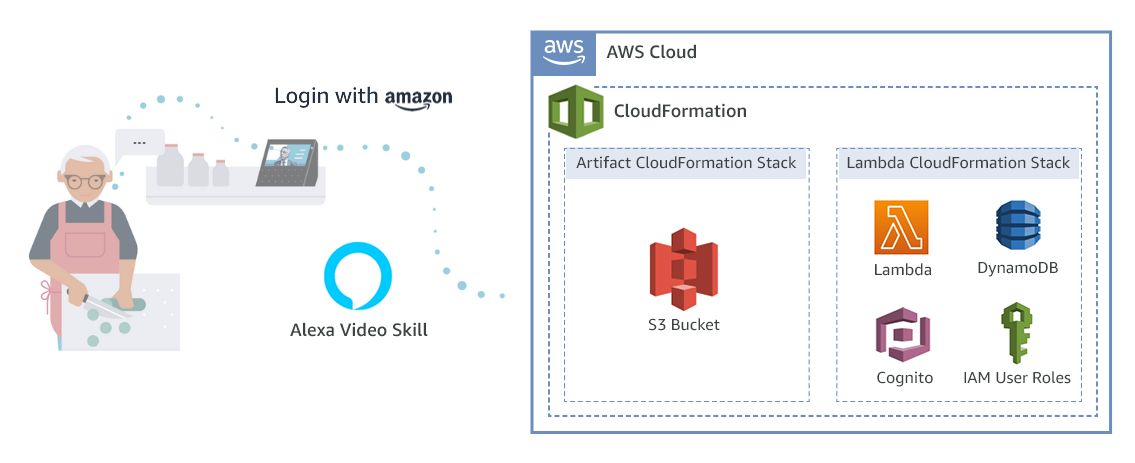
- Artifact CloudFormation Stack
- Lambda CloudFormation Stack
Artifact CloudFormation StackIt contains an S3 bucket that hosts the following:
- Built Lambda (as a zip file)
- Sample video content
- Built web player (as a website)
