Localization options supported by the Appstore
When distributing your app internationally, you can decide which countries and regions to target with a localized app experience in the Appstore. The Appstore refers to your app’s store listing on the website or in the device’s store display. Users who view your app in an Amazon Appstore marketplace that corresponds with one of these languages will see the localized version of your app’s description and image assets. If the user’s country or region is outside of a supported Amazon Appstore marketplace, English is used by default. The Appstore supports the following localizations for store listings:- Dutch
- English (Australia)
- English (India)
- English (United States)
- French
- German
- Italian
- Japanese
- Polish
- Portuguese (Brazil)
- Portuguese (Portugal)
- Spanish
- Swedish
Localization options supported by Fire TV and tablets
Fire TV allows users to set the following language preferences on the device:- Deutsch (Deutschland)
- Deutsch (Österreich)
- English (Australia)
- English (Canada)
- English (India)
- English (United Kingdom)
- English (United States)
- Español (Mexico)
- Español (España)
- Français (Canada)
- Français (France)
- Italiano (Italia)
- Nederlands
- 日本語 (Japanese)
- Polskie
- Português (Brasil)
- Português (Portugal)
- Svenksa
- Deutsch (Deutschland)
- English (United Kingdom)
- English (United States)
- Español
- Français
- Italiano
- 日本語 (Japanese)
- Português (Brasil)
- Simplified Chinese
How marketplaces map to countries/regions and languages
The following image shows the various Amazon Appstore marketplaces and the countries/regions and languages they’re associated with.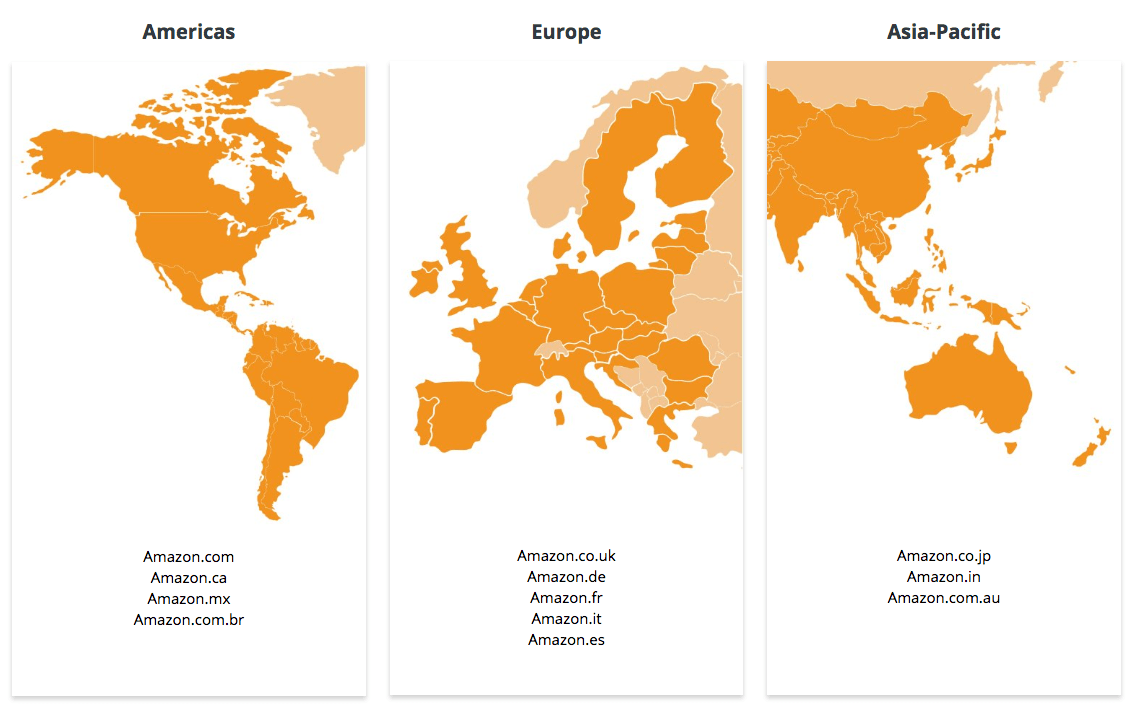
Amazon Appstore's marketplaces and the geographical regions they include
Appstore marketplaces, country/regions, and languages
| Global Area | Marketplace and Currency | Language | Countries Included |
|---|---|---|---|
| Americas | Amazon.com $USD | English (US) | United States and other countries and territories For a list of countries and territories where users can download apps from the Amazon.com marketplace, see Countries & Territories Eligible to Shop for Apps on Amazon.com. |
| Amazon.ca $CAD | English, French | Canada | |
| Amazon.mx $MXN | Spanish | Mexico | |
| Amazon.com.br $BRL | Portuguese | Brazil | |
| Europe | Amazon.co.uk £GBP | English (UK) | United Kingdom, Gibraltar, Guernsey, Ireland*, Isle of Man, Jersey |
| Amazon.de €EUR | German | Germany, Austria, Liechtenstein, Switzerland, Luxembourg, the Netherlands, Finland, Ireland* | |
| Amazon.fr €EUR | French | France metropolitan, Switzerland, Luxembourg, Monaco, Belgium | |
| Amazon.it €EUR | Italian | Italy, Vatican City, San Marino, Switzerland | |
| Amazon.es €EUR | Spanish | Spain, Andorra, Portugal | |
| Asia-Pacific | Amazon.co.jp ¥JPY | Japanese | Japan |
| Amazon.in ₹INR | English (India) | India | |
| Amazon.com.au $AUD | English (Australian) | Australia, New Zealand, Christmas Island, Cocos (Keeling) Islands, Heard & McDonald Islands, Norfolk Island, Cook Islands, Niue, Tokelau |
Marketplace routing for Ireland
Ireland has an Amazon retail site (Amazon.ie) but doesn’t have a dedicated Appstore marketplace. Users with Ireland set as their country of residence are routed to an existing Appstore marketplace for app discovery and purchases. A user’s country of residence is the country selected in their Amazon account’s Country/Region Settings. For a country of residence of Ireland, a user’s device type and other factors determine the Appstore marketplace.- On Fire TV, users with Ireland as their country of residence route to the Amazon.de marketplace. These users see euros (EUR) as their local currency instead of pounds (GBP).
- On Fire tablet, users with Ireland as their country of residence route to the Amazon.co.uk marketplace, except if the user originally created their account on Amazon.com, in which case, they’re routed to the Amazon.com marketplace.
Fire device availability in marketplaces
Not all types of Fire TV or Fire tablet devices are available in all retail marketplaces. During app submission, you select the countries and regions you want to target in the Availability section, and choose which devices you want to support in the Supported devices section.Fire TV availability in marketplaces
The following table lists the availability of each Fire TV device by retail marketplace. Devices are listed by release date.Fire tablet availability in marketplaces
The following table lists the availability of each Fire tablet device by retail marketplace. Devices are listed by release date.Coding practices for localization
For details on coding your app to support various localizations, follow standard Android localization practices as outlined in the following topics:How to localize your app in the Appstore
When you Submit Your App to the Amazon Appstore, the Developer Console allows you to provide localized descriptions and image assets for your app. Note the following options as you submit your app. Each option is explained in the sections below.- Restricting app availability
- Setting prices for other marketplaces
- Providing localized descriptions
- Provide localized image assets
- Indicate your binary file’s supported languages
Restricting app availability
By default, when you submit your app, it becomes available in every marketplace. But if you only want your app to be available, say, in Japan (perhaps because your app only supports Japanese), you can select Japan as the only available country for your app. You can restrict the availability of your app to specific countries and regions during app submission. In the Availability section of the App Setup screen, click Only in selected countries and regions, then select the countries and regions where you want your app to be available. Your customers can only see your app if they have selected the applicable country of residence in their Amazon.com account Country/Regions Settings.Setting prices for other marketplaces
If you charge for your app, you can set prices for each marketplace in the Pricing section of the App Setup screen. By default, Amazon will calculate the list price used to calculate royalties for sales of your app in foreign currencies based on recent exchange rates. However, you can change the list prices as desired. For example, an app that sells for $2.99 in USD becomes ₤1.96 Pounds in Great Britain. You might want to change the list prices to end in .99, .49, or other common values in each marketplace. The Appstore calculates these other list prices proportional to the Amazon.com list price, so the auto-generated list prices for other marketplaces might end in oddly specific prices.Providing localized descriptions
The Description section of the App Setup screen allows you to describe your app title, description, feature bullets, and more, and acts as the storefront copy for your app in the Appstore. To provide localized descriptions of your app, click Add localization and select the language you want to add. The following dialog box to select the localizations appears:
Supported localizations for the Appstore
Provide localized image assets
The Assets section of the App Setup screen lets you upload your app logo, background image, screenshots, and other image assets that are used to promote your app within the Appstore. To provide localized image assets, click Add localization and select the language you want. Language tabs appears where you can upload your localized image assets. You don’t have to wait for the assets to load before you switch to other tabs and select images to upload.Indicate your binary file’s supported languages
The App Setup screen provides a Language Support section where you can select languages your app supports.
Language Support checkboxes