---
title: 紛争を管理する
url: ja/amazon-pay-checkout/ja-manage-disputes.html
---

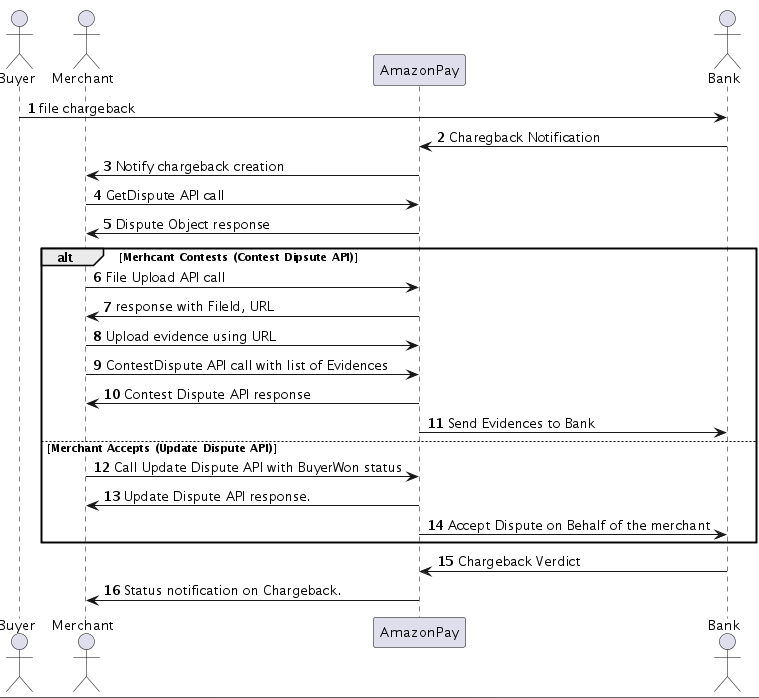
購入者はクレジットカード会社にチャージバックを申請することで紛争（Dispute）が作成されます。この方法では、セラーセントラルの代わりに Dispute API を通じてプログラムで処理できる紛争管理プロセスが開始します。API エンドポイントを通じて、紛争の詳細の取得、証拠の提出、状態の追跡、チャージバックへの対応が可能となります。

* TOC
{:toc}
{::options toc_levels="3" /}

***

### Dispute API を使用した事業者インテグレーションフロー図

<img src='https://m.media-amazon.com/images/G/01/EPSDocumentation/AmazonPay/Integration/Dispute-1PPP-Flow-Diagram.png' />

### 紛争通知の受信

紛争が作成されたり、その状態が変更されたりすると、Amazon Pay は設定されたエンドポイントにインスタント支払通知（IPN）を送信します。IPN メッセージには以下が含まれます。

```
{
    "MerchantID": "事業者識別子",
    "ObjectType": "CHARGEBACK",
    "ObjectId": "S03-0000000-0000000-B000000",
    "ChargePermissionId": "S03-0000000-0000000",
    "NotificationType": "STATE_CHANGE",
    "NotificationId": "9b4155a0-c396-46d0-83f7-te1st2xx1234",
    "NotificationVersion": "V2"
}
```

<a href="../amazon-pay-checkout/set-up-instant-payment-notifications.md#チャージバック" target="_blank" rel="noopener noreferrer">chargeback IPN notification の詳細を参照する。</a>

### Get Dispute 詳細

ユニークなDispute ID を指定して、特定の紛争に関する詳細情報を取得します。このAPIは、紛争タイプ、金額、ステータス、関連する証拠や文書など、包括的な紛争データを返します。特定の紛争の詳細を確認したり、紛争ステータスを追跡したり、紛争解決のための情報を収集したりする必要がある場合は、 <a href="../amazon-pay-api-v2/dispute.md#get-dispute-詳細" target="_blank" rel="noopener noreferrer">Get Dispute API </a>コールを使用してください。Dispute ID を提供することで、特定の紛争に関する詳細情報を取得できます。このエンドポイントは、紛争の種類、金額、状態、関連する証拠や文書を含む包括的な紛争データを返します。

#### Request

<div style="display:none" class="environmentSpecificKeys">
<code style="color:black">
curl "https://pay-api.amazon.jp/v2/disputes/:disputeId" \<br />
-X GET<br />
-H "authorization: Px2e5oHhQZ88vVhc0DO%2FsShHj8MDDg%3DEXAMPLESIGNATURE"<br />
-H "x-amz-pay-date:20201012T235046Z"<br />
</code>
</div>
<div style="display:none" class="notEnvironmentSpecificKeys">
<code style="color:black">
curl "https://pay-api.amazon.jp/:environment/v2/disputes/:disputeId" \<br />
-X GET<br />
-H "authorization: Px2e5oHhQZ88vVhc0DO%2FsShHj8MDDg%3DEXAMPLESIGNATURE"<br />
-H "x-amz-pay-date:20201012T235046Z"<br />
</code>
</div>

#### Response Format

APIは以下を含むDisputeオブジェクトを返します：
* 基本的な紛争情報（ID、タイプ、金額、申し立て理由）
* トランザクションの詳細（チャージ ID、タイムスタンプ）
* ステータス情報（状態、解決、理由コード）
* 証拠の提出（加盟店の文書およびファイル）

```
{
    "disputeId": "P03-1111111-1111111-B123456",
    "chargeId": "P03-1111111-1111111-C123456",
    "disputeType": "Chargeback",
    "disputeAmount":  {
        "amount": "400",
        "currencyCode": "JPY" 
    },
    "filingReason": "Fraudulent",
    "filingTimestamp": "20190714T155300Z",
    "resolutionAuthority": "AmazonPay",
    "statusDetails":  {
        "state": "Resolved",
        "reasonCode": "MerchantAcceptedDispute",
        "reasonDescription": "Merchant accepted the dispute request",
        "resolution": "BuyerWon",
        "lastUpdatedTimestamp": "20190716T156500Z" 
    },
    "resolutionAuthority": "AmazonPay",
    "merchantEvidences": [
        {
            "evidenceType" : "TrackingNumber",
            "fileId" : null,
            "evidenceText": "raw text supporting merchant evidence"
        },
        {
            "evidenceType": "CustomerSignature",
            "fileId": "customer_signature_file_id",
            "evidenceText": null
        }
    ],
    "closureTimestamp": "20190716T155300Z",
    "releaseEnvironment": "Live"
}
```


### Update Dispute 詳細

購入者のチャージバックが有効であることに同意する場合、<a href="../amazon-pay-api-v2/dispute.md#update-dispute-詳細" target="_blank" rel="noopener noreferrer">Update Dispute API</a> を通じて応答を提出して紛争を受け入れることができます。

#### Request

<div style="display:none" class="environmentSpecificKeys">
<code style="color: black">
curl "https://pay-api.amazon.jp/v2/disputes/:disputeId" \ <br />
-X PATCH <br />
-H "authorization: Px2e5oHhQZ88vVhc0DO%2FsShHj8MDDg%3DEXAMPLESIGNATURE"<br />
-H "x-amz-pay-date:20201012T235046Z"
-d @request_body <br />
</code>
</div>
<div style="display:none" class="notEnvironmentSpecificKeys">
<code style="color: black">
curl "https://pay-api.amazon.jp/:environment/v2/disputes/:disputeId" \ <br />
-X PATCH <br />
-H "authorization: Px2e5oHhQZ88vVhc0DO%2FsShHj8MDDg%3DEXAMPLESIGNATURE"<br />
-H "x-amz-pay-date:20201012T235046Z"
-d @request_body <br />
</code>
</div>

#### Request body

```
{
    "statusDetails": {
        "resolution": "BuyerWon",
        "state": "Resolved",
        "reasonCode": "MerchantAcceptedDispute",
        "reasonDescription": "Merchant accepted the dispute request"
    },
    "closureTimestamp": "20190716T162300Z"
}
```


#### Request parameters

<table width="100%" border="1">
    <tbody>
        <tr id='PDP9CAQSM5J'>
            <td id='s:PDP9CAQSM5J;PDP9CAXfdYQ' style='vertical-align: top; font-weight: bold; width: 30%;' class='bold'>名前
                <br /></td>
            <td id='s:PDP9CAQSM5J;PDP9CAkAlRX' style='vertical-align: top; font-weight: bold; width: 20%;' class='bold'>ロケーション
                <br /></td>
            <td id='s:PDP9CAQSM5J;PDP9CAn6CQD' style='vertical-align: top; font-weight: bold; width: 50%;' class='bold'>説明
                <br /></td>
        </tr>
        <tr id='PDP9CAkesJe'>
            <td id='s:PDP9CAkesJe;PDP9CAXfdYQ' style='vertical-align: top;'>StatusDetails<br><b>(required)</b><br><br>Type: <a href="../amazon-pay-api-v2/dispute.md#type-disputestatusdetails" target="_blank" rel="noopener noreferrer">DisputeStatusDetails</a>
                <br /></td>
            <td id='s:PDP9CAkesJe;PDP9CAkAlRX' style='vertical-align: top;'>Body
                <br /></td>
            <td id='s:PDP9CAkesJe;PDP9CAn6CQD' style='vertical-align: top;'>紛争状態（Resolved/Closed）、解決方法（BuyerWon/MerchantWon/NoFault）、理由コードを指定します。すべてのフィールドは必須です。
                <br /></td>
        </tr>
        <tr id='PDP9CAkesJe'>
            <td id='s:PDP9CAkesJe;PDP9CAXfdYQ' style='vertical-align: top;'>ClosureTimeStamp<br><b>(required)</b><br><br>Type: dateTime
                <br /></td>
            <td id='s:PDP9CAkesJe;PDP9CAkAlRX' style='vertical-align: top;'>Body
                <br /></td>
            <td id='s:PDP9CAkesJe;PDP9CAn6CQD' style='vertical-align: top;'>"Closed "の場合のみ必要。ISO 8601形式のUTCタイムスタンプ。
                <br /></td>
        </tr>
    </tbody>
</table>


#### Response

API は以下を含む更新された Dispute オブジェクトを返します:
* 基本的な紛争情報（ID、タイプ、金額、申し立て理由）
* トランザクションの詳細（チャージ ID、タイムスタンプ）
* 更新されたステータス情報（状態、解決、理由コード）
* 証拠の提出（加盟店の文書およびファイル）

```
{
    "disputeId": "P03-1111111-1111111-B123456",
    "chargeId": "P03-1111111-1111111-C123456",
    "disputeType": "Chargeback",
    "disputeAmount":  {
        "amount": "400",
        "currencyCode": "JPY" 
    },
    "filingReason": "Fraudulent",
    "filingTimestamp": "20190714T155300Z",
    "resolutionAuthority": "AmazonPay",
    "statusDetails":  {
        "state": "Resolved",
        "reasonCode": "MerchantAcceptedDispute",
        "reasonDescription": "Merchant accepted the dispute request",
        "resolution": "BuyerWon",
        "lastUpdatedTimestamp": "20190716T156500Z" 
    },
    "resolutionAuthority": "AmazonPay",
    "closureTimestamp": "20190716T155300Z",
    "releaseEnvironment": "Live"
}
```


### Contest Dispute 詳細

根拠となる証拠や書類を提出することで、チャージバックの異議申し立てを行うことができます。このエンドポイントを利用することで、事業者は出荷確認、購入者とのコミュニケーション、または製品ドキュメントなどの関連証拠を提出することで、正式に異議申し立てを行うことができます。 <a href="../amazon-pay-api-v2/dispute.md#contest-dispute-詳細" target="_blank" rel="noopener noreferrer">Contest Dispute API </a>コールは、購入者のチャージバックに対して異議申し立てをする正当な根拠があり、レビューのために裏付けとなる証拠を提出したい場合にご利用ください。

#### Request

<div style="display:none" class="environmentSpecificKeys">
<code style="color: black">
curl "https://pay-api.amazon.jp/v2/disputes/:disputeId/contest" \ <br />
-X POST <br />
-H "authorization: Px2e5oHhQZ88vVhc0DO%2FsShHj8MDDg%3DEXAMPLESIGNATURE" <br />
-H "x-amz-pay-date:20201012T235046Z" <br />
-d @request_body <br />
</code>
</div>
<div style="display:none" class="notEnvironmentSpecificKeys">
<code style="color: black">
curl "https://pay-api.amazon.jp/:environment/v2/disputes/:disputeId/contest" \ <br />
-X POST <br />
-H "authorization: Px2e5oHhQZ88vVhc0DO%2FsShHj8MDDg%3DEXAMPLESIGNATURE" <br />
-H "x-amz-pay-date:20201012T235046Z" <br />
-d @request_body <br />
</code>
</div>

#### Request body

```
{
    "merchantEvidences":  [
        {
            "evidenceType" : "TrackingNumber",
            "fileId": null,
            "evidenceText": "raw text supporting merchant evidence" 
        },
        {
            "evidenceType": "CustomerSignature",
            "fileId": "customer_signature_file_id",
            "evidenceText": null
        }
    ]
}
```


#### Request parameters

<table width="100%" border="1">
    <tbody>
        <tr id='PDP9CAQSM5J'>
            <td id='s:PDP9CAQSM5J;PDP9CAXfdYQ' style='vertical-align: top; font-weight: bold; width: 30%;' class='bold'>名前
                <br /></td>
            <td id='s:PDP9CAQSM5J;PDP9CAkAlRX' style='vertical-align: top; font-weight: bold; width: 20%;' class='bold'>ロケーション
                <br /></td>
            <td id='s:PDP9CAQSM5J;PDP9CAn6CQD' style='vertical-align: top; font-weight: bold; width: 50%;' class='bold'>説明
                <br /></td>
        </tr>
        <tr id='PDP9CAkesJe'>
            <td id='s:PDP9CAkesJe;PDP9CAXfdYQ' style='vertical-align: top;'>merchantEvidences<br><b>(required)</b><br><br>Type: list <<a href="../amazon-pay-api-v2/dispute.md#type-evidence" target="_blank" rel="noopener noreferrer">Evidence </a>>
                <br /></td>
            <td id='s:PDP9CAkesJe;PDP9CAkAlRX' style='vertical-align: top;'>Body
                <br /></td>
            <td id='s:PDP9CAkesJe;PDP9CAn6CQD' style='vertical-align: top;'>ケースをサポートする証拠アイテムのリスト <br><br> <ul><li>各証拠アイテムには、fileIdまたはevidenceTextのいずれかが必要です</li><li>サポートされる値については、エビデンス・タイプの表を参照してください。</li></ul>
                <br /></td>
        </tr>
    </tbody>
</table>

#### Response

API は以下を含む更新された Dispute オブジェクトを返します:

```
{
    "disputeId": "P03-1111111-1111111-B123456",
    "chargeId": "P03-1111111-1111111-C123456",
    "disputeType": "Claim",
    "disputeAmount": { 
        "amount": "400", 
        "currencyCode": "JPY" 
    },
    "filingReason": "ProductNotReceived",
    "filingTimestamp": "20190714T155300Z",
    "statusDetails": {
        "state": "UnderReview",
        "reasonCode": null,
        "reasonDescription": null,
        "resolution": null, 
        "lastUpdatedTimestamp": "20190714T156500Z"
    },
    "resolutionAuthority": "AmazonPay",
    "releaseEnvironment": "Live",
    "merchantEvidences": [
        {
            "evidenceType" : "TrackingNumber",
            "fileId" : null,
            "evidenceText": "raw text supporting merchant evidence"
        },
        {
            "evidenceType": "CustomerSignature",
            "fileId": "customer_signature_file_id",
            "evidenceText": null
        }
    ]
}
```


### Upload File 詳細

紛争証拠やその他の文書作成に必要なファイルをアップロードして管理します。 <a href="../amazon-pay-api-v2/file.md#upload-file-詳細" target="_blank" rel="noopener noreferrer">Upload File API</a>は、一般的なファイル形式をサポートし、安全なアップロードURLを提供します。APIは、ファイルを安全にアップロードするための2段階のプロセスを提供します。

#### Step 1: Upload URL取得

まず安全なアップロードURLをリクエストします。:

#### Request

<div style="display:none" class="environmentSpecificKeys">
<code style="color: black">
curl "https://pay-api.amazon.jp/v2/files" \<br />
-X POST \<br />
-H "authorization: Bearer YOUR_TOKEN" \<br />
-H "x-amz-pay-date: 20201012T235046Z" \<br />
-H "x-amz-pay-idempotency-key: YOUR_IDEMPOTENCY_KEY" \<br />
-d @request_body <br />
</code>
</div>
<div style="display:none" class="notEnvironmentSpecificKeys">
<code style="color: black">
curl "https://pay-api.amazon.jp/:environment/v2/files" \<br />
-X POST \<br />
-H "authorization: Bearer YOUR_TOKEN" \<br />
-H "x-amz-pay-date: 20201012T235046Z" \<br />
-H "x-amz-pay-idempotency-key: YOUR_IDEMPOTENCY_KEY" \<br />
-d @request_body <br />
</code>
</div>

#### Request body

```
{
    "type" : "jpg",
    "purpose" : "disputeEvidence"
}
```

#### Request parameters

<table width="100%" border="1">
    <tbody>
        <tr id='PDP9CAQSM5J'>
            <td id='s:PDP9CAQSM5J;PDP9CAXfdYQ' style='vertical-align: top; font-weight: bold; width: 30%;' class='bold'>名前
                <br /></td>
            <td id='s:PDP9CAQSM5J;PDP9CAkAlRX' style='vertical-align: top; font-weight: bold; width: 20%;' class='bold'>ロケーション
                <br /></td>
            <td id='s:PDP9CAQSM5J;PDP9CAn6CQD' style='vertical-align: top; font-weight: bold; width: 50%;' class='bold'>説明
                <br /></td>
        </tr>
        <tr id='PDP9CAkesJe'>
            <td id='s:PDP9CAkesJe;PDP9CAXfdYQ' style='vertical-align: top;'>x-amz-pay-idempotency-key<br><b>(required)</b><br><br>Type: String
                <br /></td>
            <td id='s:PDP9CAkesJe;PDP9CAkAlRX' style='vertical-align: top;'>Header
                <br /></td>
            <td id='s:PDP9CAkesJe;PDP9CAn6CQD' style='vertical-align: top;'>重複アップロードを防ぐための一意のキー。idempotencyキーの作成と使用に関する詳しいガイダンスについては、別途idempotencyを参照してください。
                <br /></td>
        </tr>
        <tr id='PDP9CAkesJe'>
            <td id='s:PDP9CAkesJe;PDP9CAXfdYQ' style='vertical-align: top;'>type<br><br>Type: String
                <br /></td>
            <td id='s:PDP9CAkesJe;PDP9CAkAlRX' style='vertical-align: top;'>Body
                <br /></td>
            <td id='s:PDP9CAkesJe;PDP9CAn6CQD' style='vertical-align: top;'>ファイルフォーマット(jpg, png, pdf)
                <br /></td>
        </tr>
        <tr id='PDP9CAkesJe'>
            <td id='s:PDP9CAkesJe;PDP9CAXfdYQ' style='vertical-align: top;'>purpose<br><br>Type: String
                <br /></td>
            <td id='s:PDP9CAkesJe;PDP9CAkAlRX' style='vertical-align: top;'>Body
                <br /></td>
            <td id='s:PDP9CAkesJe;PDP9CAn6CQD' style='vertical-align: top;'>アップロード理由(disputeEvidence)
                <br /></td>
        </tr>
    </tbody>
</table>

#### Supported file types

<table width="100%" border="1">
    <tbody>
        <tr id='PDP9CAQSM5J'>
            <td id='s:PDP9CAQSM5J;PDP9CAXfdYQ' style='vertical-align: top; font-weight: bold; width: 30%;' class='bold'>ファイルタイプ<br /></td>
            <td id='s:PDP9CAQSM5J;PDP9CAXfdYQ' style='vertical-align: top; font-weight: bold; width: 20%;' class='bold'>説明<br /></td>
            <td id='s:PDP9CAQSM5J;PDP9CAXfdYQ' style='vertical-align: top; font-weight: bold; width: 50%;' class='bold'>Content-Type<br /></td>
        </tr>
        <tr id='PDP9CAkesJe'>
            <td id='s:PDP9CAQSM5J;PDP9CAXfdYQ' style='vertical-align: top;'>csv<br /></td>
            <td id='s:PDP9CAQSM5J;PDP9CAXfdYQ' style='vertical-align: top;'>CSV files<br /></td>
            <td id='s:PDP9CAQSM5J;PDP9CAXfdYQ' style='vertical-align: top;'>text/csv<br /></td>
        </tr>
        <tr id='PDP9CAkesJe'>
            <td id='s:PDP9CAQSM5J;PDP9CAXfdYQ' style='vertical-align: top;'>pdf<br /></td>
            <td id='s:PDP9CAQSM5J;PDP9CAXfdYQ' style='vertical-align: top;'>PDF documents<br /></td>
            <td id='s:PDP9CAQSM5J;PDP9CAXfdYQ' style='vertical-align: top;'>application/pdf<br /></td>
        </tr>
        <tr id='PDP9CAkesJe'>
            <td id='s:PDP9CAQSM5J;PDP9CAXfdYQ' style='vertical-align: top;'>xls/xlsx<br /></td>
            <td id='s:PDP9CAQSM5J;PDP9CAXfdYQ' style='vertical-align: top;'>Excel spreadsheets<br /></td>
            <td id='s:PDP9CAQSM5J;PDP9CAXfdYQ' style='vertical-align: top;'>application/vnd.ms-excel (xls)<br />application/vnd.openxmlformats-officedocument.spreadsheetml.sheet (xlsx)<br /></td>
        </tr>
        <tr id='PDP9CAkesJe'>
            <td id='s:PDP9CAQSM5J;PDP9CAXfdYQ' style='vertical-align: top;'>doc/docx<br /></td>
            <td id='s:PDP9CAQSM5J;PDP9CAXfdYQ' style='vertical-align: top;'>Word documents<br /></td>
            <td id='s:PDP9CAQSM5J;PDP9CAXfdYQ' style='vertical-align: top;'>application/msword (doc)<br />application/vnd.openxmlformats-officedocument.wordprocessingml.document (docx)<br /></td>
        </tr>
        <tr id='PDP9CAkesJe'>
            <td id='s:PDP9CAQSM5J;PDP9CAXfdYQ' style='vertical-align: top;'>ods<br /></td>
            <td id='s:PDP9CAQSM5J;PDP9CAXfdYQ' style='vertical-align: top;'>OpenDocument spreadsheets<br /></td>
            <td id='s:PDP9CAQSM5J;PDP9CAXfdYQ' style='vertical-align: top;'>application/vnd.oasis.opendocument.spreadsheet<br /></td>
        </tr>
        <tr id='PDP9CAkesJe'>
            <td id='s:PDP9CAQSM5J;PDP9CAXfdYQ' style='vertical-align: top;'>jpg/png<br /></td>
            <td id='s:PDP9CAQSM5J;PDP9CAXfdYQ' style='vertical-align: top;'>Image files<br /></td>
            <td id='s:PDP9CAQSM5J;PDP9CAXfdYQ' style='vertical-align: top;'>image/jpeg (jpg)<br />image/png (png)<br /></td>
        </tr>
    </tbody>
</table>

#### Response

The API returns:

```
{
    "id": "file_sdcjscbjckndjhckj", 
    "type" : "jpg",
    "purpose": "disputeEvidence",
    "uploadTimestamp": "20190714T155300Z",
    "url": "https://pay-api.amazon.jp/v1/files/file_sdcjscbjckndjhckj/contents",
    "urlExpirationTimeStamp": "20190714T155300Z"
}
```


#### Step 2: ファイルアップロード

レスポンスにあるURLにファイルを送信します：:

<code style="color: black">
curl "YOUR_PRESIGNED_URL" \ <br />
-X PUT \ <br />
-H "Content-Type: application/pdf" \ <br />
-T "/path/to/file" <br />
</code>

ファイル要件：
* 最大サイズ：2MB
* ファイルは紛争の証拠として関連性があるものでなければなりません

アップロード後、Upload File APIのレスポンスにある fileId を使用します。
