---
title: Additional payment button
url: amazon-pay-apb-checkout/additional-payment-button-overview.html
---

<!-- THIS PAGE IS DEPRECATED. APB GUIDE WAS MERGED INTO RESPECTIVE OTHER GUIDES (ONE TIME, RECURRING, ...) 
           
           PLEASE DON'T EDIT THOSE PAGES ANYMORE. KEPT FOR COMPATIBILITY ONLY.

-->

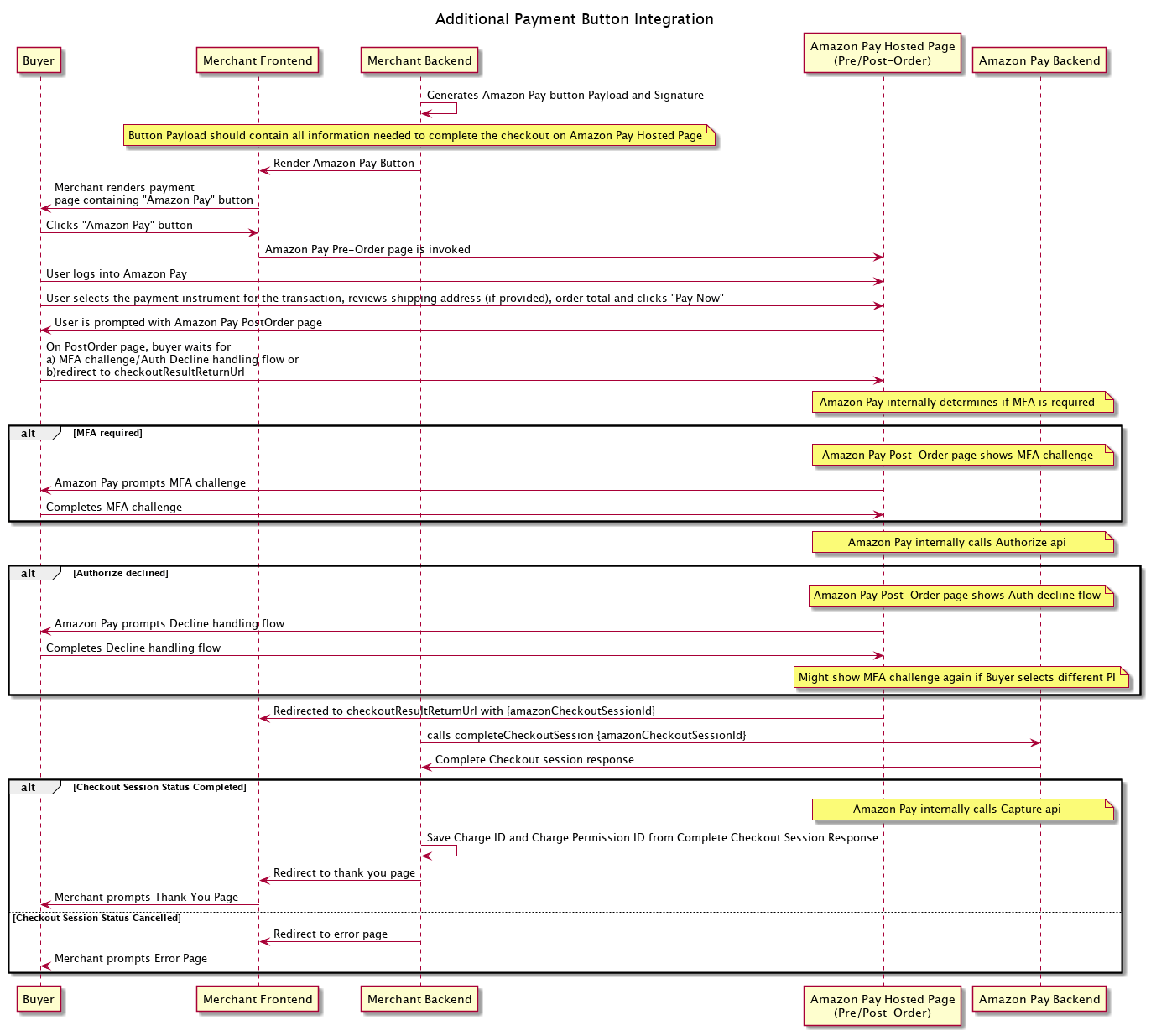
You can add an additional payment button for one-time transactions at the end of your checkout flow. The additional button is typically added at the step where the buyer selects their payment method before completing checkout. Unlike the one-time integration, the buyer will not have the opportunity to return to your site to review their order before completing checkout after clicking on the Amazon Pay button.

<script>
  if (openInPopup === undefined) {
    function openInPopup(url) {
      const popupWinWidth = screen.width;
      const popupWinHeight = screen.height;
      window.open(
        url,
        "_blank",
        `popup:true, resizable=yes, width: ${screen.availWidth}, height: ${screen.availHeight}`
      );
      return false;
    }
  }
</script>

<input type="hidden" id="" value="https://m.media-amazon.com/images/G/01/amazonpayments/documentation/AdditionalPaymentButtonIntegrationOverview._CB1198675309_.png" />
<a href="#" onclick="return openInPopup(document.getElementById('')?.value)"><img style="width: 100%" src="https://m.media-amazon.com/images/G/01/amazonpayments/documentation/AdditionalPaymentButtonIntegrationOverview._CB1198675309_.png" /></a>


Key differences from an one-time integration:

* You can re-use most of the code from your one-time integration. The key differences are:
    * You will <a href="../amazon-pay-checkout/set-payment-info.md" target="_blank" rel="noopener noreferrer">set payment info</a> when you render the Amazon Pay button instead of setting it via <a href="../amazon-pay-api-v2/checkout-session.md#update-checkout-session" target="_blank" rel="noopener noreferrer">Update Checkout Session</a>.
    * You will skip <a href="../amazon-pay-checkout/display-shipping-payment-info.md" target="_blank" rel="noopener noreferrer">displaying shipping/payment info</a> since the buyer will complete checkout on the Amazon Pay hosted page after clicking on the Amazon Pay button.
* Since the Amazon Pay button is at the end of checkout after buyer has already manually entered their shipping address, you must provide that information in addressDetails for all physical goods transactions. Providing addressDetails for digital goods transactions will result in an error.